Make your life easier with React Hooks
React Hooks 101
Hi! 👋
I'm Dani



What this talk is about
- Reasons why we decided start using React Hooks
- Our experience and insights
- Tips and Tricks
What this talk is not about
- A React.JS introduction
Why we decided to use React Hooks
#1. The libraries we depend on are moving to hooks



#2. Simplified mental model

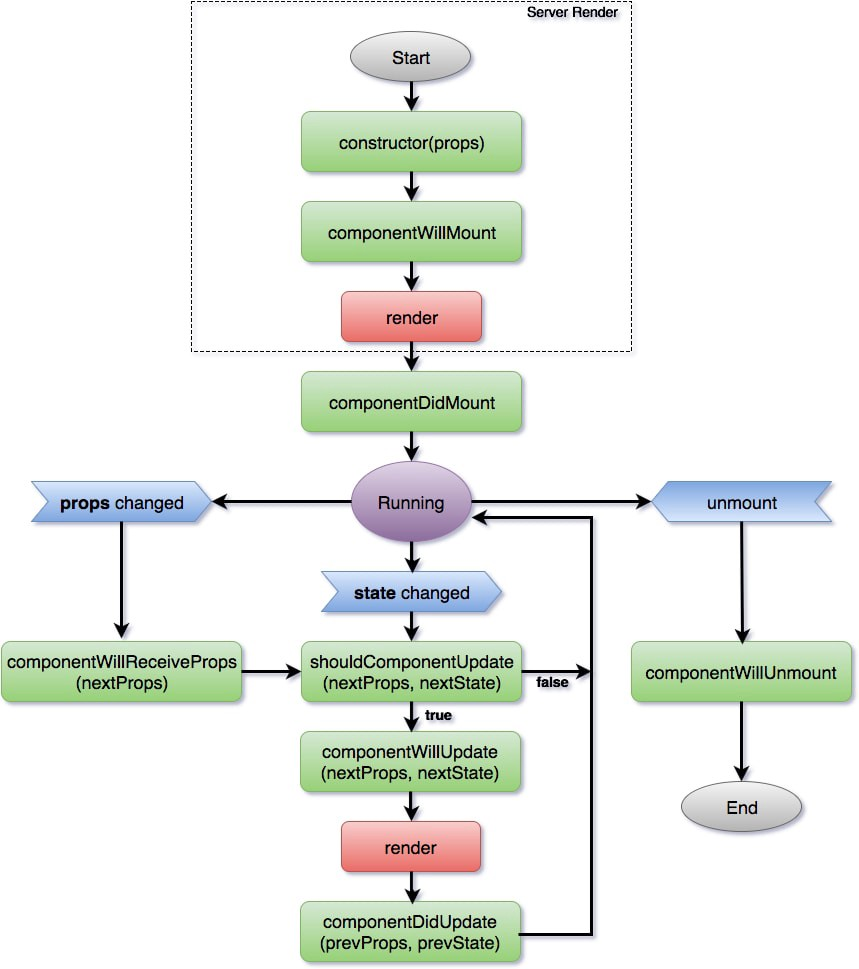
fn(props, state) => view

But what about the side effects?
- Async data fetching
- Event emitters/listeners
- DOM Manipulation
- ...etc
Hooks focus on side effects, not on implementation details

#3. Performance
- Avoid cost of creating instances
- Avoid binding events
- Less code to write
- Less code after transpiling
- Non-blocking UI hooks
What was wrong with Higher Order Components?
🙌
function withDoctors (Component) {
  return class WithDoctors extends React.Component {
    state = {
      doctors: [],
      loading: true
    }
    componentDidMount () {
      this.updateDoctors(this.props.id)
    }
    componentDidUpdate (prevProps) {
      if (prevProps.id !== this.props.id) {
        this.updateDoctors(this.props.id)
      }
    }
    updateDoctors = (id) => {
      this.setState({ loading: true })

      fetchDoctors(id)
        .then((doctors) => this.setState({
          doctors,
          loading: false
        }))
    }
    render () {
      return (
        <Component
          {...this.props}
          {...this.state}
        />
      )
    }
  }
}
// DoctorsGrid.js
function DoctorsGrid ({ loading, doctors }) {
...
}
export default withDoctors(DoctorsGrid)export default withHover(
withTheme(
withAuth(
withDoctors(DoctorsGrid)
)
)
)<WithHover>
<WithTheme hovering={false}>
<WithAuth hovering={false} theme='dark'>
<WithDoctors hovering={false} theme='dark' authed={true}>
<DoctorsGrid
loading={true}
doctors={[]}
authed={true}
theme='dark'
hovering={false}
/>
</WithDoctors>
</WithAuth>
<WithTheme>
</WithHover>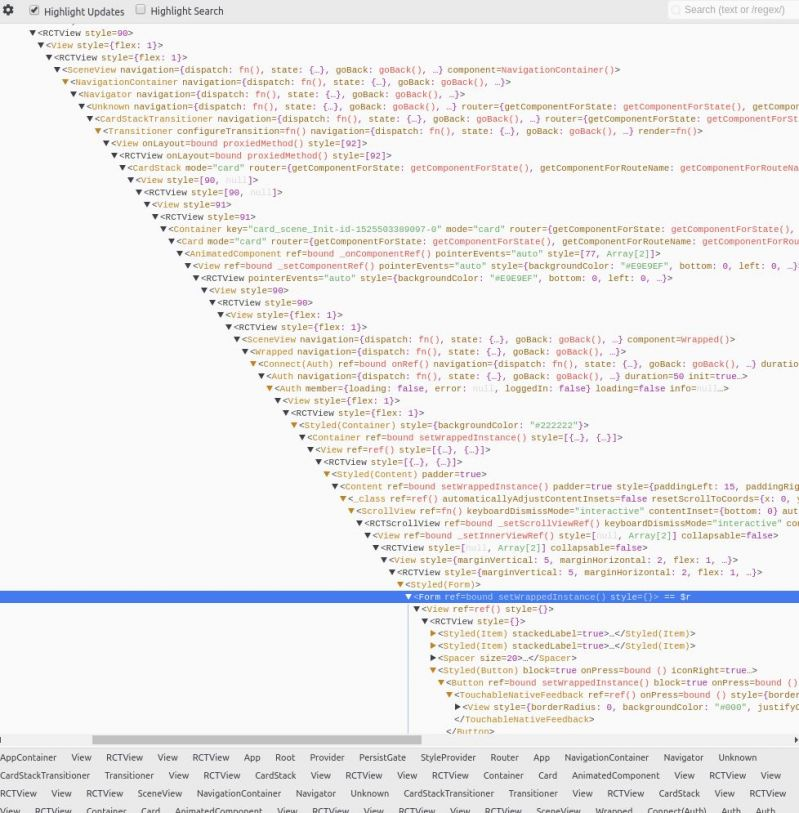
useState()
function MyComponent() {
  const [name, setName] = React.useState('');

  return (
    <>
      <div>{name}</div>
      <input onChange={(ev) => setName(ev.target.value)} />
    </>
  );
}
In a nutshell
function MyComponent() {
  const [counter, setCounter] = React.useState(0);

  return (
    <>
      <div>{counter}</div>
      <button onClick={() => setCounter(counter => counter + 1)}>
      	Add
      </button>
    </>
  );
}
Use a callback function for mutations depending on previous state values
const [age, setAge] = useState(42);
const [name, setName] = useState('Mike Myers');
const [doctor, setDoctor] = useState({ name: 'Mike', surname: 'Myers', age: 42 });
State can be as complex as you need
Should I use one or many state variables?
function Box() {
  const [state, setState] = useState({ left: 0, top: 0, width: 100, height: 100 });
}
With this.setState()
function handleWindowMouseMove(e) {
  this.setState({ left: e.pageX, top: e.pageY }));
}

// Note: this implementation is a bit simplified
window.addEventListener('mousemove', handleWindowMouseMove);
Spread previous state or it will be overridden!
function handleWindowMouseMove(e) {
  // Spreading "...state" ensures we don't "lose" width and height
  setState(state => ({ ...state, left: e.pageX, top: e.pageY }));
}

// Note: this implementation is a bit simplified
window.addEventListener('mousemove', handleWindowMouseMove);
An alternative: separate concerns
const [position, setPosition] = useState({ left: 0, top: 0 });
const [size, setSize] = useState({ width: 100, height: 100 });

function handleWindowMouseMove(e) {
  setPosition({ left: e.pageX, top: e.pageY });
}
useEffect()
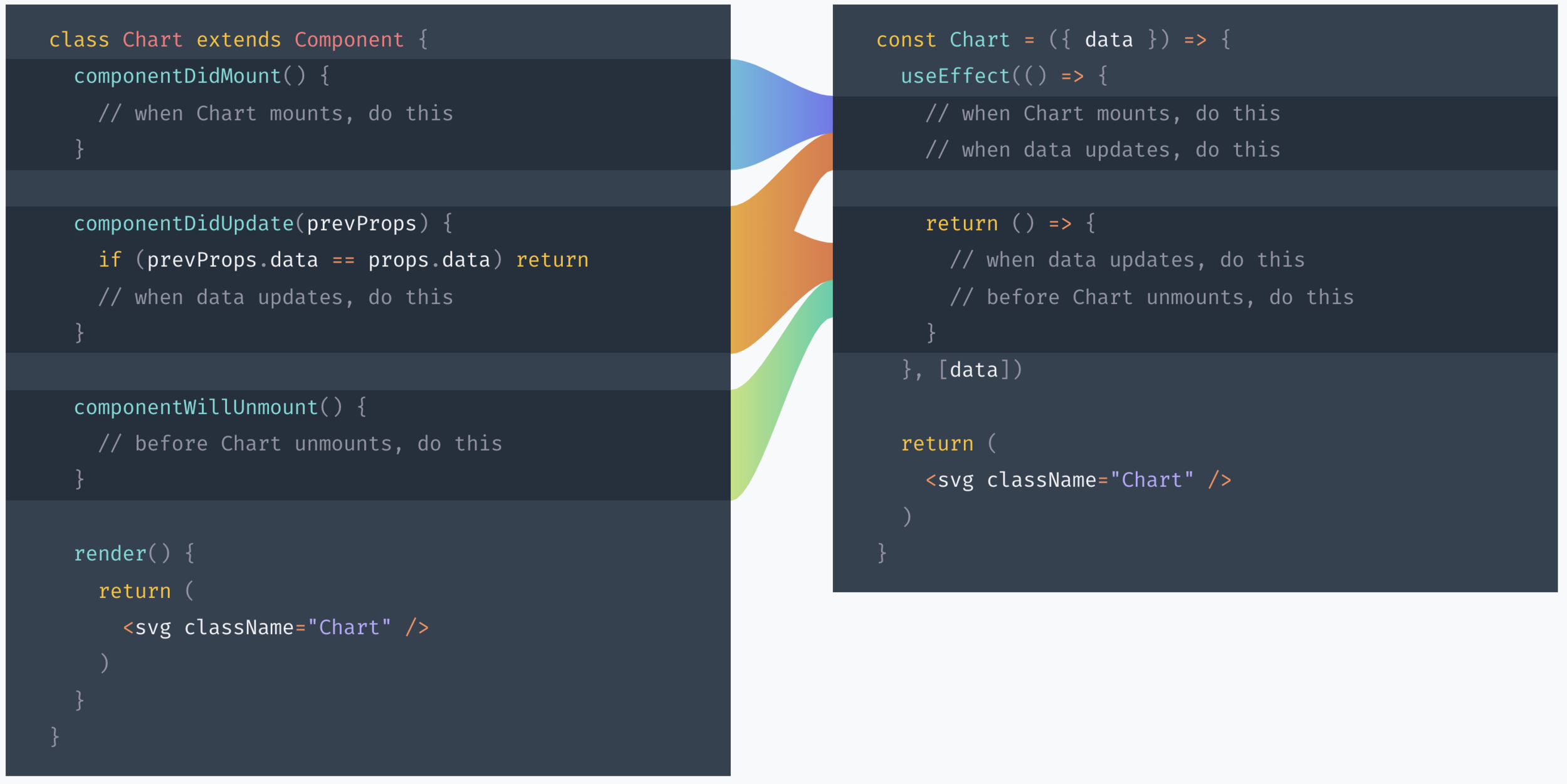
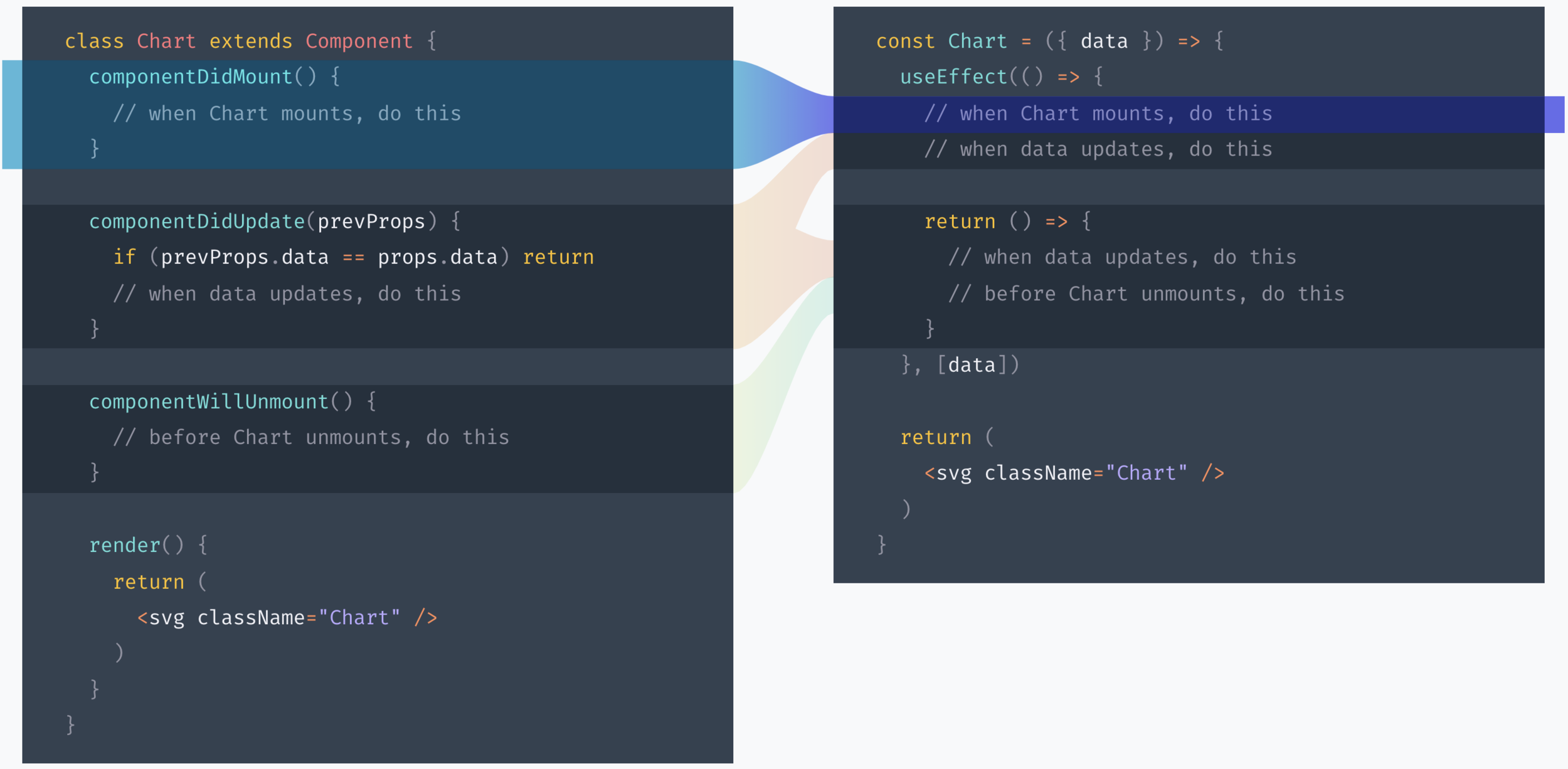
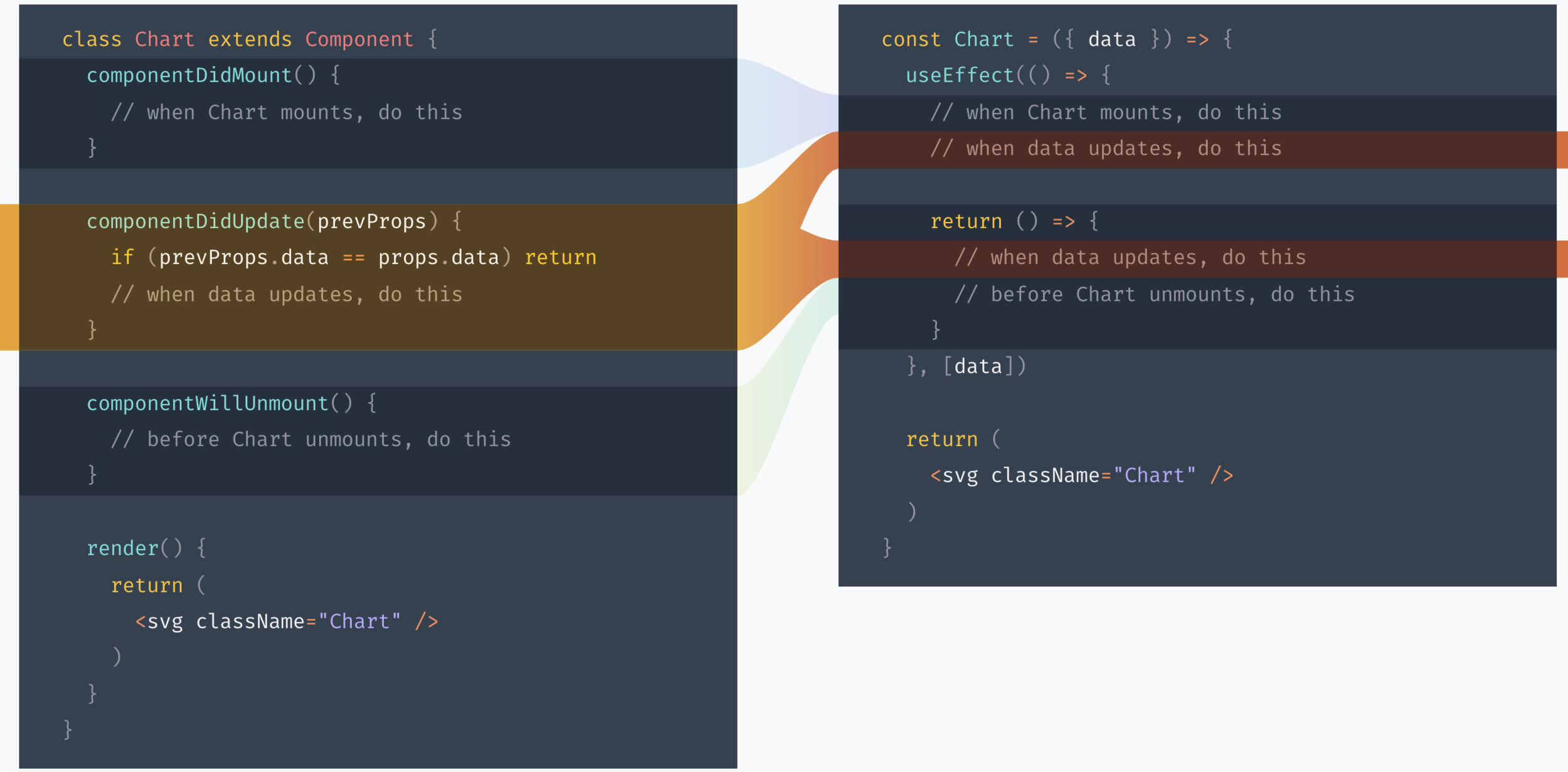
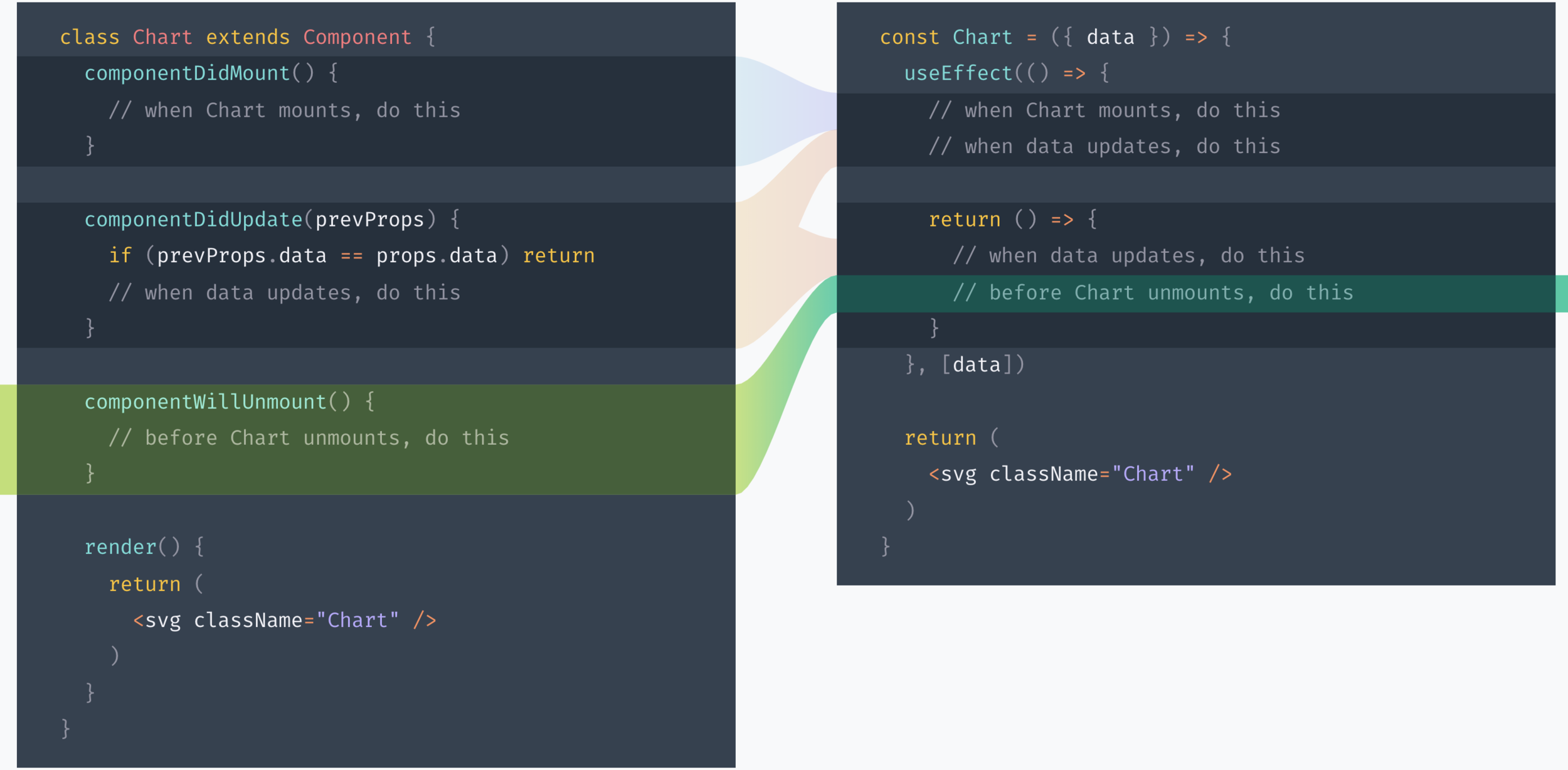
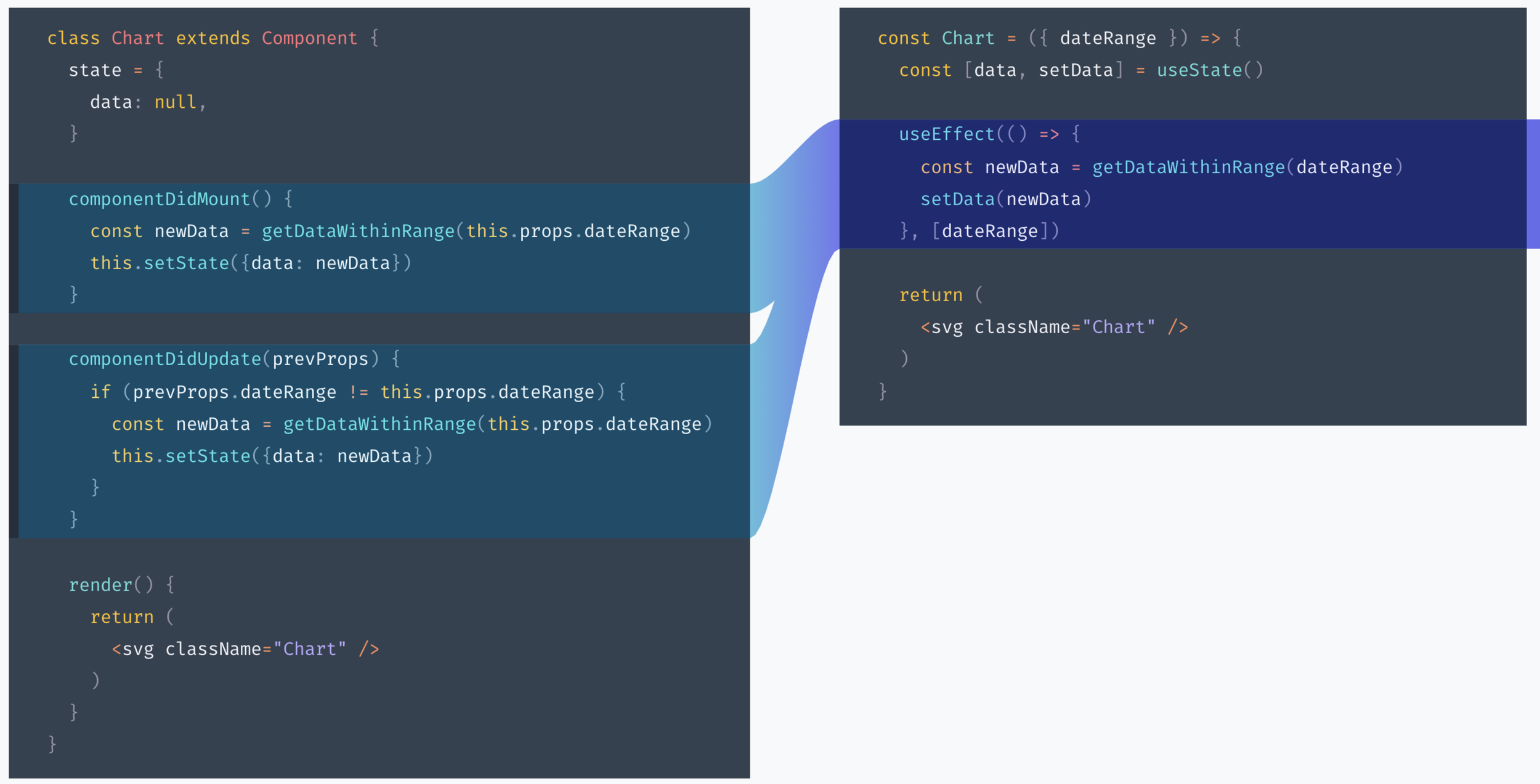
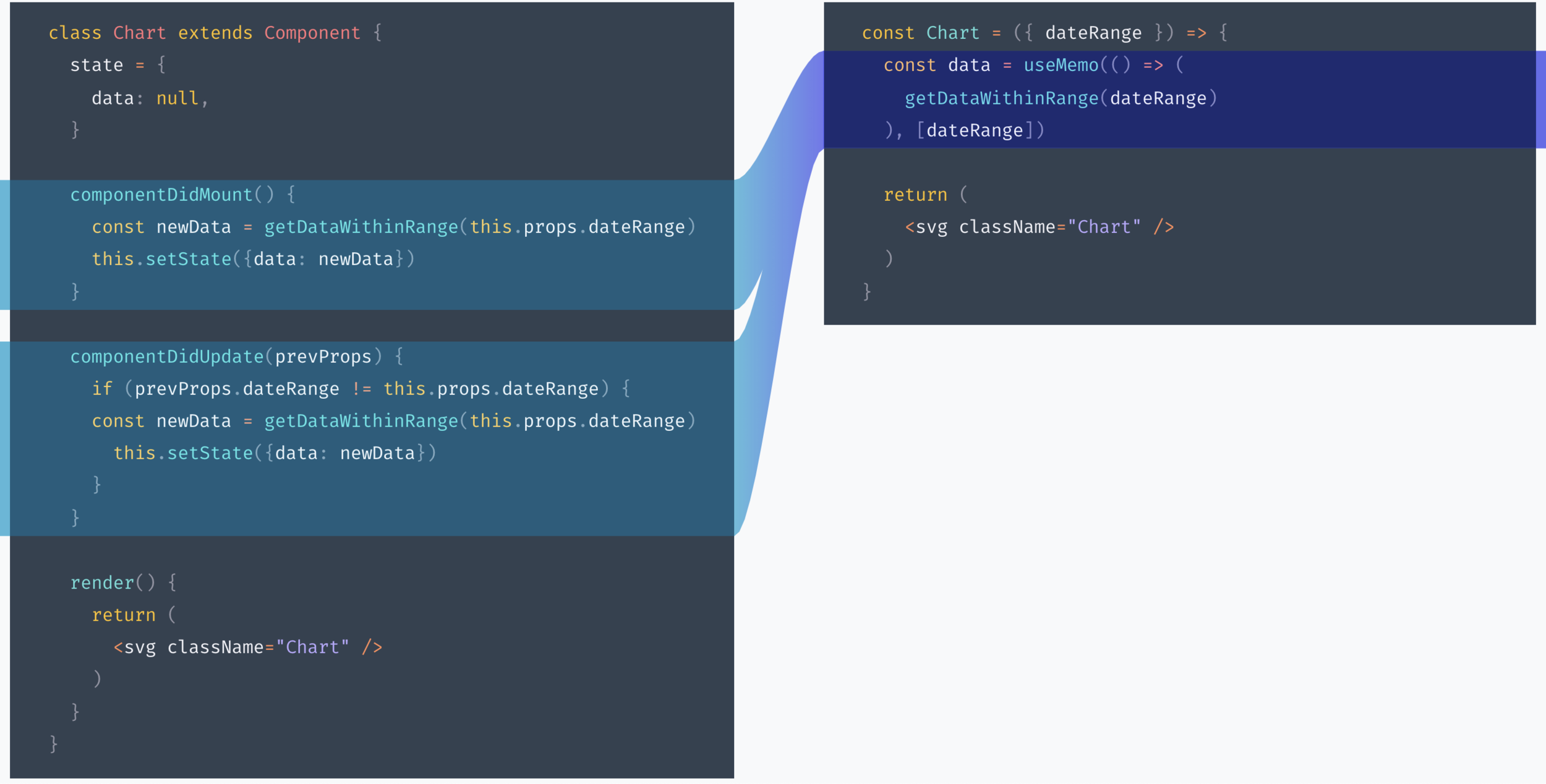
Sync data every time the component updates or prop dateRange changes
Keep data in sync with dateRange
Caveat: dependencies are tricky
useEffect(() => {
  trackSomeEvent();
}, []); // ✅ You can always pass an empty array
        // and your code inside useEffect will only
        // be executed when the component mounts
Caveat: dependencies are tricky
function Example({ someProp }) {
  function doSomething() {
    console.log(someProp);
  }

  useEffect(() => {
    doSomething();
  }, []); // 🔴 This is not safe (it calls `doSomething`
          // which uses `someProp`)
}
Caveat: dependencies are tricky
function Example({ someProp }) {
  useEffect(() => {
    function doSomething() {
      console.log(someProp);
    }

    doSomething();
  }, [someProp]); // ✅ OK (our effect only uses `someProp`)
}
Advice:
Take your time
useContext()
import { createContext } from 'react';

interface AbilityInterface {
  canUse: (requiredPermission: string) => boolean;
}

class Ability extends EventTarget implements AbilityInterface {
  private permissions: Set<string>;

  constructor(permissions: string[] = []) {
    super();
    this.permissions = new Set<string>(permissions);
  }

  public canUse(requiredPermission: string): boolean {
    return this.permissions.has(requiredPermission);
  }
}

const AbilityContext = createContext(new Ability());

export { Ability, AbilityContext };
Example 1: Permissions
const App = () => {
  // fetch permissions
  return (
    <AbilityContext.Provider value={new Ability(permissions)}>
      <Router history={browserHistory}>
        <Switch>
          <SecureRoute path="/" component={Home} />
        </Switch>
      </Router>
    </AbilityContext.Provider>
  );
};
import React, { useContext } from 'react';
import { AbilityContext } from './ability';

const Can = ({ children, permission }) => {
  const ability = useContext(AbilityContext);

  const canUse = ability.canUse(permission);

  if (canUse) {
    return <>{children}</>;
  } else {
    return null;
  }
};
<Can permission='a-permission'>
  <MyComponent />
</Can>
Example 2: Notifications
const Notifications = ({ children }) => {
  const [notification, setNotification] = useState({ type: 'none', message: '' });

  const onError = (message) => setNotification({ type: 'error', message });
  const onSuccess = (message) => setNotification({ type: 'success', message });
  const onRequestClose = () => setNotification({ type: 'none' });

  return (
    <>
      <Success
        open={notification.type === 'success'}
        onRequestClose={onRequestClose}
        message={notificationState.message}
      />
      <Error
        open={notificationState.type === 'error'}
        onRequestClose={onRequestClose}
        message={notificationState.message}
      />
      <NotificationsContext.Provider value={{ onError, onSuccess }}>
        {children}
      </NotificationsContext.Provider>
    </>
  );
};
const { onError, onSuccess } = useContext(NotificationsContext);
// ...
fetch(myApiEndpoint)
.then(() => {
onSuccess('Success!');
})
.catch((e) => {
onError(e.message);
})Tip: Don't (ab)useContext
// Form.js
function Form() {
  return (
    <FormContext.Provider value={entity}>
    	{/* Some levels of nested children here */}
    </FormContext.Provider>
  );
}

// Input.js
function Input() {
  const { entity } = useContext(FormContext);

  const disabled = entity.status !== 'draft';

  return <input disabled={disbled} />
}
useReducer()
<MyComponent
  onSubmit={handleSubmit}
  onSubmitComplete={handleSubmitComplete}
  onError={handleError}
  onFetchStart={handleFetchStart}
  onFetchEnd={handleFetchComplete}
/>
Convenient for complex state mutations
function reducer(state, action) {
  switch (action.type) {
    case "ready":
      return { ...state, notification: "none" };
    case "submit_start":
      return {
        ...state,
        notification: "loading",
        loading: true,
        message: "Submitting..."
      };
    case "submit_complete":
      return {
        ...state,
        notification: "success",
        loading: false,
        message: "Saved!"
      };

    // ...
  }
}
Extract state mutation logic
const [state, dispatch] = useReducer(reducer, initialState);

<MyComponent dispatch={dispatch} />
Simplify your component
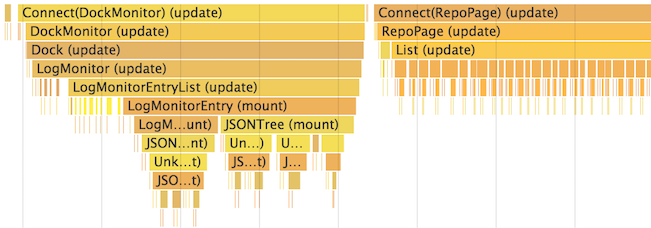
Where are my shouldComponentUpdate() and PureComponent?
🌸

Short Answer:
Long answer: Measure!
useMemo()
React.memo()
const Button = React.memo((props) => {
  // your component
}, arePropsEqual);

function arePropsEqual(prevProps, nextProps) {
  // compare props and return true if they are equal
}
// Will not change unless `a` or `b` changes
const memoizedCallback = useCallback(() => {
doSomething(a, b);
}, [a, b]);
return <NestedComponent onSomething={memoizedCallback} />useCallback()
What will happen to my tests?
🙋♂️
show some code from enzyme
// accordion.js
import React from 'react'
import AccordionContents from './accordion-contents';

class Accordion extends React.Component {
  state = {openIndex: 0}

  setOpenIndex = openIndex => this.setState({openIndex})

  render() {
    const {openIndex} = this.state
    return (
      <div>
        {this.props.items.map((item, index) => (
          <>
            <button onClick={() => this.setOpenIndex(index)}>
              {item.title}
            </button>
            {index === openIndex ? (
              <AccordionContents>{item.contents}</AccordionContents>
            ) : null}
          </>
        ))}
      </div>
    )
  }
}

export default Accordion
show some code from enzyme
test('setOpenIndex sets the open index state properly', () => {
  const wrapper = mount(<Accordion items={[]} />)
  expect(wrapper.state('openIndex')).toBe(0)
  wrapper.instance().setOpenIndex(1)
  expect(wrapper.state('openIndex')).toBe(1)
});

test('Accordion renders AccordionContents with the item contents', () => {
  const hats = {title: 'Favorite Hats', contents: 'Fedoras are classy'}
  const footware = {
    title: 'Favorite Footware',
    contents: 'Flipflops are the best',
  }
  const wrapper = mount(<Accordion items={[hats, footware]} />)
  const children = wrapper.find('AccordionContents').props().children;
  expect(children).toBe(hats.contents)
});
// counter.js
import React from 'react'
class Counter extends React.Component {
state = {count: 0}
increment = () => this.setState(({count}) => ({count: count + 1}))
render() {
return <button data-testid='button-increment'onClick={this.increment}>
{this.state.count}
</button>
}
}
export default Counter// __tests__/counter.js
import React from 'react'
import {render, fireEvent} from '@testing-library/react'
import Counter from '../counter.js'
test('counter increments the count', () => {
const { getByTestId } = render(<Counter />)
const button = getByTestId('button-increment')
expect(button.textContent).toBe('0')
fireEvent.click(button)
expect(button.textContent).toBe('1')
})
Recommendation
// counter.js
import React from 'react'
function Counter() {
  const [count, setCount] = useState(0)
  const incrementCount = () => setCount(c => c + 1)
  return <button data-testid='button-increment' onClick={incrementCount}>
    {count}
  </button>
}
export default Counter
📝 Summary
- Switching mental model
- Keep concerns together when using state
- Don't (ab)useContext
- Avoid testing implementation details to make the transition easier