in
One Shot

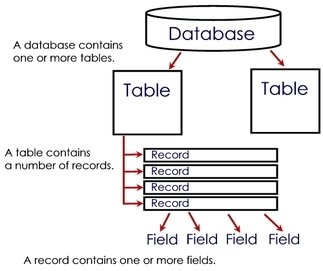
Creating & using Databadse
Database is a memory location where all tables will get placed.
Creating Database
create database databasename
using database
use databasename
SQL
- It Stands for Structured Query Language.
- It is a ANSI standard which provides to creating and managing the database objects.
- It could be classified into following categories-
- DDL
- DML
- DQL
DDL
- DDL stands for data definition language, it is used for creating a database object like table. These are-
1. create
2. alter
3. drop
create
This command is used for creating a table.
Syntax
create table tablename(fieldname datatype(size),......);
Data Types
- varchar
- numeric
- int
- date
Example
Table Name :
emp
Fields
- eid
- ename
- esalary
- edesig
alter command
This command modifying the structure of a table.
Syntax-1: Adding a new column
alter table tablename add columnname datatype(size);
Example
Add a new column named as edeptno & ephno
alter command
Syntax-2: Modifying an existing column
alter table tablename modify columnname datatype(size);
Example
set the size of ename field as 120 characters
alter command
Syntax-3: Deleting an Existing Column
alter table tablename drop column columnname
Example
delete the column named as ephno
alter command
Syntax-4: Renaming an existing Column.
alter table tablename change column oldcolumnname newcolumnname datatype(size)
Example
change the name of column esalary to esal
drop command
This command is used for deleting a table.
Syntax
drop table tablename
DML Statements
These commands are used for manipulating the content of a table. They are-
- insert
- delete
- update
Insert Command
This command is used for inserting the data into a table.
Syntax-1: inserting data in all the fields
insert into tablename values(value1,value2,...)
Insert Command
Syntax-2: inserting data in particular the fields
Syntax
insert into tablename(field1,field2,..) values(value1,value2,...);
Delete Command
This command is used for deleting the content of a table.
Syntax
delete from tablename [where condition]
Update Command
This command is used for modifying the content of a table.
Syntax
update tablename set columnname=value [where condition]
Data Query Language
select command is known as Data Query Language.
Syntax-1:
Select *|fieldname from tablename
Syntax-2:
select *|fieldname from tablename where condition.