Ruby on Rails
and
Databases


RoR and Sqlite3
Ruby on Rails uses sqlite3 as its default database, which works great in many cases, but may not be sufficient for your application.
# ../your_app/Gemfile
gem 'sqlite3'

# ../your_app/config/database.yml
development:
  adapter: sqlite3
  database: db/development.sqlite3
  pool: 5
  timeout: 5000

test:
  adapter: sqlite3
  database: db/test.sqlite3
  pool: 5
  timeout: 5000

production:
  adapter: sqlite3
  database: db/production.sqlite3
  pool: 5
  timeout: 5000
List of DB
-
MySQL
-
PostgreSQL
-
MongoDB
-
Sqlite3 (by default)
-
gem 'mysql2'
-
gem 'pg'
-
gem 'mongoid'
-
gem 'sqlite3'
RoR and MySQL
# install gem mysql
$ gem install mysql2

# my_app/Gemfile
gem 'mysql2'

# create app with mysql
$ rails new appname -d mysql

# myapp/config/database.yml
development:
  adapter: mysql2
  encoding: utf8
  reconnect: false
  database: test-mysql2_development
  pool: 5
  username: root
  password:
  socket: /tmp/mysql.sock

test:
  ...

production:
  ...
RoR and PostgreSQL
# install gem pg
$ gem install pg

# my_app/Gemfile
gem 'pg'

# create app with postgresql
$ rails new myapp --database=postgresql

# myapp/config/database.yml
development:
  adapter: postgresql
  encoding: unicode
  database: myapp_development
  pool: 5
  username: myapp
  password:

test:
  ...

production:
  ...
RoR and MongoDB
# install gem pg
$ gem install mongoid

# my_app/Gemfile
gem 'sqlite3-ruby', :require => 'sqlite3'
gem 'mongoid'
gem 'bson_ext'

# config MongoDB for project
$ rails g mongoid:config

# myapp/config/mongoid.yml
defaults: &defaults
  host: localhost

development:
  <<: *defaults
  database: blog_development

# set these environment variables on your prod server
production:
  host: <%= ENV['MONGOID_HOST'] %>
  port: <%= ENV['MONGOID_PORT'] %>
  username: <%= ENV['MONGOID_USERNAME'] %>
  password: <%= ENV['MONGOID_PASSWORD'] %>
  database: <%= ENV['MONGOID_DATABASE'] %>
Console commands
Creating your database for project
$ rake db:createCreating tables from your migrations
$ rake db:migrate
or
$ rake db:schema:load
Dropping your database
$ rake db:dropReseting your database
$ rake db:resetModels
# my_app/app/models/post.rb
class Post < ActiveRecord::Base
end

# my_app/db/migrate/20161026072633_create_posts.rb
class CreatePosts < ActiveRecord::Migration
  def change
    create_table :posts do |t|
      t.string :title
      t.text   :content

      t.timestamps null: false
    end
  end
end
$ rails g model Post title:string content:text
invoke  active_record
  create    db/migrate/20161026072633_create_posts.rb
  create    app/models/post.rb
  invoke    test_unit
  create      test/models/post_test.rb
  create      test/fixtures/posts.yml
Example
class Post < ActiveRecord::Base
  # set other table for model
  self.table_name = :lists

  # validation
  validates_presence_of :content
  validates             :title, presence: true, length: { maximum: 50 }

  # associations
  belongs_to              :user
  has_one                 :autor
  has_many                :comments
  has_and_belongs_to_many :reader

  # callbacks
  before_validate :some_method
  before_create   :some_method
  before_save     :some_method
  after_update    :some_method
  after_save      :some_method
  # others

  def some_mothod
    puts 'code is bichina'
  end

  # ...
end
Example
class Post < ActiveRecord::Base
  # ...

  # example method
  def set_category
    self.category = Category.first
  end

  def self.get_comments
    self.comments
  end

  # protected and private methods
  protected
    def set_values
        first_name = "Vasia"
        full_name first_name
    end

  private
    def full_name first_name
        first_name + " Rahul"
    end
end
My First Applcation
Domashka
- Generate project Blog
- Add Posts (fields: title content)
- Add Categories (fields: name)
- Add associations (Post -> Category)
- Research Validations, Callbacks, Associations, Methods
- Dlia prodvynutyh: add comments to posts
https://scotch.io/tutorials/build-a-blog-with-ruby-on-rails-part-1
app/
- assets/
- controllers/
- helpers/
- mailers/
- models/
- views/
Contains the controllers, models, views, helpers, mailers and assets for your application. You'll focus on this folder for the remainder of this guide.
Application structure
bin/
- bundle
- rails
- rake
- setup
- spring
Contains the rails script that starts your app and can contain other scripts you use to setup, update, deploy or run your application.
Application structure
config/
- enviroments/
- initializers/
- locales/
- application.rb
- boot.rb
- database.yml
- enviromment.rb
- routes.rb
- secrets.yml
Configure your application's routes, database, and more.
Application structure
lib/
- assets/
- tasks/
- schema.rb
- seeds.rb
Extended modules for your application.
Application structure
log/
- development.log
- production.log
Application log files.
db/
- migrate/
- development.sqlite3
- schema.rb
- seeds.rb
Contains your current database schema, as well as the database migrations.
public/
- assets/
- systems/
- 404.html
- 422.html
- favicon.ico
- obots.txtr
The only folder seen by the world as-is. Contains static files and compiled assets.
Application structure
vendor/
- assets/
- ...
A place for all third-party code. In a typical Rails application this includes vendored gems.
tmp/
- cache/
- pids/
- sessions/
- sockets/
Temporary files (like cache and pid files).
Application structure
test/
- controllers/
- fixtures/
- helpers/
- integration/
- mailers/
- models/
- test_helper.rb
Application structure
.../
-
config.ru - Rack configuration for Rack based servers used to start the application.
- Gemfile and Gemfile.lock - These files allow you to specify what gem dependencies are needed for your Rails application. These files are used by the Bundler gem.
- Rakefile - This file locates and loads tasks that can be run from the command line.
- Readme.rdoc - This is a brief instruction manual for your application. You should edit this file to tell others what your application does, how to set it up, and so on.
Rails Scaffolding
$ rails generate scaffold Post name:string title:string content:textWith the scaffold action, Rails generates all the code it needs dynamically. By running scaffold as a script, we can get all the code written to disk, where we can investigate it and then start tailoring it to our requirements.
Git and Github
Git is a version control system that is used for software development and other version control tasks. As a distributed revision control system it is aimed at speed, data integrity, and support for distributed, non-linear workflows.
GitHub is a web-based Git repository hosting service. It offers all of the distributed version control and source code management (SCM) functionality of Git as well as adding its own features.
Git and Github

Git and Github
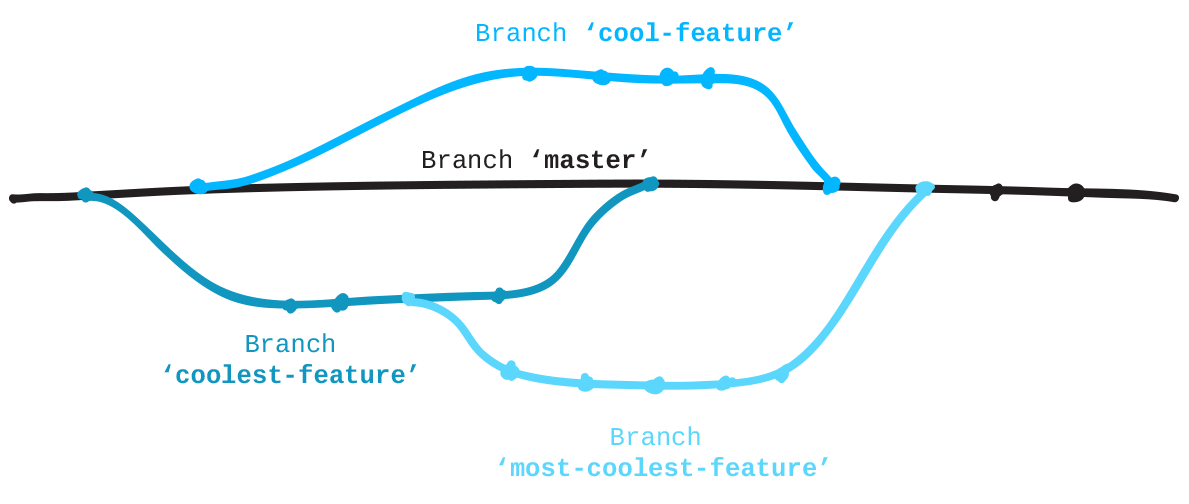
Installation git
$ sudo yum install git-allOn linux
or
$ sudo apt-get install git-allOn Mac
An OSX Git installer is maintained and available for download at the Git website, at http://git-scm.com/download/mac.
Git configuration
# checking git version
$ git version

# set user name
$ git config --global user.name "John Doe"

# set user email
$ git config --global user.email johndoe@example.com

# get config info
$ git config --list

user.name=John Doe
user.email=johndoe@example.com
color.status=auto
color.branch=auto
color.interactive=auto
color.diff=auto
...
Git commands
$ cd your app

# Initializing a Repository in an Existing Directory
$ git init

# Check status
$ git status

# Addition of files
$ git add .

# Addition your commit
$ git commit -m "Name Of Your Commit"

# Set a new remote
$ git remote add origin https://github.com/user/repo.git

# Verify new remote
$ git remote -v

# Cloning from repository
$ git clone https://github.com/user/your_app.git
Git commands
# Get list of local branches
$ git branch

# Add new branch
$ git checkout -b origin your_new_branch

# Checkout on other branch
$ git checkout my_branch

# Pull origin from repository
$ git pull origin other_branch

# Push your branch
$ git push origin my_brach

# Push with force
$ git push -f origin my_branch

# Get list of commits on branch
$ git log
Git commands
# Rebase branches
$ git rebase origin other_branch

# Merge branches
$ git merge other_origin

# Reset your changes
$ git reset commit_id

# Force reset your changes
$ git reset -f commit_id

# Revert your commit by id
$ git revert commit_id
Sources
- rubyonrails.org
- rusrails.ru
- railscasts.com
- git-scm.com
- github.com
- stackoverflow.com