ECSE 321 - Tutorial 2
Dominic Charley-Roy
https://github.com/dominiccharleyroy
dominic.charley-roy @ mail.mcgill
Writing Good Requirements
Requirement Elicitation and Specification
Our goal is to understand and document a system's functions, behavior and constraints.
Requirements are:
- From the perspective of the user
- A contract between the developer and the customer
- Useful for future lifecycle phases (eg. during testing, verify that all requirements are satisfied)
What are we covering today?
We'll be focusing on the requirement process through the use of an example. We will cover:
- The various types of requirements
- The charateristics of a good requirement
Our Example:
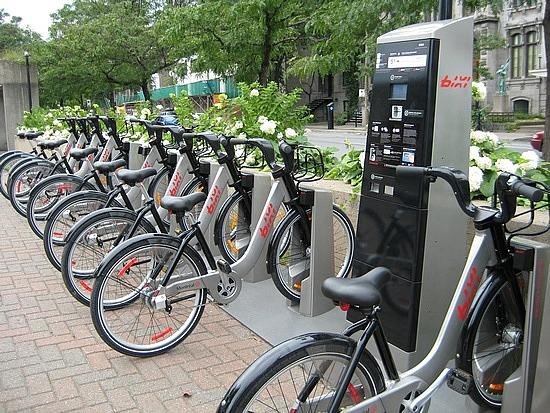
Throughout this lecture, we will be using the example of a Bixi backend management system for developing requirements.

Project Scope
Our system needs to track information for: bikes, members and guest users and utilization at each station.
The system will take care of billing and registration. It will provide both an online and a mobile interface.
We won't be building software for the stations themselves. Rather, station software will tell us when a bike is checked in / out.
Functional Requirements
These describe system features and behaviors.
- Inputs and outputs
- Data that should be stored
- Error handling
- Initialization/shutdown
Examples:
- On the registration screen, a user enters their gender, language, first and last name, date of birth, home address, username and password.
- If the user tries to register with a username already in the system, the user is presented with a message asking them to try a different username.
Non-Functional Requirements
Functional requirements are features, ie. they're either present/implemented or not.
Non-functional requirements describe some quality characteristic of the software, and is generally more quantifiable (eg. response time). These also include design constraints (eg. platform or required interface) and process constraints (eg. required documentation or process).
They are usually broken down into different types...
Performance Requirements
These describe requirements on system metrics.
- How much data flows through the system?
- How often is data sent and received?
- What are we focusing on - execution speed, response time or throughput?
Examples:
- The system can process 500 transactions per second.
- The system has capacity to store records for 5 years worth of data for 1,000 bikes, 10,000 users and 300 stations.
- The communication delay from any station to the system should be under 50ms.
Usability Requirements
These describe requirements on system metrics.
- What kind of training is required?
- How easy is it to understand the system / user interface?
- How difficult should it be to misuse the system?
Examples:
- 75 of 100 average users should be able to sign up for a new account, starting from the main web page, in under 5 minutes.
- The system should automatically detect when a new user has pressed reload while a credit card transaction is in process and should not charge twice.
Security Requirements
- Is access to the system controlled? Only some parts?
- Are there different levels of user access?
- Should portions of the system be isolated?
- Precautions againt theft?
Examples:
- All personal user information, such as street address or contact information, should be encrypted before being written to disk.
- Credit card numbers will not be recorded or stored.
- All credit card transactions are transmitted over a 128-bit SSL encrypted connection directly to the credit card company.
Reliability and Availability Requirements
- Does the system detect/isolate faults?
- Mean time between failures?
- Maximum time to recover from failure?
- How should backups be done?
Examples:
- The system will be online 99.9% of the time.
- All transactions will be processed by three redundant servers.
- When a failure has been detected, the system can be restarted and back online in 5 minutes or less.
Precision and Accuracy Requirements
- How accurate should calculations be?
- What should be the precision of stored data?
Examples:
- The total amount of team that each bike is checked out since its last repair and tune-up will be stored as a number of seconds.
- An estimate of the distance travelled by a bike, in units of 100m, will be calculated based on the distance between the check-out and check-in station and between the check-out and check-in time.
Maintainability Requirements
- Will maintenance just be fixing bugs, or will additional features be added?
- What features are likely to be added/changed?
- How easy should it be to add features?
- How easy should it be to port to other platforms?
Examples:
- In the future, users will likely be able to reserve a bike from their mobile device.
- In the future, bikes will be equipped with GPS to record how many miles each bike has been used.
- The system will likely be expanded to support 5,000 bikes, 75,000 users and 750 stations.
Recap
Functional requirements describe system and behaviour (features). They're either implemented or not.
Non-functional requirements describe some characteristic.
- Performance
- Usability
- Security
- Reliability and Availability
- Precision and Accuracy
- Maintainability
Writing Good Requirements!
The most important thing about requirements is that they should be correct and that everyone is on the same page. But they should also be of high quality. Why?
Good requirements can save you significant effort down the line. If you miss a requirement, you may have to re-design...
Also, remember that these are your contract with the customer!
Characteristics of
a good requirement
1. Consistent
- No two requirements should conflict. What would we do in this case?
- The system will manage up to 1,000 bikes.
- Each bike is assigned a unique numeric id between 1 and 512.
Change the second requirement to read: each bike is assigned a unique numeric id greater than 0!
2. Unambiguous
- Each requirement should have exactly one interpretation.
The system can deal with a lot of users (how many?)
vs.
The system can support up to 1,000 users (better!)
3. Complete
- The requirements should specify behavior and outputs for all possible inputs in all possible stats.
- This requirement is not enough:
To register online, the user must enter their mailing address and credit card. - Need a complete spec!
- To register online, the user must enter their mailing address and credit card.
- If the mailing address is not in Montreal, then the user is presented a message saying they are not eligible for a Bixi subscription.
- If the credit card transaction is not approved, the user is presented with a message that the transaction did not go through and their subscription is incomplete.
4. Feasible
- It must be possible to build a solution which meets the customer's needs!
- The response time for every transaction will be under one nanosecond.
- The time to complete the software project will be 1 day after agreeing on the requirements.
5. Relevant
- All features should be directly related to the customer's needs.
- In our example, the customer doesn't need to know things like the user's SIN, date of birth, favorite color, etc. for registration.
6. Testable
- The requirements should suggest an acceptable test that would clearly demonstrate that the requirement is fulfilled. Ask your self - can I test this?
The user interface is easy to use
vs.
75% of users will be able to login and locate the preference screen in under 5 minutes.
The system will never go down
vs.
The system will be online 360 days a year.
7. Traceable
- Requirements should be organized and uniquely labeled for reference.
- Not traceable:
- This is a requirement.
- This is also a requirement.
- This is another requirement.
- Much better!
- 1.1.2 This is a requirement
- Requirement #2: This is also a requirement
- Input 2.1) This is another requirement.
Recap
Good requirements should be correct and high quality in order to save time down the line. A good requirement is:
- Consistent
- Unambiguous
- Complete
- Feasible
- Relevant
- Testable
- Traceable