Mobile Test Automation
with Calabash
Daniel Tolbert
Requirements
- Cross Platform
- Integration with Continuous Integration tools
- Open Source
- Multi-device capable

- NodeJS Based
- UIAutomation Library for iOS
- UIAutomator Framework for Android
- Saucelabs
- http://appium.io
- Cucumber driven
- Ruby based
- http://calaba.sh
- Now owned by Xamarin


Pros
- Any Selenium Webdriver language
- Any Test Framework
- Runs on production App
- Optional Visual SDK
- Support for Firefox OS
Cons
- New(er) - fewer examples
- 'Quick' tests require more overhead
Limited Android Support: (API >= 17, 4.2)- Now Supports older API through selendroid

Pros
- Natural Language (gherkin)
- 'Quick' Tests easy to write
- Great Documentation
- Eventual support for Windows*
- Optional App Explorer
Cons
- Separate 'step definitions' for each platform
- Ruby backed (?)
- Multiple packages (one for each platform)
- Only able to control App under test

*This may or may not happen, no new news for a while now
Gherkin
- Given-When-Then
Feature: Login

  @invalid
  Scenario: Add site - Invalid login
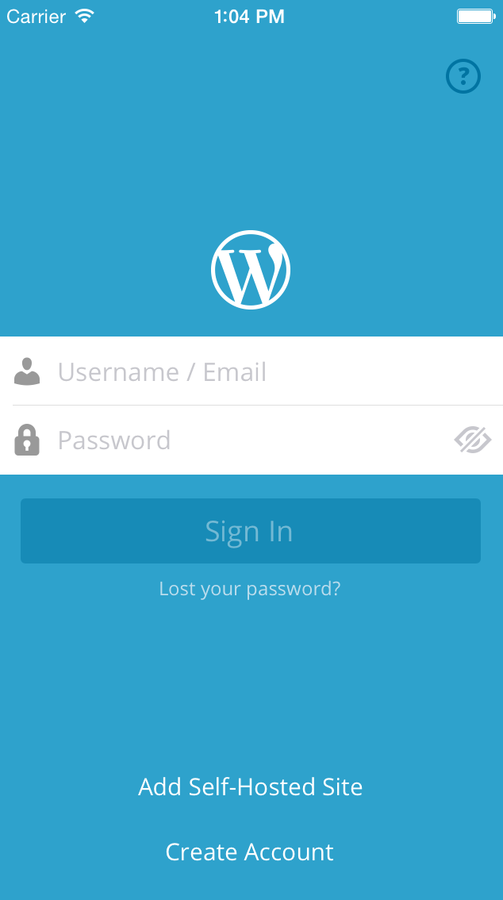
    Given I am about to login
    When I enter invalid credentials
    Then I am prompted to correct credentials

  @valid
  Scenario: Add site
    Given I am about to login
    When I enter valid credentials
    Then I am successfully authenticated
    And I can see posts for the site

Calabash Flow
Feature
Feature
Scenarios
steps
Contains
Contains
Step Definition
Which
call the
iOS Specific Page
Object
Android Specific
Page Object
iOS Unique
Code
Android Unique
Code
Platform Dependent
Which
call the
All together...
Feature: Login
 Scenario: Add site
  Given I am about to login
  When I enter valid credentials
  Then I am successfully authenticated
  And I can see posts for the site
Given(/^I am about to login$/) do
@current_page = page(LoginPage).await(timeout: 30)
@current_page.self_hosted_site
end
When(/^I can see posts for the site$/) do
@current_page.to_posts
end
Feature File (Gherkin)
Step Definitions (Ruby)
- Each 'Step' must be defined somewhere
- Steps are reusable between features
- Only define each step once
- Step definitions call to page objects
- Page objects are platform dependent
Given(/^I am about to login$/) do
  @current_page = page(LoginPage).await(timeout: 30)
  @current_page.self_hosted_site
end
Step Definition
require 'calabash-android/abase'

class LoginPage < Calabash::ABase

  def trait
    "android.widget.TextView text:'Sign in'"
  end

  def self_hosted_site
    hide_soft_keyboard
    tap_when_element_exists(add_self_hosted_site_button)
  end

  def add_self_hosted_site_button
    "android.widget.TextView text:'Add self-hosted site'"
  end
end
Page File (Android)
await is inherited from ABase
(LoginPage's superclass)
function trait
is called by await
Unique element to our app
Given(/^I am about to login$/) do
  @current_page = page(LoginPage).await(timeout: 30)
  @current_page.self_hosted_site
end
Step Definition
require 'calabash-cucumber/ibase'

class LoginPage < Calabash::IBase

  def trait
    "button marked:'Sign In'"
  end

  def self_hosted_site
    touch("* marked:'Add Self-Hosted Site'")
    wait_for_none_animating
  end
end
Page File (iOS)
await is inherited from IBase
(LoginPage's superclass)
function trait
is called by await
iOS app specific implementations of same functions
Packaged Examples
Feature: Login

  @invalid
  Scenario: Add site - Invalid login          # features/login.feature:4
    Given I am about to login                 # features/step_definitions/login_steps.rb:1
    When I enter invalid credentials          # features/step_definitions/login_steps.rb:8
    Then I am prompted to correct credentials # features/step_definitions/login_steps.rb:15

  @valid
  Scenario: Add site                     # features/login.feature:10
    Given I am about to login            # features/step_definitions/login_steps.rb:1
    When I enter valid credentials       # features/step_definitions/login_steps.rb:19
    Then I am successfully authenticated # features/step_definitions/login_steps.rb:26
    And I can see posts for the site     # features/step_definitions/login_steps.rb:32

2 scenarios (2 passed)
7 steps (7 passed)
0m36.587s
New Feature

The Feature
- Create new .feature file
- Define Scenario(s)
- Add steps
- (Given-When-Then)*
Feature: Help

  Scenario: Help Buttons are visible
    Given I am about to login
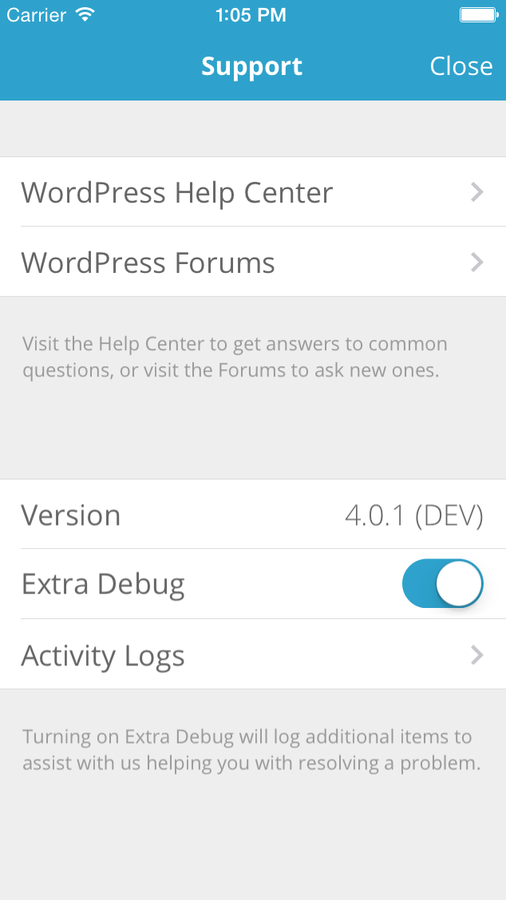
    When I tap the question mark
    Then I see the "Help Center" Button
And I see the button to open the logs*And, Or, and But can also be used to make the steps more readable. (The truth is that all these labels are ignored by the test runners and are there simply to make your tests more readable. Use them.)
Step Definitions
- Run the Calabash Test for any platform*
- Copy/Paste Generated Step definitions into new file
*Run individual scenarios by specifying the file and line number
bundle exec calabash-android run prebuilt/Android-debug.apk -p android features/help.feature:10You can implement step definitions for undefined steps with these snippets:
When(/^I tap the question mark$/) do
pending # express the regexp above with the code you wish you had
end
Then(/^I see the "(.*?)" Button$/) do |arg1|
pending # express the regexp above with the code you wish you had
end
Then(/^I see the button to open the logs$/) do
pending # express the regexp above with the code you wish you had
end
Inspect each app
- Create the Page File for each platform
- Launch the console to start building page object
-
calabash-ios console
-
calabash-android console <path-to-apk>
-
- Use query to find elements
>>query("*")
...
>>query("* marked:'Help'")
...
>>query("UIButton marked:'Help'")
[
    [0] {
              "class" => "UIButton",
                 "id" => nil,
               "rect" => {
            "center_x" => 294,
                   "y" => 27,
               "width" => 22,
                   "x" => 283,
            "center_y" => 48,
              "height" => 42
        },
              "frame" => {
                 "y" => 27,
             "width" => 22,
                 "x" => 283,
            "height" => 42
        },
              "label" => "Help",
        "description" => "<UIButton: 0xd8a5d10; frame = (283 27; 22 42); opaque = NO; autoresize = LM+RM; layer = <CALayer: 0xd8a59b0>>"
    }
]
Create Page Object - iOS
- What functions are needed?
- What constants are needed?
require 'calabash-cucumber/ibase'

class HelpPage < Calabash::IBase

  def trait
    "UILabel marked:'Support'"
  end

  def help_center
    "UISwitch marked:'WordPress Help Center'"
  end

  def activity_logs_button
    "UILabel marked:'Activity Logs'"
  end

  def has_log_button
    wait_for_elements_exist([activity_logs_button])
  end

  def check_button(button_name)
    if button_name == "Help Center"
      wait_for_elements_exist([help_center])
    end
  end

end- Try to keep same names (if possible)
Create Page Object - Android
- What functions are needed?
- What constants are needed?
require 'calabash-android/abase'

class HelpPage < Calabash::ABase

  def trait
    "* marked:'Help'"
  end

  def help_center
    "WPTextView marked:'Help center'"
  end

  def application_logs_button
    "WPTextView marked:'applog_button'"
  end

  def has_log_button
    wait_for_element_exists(application_logs_button)
  end

  def check_button(button_name)
    if button_name == "Help Center"
      wait_for_element_exists(help_center)
    end
  end
end
require 'calabash-android/abase'
class HelpPage < Calabash::ABase
def trait
"* marked:'Help'"
end
def help_center
"WPTextView marked:'Help center'"
end
def application_logs_button
"WPTextView marked:'applog_button'"
end
def has_log_button
wait_for_element_exists(application_logs_button)
end
def check_button(button_name)
if button_name == "Help Center"
wait_for_element_exists(help_center)
end
end
endrequire 'calabash-cucumber/ibase'
class HelpPage < Calabash::IBase
def trait
"UILabel marked:'Support'"
end
def help_center
"UISwitch marked:'WordPress Help Center'"
end
def activity_logs_button
"UILabel marked:'Activity Logs'"
end
def has_log_button
wait_for_elements_exist([activity_logs_button])
end
def check_button(button_name)
if button_name == "Help Center"
wait_for_elements_exist([help_center])
end
end
endAndroid
iOS
Create Step Definitions
- Use the commonly named functions to fill out the step definitions
When(/^I tap the question mark$/) do
  page(LoginPage).open_help
  @current_page = page(HelpPage).await(timeout: 30)
end

Then(/^I see the "(.*?)" Button$/) do |button_name|
  page(HelpPage).check_button(button_name)
end

Then(/^I see the button to open the logs$/) do
  page(HelpPage).has_log_button
endb
Run the new test!
% bundle exec calabash-android run prebuilt/Android-debug.apk -p android features/help.feature Using the android profile...
5982 KB/s (552918 bytes in 0.090s)
6222 KB/s (4559840 bytes in 0.715s)
Feature: Help


  Scenario: Help Buttons are visible      # features/help.feature:3
    Given I am about to login             # features/step_definitions/login_steps.rb:1
    When I tap the question mark          # features/step_definitions/help_steps.rb:1
    Then I see the "Help Center" Button   # features/step_definitions/help_steps.rb:6
    And I see the button to open the logs # features/step_definitions/help_steps.rb:10

1 scenario (1 passed)
4 steps (4 passed)
0m21.329s
% bundle exec cucumber -p ios features/help.feature
Using the ios profile...
Feature: Help

  Scenario: Help Buttons are visible      # features/help.feature:3
    Given I am about to login             # features/step_definitions/login_steps.rb:1
    When I tap the question mark          # features/step_definitions/help_steps.rb:1
    Then I see the "Help Center" Button   # features/step_definitions/help_steps.rb:6
    And I see the button to open the logs # features/step_definitions/help_steps.rb:10

1 scenario (1 passed)
4 steps (4 passed)
0m13.595s
Experience & Tips


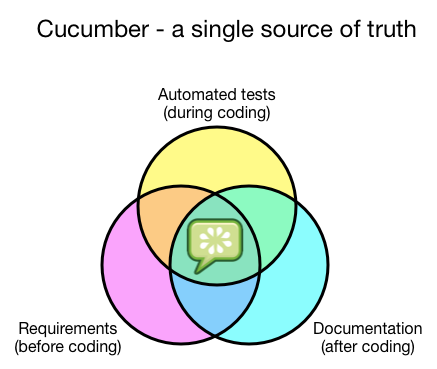
The 'Dream'
Your cucumber features should drive your implementation, not reflect it.
The 'Reality'
You write step definition and page files after-the-fact to describe user events and actions.
Misc.
- Lint Ruby Code to ensure quality (Rubocop)
- Don't use predefined steps
- Keep scenarios short by hiding implementation details
- ....