Implementing and Styling Cascade UI for SSB
BUGMI 2014
Eddie Bachle
Albion College
Introduction
- Why Cascade
- Installation Process
- Pinch Points
- Configuration
- Style Guides
- Styling Tools
- HTML Refresher
- Pure CSS
- LessCSS
- Cross Browser Testing
- Albion as a Case Study
Why Cascade
"The Cascade theme provides Web 2.0 functionality within Banner Self-Service. This theme adds rich user interaction to Banner Self-Service such as auto complete functionality, button mouse-over state changes and in page refreshes to provide the end user a compelling user experience." -- Banner Web Tailor User Guide
- No more of the 90's website design
- Adds a significant number of possible CSS selectors
- Fairly easy to implement, and requires little downtime
- Pure CSS styling is possible (no mods)
- More friendly UI for more web-savvy users
- Improved usage of the provided baseline offering
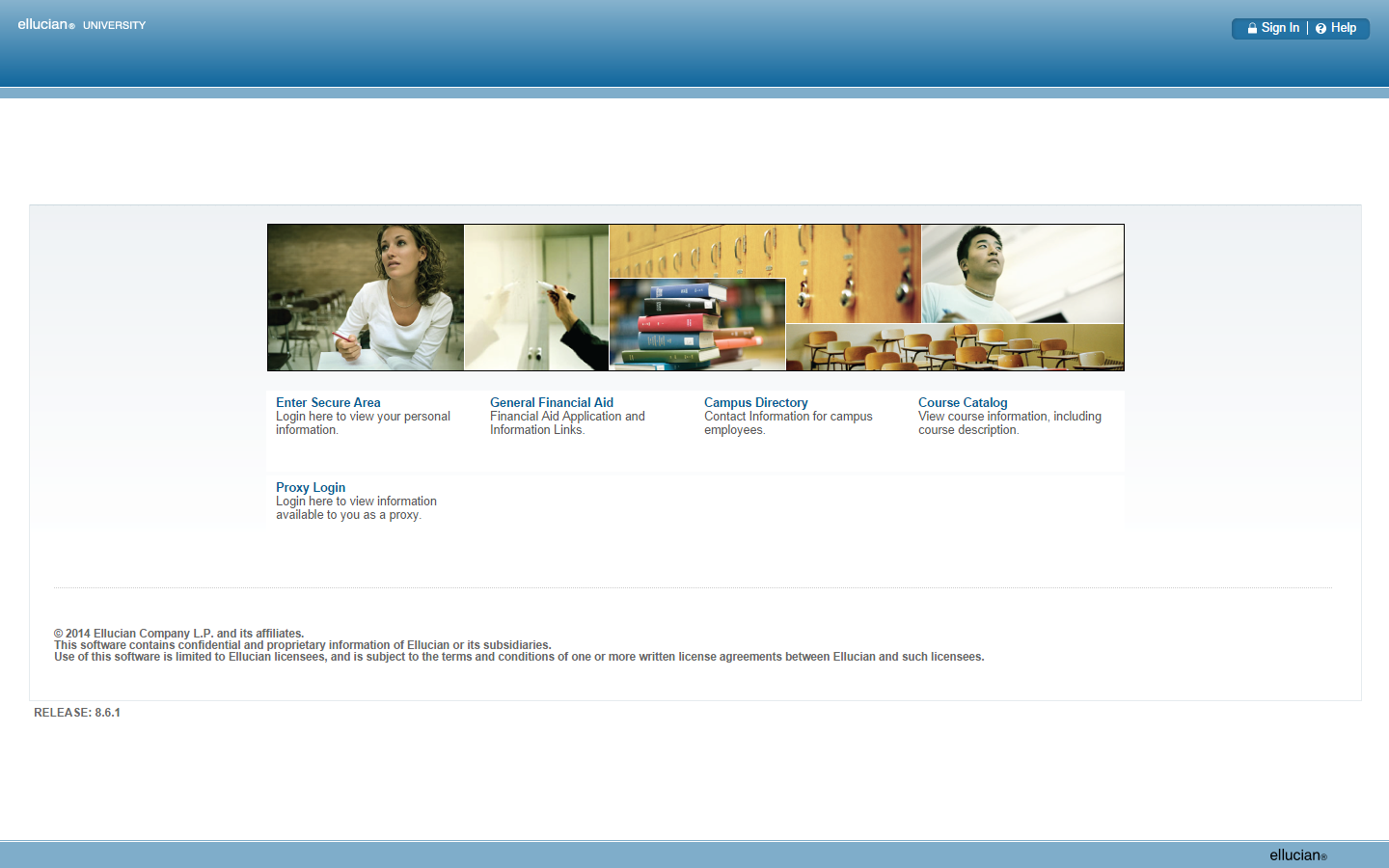
The End Result
Installing Cascade
- You can do this in-house and fairly expediently
- Use the most recent Banner Middle-Tier Implementation Guide (on the Download Center)
- Consult your most recent Web Tailor Upgrade Guide
- Be cognizant that new versions supersede old ones
- Final conversion can be done on a live database
- Be ready to submit ActionLine tickets
- Starting version is slightly unclear
- Need rolled up files from previous version
- Only need to deploy most recent .ear files
Abridged Installation
- Add a new instance WebLogic server instance
- Deploy aurora-ws.ear and banner-ssb-ws.ear
- Make sure the Oracle cascadeu exists and is set up
- Set up a JDBC resource for your Banner instance
- Modify serviceProperties.js
- No SSL, use Cascade Managed Server host:port
- With SSL, use HTTP server host:port
- With WebCache, always use its port
- Use Article 1-129XVZ1 for guidance
- Enable the theme in Web Tailor
Pinch Points
- Version to do initial implementation with is unclear
- Use the most recent versions of each ear file
- Get all of your settings right or it's a paperweight
- Watch for Oracle Patches
- OHS error "apr_socket_connect call failed"
- 12632886
- Each SSB instance needs its own doc root and files
- Don't implement on a deadline
- Contextual style issues
- Browser compatibility (more on this soon)
Housekeeping
- You may need to bake cookies for this next part
- Images provided by Ellucian use their blue color
- Images provided by Ellucian aren't transparent
- Glyphicons can help with this
- You'll need an appropriate version of your logo
- Start thinking about what browsers you support
- Accessibility query string: "&accessibility=true"
Style Guide
- Your institution likely has one somewhere
- Check with your marketing department
- Typically gives you:
- Website colors
- Fonts
- Usage Guidelines
- Logos
- Take your design cues from your main website
- This may come with a base stylesheet if you ask
- If you bake cookies, it may come with a web dev too!
Our Tools
- HTML (obviously)
- CSS
- LessCSS
- Chrome Dev Tools / Firebug / IE Inspector
- CanIUse.com - Compatibility tables for HTML5, CSS3
- Git or other version control (optional, but advised)
- Your friendly neighborhood web developer
- Cookies!

HTML Refresher
- HTML is a markup language (it has tags)
- SSB's HTML isn't necessarily perfect
- Tags in HTML translate to CSS selectors
- Tags have attributes, we'll focus on two
- ID - A unique identifier for a one element only
- Class - A general identifier for multiple elements
- An HTML element can have multiple classes
- There are others for use in CSS selectors
- HTML is hierarchical, so are selectors
- W3 (not W3Schools) is the official reference for HTML
<!DOCTYPE html PUBLIC "-//W3C//DTD XHTML 1.0 Strict//EN"
"http://www.w3.org/TR/xhtml1/DTD/xhtml1-strict.dtd">
<html xmlns="http://www.w3.org/1999/xhtml">
<head>
<title></title>
</head>
<body>
<div id="content" style="display: block;">
<div id="bodyContainer">
<div id="pageheader">
<div id="pagetitle"></div>
<div id="crumb" class="anonymous">
<div class="breadCrumb">
<a class="">
Home
</a>
<div class="breadcrumbSeperator">
>
</div>
<a class="selected" style="cursor: default;">
homepage
</a>
</div>
</div>
</div>
<div id="pagebody" class="anonymous home">
<div id="mainBannerImage"></div>
<div id="contentHolder" style="display: none;">
<div id="contentBelt"></div>
</div>
<div id="row1">
<div class="anonymousHomeLinks" style="height: 71px;">
<h3>
<a id="contentItem0">
Enter Secure Area
</a>
</h3>
<p>
<a id="contentItem0">
Login here to view your personal information.
</a>
</p>
</div>
<div class="anonymousHomeLinks" style="height: 71px;">
<h3>
<a id="contentItem1">
General Financial Aid
</a>
</h3>
<p>
<a id="contentItem1">
Financial Aid Application and Information Links.
</a>
</p>
</div>
<div class="anonymousHomeLinks" style="height: 71px;">
<h3>
<a id="contentItem2">
Campus Directory
</a>
</h3>
<p>
<a id="contentItem2">
Contact Information for campus employees.
</a>
</p>
</div>
<div class="anonymousHomeLinks" style="height: 71px;">
<h3>
<a id="contentItem3">
Course Catalog
</a>
</h3>
<p>
<a id="contentItem3">
View course information, including course description.
</a>
</p>
</div>
</div>
<div id="row2">
<div class="anonymousHomeLinks" style="height: 71px;">
<h3>
<a id="contentItem4">
Proxy Login
</a>
</h3>
<p>
<a id="contentItem4">
Login here to view information available to you as a proxy.
</a>
</p>
</div>
</div><br style="clear:both" />
<br />
<div class="disclaimer">
<h5>
<br />
© 2014 Ellucian Company L.P. and its affiliates.<br />
This software contains confidential and proprietary
information of Ellucian or its subsidiaries.<br />
Use of this software is limited to Ellucian licensees,
and is subject to the terms and conditions of one or more
written license agreements between Ellucian and such licensees.
</h5>
</div>
</div>
<div id="pagefooter" class="footertext">
<div class="reltext">
Release: 8.6.1
</div>
</div>
<div id="globalFooter" class="footertext"></div>
</div>
</div>
</body>
</html>
Styling Basics
- Come in with a plan
- Solve problems one at a time
- Corollary: Solve problems abstractly if possible
- Start with the lowest level styling first
- Overwrite when necessary
- When overwriting Ellucian styles, specificity may be important
- CSS is our tool for this task
CSS
- Cascading Style Sheets - hence it cascades
- Operates on selectors
- Define style attributes in selectors
- Can set sizing, spacing, location, fonts, colors, etc.
- Browsers have a base set of styles for unstyled sites
- This is called the User-Agent Stylesheet
- Browser incompatibilities are a real thing
- Consider your browser support policy
- Cross-browser testing is important
-
caniuse.com
- Cross-browser compatibility tables
- W3 maintains CSS standards
CSS Specifics
- Can be defined globally in <head> or on elements
- We only have access to one in the <head>
- Loaded/processed in the order listed in the HTML
- app-overrides.css is loaded last
- Stylesheets processed from top to bottom
- Styles loaded later overwrite
- EXCEPTION: "selector specificity" - Google it
- If you duplicate Ellucian's selector, you win.
- Not going to cover the entire syntax and semantics
html,
body {
  margin: 0;
}
p {
  margin: 0 0 15px;
  line-height: 131%;
}
a:hover {
  text-decoration: underline;
}
.purple {
  color: #592041;
}
body #header {
  border-bottom: 5px #d69d00 solid;
  background: #592041;
}
body #header #globalNav > div > ul li a.helpText {
  background: url("albion/glyphicons/question_mark_white.png") no-repeat 5px center;
  background-size: 15px;
  border-left: 1px #d69d00 solid;
}
body #content #bodyContainer #pagebody #footerLinks ul li a:link,
body #content #bodyContainer #pagebody #footerLinks ul li a:active {
  color: #592041;
  padding: 0 10px;
}
body #content #search {
  z-index: 1000;
  top: 62px;
  right: 81px;
  background: none;
}
CSS Inspection Tools
- Chrome Developer Tools, Firebug, IE Inspector
- Used to work on CSS "live"
- Analogous to breakpoint debugging
- Allows enabling/disabling of styles to analyze effects
- Helps determine selectors that need to be overridden
LessCSS
"Less is a CSS pre-processor, meaning that it extends the CSS language, adding features that allow variables, mixins, functions and many other techniques that allow you to make CSS that is more maintainable, themable and extendable." -- LessCSS.org Getting Started
- This significantly helps with selector specificity
- It won't compile malformed code
- Prevents many CSS syntax errors
- Can be compiled through the command line
- Many IDEs and text editors have plugins for Less
- Pure CSS syntax is valid Less syntax
@nice-blue: #5B83AD;
#header {
    color: @nice-blue;
}

.bordered {
    border-top: dotted 1px black;
    border-bottom: solid 2px black;
}
#menu a {
    color: #111;
   .bordered;
}
Variables and Mixins
#header {
    color: #5B83AD;
}

.bordered {
    border-top: dotted 1px black;
    border-bottom: solid 2px black;
}
#menu a {
    color: #111;
    border-top: dotted 1px black;
    border-bottom: solid 2px black;
}
Less
CSS
#header {
color: black;
.navigation {
font-size: 12px;
}
> .logo {
width: 300px;
}
}
Less
CSS
Nested Rules
#header {
    color: black;
}
#header .navigation {
    font-size: 12px;
}
#header > .logo {
    width: 300px;
}
h1, .h1 {
color: #592041;
&.item-page-title {
color: #d69d00;
}
}
a {
color: #d69d00;
&:hover {text-decoration: underline;}
}
Less
CSS
Current Selector Parent - &
h1,
.h1 {
  color: #592041;
}
h1.item-page-title,
.h1.item-page-title {
  color: #d69d00;
}
a {
  color: #d69d00;
}
a:hover {
  text-decoration: underline;
}
Conclusion
- Between HTML, CSS, and Less you now have the tools to style Cascade to fit your college's branding
- A well planned design should be easy to implement
- This styling results in no baseline mods
- Use a style guide to direct your efforts
- If you can, find a web developer to help