Introduction to ES6
UP CSI DevCap 1819B


Johnny Estilles
Regional Director of Engineering
Freelancer.com
johnny@freelancer.com

@JohnnyEstilles

Introduction to ES6
A Brief History of JavaScript


A Brief History of JavaScript
1995
JavaScript is invented
-
by Brendan Eich, Netscape Communications Corporation
-
in 10 days
-
originally called Mocha

A Brief History of JavaScript
JavaScript is handed over to ECMA
-
Given to official name ECMAScript (ES)
-
Standard ECMA-262
1996
1995
A Brief History of JavaScript
ES1/ES2 released
-
ES1 was just the original language description
-
ES2 was just an editorial change for ISO/IEC 16262
1996
1995
1997
1998
A Brief History of JavaScript
ES3 released
-
regular expressions
-
try/catch
-
formatting for numeric output
1999
1996
1995
1997
1998
A Brief History of JavaScript
ES5 released
-
JSON parsing/serialization
-
Array prototype methods
-
methods for listing object properties
-
dangling commas
-
"strict mode"
1999
2009
1997
1998
1996
1995
A Brief History of JavaScript
-
renamed from ES6 to ES2015
-
first of the new yearly June release schedule
-
classes and modules
-
iterators, generators and for/of loops
-
arrow functions
-
collections (maps/sets)
-
promises
1999
2009
1997
1998
1996
1995
ES6/ES2015 released
2015
A Brief History of JavaScript
-
ES2016: exponentiation operator (**)
-
ES2016: Array.prototype.includes
-
ES2017: async/await
1999
2009
1997
1998
1996
1995
ES2016/ES2017 released
2015
2016
2017
A Brief History of JavaScript
-
new regular expression features
-
rest/spread parameters
1999
2009
1997
1998
1996
1995
ES2018 released
2015
2016
2017
2018
A Brief History of JavaScript
What's coming up in ES2019?
Introduction to ES6
Basic Syntax
Basic Syntax
<script>
 ...
</script>

<script src="/path/to/source.js"></script>
Embedding JavaScript in HTML
Basic Syntax
// This is a single line comment

/*
  This is a multi line comment.
  It can have as many lines as you need.
*/
Comments
Basic Syntax
var myVariable = "This is the value.";
Variables
Types
| Type | Description | Example |
|---|---|---|
| String | A sequence of characters delimited by quotes. | var x = "string"; |
| Number | Any integer or floating point number. | var x = 100; |
| Boolean | The values true or false. | var x = true; |
| Array | A structure that allows you to store multiple values in one single reference. | var x = [1, 2, 3]; |
| Object | A collection that allows you to store key/value pairs. | var x = { a: 1, b: "test" }; |
Basic Syntax
Operators
| Type | Description | Symbol | Example |
|---|---|---|---|
| Addition | Used for numeric addition and string concatenation. | + | 6 + 9; "Hello " + "world!"; |
| Subtraction, Multiplication, Division | These do what you'd expect them to do in basic math. | -, *, / | 9 - 3; 8 * 2; 9 / 3; |
| Assignment | You've seen this already: it assigns a value to a variable. | = | var x = "value"; |
| Equality | Does a test to see if two values are equal to one another and returns a true/false (Boolean) result. | === | var x = 3; x === 4; // returns false |
| Not | Returns the logically opposite value of what it precedes. | ! | var x = 3; !(x === 4); // returns true |
| Inequality | Tests whether two values are not equal. | !== | var x = 3; x !== 4; // returns true |
Basic Syntax
var iceCream = 'chocolate';
if (iceCream === 'chocolate') {
  alert('Yay, I love chocolate ice cream!');
} else {
  alert('Awwww, but chocolate is my favorite...');
}
Conditionals
Basic Syntax
// basic counter using a for loop
for (x = 1; x <= 10; x++) {
  console.log(x);
}
For Loop
Basic Syntax
// Same counter using a while
var x = 1;
while (x <= 10) {
  console.log(x);
  x = x + 1;
}
While Loop
Basic Syntax
alert('hello!');Functions (Built-In)
function multiply(num1,num2) {
  var result = num1 * num2;
  return result;
}

multiply(4, 7);
multiply(20, 20);
Functions (User Defined)
Introduction to ES6
The Event Loop
The Event Loop
Is JavaScript single threaded?
Yes? No? Sort of?
The Event Loop
- Main Loop
- JavaScipt Tasks
- Animation Callbacks
- Microtasks
The Event Loop
Main Loop

The Event Loop
JavaScript Task Loop

The Event Loop
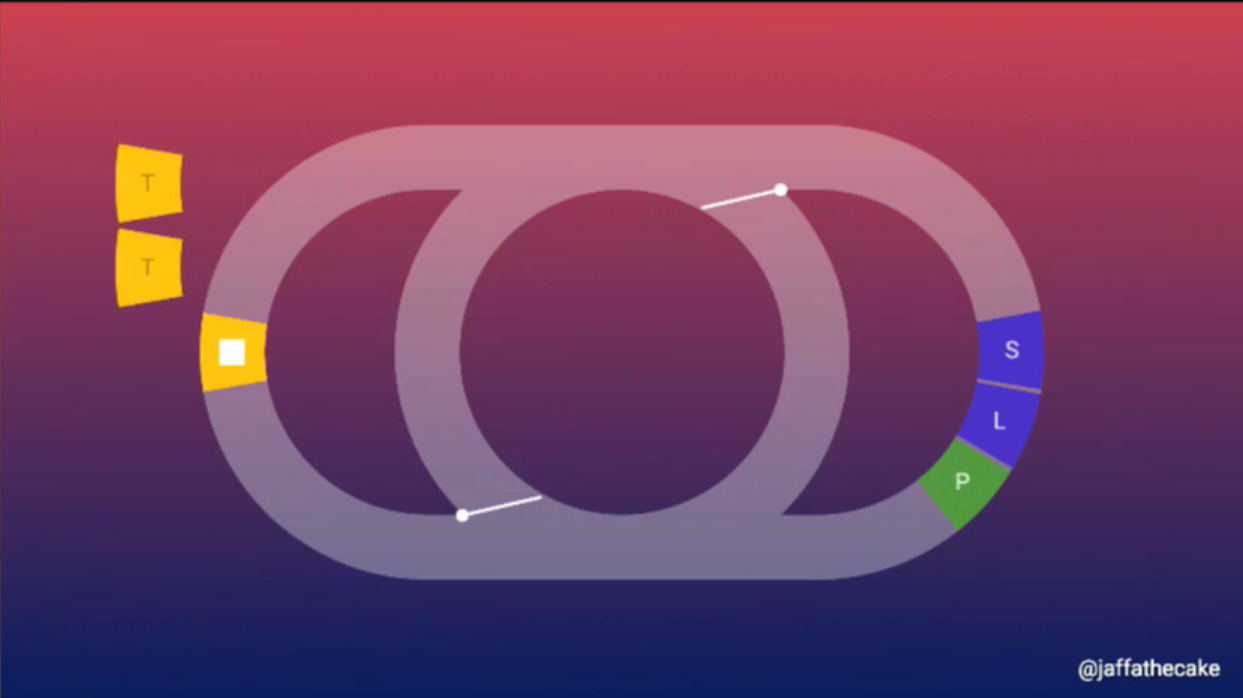
Rendering Steps
The Event Loop
Animation Callbacks
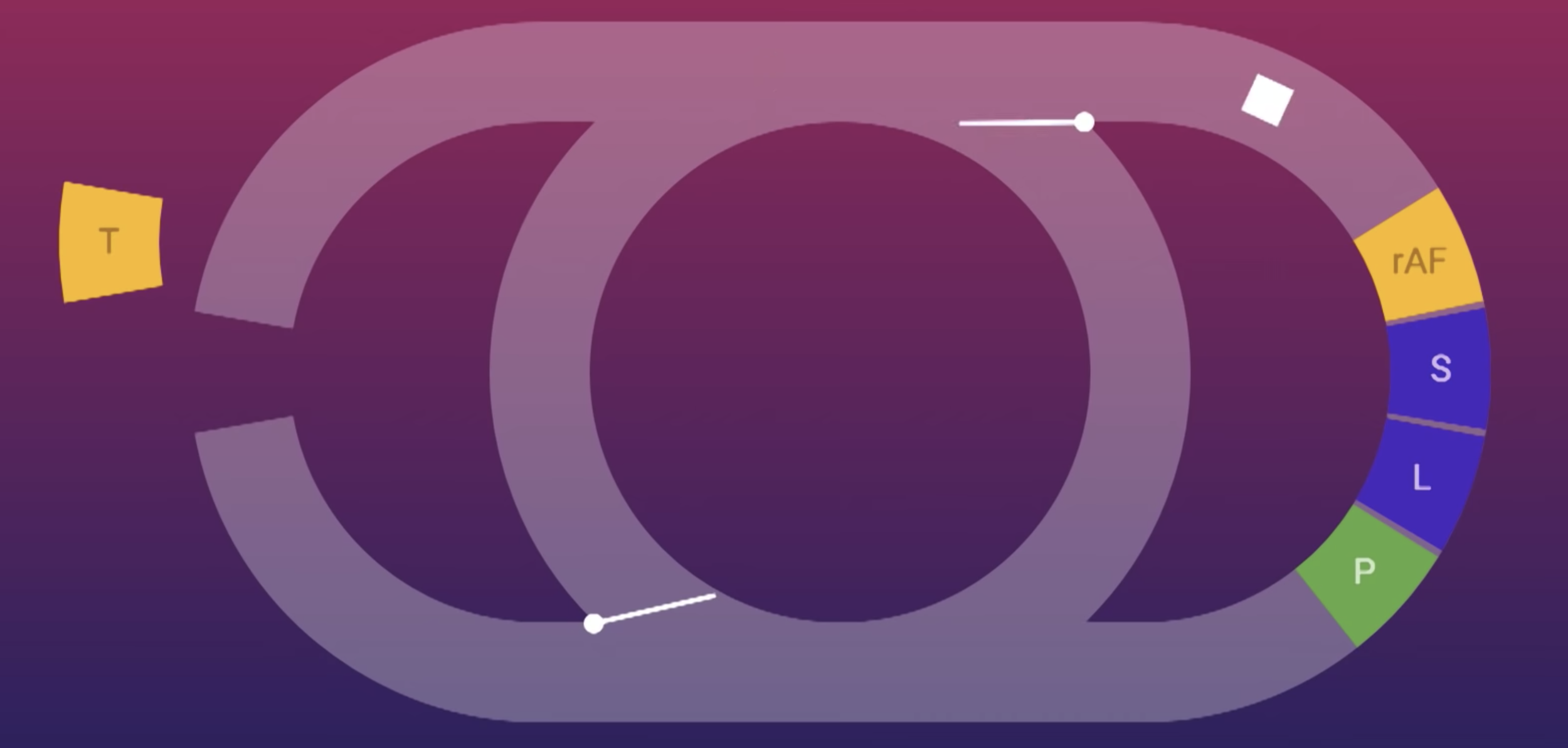
The Event Loop
Microtasks?
The Event Loop
Jake Archibald @ JSConf Asia 2018
Introduction to ES6
New Features
New Features
function f() {
  {
    let x;
    {
      // this is ok since it's a block scoped name
      const x = "sneaky";
      // error, was just defined with `const` above
      x = "foo";
    }
    // this is ok since it was declared with `let`
    x = "bar";
    // error, already declared above in this block
    let x = "inner";
  }
}
Let & Const
New Features
// Expression bodies
var increment = x => x + 1;
var add = (x, y) => x + y;

increment(1); // returns 2
add(1, 2); returns 3
Arrow Functions
New Features
// Spread example
function f(x, y, z) {
  return x + y + z;
}
// Pass each elem of array as argument
f(...[1,2,3]) == 6


// Rest example
function f(x, ...y) {
  // y is an Array
  return x * y.length;
}
f(3, "hello", true) == 6
Spread & Rest
New Features
function timeout(duration = 0) {
    return new Promise((resolve, reject) => {
        setTimeout(resolve, duration);
    });
}

var p = timeout(1000).then(() => {
    return timeout(2000);
}).then(() => {
    throw new Error("hmm");
}).catch(err => {
    return Promise.all([timeout(100), timeout(200)]);
});
Promises
New Features
// lib/math.js
export function sum(x, y) {
  return x + y;
}
export var pi = 3.141593;


// app.js
import * as math from "lib/math";
console.log("2π = " + math.sum(math.pi, math.pi));
Modules
New Features
class Rectangle {
   constructor(height, width) {
      this.h = height;
      this.w = width;
   }

   area() {
      return this.w * this.h;
   }

   display() {
      console.log("The height of the rectangle: ", this.h);
      console.log("The width of the rectangle: ",this. w);
   }
}

//creating an instance
var rectangleObj = new Rectangle(10,20);
rectangleObj.display();
console.log("The area of the rectangle: ", rectangleObj.area();
Classes
New Features
class StaticExample {
   static disp() {
      console.log("Static Function called");
   }
}

StaticExample.disp(); //invoke the static method

// Static Function called
Classes (static methods)
New Features
class Person{
  constructor(name, age) {
    this.name = name;
    this.age = age;
  }

  display() {
    console(this.name, " is ", this.age, " years old.");
  }
}
var obj = new Person()
var isPerson = obj instanceof Person;
console.log("obj is an instance of Person " + isPerson);

// obj is an instance of Person True
Classes (instance of)
New Features
class Shape {
   constructor(a) {
      this.Area = a;
   }
}
class Circle extends Shape {
   disp() {
      console.log("Area of the circle: "+this.Area);
   }
}
var obj = new Circle(223);
obj.disp();

// Area of the circle: 223
Classes (inheritance)
New Features
class Root {
   test() {
      console.log("call from parent class");
   }
}
class Child extends Root {}
class Leaf extends Child {}

//indirectly inherits from Root via Child
var obj = new Leaf();
obj.test()

// call from parent class
Classes (multilevel inheritance)
New Features
class PrinterClass {
   doPrint() {
      console.log("doPrint() from Parent called… ");
   }
}
class StringPrinter extends PrinterClass {
   doPrint() {
      console.log("doPrint() is printing a string…");
   }
}
var obj = new StringPrinter();
obj.doPrint();

// doPrint() is printing a string…
Classes (method overriding)
New Features
class PrinterClass {
   doPrint() {
      console.log("doPrint() from Parent called…")
   }
}
class StringPrinter extends PrinterClass {
   doPrint() {
      super.doPrint()
      console.log("doPrint() is printing a string…")
   }
}
var obj = new StringPrinter()
obj.doPrint()

// doPrint() from Parent called.
// doPrint() is printing a string.
Classes (super keyword)
New Features
Fetch API
fetch('https://example.com/some/url')
  .then(function(response) {
	// process response
  })
  .catch(function(err) {
	// process error
  });
New Features
Fetch API (Request)
const request = new Request('https://example.com/some/url', {
  headers: new Headers({
      'Content-Type': 'text/plain'
  })
});

fetch(request).then(function() { /* handle response */ });
New Features
Fetch API (Request)
- method - GET, POST, PUT, DELETE, HEAD
- url - URL of the request
- headers - associated Headers object
- referrer - referrer of the request
- mode - cors, no-cors, same-origin
- credentials - should cookies go with the request? omit, same-origin
- redirect - follow, error, manual
- integrity - subresource integrity value
- cache - cache mode (default, reload, no-cache)
New Features
Fetch API (Request)
const request = new Request('https://example.com/some/url', {
  method: 'POST',
  mode: 'cors',
  redirect: 'follow',
  headers: new Headers({
    'Content-Type': 'text/plain'
  })
});

// Now use it!
fetch(request).then(function(response) { /* handle response */ });
New Features
Fetch API (Response)
- type - basic, cors
- url
- useFinalURL - Boolean for if url is the final URL
- status - status code (ex: 200, 404, etc.)
- ok - Boolean for successful response (status in the range 200-299)
- statusText - status code (ex: OK)
- headers - Headers object associated with the response.
New Features
Fetch API (Response)
// The fetch's `then` gets a Response instance back
fetch('https://example.com/some/url')
  .then(function(response) {
    console.log('status: ', response.status);
  });
New Features
Fetch API (Response)
- clone() - Creates a clone of a Response object.
- error() - Returns a new Response object associated with a network error.
- redirect() - Creates a new response with a different URL.
- arrayBuffer() - Returns a promise that resolves with an ArrayBuffer.
- blob() - Returns a promise that resolves with a Blob.
- formData() - Returns a promise that resolves with a FormData object.
- json() - Returns a promise that resolves with a JSON object.
- text() - Returns a promise that resolves with a USVString (text).
New Features
Fetch API (JSON Response)
fetch('https://example.com/some/url').then(function(response) {
  // Convert to JSON
  return response.json();
}).then(function(j) {
  // Yay, `j` is a JavaScript object
  console.log(j);
});
Exercises
References
Introduction to ES6
UP CSI DevCap 1819B