簡単なChrome拡張を作ってみる!
Chrome拡張
- chromiumを搭載したブラウザで使える
- Chrome, Vivaldi etc.
- ブックマークの操作などいろんなAPIが提供されている
- javascript
やること
- Chrome拡張を作る時に登場する概念の紹介
- 選択範囲の色を変える拡張機能を作る
やらないこと
- 詳細なAPIの説明
- 必要な時にドキュメントを見ましょう
- javascriptの文法の詳細
- 時間がないのでカットで🙇♂️
Chrome拡張で登場する概念
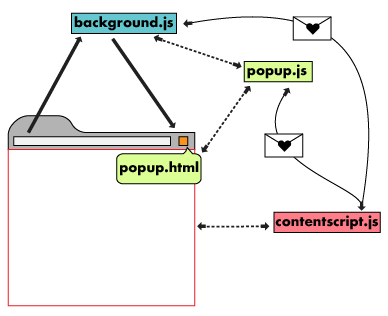
background
chrome APIにアクセス可能
DOMへのアクセスは出来ない
popup
アイコンをクリックした時に
表示される領域
content script
DOMの操作やDOMイベントの
アクセスが可能
chrome APIのアクセスは出来ない
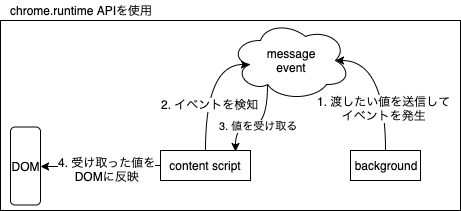
background と content scriptの通信
- backendで処理した結果をDOMに反映したい!
- backendではDOMの操作が出来ないのだった
- content scriptと通信してcontent scriptからDOMを変更する!
今回作りたいもの
選択範囲の色を青色にしてくれる君
- markdownで青色にしようとすると<font color="blue"><\font> で囲う必要がある
- メンドクサイ!
実現するには…
- 選択範囲の取得/fontタグで囲う
- DOM操作が必要
- 実行するタイミング
- アイコンを押したときにする
- chrome APIを叩く必要がある
- アイコンを押したときにする
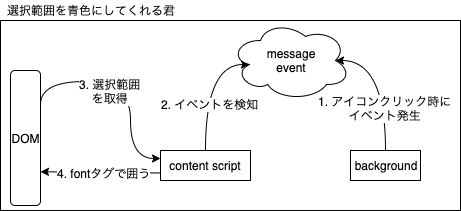
1. アイコンクリック時にイベントを発生させる
chrome.browserAction.onClicked.addListener(tab => {
  chrome.tabs.sendMessage(tab.id,
    {
      action: "clickedIcon"
    });
});- browserAction API: ブラウザにアイコンを追加して操作できる
- アイコンをクリックしたときのイベントをlisten
- background → content scriptにメッセージを送信
2,3. イベントを検知して選択範囲を取得
chrome.extension.onMessage.addListener(msg => {
  if (msg.action === "clickedIcon") {
    const textarea = document.activeElement;
});- messageイベントをlisten
- 選択範囲を取得したい
4. fontタグで囲う
chrome.extension.onMessage.addListener(msg => {
  if (msg.action === "clickedIcon") {
    const textarea = document.activeElement;

    const sentence = textarea.value;
    const start = textarea.selectionStart;
    const end = textarea.selectionEnd;

    //substring: 開始位置と終了位置を指定して文字列を切り出す
    const before = sentence.substring(0, start);
    const target = sentence.substring(start, end);
    const after = sentence.substring(end);

    if (target !== '') {
      textarea.value = before +
      "<font color=\"" + "blue" + "\">" + target + "</font>" + after;
    }
  }
});- 選択範囲から文字列を取得
- fontタグで囲んだ新たな文字列を選択範囲に挿入
完成!
でも実はまだリリースできない😢
manifest fileを用意する
- json形式のファイル
- content script, backgroundなどを設定する
{
  "manifest_version": 2,
  "name": "markdown blue helper",
  "version": "1.0",
  "description": "Simple tool to insert blue font tag.",
  "author": "tjmtmmnk",
  "permissions": ["tabs"],
  "icons": {"32": "icons/icon32.png"},
  "browser_action": {
    "default_icon": { "32": "icons/icon32.png"},
    "default_title": "color-changer"
  },
  "content_scripts": [
    {
      "js": ["js/change_color.js"],
      "matches": ["<all_urls>"]
    }
  ],
  "background": {
    "scripts": ["js/background.js"],
    "persistent": false
  }
}