Previously:
- HTML skeleton
- Code Editors
- Basic HTML Tags (<p> , <a>, <img>)
- Converted PDF content into HTML
- Published our HTML using FTP client
- Setup www.trello.com accounts
Today:
HTML5 Browser Compatibility
HTML 5 Media Tags
Semantic HTML
Intro to HTML Styling
It's a multi-screen/multi-device world!


The dream is...code once, deploy on many devices.
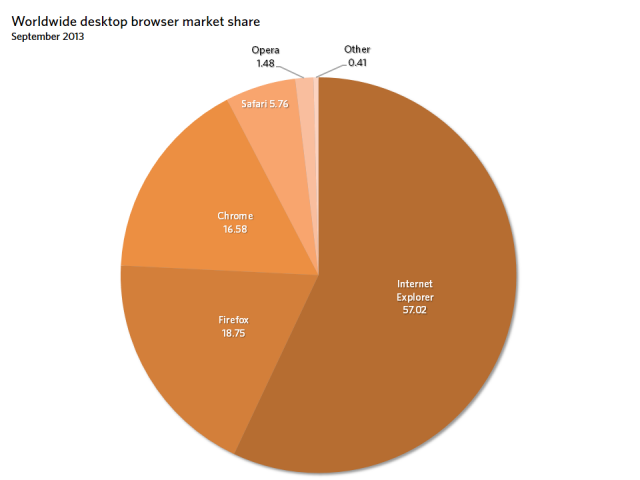
Browser Market share (desktop)
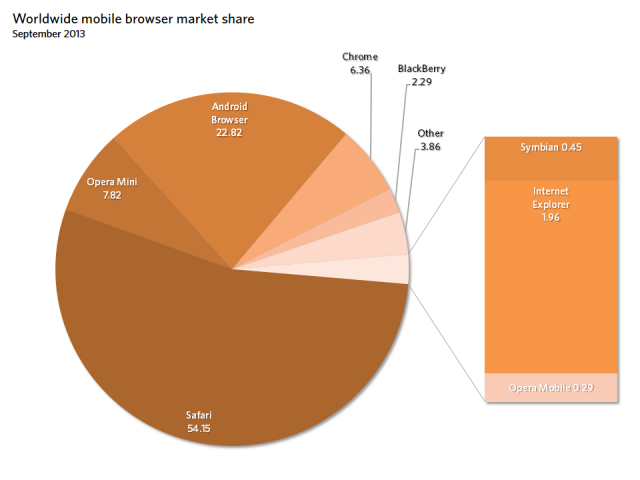
Browser Market share (mobile)
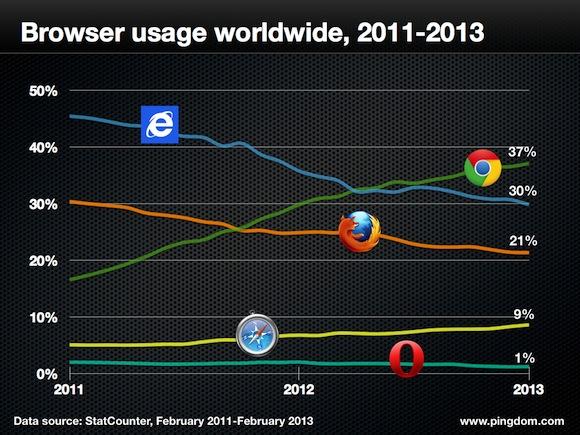
Browser Usage (desktop)
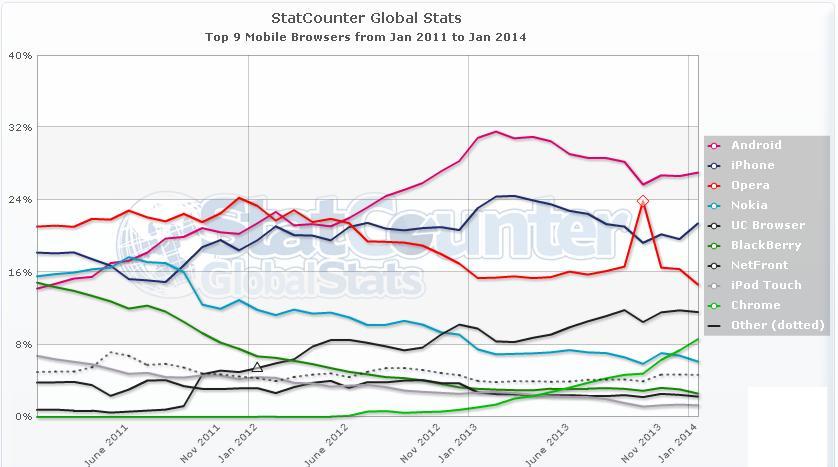
Browser Usage (mobile)
HTML 5 Browser Support
http://html5test.com/
http://caniuse.com/
http://www.w3schools.com/browsers/
HTML 5 <video> tag
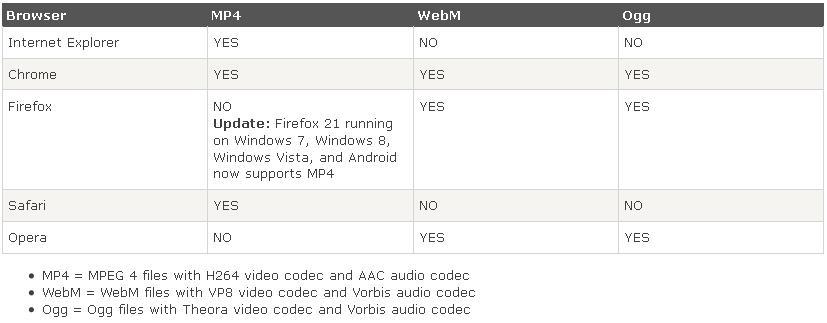
We need to use three file versions of the same video
to ensure compatibility over the different browsers
MP4, WebM and Ogg
Note: Since older browsers don't support the <video> tag,
devs will use a flash video "fallback", so this means
maintaining FOUR versions of a video.
HTML 5 <video> tag
HTML 5 <video> tag
<video controls>
<source src="movie.mp4" type="video/mp4">
<source src="movie.ogg" type="video/ogg">
<source src="movie.webm" type="video/webm">
Your browser does not support the video tag.
</video>
Inside the <video> tag we need to define <source> tags
with pathname src and MIME type attributes
HTML 5 <video> tag
<video> attributes that can be set in the opening tag:
autoplay, controls, loop, muted --> doesn't need to assign a value
preload --> "auto", "none", "metadata"
poster -->image filename
height, width --> number of pixels
HTML <iframe> tag for youtube videos
<iframe>, or inline frame element, actually embeds an html document inside another html document
<iframe width="400" height="300"
src="http://www.youtube.com/embed/xxxxx?html5=1">
</iframe>
Class Exercise #6
Embed three videos into an HTML document .
- Using relative URL's to files
- Using absolute URL address
- Using a youtube.com URL
HTML 5 <audio> tag
There are 3 supported file formats for the <audio> tag:
MP3, Wav, and Ogg:
Note: HTML <audio> has limitations in manipulating
sounds & effects (panning, environmental processing,
multiple streams not possible)
HTML 5 <audio> tag
<source src="sound.mp3" type="audio/mpeg">
<source src="sound.ogg" type="audio/ogg">
<source src="sound.wav" type="audio/wav">
Your browser does not support the audio element.
</audio>
HTML 5 <audio> tag
<audio> attributes that can be set in the opening tag:
autoplay, controls, loop, muted --> doesn't need to assign a value
Class Exercise #7
Embed audio files into an HTML document
using relative URL's to the sound files
Class Exercise #8
Embed audio files into an the Animal Jokes HTML
using absolute URL's to the audio files.
(Use just 1 audio file type for this exercise)
www.findsounds.com
Semantic HTML
Providing Context to the Content
Before HTML5, devs would use <div> tags to define
groupings of content <div id="nav">
Semantic HTML
Providing Context, or Meaning, to the Content
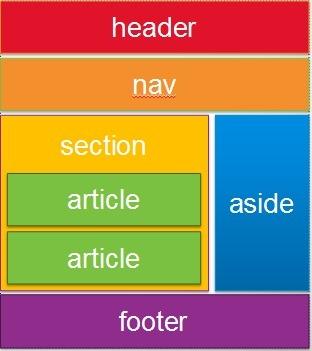
LIST of Semantic HTML ElEMENTS
- article
- aside
- figcaption
- figure
- footer
- header
- hgroup
- mark
- nav
- section
- time
Typical Usage Case of Semantic HTML to group Content
<body>
    <header>
        <hgroup>
            <h1>Header in h1</h1>
            <h2>Subheader in h2</h2>
        </hgroup>
    </header>
    <nav>
        <ul>
            <li><a href="#">Menu Option 1</a></li>
            <li><a href="#">Menu Option 2</a></li>
            <li><a href="#">Menu Option 3</a></li>
        </ul>
    </nav>
Note: The <div> tag is still used in cases where there is not
a Semantic HTML element term to define a grouping
Class Exercise #9
Create Semantic HTML tags for our Animal Jokes HTML.
Make a hyperlink somewhere inside each joke.
Intro to HTML5 Styling
We can style the HTML from the inside the HTML doc.
Using the <style> tag, for a single HTML page is fine.
But to apply or change a style over many HTML pages
then using an external file to reference makes more sense.
Intro to HTML5 Styling
We nest the <style> </style> tags inside the <head></head> tags of the HTML framework
Then we can define the individual style properties of all
the elements inside the HTML page.
Intro to HTML5 Styling
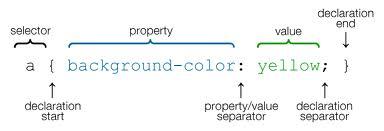
HTML styling format involves 3 parts:
- Selector
- Property
- Value
Intro to HTML5 Styling
<head>
<style>
h1 { color : red; }
p { text-align : center }
</style>
</head>
Class Exercise #10
Create an HTML document using Semantic Tags
for the acidrain PDF document.
Use <Style> tags and the style sheet language
to adjust font colors and adjust text-alignment.
Make a hyperlink for the safety tips.