CONTEMPORARY HTML & CSS
Prof. Peter Locharernkul
What is HTML5?

Three components:
HTML + CSS3 + JAVASCRIPT
(Content) (Presentation) (Interactivity)
Goals for this semester:
- Proficiency in HTML5
- Understand web coding principles and practices
- Create an interactive website that will run on multiple devices/screens from scratch
Code Editors:
- Notepad++ (Free! Windows) - www.notepad-plus-plus.org
-
Sublime 2 (Free! Mac, Windows, Linux) - www.sublimetext.com
- TextWrangler (Free! Mac) - www.barebones.com/products/textwrangler
- TextMate (Mac) - www.macromates.com
- Coda (Mac) - www.panic.com/coda
Please download and install a code editor at home!
Html
Hyper Text Markup Language
HTML DoCument = A Collection of Tags
Tags are containers of content.
<tag>Place Content Here</tag>
An HTML document is collection of tags.
Content within the tags is referred to as 'elements'
Creating an HTML document
<!DOCTYPE html>
This tells an internet browser that a text document needs
to be rendered as an HTML document.
Tags can be nested inside other tags.<!DOCTYPE html>
<html><head><html><title>Sample HTML</title></head>
<body>
</body>
The <head> and <body> tags are nested inside the <html> tag.
<h1> to <h6> Defines HTML headings
<p> Defines a paragraph
<b> Bold Text
<i> ItalicText
Commenting code is always a good thing!

HTML Tags Reference
http://www.w3schools.com/
PUBLISHING A WEBSITE
Typical web development process:
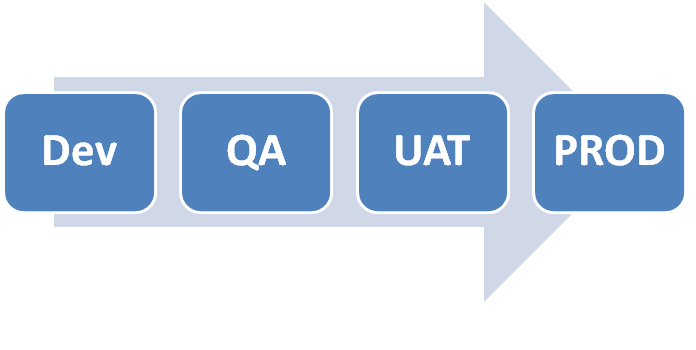
Files are staged on separate servers.
PUBLISHING A WEBSITE
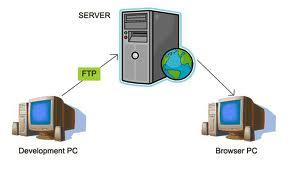

Upload files to the web server using FTP
(File Transfer Protocol)
PUBLISHING A WEBSITE
FDU has provided a server to host our projects.
host name: fducomputerclasses.org
user ID:   contemporary_html
Password:  Spring_2014
PUBLISHING A WEBSITE
The HTML document is now part of the Internet!
Access it through this URL:
ftp://fducomputerclasses.org/INITIALS/hello_world/index.html
PUBLISHING A WEBSITE
Class Project Management
Join:
www.trello.comLet's fill in the <body> using some more tags:
<a> Defines a hyperlink
<ul> Defines an unordered list
<ol> Defines an ordered list
<li> Defines a list item
Hyperlinks
<a href="url">Link text</a>
There is a second method to define html content.
Inside the opening html <tag> we can make an html 'Attribute'
HTML --> Tags, Elements, Attributes
Class Exercise #1:
Create an HTML document based on a pdf document.
Create Two hyperlinks inside the HTML.
Upload into your individual 'projects' folder.
Provide the URL link to the HTML document.
Inserting Images into HTML
<img src="name.jpg" alt="image name">
<img> tags are self-closing
Class Exercise #2:
Insert Animal images into the HTML document.
Upload into your individual 'projects' folder.
Provide the URL link to the HTML document.Class Exercise #3:
Create an HTML document from recipe.pdf document.
Upload into your individual 'projects' folder.
Provide the URL link to the HTML document.