Cooking up servers
Ohai!
Eric Fusciardi
Not the guy on the can of ravioli
You'll get the ohai thing later.
What problems are we solving
- Infrastructure as code
- Environmental consistency
- More agile than snapshotting VMs
- Enabling Review / Peer interaction
We are good at deploying
Pushing code up environments and validation has become commonplace, quick, and highly automated.
Works well because we have an ecosystem of tools and scripting setup to enable deployment to be a non-issue.
But then maintenance...
The creation of those envs and installation of the tools, upkeep of maintenance, and provisioning / configuring middleware is where problems tend to arise.
Things that exacerbate this:
- Manual error
- Tons of environments
- Dates of same activity spread between weeks/months
- Because of above, upwards of 20 or so things in various states of doneness at any given time
We stress DRY in code
Why not here?
Chef enables us to capture that flow the first time, validate it, and then run the same action in each environment at whatever time we want.
And it's just another act of "Deploying Code"
And we're good at that.
Some Terminology
Chef Server - Hosts the chef process, acts as a repository and reporting of client activity
Chef Client - A machine that is associated with a Chef Server.
Chef Workstation - A machine that has ChefDK installed, and user keys set up so that you can issue commands / queries to the Chef Server.
Knife - Your command line utility.
More Terminology
Resource - A Ruby block that represents the desired configuration of some server configuration on the server.
Ex: Directory, User, Yum/Apt Package, A Script to run
Attributes - Variables that are interpreted at runtime based off a hierarchy of sources.
Recipe - A script that describes a server's desired state via resources
Cookbook - A collection of recipes + attributes that is versioned. Generally a vertical slice of config.
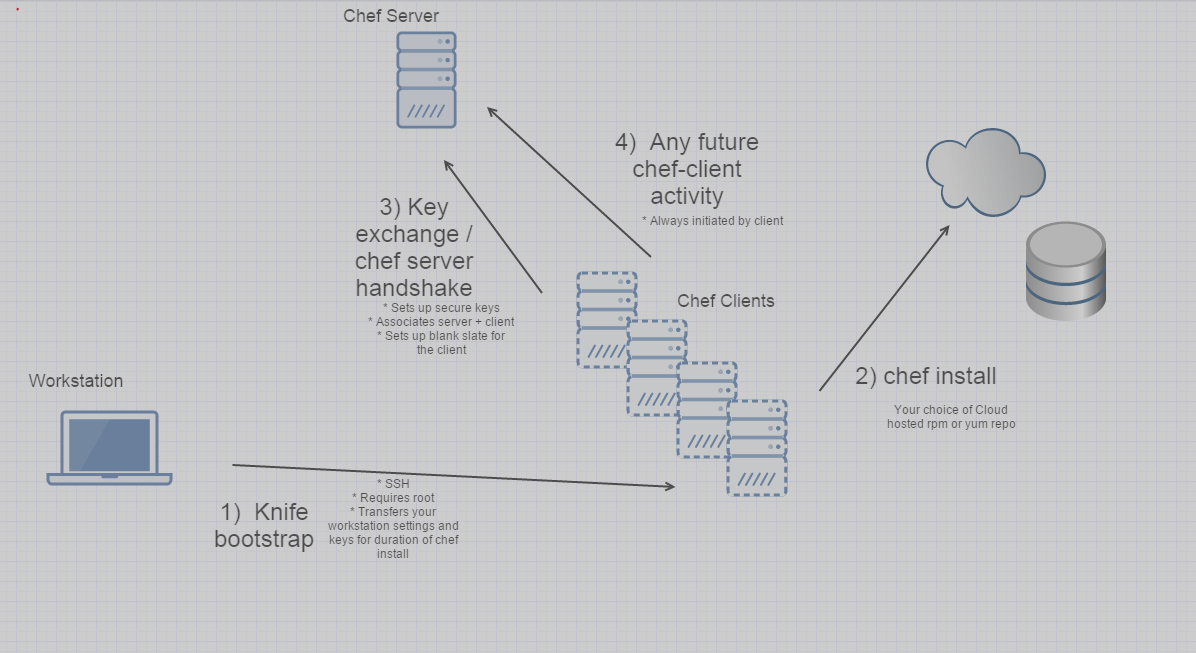
Bootstrap
knife bootstrap 192.168.0.1 -x root -P password [other optional args]
Dev Environment
ChefDK - https://downloads.chef.io
Vagrant - http://www.vagrantup.com
( Put bin on $PATH / %PATH% )
VirtualBox - https://www.virtualbox.org/
IDE / Multi-file text editor of your choice
Hello Ohai World
chef generate cookbook ohai_worldhttps://github.com/fooshards/chef-presentation
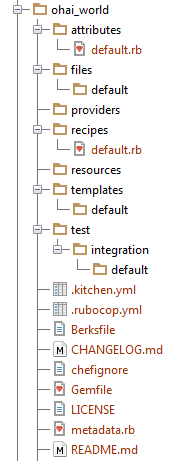
Cookbook Dir Structure
New things:
Resources - Custom resource declarations
Providers - Implementation of above
Files/Templates - Assets for cookbook
.kitchen.yml - Settings to run locally / run test cases
Berksfile - Dependency management (Think Maven)
metadata.rb - Versioning info of this cookbook + it's dependencies
Built in Resources
File-type things:
File, Directory, Remote_File, Template, Symlinks
OS-type things:
Users, Groups, Cron, Packages, Services
More esoteric-type things:
Execute arbitrary stuff in Bash, Powershell, Python, Perl, Ruby
Recipe: ohai_world::default.rb
directory '/helloworld' do
  owner 'root'
  group 'root'
  mode 0755
  action :create
end

template '/helloworld/message' do
  owner 'root'
  group 'root'
  source 'message.erb'
  mode 0755
  action :create
end
Template: message.log.erb
Attributes:
default['ohai_world']['message'] = 'We have arrived!'<%= node['ohai_world']['message'] %> at <%= node['ipaddress'] %>Run it locally
cd ./ohai_world
kitchen converge

<output of stuff as it boots local vm, installs chef, runs recipe>

Running handlers complete
Chef Client finished, 2/2 resources updated in 1.120078901 seconds
Finished converging <default-centos-65> (0m13.02s).
Kitchen is finished. (0m56.61s)

kitchen login     (or ssh localhost:2222 root/vagrant)

[root@default-centos-65 ~]# cd /helloworld
[root@default-centos-65 helloworld]# ls -l
-rwxr-xr-x. 1 root root 29 Jun  2 21:37 message
[root@default-centos-65 helloworld]# cat message
We have arrived! at 10.0.2.15
Discuss the magic
Re running it?
cd ./ohai_world
kitchen converge
...
Recipe: ohai_world::default
 (up to date)
 (up to date)

Running handlers:
Running handlers complete
Chef Client finished, 0/2 resources updated in 0.927 seconds
Finished converging <default-centos-65> (0m4.29s).
This enables MAINTENANCE of chef-provisioned servers!
Try doing that with VM images.
Dicussion on Guards
Yo dawg, I heard you liked bash scripts.
Dependencies
Wordpress... What makes it work?
- mysql
- php
- apache
- other stuff gluing it together
Isolate components into their own cookbooks as much as possible / is reasonable to do, and use a cookbook to wrap them all up.
metadata.rb - What you want
Berksfile - How to fetch it (locally)
name 'wordpress'
# ...
version '0.1.0'

depends 'mysql'
depends 'php'
depends 'apache2', '2.0.0'   # <<<  Can lock to a specific version.
source "https://supermarket.chef.io" # <<< Like Maven Central,
# but for cookbooks
metadata
cookbook 'mysql', path: '../mysql'
cookbook 'php', path: '../php'
cookbook 'apache2' # <<< Will resolve from public repo
# since no local path specifiedNow just reference it
Recipe: wordpress::default.rb
include_recipe 'mysql::default'
include_recipe 'php::default'
include_recipe 'apache2::default'

# Init wordpress database in mysql
# Add an apache virtual host
# Create some users to login to the box with
# etc
Test it
Serverspec tests
Suites declared in your .kitchen.yml and /test directories.
describe file('/helloworld/message') do
  it { should be_file }
  it { should contain /We have arrived/ }
end
Results
cd ./ohai_world
kitchen converge
...
kitchen verify
...
       File "/helloworld/message"
         should be file
         should contain /We have arrived/

       Finished in 0.05042 seconds (files took 0.26159 seconds to load)
       2 examples, 0 failures

       Finished verifying <default-centos-65> (0m2.08s).
-----> Kitchen is finished. (0m4.05s)
Push it
RTFM on the wiki and http://www.chef.io on setting up chef server, configuring your knife.rb
cd ./ohai_world
berks install   # Resolves dependencies
                # Also ermahgerd, cerkberks
berks upload
Apply it
In knife or chef server UI, assign recipe ohai_world::default to a client.
ssh root@thathost.domain
...
chef-client
...

   Running handlers:
   Running handlers complete
   Chef Client finished, 2/2 resources updated in 1.120078901 seconds
   Finished converging <thathost.domain> (0m13.02s).
>
Maintain it
- Make changes to recipe
- Bump version in metadata.rb up
- Push to server
- Run it again on clients.
Environments
Attributes are overridable in many different ways.
ohai_world cookbook had this as the default.
default['ohai_world']['message'] = 'We have arrived!'This can be overridden at runtime of hosts in the following ways:
- From the chef server's environment config
- From the chef server's node config
- From another cookbook
- From another recipe
- From the command line of the host
Secrets
Encrypted data bags
Like a little private KeePass
- Standard JSON object to store text in
- Encrypted content stored on the chef server
- Symmetric Key used to encrypt the content when editing, and to read the content on the node at runtime.
- Key file for preprod+ stored by our lovely sysadmins so that they may edit the contents.
- Key file must be placed manually on the host as a root owned 700 file (or at bootstrap time automatically)