CSS Cross-Country
Explore the fundamentals of CSS, and review all the web-styling tools needed for front-end efficiency.
What is CSS ?
- CSS handles the look and feel part of a web page. Using CSS, you can control the color of the text, the style of fonts, the spacing between paragraphs, how columns are sized and laid out, what background images or colors are used, layout designs,variations in display for different devices and screen sizes as well as a variety of other effects.
- Cascading Style Sheets, fondly referred to as CSS, is a simple design language intended to simplify the process of making web pages presentable.
- CSS is easy to learn and understand but it provides powerful control over the presentation of an HTML document. Most commonly, CSS is combined with the markup languages HTML or XHTML.
Advantages of CSS
CSS saves time − You can write CSS once and then reuse same sheet in multiple HTML pages. You can define a style for each HTML element and apply it to as many Web pages as you want.
Pages load faster − If you are using CSS, you do not need to write HTML tag attributes every time. Just write one CSS rule of a tag and apply it to all the occurrences of that tag. So less code means faster download times.
Easy maintenance − To make a global change, simply change the style, and all elements in all the web pages will be updated automatically.
Superior styles to HTML − CSS has a much wider array of attributes than HTML, so you can give a far better look to your HTML page in comparison to HTML attributes.
Advantages of CSS
Multiple Device Compatibility − Style sheets allow content to be optimized for more than one type of device. By using the same HTML document, different versions of a website can be presented for handheld devices such as PDAs and cell phones or for printing.
Global web standards − Now HTML attributes are being deprecated and it is being recommended to use CSS. So its a good idea to start using CSS in all the HTML pages to make them compatible to future browsers.
Offline Browsing − CSS can store web applications locally with the help of an offline catche.Using of this, we can view offline websites.The cache also ensures faster loading and better overall performance of the website.
Platform Independence − The Script offer consistent platform independence and can support latest browsers as well.
CSS - Syntax
A CSS comprises of style rules that are interpreted by the browser and then applied to the corresponding elements in your document. A style rule is made of three parts
- Selector − A selector is an HTML tag at which a style will be applied. This could be any tag like <h1> or <table> etc.
- Property - A property is a type of attribute of HTML tag. Put simply, all the HTML attributes are converted into CSS properties. They could becolor, border etc.
- Value - Values are assigned to properties. For example, color property can have value either red or #F1F1F1 etc.
CSS - Syntax
The Type Selectors
h1 {
   color: #36CFFF;
}
- This is the same selector we have seen above. Again, one more example to give a color to all level 1 headings
CSS - Syntax
The Universal Selectors
* {
   color: #000000;
}
- Rather than selecting elements of a specific type, the universal selector quite simply matches the name of any element type
CSS - Syntax
The Class Selectors
.black {
   color: #000000;
}
- You can define style rules based on the class attribute of the elements. All the elements having that class will be formatted according to the defined rule.
- This rule renders the content in black for every element with class attribute set to black in our document. You can make it a bit more particular. For example:
h1.black {
   color: #000000;
}
CSS - Syntax
The Class Selectors
<p class="center bold">
   This para will be styled by the
   classes center and bold.
</p>
- You can apply more than one class selectors to given element. Consider the following example:
CSS - Syntax
The ID Selectors
#black {
   color: #000000;
}
- You can define style rules based on the id attribute of the elements. All the elements having that id will be formatted according to the defined rule.
- This rule renders the content in black for every element with id attribute set toblack in our document. You can make it a bit more particular. For example −
h1#black {
   color: #000000;
}
CSS - Syntax
The ID Selectors
#black h2 {
   color: #000000;
}
- The true power of id selectors is when they are used as the foundation for descendant selectors, For example:
- In this example all level 2 headings will be displayed in black color when those headings will lie with in tags having id attribute set to black.
CSS - Syntax
The Child Selectors
body > p {
   color: #000000;
}
- You have seen the descendant selectors. There is one more type of selector, which is very similar to descendants but have different functionality. Consider the following example
- This rule will render all the paragraphs in black if they are direct child of <body> element. Other paragraphs put inside other elements like <div> or <td> would not have any effect of this rule.
CSS - Syntax
The Attribute Selectors
input[type = "text"]{
   color: #000000;
}
- You can also apply styles to HTML elements with particular attributes. The style rule below will match all the input elements having a type attribute with a value of text −
CSS - Syntax
Multiple Style Rules
h1 {
   color: #36C;
   font-weight: normal;
   letter-spacing: .4em;
   margin-bottom: 1em;
   text-transform: lowercase;
}
- You may need to define multiple style rules for a single element. You can define these rules to combine multiple properties and corresponding values into a single block as defined in the following example −
CSS - Syntax
Grouping Selectors
h1, h2, h3 {
   color: #36C;
   font-weight: normal;
   letter-spacing: .4em;
   margin-bottom: 1em;
   text-transform: lowercase;
}
- You can apply a style to many selectors if you like. Just separate the selectors with a comma, as given in the following example −
CSS - Syntax
Grouping Selectors
#content, #footer, #supplement {
   position: absolute;
   left: 510px;
   width: 200px;
}
- You can combine the various class selectors together as shown below −
CSS - Inclusion
Embedded CSS - The <style> Element
- You can put your CSS rules into an HTML document using the <style> element. This tag is placed inside <head>...</head> tags. Rules defined using this syntax will be applied to all the elements available in the document. Here is the generic syntax
<style type = "text/css" media = "all">
     body {
       background-color: linen;
     }
     h1 {
       color: maroon;
       margin-left: 40px;
     }
</style>
CSS - Inclusion
External CSS - The <link> Element
<head>
   <link type = "text/css" href = "..." media = "..." />
</head>
- The <link> element can be used to include an external stylesheet file in your HTML document. An external style sheet is a separate text file with .css extension. You define all the Style rules within this text file and then you can include this file in any HTML document using <link> element.
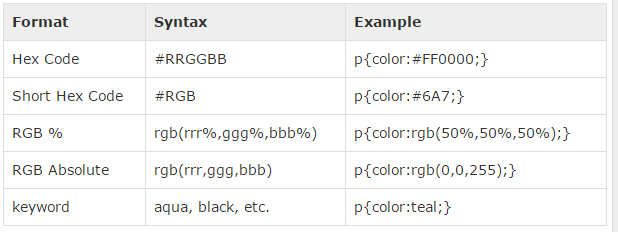
CSS - Colors
CSS - Backgrounds
-
The background-color property is used to set the background color of an element. - The background-image property is used to set the background image of an element.
- The background-repeat property is used to control the repetition of an image in the background.
- The background-position property is used to control the position of an image in the background.
- The background-attachment property is used to control the scrolling of an image in the background.
- The background property is used as a shorthand to specify a number of other background properties.
CSS - Fonts
-
The font-family property is used to change the face of a font. - The font-style property is used to make a font italic or oblique.
- The font-variant property is used to create a small-caps effect.
- The font-weight property is used to increase or decrease how bold or light a font appears.
- The font-size property is used to increase or decrease the size of a font.
- The font property is used as shorthand to specify a number of other font properties.
CSS - Text
-
The color property is used to set the color of a text. - The letter-spacing property is used to add or subtract space between the letters that make up a word.
- The word-spacing property is used to add or subtract space between the words of a sentence.
- The text-indent property is used to indent the text of a paragraph.
- The text-align property is used to align the text of a document.
- The text-decoration property is used to underline, overline, and strikethrough text.
- The text-transform property is used to capitalize text or convert text to uppercase or lowercase letters.
CSS - Borders
-
The border-color specifies the color of a border. - The border-style specifies whether a border should be solid, dashed line, double line, or one of the other possible values.
- The border-width specifies the width of a border.
- The boder property is used as shorthand to specify a number of other border properties.
Border Style Properties
 - none       - groove
- solid - ridge
- dotted - inset
- dashed - outset
- double - hidden
CSS - Margins
-
The margin specifies a shorthand property for setting the margin properties in one declaration. - The margin-bottom specifies the bottom margin of an element.
- The margin-top specifies the top margin of an element.
- The margin-left specifies the left margin of an element.
- The margin-right specifies the right margin of an element.
CSS - Paddings
-
The padding serves as shorthand for the preceding properties. - The padding-bottom specifies the bottom padding of an element.
- The padding-top specifies the top padding of an element.
- The padding-left specifies the left padding of an element.
- The padding-right specifies the right padding of an element.
CSS - Dimensions
- The width property is used to set the width of a box.
-
The height property is used to set the height of a box. - The line-height property is used to set the height of a line of text.
- The min-height property is used to set the minimum height that a box can be.
- The max-height property is used to set a maximum height that a box can be.
- The min-width property is used to set the minimum width that a box can be.
- The max-width property is used to set the maximum width that a box can be.
CSS - Scrollbars
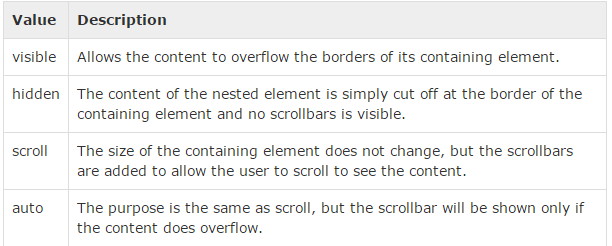
- CSS provides a property called overflow which tells the browser what to do if the box's contents is larger than the box itself. This property can take one of the following values