Git
Do you git it?
Teach Hector
What?
Why?
How?
What?
Git it
Git is a free and open source distributed version control system.

It introduces branching, a way to keep different versions of code.
Git assures your data with cryptography.
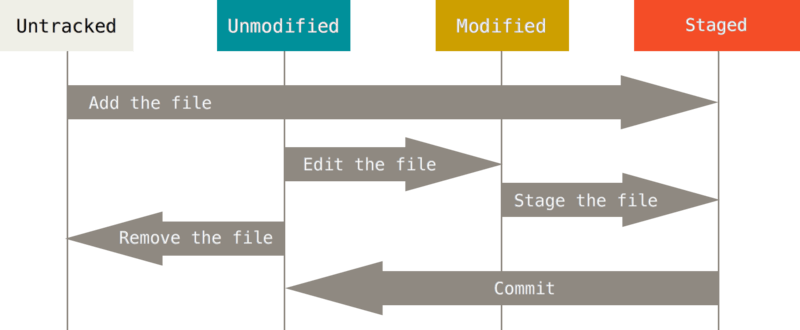
It stages your data within a staging area.
Why?
Use Case

Reilly, the playwright, just finished writing a play and is considering to write an alternate ending. How can he use version control to write his latest masterpiece?
Branching
Allows you to keep different versions of files.
It's forming a small group of work, and isolating it from all the other work.
When the work on the feature branch is complete, it should be merged into another branch.
E.g. creating a new branch for each feature you'll be working on. This example was generated with this bash command.

Version Control
It keeps track of changes to a file or files over a span of time.
This allows you to go back to a previous version at a later time.
It also allows you to work with others, and it allows you to work offline.

Staging Area
It allows you to have files locally without pushing them to the repository.
You add or remove files to the staging area before committing them.
Committing a change adds a commit, creating a new HEAD, thus making files unmodified.
This pleases Reilly
Reilly is able to create a branch for his alternate ending; he can work on it and add little tidbits earlier in the play suggesting that the alternate ending makes sense.
How?
Git Workflows

Let's Git it on
Git has a few commands
- Init
- Clone
- Status *
- Log
- Add/Remove *
- Commit *
- Push *
- Pull *
- Branch *
- Checkout *
- Merge
- Rebase

git init
This command is used to create a new repository in an existing directory (folder)

git clone <url> [cool_name]
This command is used to clone an existing repository. It copies code from the url, and downloads it locally.

git status
This shows you the status of the repository. If anything is modified and is not excluded, it will be noted by this command.

git [add or remove] <file or dir>
These commands are what you need to add or remove files from your staging area.

git commit
This stores the staged changes in a new commit along with a log message. This does not push it to the remote.

git pull
This fetches changes from the remote, and merges them in locally. This is what you'd use to ensure that your code is up-to-date.

git branch/checkout <branch>
This allows you to create a new branch and work on it (respectfully).

git merge <branch>
This will merge all the commits from the `<branch>` into the working branch by including a merge commit. This is used when you want to combine branches.

git rebase <branch>
This will merge all the commits from the `<branch>` into the working branch. This is used when you want to combine branches, but want to keep history linear.
Just
It
Do
Whoa whoa whoa
Git != GitHub
Thanks!
Has questions?
Email me at that.hector@gmail.com
Tweet me @hrios10