Template-driven forms
Use template-driven forms when developing static forms. Static means the structure and logic of a form is fix. E.g. the number of form fields does not vary, form validation rules are the same for different user roles, etc.
Examples are login forms, reset password forms, forms to enter and edit address data, order data and similar fix data structures.
In the template-driven approach the form structure and logic is mainly implemented in HTML. Based on this a representation of the form in TypeScript is generated automatically.
Template-driven forms support…
- One-way and two-way data-binding. Forms to enter new data and to edit existing data (from a backend service) can be developed
- Creation of nested form fields, e.g. a form containing a user model consisting of user name, email address and postal address — consisting of street, city, zip code
- Field-spanning validation, e.g. validate entire user model instead of checking each field individually
- Synchronous and asynchronous validation, e.g. check via remote server whether email address exists
- Checking form state, e.g. warn when leaving the form with unsaved changes
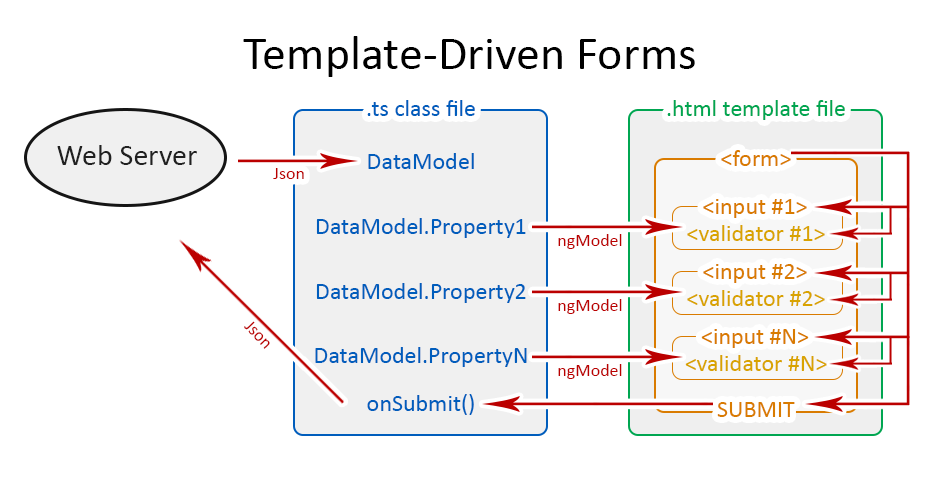
ngModel:
ngModel is an instance of the FormControl which has quite a number of controls which include dirty, invalid, errors, pristine, touched, untouched, value etc. The FormControl class is use to track the state changes of our input.
<input type="text" ngModel name="firstName">
<input type="text" ngModel
name="firstName"
#firstName="ngModel"
(change)="doSomething(firstName)"
>
ngForm:
The ngForm is an instance of the FormGroup. The FormGroup represents the group of FormControl, each form is a FormGroup because it will have at least one FormControl that gives us access to (ngSubmit) which can be bind to a method in our component.
<form #f="ngForm" (ngSubmit)="submit(f)">
<input type="text" ngModel
name="firstName"
#firstName="ngModel"
(change)="doSomething(firstName)"
>
</form>
The FormGroup also has a lot of properties similar to the FormControl like dirty, errors, invalid, parent, etc.
ngModelGroup:
At times, when building a complex form. Need might arise where we need make a particular object a parent to some other inputs, so we can access those inputs under the parent, hence the need for ngModelGroup. We can access the firstName and lastName under the person object.
<form #f="ngForm" (ngSubmit)="submit(f)">
  <div ngModelGroup="person">
     <input type="text" ngModel
        name="firstName"#firstName="ngModel"
        (change)="doSomething(firstName)">
     <input type="text" ngModel
        name="lastName"#lastName="ngModel"
        (change)="doAnotherthing(lastName)">
  </div>
</form>
ng-invalid, ng-dirty, ng-touched: angular automatically attach these classes to our input when the input is invalid, dirty and touched. ng-invalidis added when the validation fails or requirement not met, ng-dirty is added when the user has interacted with the input, ng-touched is added when the user has lost focus. We can increase the usability of our form by using these dynamic classes to style our form
Validation
required: is use to enforce the user that the input must be filled.
Maxlength, Minlength and Pattern: The Maxlength is use to enforce the maximum number of characters an input can accept. The Minlength is use to efforce the minimum number of characters an input can accept. The Pattern attribute is mostly use for regular expression validation on form input.
Pros
- Form structure and logic is located in one place (HTML)
- New form functionality without / with minimal TypeScript coding
- Makes use of pure web standards, e.g. HTML required attribute for input validation
- Rather easy to understand
Cons
Beyond static form structure and logic template-driven forms provide only limited capabilities to implement dynamic aspects like variable number of fields, repetitive fields, etc.
Add a Form with the following Inputs (and Validators)
1) Mail address (should not be empty and should be an email address)
2) A Dropdown which allows the user to select from three different Subscriptions (“Basic”, “Advanced”, “Pro”)
Set “Advanced” as Default
3) A Password field (should not be empty)
4) A Checkbox field
5) A Radio field
6) A Submit Button
7) A nested person firstName input field (using ngModelGroup)
Display a warning message if the Form is invalid AND was touched. Display a warning message below each input if it’s invalid.
Upon submitting the form, you should simply print the Value of the Form to the Console.
Reactive-forms
Use the reactive forms approach in case the form shall support dynamic data structures and logic. Examples are dynamic survey forms, forms to add/delete 0..n tags or phone numbers, forms providing different validation for different user roles, etc.
The structure and logic of reactive forms is mainly implemented in TypeScript. Corresponding HTML artifacts only refer to the form controls defined in TypeScript. At highest expansion stage a reactive form can be entirely generated at runtime based on a data structure.
Data binding
The exchange of data from HTML to TypeScript is performed by passing the form’s value property from HTML to TypeScript — not by one/two-way data binding. See saving reactive-forms
Passing data from TypeScript to HTML is done by using the form object’s method setValue() or patchValue() within TypeScript. Both methods support setting the entire data structure of the form object at once as well as setting single form fields.
Form Control
FormControl are the basic building blocks of a reactive form or a form in general. Think of them as input box, select box, radio buttons, dropdown etc.
Under the hood it’s a class which tracks a particular form control and keeps track of its validity and values.
It has to be imported from @angular/forms
import { FormControl } from ‘@angular/forms’;

myName: FormControl;

this.myName = new FormControl(‘Aviabird’);
Form Group
FormGroup is a collection/group of FormControls. It also offers many api’s such as tracking validity and values of the whole formGroup.
It has to be imported from @angular/forms
import { FormGroup } from ‘@angular/forms’;

myName: FormGroup;

this.myForm = new FormGroup({
  name: new FormControl(‘Test’)
});
FormArray
Verbatim from angular docs It tracks the value and validity state of an array of FormControl instances.
However I would later show how that definition is not accurate and it should be Tracks the value and validity state of an array of FormControl/FormGroup/FormArray instances.
import { FormArray } from ‘@angular/forms’;

myName: FormArray;

this.myForm = new FormArray([
   new FormControl(‘Test’),
]);
Pros
- Form definition and logic is mainly implemented in TypeScript. Form fields are created programmatically by using FormGroup or FormBuilderclass. HTML form tags only reference TypeScript-based form controls.
- Allows programmatic and full control of form value updates and form validation
- Supports creation of forms with dynamic structure at runtime
- Supports implementation of custom form validation
Cons
- Requires more coding, especially in TypeScript
- Is more difficult to understand and to maintain
-
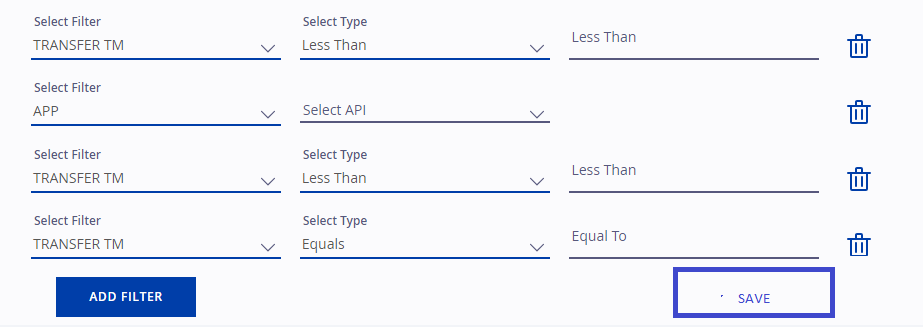
I’ll have to create a FormGroup, with a filters FormArray.
-
Each filter in the FormArray would be another FormGroup.
-
This filter FormGroup would initially have two FormControls one for filterType and the other for apiType.
-
I’ll add a new FormControl to the filter FormGroup if the user selects a value for apiType.
-
I can use .push method on the filters FormArray to push a new FormGroup for a filter.
-
I can use the .removeAt method on the filters FormArray to remove a specific FormGroup at a particular index.
-
I can also use the .addControl method on a FormGroup in order to add a FormControl to a FormGroup.