Webix Views: Essentials
Widget API
Webix Modules
Widget Nature
Webix Debug
    <script type="text/javascript" src="http://cdn.webix.com/edge/webix.js"></script>
<link rel="stylesheet" type="text/css" href="http://cdn.webix.com/edge/webix.css">- human-readable code
- comprehensible error stack
- warning messages for typical mistakes
- logging event flow to console
- right-click menu for each widget
Webix Debug
Ctrl+Right Click
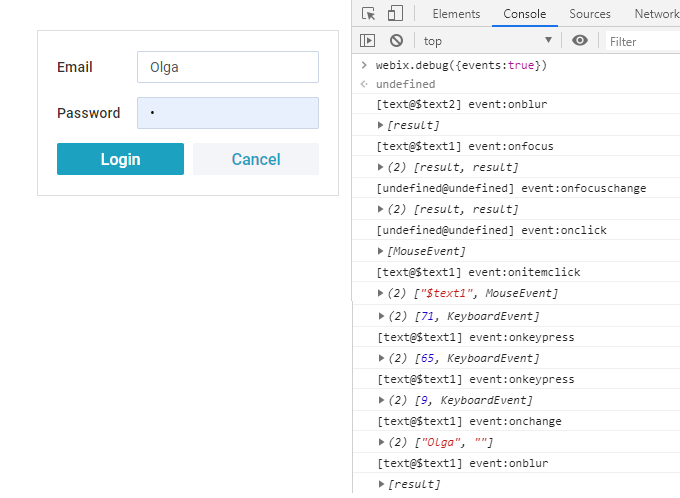
webix.debug({events:true});
Webix Views
ui.view
Layout
Button
Window
List
popup & suggests
Chart
Datatable
other lists
Tree
form controls
Form, Toolbar
Data Loader
DataStore
MouseEvents
Settings
EventSystem
* for all
* for most
* for data components
Mixins
- Editability
- ProgressBar
- SelectionModel
- KeysNavigation
- PagingAbility
- DataStore
- TreeStore
- Number
- Date
- PowerArray
- UIManager
- DataCollection
- TreeCollection
- DataProcessor
Extend component's API:
Used independently:
* used by data components
Helpers
- webix.ajax
- webix.promise
- webix.html
- webix.storage.local
- webix.i18n
Ajax and Promises
Localization
HTML and Browser
webix.ajax(url).then(function(data){
    ...
});
webix.storage.local.put("--app:data--", { ... });
var data = webix.storage.local.get("--app:data--");var text = webix.i18n.dateFormatStr(new Date());
//"02/20/2018"Other
- webix.delay
- webix.toFunctor
webix.toFunctor("webix.message('test')");Webix UI
  webix.ui({
    id:"top", cols:[
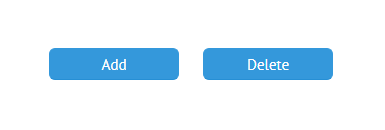
        { view:"button", id:"addBtn", value:"Add", click:function(){ ... }},
        { view:"button", id:"delBtn", value:"Delete", click:function(){ ... }}
    ]
  });
<div class="webix_view webix_control webix_el_button webix_secondary"
        view_id="addBtn" style="width: 200px; height: 38px;">
        <div class="webix_el_box" style="width:200px; height:38px">
            <button type="button" class="webix_button">Add</button>
        </div>
</div>
View Instances
var views = webix.ui.views;
/*{
    top:{ ..view object ..},
    addBtn:{ ..view object ..},
    delBtn:{ ..view object ..}
}*/
webix.ui({
id:"top", cols:[
{ view:"button", id:"addBtn", value:"Add", click:function(){ ... }},
{ view:"button", id:"delBtn", value:"Delete", click:function(){ ... }}
]
});$$("addbtn") or webix.$$("addBtn")
All view instances in the application:
var topLayout = webix.ui({ id:"top", rows:[] });1.
2.
View Name
-
Spacer
-
Template
-
Layout
-
Multiview
-
Accordion
{ } { template:"some" }
    { rows:[ ] }
    { cols:[ ] }
{ cells:[ ] } { cols:[ { header:"Some", body:{}} ]}
{ rows:[ { header:"Other", body:{}} ]}No view name or key settings?
Spacer
View API
webix.ui({
    view:"button",
    id:"addBtn",
    value:"Click me",
    width:200
});

console.log($$("addBtn").config);
{
borderless: true,
width: 200,
height: 38,
gravity: 1,
view: "button",
id: "mybutton",
value: "Click me",
$topView: true
}Essentials:
- id must be unique or none
- width / height must be a number
- margin / padding must be set via JS config
- container kills responsiveness
View API
- Public
- Private
- Inner
$$("addBtn").getParentView();
$$("table").parse(data);

$$("addBtn").config;
$$("table").data.pull;
//anything, starting with $
$$("table").$getSize();
$$("table").$setSize(x, y);
$$("table").$skin();
$$("table").$ready();
$$("table").$height
$$("table").$width;
$$("table").$view;
//anything, starting with _
$$("table")._settings;
$$("table")._columns;
View Events
    [list@$list3] event:onmouseout  [MouseEvent] webix.js:487
    [list@$list2] event:onitemclick (3) ["5", MouseEvent, div.webix_list_item]
    [list@$list2] event:onbeforeselect (2) ["5", true]
    [list@$list2] event:onbeforeunselect (2) ["7", false]
    [list@$list2] event:onafterunselect ["7"]
    [list@$list2] event:onitemrender [{ id:"7", ...}]
    [list@$list2] event:onitemrender [{id:"5", ...}]
    [list@$list2] event:onselectchange [["5"]]
    [list@$list2] event:onafterselect ["5"]
[core@undefined] event:onclick [MouseEvent] webix.debug({events:true});component | module @ id event name [ ..parameters.. ]
- EventSystem mixin
-
Indicate view processes
- mouse actions, data updates, changing state
View Events
- Listen to events
- Call events
attachEvent
callEvent
- name: case-insensitive
- handler: named or anonymous function, string that can be resolved
- parameters: array
$$("mylist").attachEvent("onItemClick", function(id){
    webix.message("Item was clicked "+id);
});
{ view:"list", on:{
onItemClick:function(id){
webix.message("Item was clicked "+id);
}
}}or on
$$("mylist").callEvent("onItemClick", [1]);
$$("mylist").callEvent("onAnyCustomAction", ["param1", "param2"]);
View Events
- Can be prevented
- Can be blocked
    //HTML events -> e.preventDefault in hanlder
    //Webix view "-before" events -> return false in handler

    $$("mytable").attachEvent("onBeforeEditStart", function(id){
        if(id > 10) return false;
    });
$$("mytext").blockEvent();
$$("mytext").setValue("silent");
$$("mytext").unblockEvent();- Can be handled once
    view:"datatable",
    on:{
        onAfterRender: webix.once(function(){
            webix.message("I'm here");
        });
    }
Extending Components
*built-in work in the same way
webix.protoUI({
    name:"editlist"
}, webix.EditAbility, webix.ui.list);

webix.ui({
    view:"editlist",
    template:"#rank#. #title#",
    editable:true,
    editor:"text",
    editValue:"title"
});
webix.ui({ view:"datatable", id:"data", data: small_film_set });
webix.extend($$("data"), webix.ProgressBar);1. Mixing extra functionality to view instance
2. Creating a separate component
Creating Components
webix.protoUI({
    name:"menuList",
    ...
}, webix.ui.list);


webix.protoUI({
    name:"editList",
    ...
}, webix.EditAbility, webix.ui.list);- name - unique or may coincide with another view's
- $init - pre-initialization logic
- .. any other properties and methods
Order of Inheritence
webix.protoUI({
    name:"editList",
    //other methods
    getEditableRow:function(){ ... },
    setEditValue:function(){ ... },
}, webix.EditAbility, webix.ProgressBar, webix.ui.list);-
own functionality
- here: name, getEditableRow, setEditValue
-
other mixins in a reversed order
- here: webix.ui.list, webix.ProgressBar, webix.EditAbility
Settings
webix.protoUI({
    name:"menuList",
    defaults:{
        select:true
    },
    $init:function(config){
       config.select = true;
    },
    menu_setter:function(value){
  	if(!webix.isArray(value))
          value = [value];
        return value;
    }
}, webix.ui.list);- defaults - can be overwritten by configuration
- $init - can modify/add settings
- setters - can modify initial settings
Lifetime Handlers
webix.protoUI({
    name:"menuList",
    defaults:{
        select:true
    },
    $init:function(config){
       this.$ready.push(this.initMenu);
    },
    initMenu:function(){
        this.menu = webix.ui({
            view:"contextmenu"
        });
    }
}, webix.ui.list);- $init - called before view is initialized
- $ready - array of callbacks that are called after view is initialized
Lifetime Handlers
webix.protoUI({
    name:"menuList",
    $init:function(config){
       this.attachEvent("onDestruct", function(){
           this.menu.destructor();
       });
    },
    initMenu:function(){
        this.menu = webix.ui({
             view:"contextmenu"
        });
    }
}, webix.ui.list);- onDestruct - called before view is destroyed
You need to destroy everything you create!
Initialization Order
webix.protoUI({
    name:"menuList",
    defaults:{
        select:true
    },
    $init:function(config){
        //firstly
       this.$ready.push(this.initMenu);
    },
    initMenu:function(){
        //thirdly
    },
    menu_setter:function(value){
        //secondly
  	if(!webix.isArray(value))
          value = [value];
        return value;
    }
}, webix.ui.list);- $init is called
- all the setters
- $ready callbacks
Component Methods
webix.protoUI({
    name:"menuList",
    defaults:{
        select:true
    },
    $init:function(config){
       this.$ready.push(this.initMenu);
    },
    initMenu:function(){
        this.menu = webix.ui({
            view:"contextMenu"
        });
    },
    getVisibleCount:function(){
        var count = webix.ui.list.prototype.getVisibleCount.apply(this, arguments);
        return count+10;
    },
    destructor:function(){
        // smth that should happen before
        webix.Destruction.destructor.apply(this,arguments);
    }
}, webix.ui.list);- own - own logic
- parent's - totally or partially redefined
Component Events
- $init
- on, for defaults
$init:function(config){
    this.attachEvent("onItemClick", function(id){
        webix.message("Item clicked "+id);
    });
}
defaults:{
on:{
onItemClick: function(id){
webix.message("Item clicked "+id);
}
}
}* Can be overwritten with the "on" setting in view configuration
Full example: https://webix.com/snippet/a3e56173
Components Size
- $getSize(x, y)
- $setSize(x, y)
$getSize:function(x, y){
    //own logic
    ...
    //parent logic
    return webix.ui.view.prototype.$getSize.call(this, x, y);
}
* returns [min width, max width, min height, max height, gravity]
$setSize:function(x,y){
    //if parent has changed its size
    if(webix.ui.view.prototype.$setSize.call(this, x, y)){
        //custom logic
    }
}
* can return true to indicate that the size has been changed
Components CSS
webix.protoUI({
    name:"menuList",
    $init:function(config){
        this.$view.className += " menu_list";
    }
}, webix.ui.list);
<div class="webix_view webix_list menu_list" style="width: 234px; height: 927px;">
<div class="webix_scroll_cont">
<div webix_l_id="1" class="webix_list_item">Item 1</div>
<div webix_l_id="2" class="webix_list_item">Item 2</div>
</div>
</div>1. Appending an extra class name:
Controls CSS
webix.protoUI({
    name:"selector",
    $cssName:"combo",
    $init:function(config){
         config.options = ["One", "Two", "Three"];
    }
}, webix.ui.combo);
2. Defining class name:
<div class="webix_view webix_control webix_el_{name}"</div>...</div>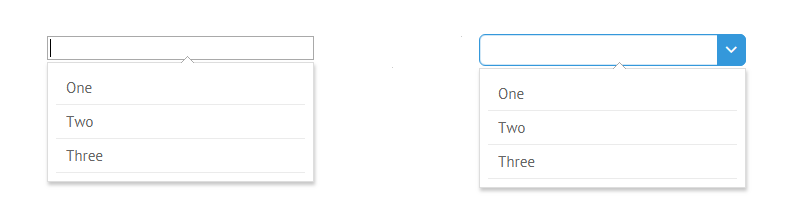
webix_el_selector
webix_el_combo
Tips
- modify config on $init, not with dynamic methods
- don't use HTML containers for child Webix views
$init:function(config){
    config.cols = [
        { template:"Column 1" },
        { template:"Column 2" }
    ]
}
webix.protoUI({
    name:"myView",
    $init:function(config){
      webix.ajax(url).then((text, data) => {
        webix.ui(data.json(), this);
      });
  }
}, webix.ui.view);
View Life Cycle
- DOM ready
- View created
- Added to DOM
fully or patrially
(multiview, data widgets)
- Actions performed
DOM changes
- Destroyed
by user, on unload
webix.ready(function(){
webix.ui(...);
});
onAterRender, view.config.ready
- View instantiated
view.$init, view.$ready
View Destruction
How
What happens
- removeView()
- close()
- resizes neighbors
- removes HTML artefacts
- child views
- related popups
- pointers to HTML and data
- focus
- destructor()
Final Destruction
- window.unload
- views are destroyed
- events detached and removed
Useful Links
Follow-up text: click here
Task for practice: click here
Webix Topics: