Coroutines in Kotlin. Practical view
Ihor Vitruk
05.12.2018
Coroutines allow to write asynchronous programs
Other alternatives used in Android Development:
- Tasks
- Threads
- Executors
- Callbacks
- RxJava
Coroutines advantages
-
Kotlin support data streams and stream handling (collection operators). No need for additional libraries to work with coroutines.
-
Easy to learn and to start for beginners.
-
Allow to write asynchronous work in a very fluent and flexible manner.
-
Are more light-weight than just threads. (Apply "Continuation"[1] mechanism and that's why use hardware resources more efficiently)
-
Imperative manner of asynchronous code writing and execution (say bye to callbacks)
Enable in project
dependencies {
    implementation 'org.jetbrains.kotlinx:kotlinx-coroutines-core:1.0.1'
}
A lot of theory first
It's boring interesting
What is a coroutine?
Coroutine is a light-weight alternative for java threads, but it's not a light-weight thread.
Coroutine - is a program component that generalize subroutines for non-preemptive multitasking, by allowing multiple entry points for suspending and resuming execution at certain locations. [2]
So, the main concept of coroutines work is to suspend on some point, save state with all it context, switch to another code block and resume then, when needed, execution, on previous suspension point.
Suspend function
How to organize suspension points?
Suspend functions are designed for this purpose.
The suspend keyword means that the function can be blocking. Such function can suspend a coroutine.
Suspending functions can be created like standard Kotlin functions, but can only been called within a coroutine.
Suspending mechanizm explanation
Essentially, every suspending function is transformed by the compiler into a state machine with states representing suspend calls.
Right before a suspension call, the next state is stored in a field of a compiler-generated class along with relevant context. Resuming from suspension restores the saved state and the state machine continues from the point after the suspension call. A suspended coroutine can also be passed around as an object of Continuation type containing its state and local context.
Example (e1.kt)
private fun loadData() {
    val data = URL("https://google.com").readText()
    println(data)
}

fun main() = runBlocking {
    launch {
        loadData()
    }
    println("Start loading data")
}
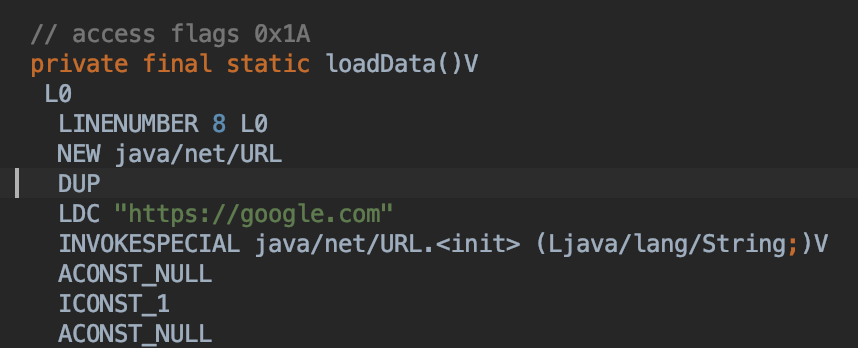
Byte
code
Example (e2.kt)
private suspend fun loadData() {
    val data = URL("https://google.com").readText()
    println(data)
}

fun main() = runBlocking {
    launch {
        loadData()
    }
    println("Start loading data")
}
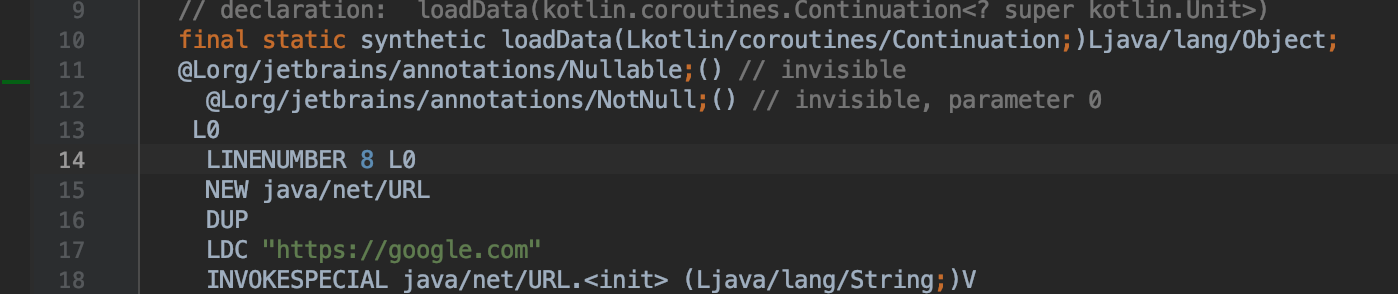
Implicit parameter of Continuation type is passed
So, what is Continuation?
Continuation symbolizes a block of code which should be executed after a coroutine suspension.
Suspended method it automatically adds a new parameter of Continuation type for you behind the scene.
As a result of this when you execute this call you’re going to make rest of the code wrap it into a Kotlin Continuation. [4]
interface Continuation<in T>
Interface representing a continuation after a suspension point that returns value of type T. [3]
Example (e3.kt) - try to debug and see how it works
/**
 * yield allows to generate streams (sequences, lists) on the fly
 *
 * yield provides an element of sequence, than stops generating with remembering if suspension point
 * of generating code, then handle current element, and then come back to suspension point to continue generating
 *
 * yield is a FUNCTION in kotlin
 *
 * yield is a SUSPEND function
 */
private fun sequence() = sequence {
    var i = 10

    println("Prepare first time")
    i *= 2
    yield(i)

    println("Prepare second time")
    i *= 5
    yield(i)

    println("Prepare third time")
    i *= 7
    yield(i)
}


fun main() {
    sequence().forEach {
        println("Some processing of $it")
    }
}
Want billion threads - buy a lot of CPU and RAM
Want billion coroutines - buy a bit of CPU and RAM
This statement is a consequence of what we understood from previous explanation.
Simple Java Threads program just create OS threads, that are handled by CPU (create and keep their objects in RAM), while
Coroutine program is a very big amount of state machines that save states, that's why they use some amount of RAM for it, but allocate it on resume of suspension points, and also only a restricted amount of real OS threads (so not many heavy Thread objects in RAM). And it's MUUUCH more effective.
Coroutines vs threads comparison
Let's run a few experiments to compare efficiency of thread and coroutines.
We will create and execute simultaneously a lot of coroutines and a lot of threads (10, 100, 1k, 10k, 100k, 300k, 1m) and let them do some pseudowork (let it be empty method first, without any heavy task or delay).
Threads execution (e4.kt)
private const val taskCount = 1_000_000

fun main() {
    println("Time: %s ms".format(measureTimeMillis {
        val threads: MutableList<Thread> = arrayListOf()
        repeat(taskCount) {
            val thread = Thread(Runnable {
                //Thread.sleep(1000) -- OutOfMemory for count ~> 10_000 if uncomment it !
                doSomeWork(it)
            })
            threads.add(thread)
            thread.start()
        }
        threads.forEach { it.join() }
    }))
}

private fun doSomeWork(@Suppress("UNUSED_PARAMETER") i: Int) {
    //do some work
}
Coroutines execution (e5.kt)
private const val taskCount = 1_000_000

fun main() = runBlocking {
    println("Time: %s ms".format(measureTimeMillis {
        val jobs: MutableList<Job> = arrayListOf()
        repeat(taskCount) {
            jobs.add(launch {
                //delay(1000) - This DOES NOT have any influence on whole Task execution time or resources providing
                doSomeWork(it)
            })
        }
        jobs.forEach { it.join() }
    }))
}

private fun doSomeWork(@Suppress("UNUSED_PARAMETER") i: Int) {
}
Execution results
| Tasks count | Coroutines execution time, ms |
Threads execution time, ms |
|---|---|---|
| 10 | 16 | 2 |
| 100 | 22 | 19 |
| 1000 | 47 | 215 |
| 10_000 | 99 | 949 |
| 100_000 | 220 | 5851 |
| 300_000 | 382 | 16731 |
| 700_000 | 1504 | 39722 |
| 1_000_000 | 2562 | 60675 |
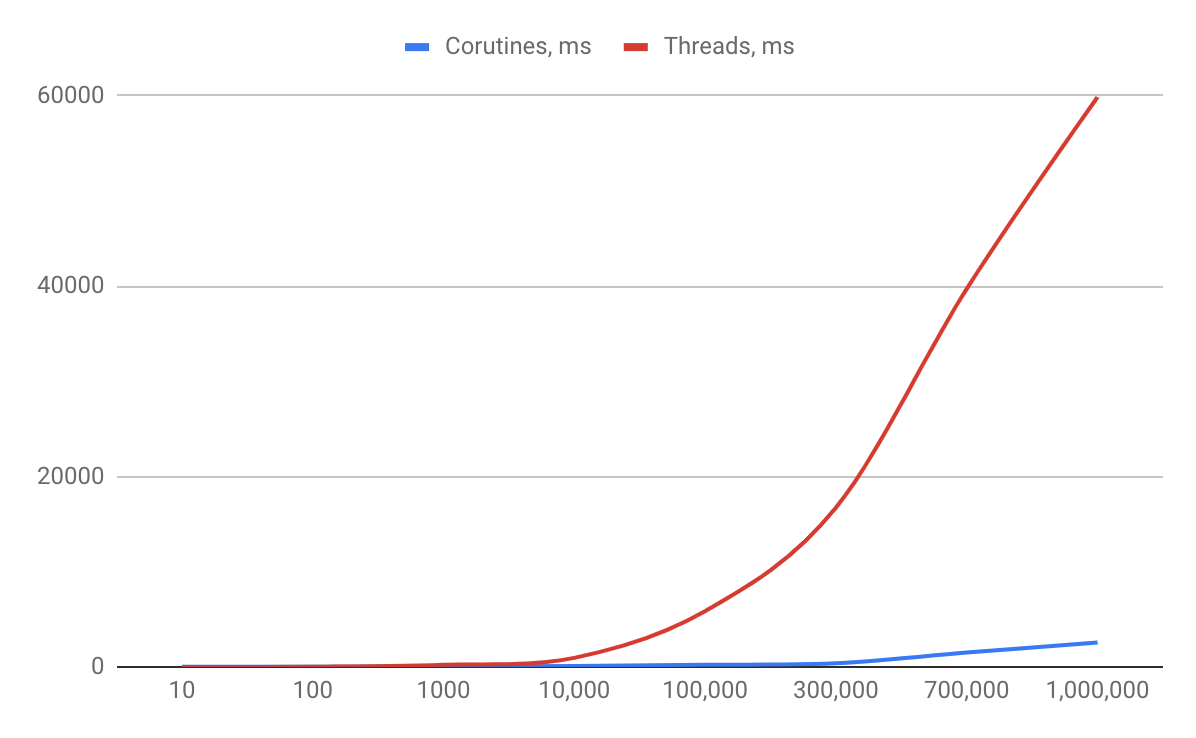
Results line chart
Let make life even more harder for threads
Previous experiment was optimistic for threads. "Do some work" was some immediate pseudotask, then do not take much time.Let simulate some 10 second long task and rerun experiment. (uncomment line in e4.kt). And run for 10k tasks
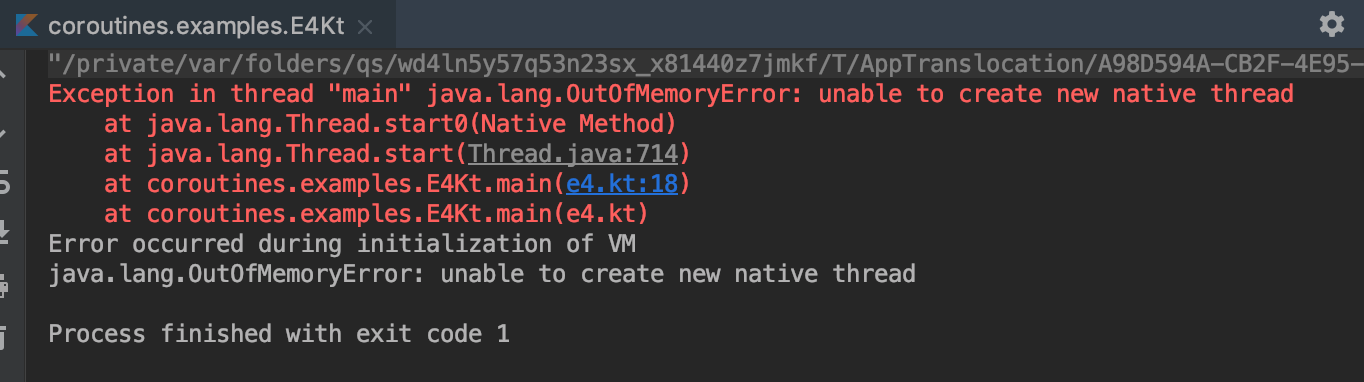
Exploring Activity monitor
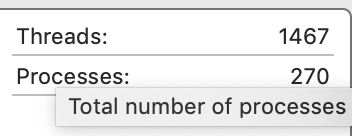
Now let see how really does our hardware resources are used while a lot of threads and coroutines work.
This is the idle state (normal work of laptop):
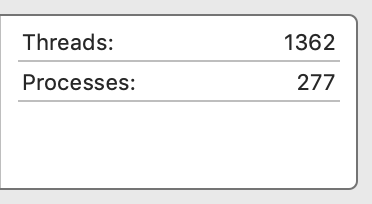
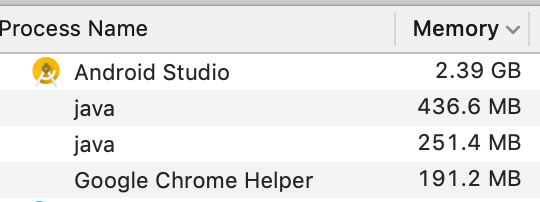
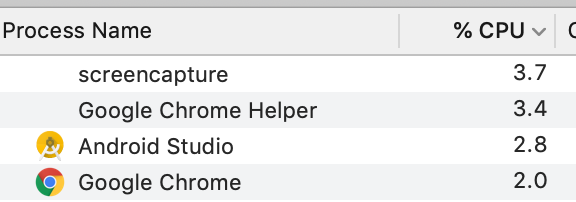
Exploring Activity monitor
Let then run 2k thread with 30-sec long jobs.
Ok, laptop dealt with it. CPU is not loaded because threads are just sleep.
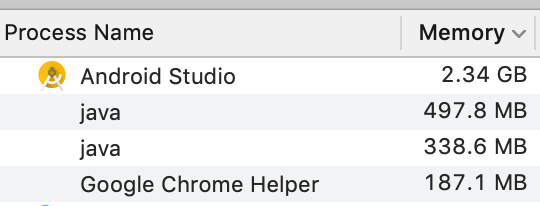
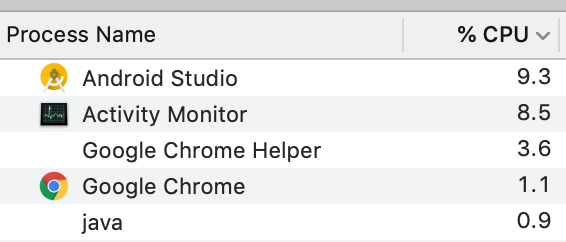
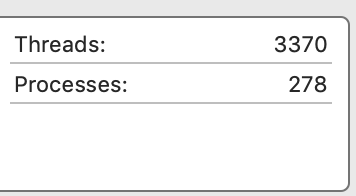
Exploring Activity monitor
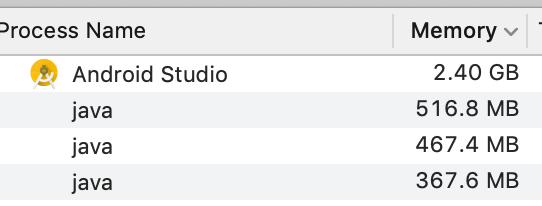
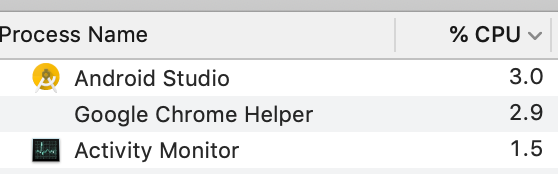
Now coroutines, run not 2k, but 1m of coroutines also with 30-sec long tasks. Os created only ~100 real Threads, and make other asynchronies work with help of suspension mechanizm and this real 100 Threads.
Now more practice
with high-level coroutines API
Coroutine builders create coroutines and return a Job
fun main() = runBlocking {
    val job = launch {
        delay(2000)
        println("Text after delay")
    }
    //job.join()
    println("Text under launch")
}
Try to run with commented and uncommented line, and track how order of printed lines changes.
Avoid GlobalScope
GlobalScope.launch or other coroutine builder on GlobalScope is always running on dedicated thread like Dispatcher.Default context. It takes memory resources, also you must track it lifecycle, check if its not hangs or error does not occur, to cancel it in time etc. Moreover, many GlobalScope launches can cause OOM, like simple threads do.
The better solution is always run corutines locally predefined CoroutineScope's. In case of Android Activity, Fragment, ViewModel can be coroutine scopes.
runBlocking in example e6.kt is a special top-level corutine, that also creates CoroutineScope for itself.
Parent coroutine always does not complete until all childs corutines complete.
We can define own Coroutine Scope with coroutineScope builder. The difference between runBlocking and coroutineScope is that the last one does not block current thread until all it child coroutines complete. Try example e7.kt
/**
 * Try to predict the order of A, B, C, D lines printing.
 */
fun main() = runBlocking {
    launch {
        delay(500L)
        println("#A. Run in scope of runBlocking")
    }

    coroutineScope {
        launch {
            delay(1000L)
            println("#B. Run in launch of coroutine scope")
        }

        delay(300L)
        println("#C. Run in coroutine scope")
    }

    println("#D. Under coroutine scope")
}
Coroutine cancellation
Coroutine cancellation
Coroutine returns a job. Job can be cancelled because of a reason. Let's see example e8.kt
fun main() = runBlocking {
    val job = launch {
        val delay = 2000L
        delay(delay)
        println("This message should appear after $delay milliseconds")
    }
    delay(1300L)
    println("Cancel job")
    //job.cancel() // cancels the job
    //job.join() // waits for job's completion
    job.cancelAndJoin()
    println("End")
}
Cancel coroutine in a right way
If we do job.cancel() it DOES NOT mean that all that is performing inside coroutine stops immediately. No.
By default, coroutine can be stopped only on suspension points, because every suspend function implicitly check inside if coroutine is cancelled.
But if coroutine some i/o work or computation, it wan't be cancelled. Let see on example e9.kt
fun main() = runBlocking {
    val job = launch(Dispatchers.Default) {
        Thread.sleep(2000L) //emulate some i/o or computation
        println("Message after emulated work") //let it be update UI "null" view after activity close.
    }
    delay(1000L)
    println("Cancel job")
    job.cancelAndJoin() // cancels the job and waits for its completion
}
Cancel coroutine in a right way
So, there are ways how to check if coroutine is still working?
1. Use Java Thread#yield() method
2. Use CoroutineScope#isActive method.
Let see how it works in example e10.kt
fun main() = runBlocking {
    val job = launch(Dispatchers.Default) {
        Thread.sleep(2000L) //emulate some i/o or computation
        yield()
        //if (isActive) {
            println("Message after emulated work") //let it be update UI "null" view after activity close.
        //}
    }
    delay(1000L)
    println("Cancel job")
    job.cancelAndJoin()
}
CancellationException
When coroutine is cancelled, CancellationException is thrown. This gives a possibility to do some final work before cancelling. Let see example e10_2.kt
fun main() = runBlocking {
    val job = launch(Dispatchers.Default) {
        try {
            Thread.sleep(2000L) //emulate some i/o or computation
            yield()
            println("Message after emulated work")
        } catch (e: CancellationException) {
            println("Do something if task has been cancelled")
        } finally {
            println("Do some final work in all cases")
        }
    }
    delay(1000L)
    job.cancelAndJoin()
}
Coroutine timeout
Often, e.g. when we do some network request, we need wait for a response for some time, but if no response for a long time, request should be cancelled because of timeout. Kotlin corutines support this feature out-of-the-box. Let see on e12.kt
fun main() = runBlocking {

    lateinit var job: Job
    /**
     * @throws TimeoutCancellationException
     */
    withTimeout(1000) {
    //withTimeoutOrNull(1000L) {
        job = launch(Dispatchers.Default) {
            Thread.sleep(2000L)
            println("Message after emulated work")
        }
    }
    job.join()
    println("End")
}
Channels
- Channels give a possibility to pass stream data between coroutines
- Channels are still an experimental feature
-
Channel is very similar to java BlockingQueue
(put / take - > send / receive) - Channel can be explicitly closed by close() method
- Channels can be purposed for receiving data or for sending data (ReceiveChannel / SendChannel)
- Out-of the box produce coroutine builder creates ReceiveChannel.
- consumeEach coroutine builder creates SendChannel
- channel coroutine builders are extensions for CoroutineScope, so to use them also create extensions for CoroutineScope.
Channels
Let see on above theory in practice. For it, run e12.kt
fun main() = runBlocking {
    val notifications = userNotifications()
    launch {
        notifications.consumeEach {
            println(it) // user receive notifications producer is not closed, or coroutineContext does not cancel all the childen!
        }
    }
    delay(5000)
    //coroutineContext.cancelChildren() //first variant how to stop
    notifications.cancel() //second variant how to stop
}

private fun CoroutineScope.userNotifications() = produce {
    while (true) {
        val delay = Math.random() * 1000L
        val userId = Math.random() * 100
        delay(delay.toLong())
        send("Notification from user #${userId.toLong()}")
    }
}
Channels
- Multiple coroutines can receive from the same channel
- Multiple coroutines can send to the same channel.
- Let's try to write a small chat with censorship filter. (e13.kt)
/**
 * Assume that there are 3 users in same messenger app. We are logged in as a User #1, and should see private
 * messages from User 2 and User 3
 */

fun main() = runBlocking {

    val messengerServer = MessengerServer(Channel(10))
    messengerServer.runServer(this)

    val user1 = User(1, true)
    val user2 = User(2, false)
    val user3 = User(3, false)

    user1.openMessenger(messengerServer)
    user2.openMessenger(messengerServer)
    user3.openMessenger(messengerServer)

    user1.sentMessage("message from user1 to user2", user2)
    user2.sentMessage("message from user2 to user3", user3)
    user2.sentMessage("message from user2 to user1", user1)
    delay(1000)
    user1.leaveMessenger()
    user3.sentMessage("message from user3 to user1 after user 1 left out", user1)
    user3.sentMessage("message from user3 to user2 after user 1 left out", user2)

    delay(30_000)
    messengerServer.shutdownServer()
}
Buffered channels
By default channel transfer en element only if somebody sent it, and somebody received (the buffer is 1 element).
Channel will suspend if somebody try to send the second element until first is received.
There is a capacity parameter to specify buffer size. Let see e14.kt
fun main() = runBlocking {
    val channel = Channel<Int>(10)
    val sender = launch {
        repeat(20) {
            println("Suggest $it")
            channel.send(it) //will suspend when buffer is full
        }
    }
    delay(1000)
    sender.cancel()
}
Suspend functions
Suspend functions run sequentially by default inside coroutine.
Let see on e15.kt
fun main() = runBlocking {
    println("Execution time: %s".format(measureTimeMillis {
        task1()
        task2()
    }))
}

suspend fun task1() {
    delay(1000)
}

suspend fun task2() {
    delay(2000)
}
async coroutine builder
Conceptually, async is just like launch. It starts a separate coroutine that works concurrently with all the other coroutines. The difference is that launch returns a Job and does not carry any resulting value, while async returns a Deferred – a light-weight non-blocking future that represents a promise to provide a result later. You can use .await() on a deferred value to get its eventual result, but Deferred is also a Job, so you can cancel it if needed. [3]. Run e16.kt
fun main() = runBlocking {
    println("Execution time: %s".format(measureTimeMillis {
        val job1 = async { task1() }
        val job2 = async { task2() }
        println("Results: ${job1.await()}, ${job2.await()}")
    }))
}

private suspend fun task1(): String {
    delay(1000)
    return "result 1"
}

private suspend fun task2(): String {
    delay(2000)
    return "result 2"
}
async in suspend functions
If we need to move some structure concurrency code in a separate method, then this method should be a suspend function
Also, if one of child coroutines inside this suspend function fails, parent will cancel all other children and throw an Exception. Let see example e17.kt
fun main() = runBlocking {
    println("Execution time: %s".format(measureTimeMillis {
        println(provideResults())
    }))
}

private suspend fun task1(): String? {
    return try {
        delay(2000)
        "result 1"

    } catch (e: CancellationException) {
        println("Task1 has been cancelled by a parent")
        return null
    }
}

@Throws(RuntimeException::class)
private suspend fun task2(): String {
    delay(1000)
    throw RuntimeException()
}

private suspend fun CoroutineScope.provideResults(): String {
    val job1 = async { task1() }
    val job2 = async { task2() }
    return "Results: ${job1.await()}, ${job2.await()}"
}
CoroutineContext
and CoroutineDispatcher
- Coroutines always execute in some context which is represented by the value of CoroutineContext type
- The main elements of CoroutineContext are the Job of the coroutine, which we've seen before, and its dispatcher
- A coroutine dispatcher (see CoroutineDispatcher) determines what thread or threads the corresponding coroutine uses for its execution
-
All coroutine builders like launch and async accept an optional CoroutineContext parameter that can be used to explicitly specify the dispatcher for new coroutine
Run example e18.kt
1. launch { ... } is used without parameters, it inherits the context of the main runBlocking coroutine which runs in the main thread.
2. Dispatchers.Unconfined is a special dispatcher, that starts coroutine in the caller thread, but only until the first suspension point. After suspension it resumes in the thread that is fully determined by the suspending function that was invoked.
3. Dispatchers.Default uses shared background pool of threads, so launch(Dispatchers.Default) { ... } uses the same dispatcher as GlobalScope.launch { ... }.
4. newSingleThreadContext creates a new thread for the coroutine to run. A dedicated thread is a very expensive resource. In a real application it must be either released, when no longer needed, using close function, or stored in a top-level variable and reused throughout the application.
CoroutineContext Job
- Job is a part of context.
- Check it: coroutineContext[Job].isActive
-
Child coroutine inherits coroutineContext and a job of coroutineScope where it launch (parent coroutine)
See e20.kt
fun main() = runBlocking {
    val request = launch {
        GlobalScope.launch {
            println("job1: Run from GlobalScope")
            delay(1000)
            println("job1: Run from GlobalScope after delay")
        }
        launch {
            delay(100)
            println("job2: Child of parent coroutine.")
            delay(1000)
            println("job2: Child after delay")
        }
    }
    delay(500)
    request.cancel()
    delay(1000)
    println("End")
}
Naming a coroutine
- Let see on e21.kt
fun main() = runBlocking {
    val job = async(CoroutineName("My coroutine")) {
        delay(4000)
        println(coroutineContext)
        println(coroutineContext[CoroutineName])
    }
    job.join()
}
Cancelling job on lifecycle event
- Let we have an app with a lifecycle, but that object is not a coroutine.
- For example, we launch coroutines in Android activity to execute operations to load data, perform animations etc.
- All of these coroutines must be cancelled when activity is destroyed to avoid memory leaks.
- First of all we should create Job() explicitly. All our coroutines will be executed on this job. And we cancel() it whenever we want (in onDestroy())
- Then we need to apply this Job for coroutineContext.
- Also we should set the dispatcher for context.
- Now coroutines lifecycle is connected with Activity lifecycle.
- Let run e22.kt
Cancelling job on lifecycle event
class Activity : CoroutineScope {
    lateinit var job: Job
    override val coroutineContext: CoroutineContext
        get() = Dispatchers.Default + job

    fun onCreate() {
        job = Job()
        loadDataAndUpdateUi()
    }

    fun onDestroy() {
        //job.cancel()
    }

    private fun loadDataAndUpdateUi() {
        launch {
            val data = loadData()
            updateUi(data)
        }
    }

    private suspend fun loadData(): String {
        delay(3000)
        return "some data"
    }

    private fun updateUi(data: String) {
        // view can be null, if activity is destroyed
        println("Update ui with $data")
    }
}

fun main() = runBlocking {
    val activity = Activity()
    activity.onCreate()
    delay(500L)
    activity.onDestroy() // cancels all coroutines
    delay(5000)
}
Exceptions handling
Coroutine builders come in two flavors: propagating exceptions automatically (launch and actor) or exposing them to users (async and produce). The first exceptions as unhandled, similar to Java's Thread.uncaughtExceptionHandler, while the last are relying on the user to consume the final exception, for example via await or receive. [3] Let run e23.kt
fun main() = runBlocking {
    val job = GlobalScope.launch {
        throw IndexOutOfBoundsException()
    }
    //try {
        job.join()
    //} catch (e: Exception) {

    //}
    val deferred = GlobalScope.async {
        throw ArithmeticException()
    }
   // try {
        deferred.await()
    //} catch (e: Exception) {

    //}
    println()
}
Exceptions handling
CoroutineExceptionHandler context element is used as generic catch block of coroutine where custom logging or exception handling may take place. It is similar to using Thread.uncaughtExceptionHandler. See e24.kt
fun main() = runBlocking {
    val handler = CoroutineExceptionHandler { _, exception ->
        println("Caught $exception")
    }
    val job = GlobalScope.launch(handler) {
        throw AssertionError()
    }
    val deferred = GlobalScope.async(handler) {
        throw ArithmeticException()
    }
    job.join()
    deferred.await()
    println()
}
Concurrency problems
The problem is when a few subjects want to modify the mutable shared state (e.g. some value updating, or in case of Android Dev it could be update of the ViewState). Run e25.kt
suspend fun CoroutineScope.runParallel(action: suspend () -> Unit) {
    val n = 100
    val k = 1000
    val time = measureTimeMillis {
        val jobs = List(n) {
            launch {
                repeat(k) { action() }
            }
        }
        jobs.forEach { it.join() }
    }
    println("Time: $time")
}

var counter: Int = 0 // Variant #0. The init problem

//@Volatile // Variant #1. Not help
//var counter: Int = 0


//var counter = AtomicInteger(0) //Variant #2 Help, but is hard to scale for complex state,
// that odes not have-ready-to-use impls


fun main() = runBlocking {
    /*val counterContext = newSingleThreadContext("counterContext")
    CoroutineScope(counterContext).runParallel {*/  //Variant #4
    GlobalScope.runParallel {
        counter++
    }
    println("Counter: $counter")
}
Actor
An actor - combination of a coroutine, the state that is confined and encapsulated into this coroutine, and a channel to communicate with other coroutines. [3]
actor coroutine builder combines actor's mailbox channel into its scope to receive messages from and combines the send channel into the resulting job object, so that a single reference to the actor can be carried around as its handle. [3]
class of messages should be define (for request and result)
Actor
example e26.kt
fun CoroutineScope.counterActor() = actor<CounterMsg> {
    var counter = 0 // actor state
    for (msg in channel) {
        when (msg) {
            is IncCounter -> counter++
            is GetCounter -> msg.response.complete(counter)
        }
    }
}

private fun main() = runBlocking {
    val counter = counterActor()
    GlobalScope.runParallel {
        counter.send(IncCounter)
    }
    val response = CompletableDeferred<Int>()
    counter.send(GetCounter(response))
    println("Counter = ${response.await()}")
    counter.close()
    println()
}

private suspend fun CoroutineScope.runParallel(action: suspend () -> Unit) {
    val n = 100
    val k = 1000
    val time = measureTimeMillis {
        val jobs = List(n) {
            launch {
                repeat(k) { action() }
            }
        }
        jobs.forEach { it.join() }
    }
    println("Time: $time")
}
Actor
It does not matter (for correctness) what context the actor itself is executed in. An actor is a coroutine and a coroutine is executed sequentially, so confinement of the state to the specific coroutine works as a solution to the problem of shared mutable state [3]
Actor is more efficient than locking under load, because in this case it always has work to do and it does not have to switch to a different context at all.
Coroutines testing
ViewModels or Presenters that probably will play role of coroutine scopes (where coroutines will be executed) mostly often. So they should have constructor parameters for Dispatchers (e.g. Dispatcher.Default / Dispatcher.Main).
For tests we just need to replace dispatchers to Dispaptcher.Unconfied, mean coroutines will execute on current threads.
Other case if we just need to write unit tests for separate suspend functions. Then the all is needed is to wrap the test body with runBlocking { }
@Test
fun someTest() = runBlocking {
    // run any suspension functions
}
Coroutines best practices
Kotlin coroutines have been released very recently. But even despite this fact, there are already some patterns/anti-patterns defined for them that can be found in internet.
-
First of all, look at official documentation for Corutines at
https://kotlinlang.org/
-
Also refer to Dmytro Danylyk article where he describe his own vision based on practice of using them:
https://proandroiddev.com/kotlin-coroutines-patterns-anti-patterns-f9d12984c68e [6]
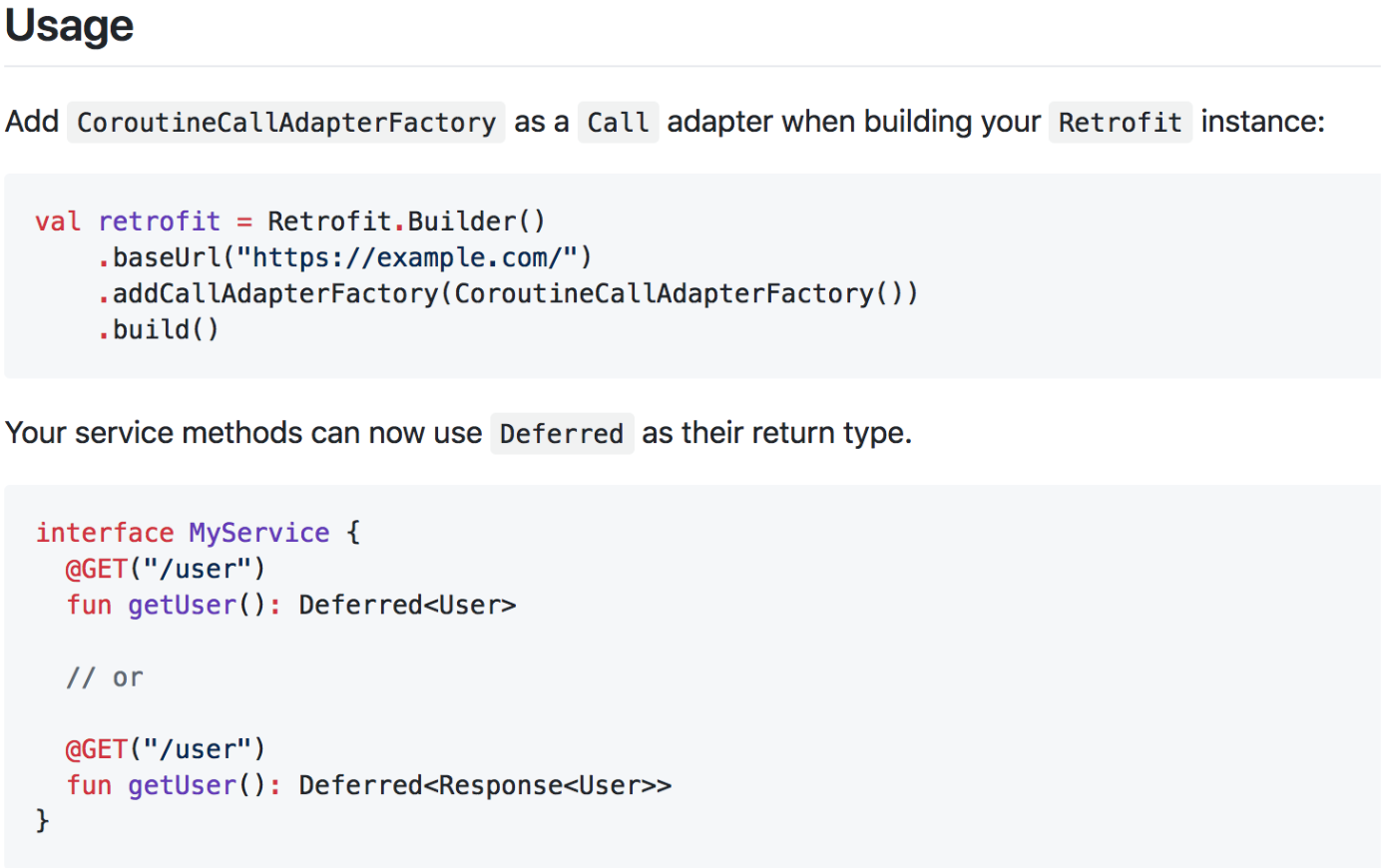
A Retrofit 2 adapter for Kotlin coroutine's Deferred type.
What's next
Android architecture based on:
- no RxJava
- coroutines everywhere for Android non-Main thread work (i/o, input, network, database, UI/UX)
- Android Architecture Components with MVVM template.
- Useful acquired practices applied from AirBnb and MvRx (but without rx)
Thank's for attention
Questions and discussion time
?
Externals sources
1. https://en.wikipedia.org/wiki/Continuation
2. https://en.wikipedia.org/wiki/Coroutine
4. https://codinginfinite.com/exploring-kotlin-coroutine-continuation/
5. https://github.com/JakeWharton/retrofit2-kotlin-coroutines-adapter
6. https://proandroiddev.com/kotlin-coroutines-patterns-anti-patterns-f9d12984c68e