AJAX and Effects
in React
HTTP
Hypertext Transfer Protocol
A standardized set of rules that computers follow when they transfer messages and exchange data with each other over the web.
HTTPS: The S stands for secure, because it is encrypted.

Public Domain, https://commons.wikimedia.org/w/index.php?curid=135820
JS Review

Client
(You)
Server
(Website / App)
HTTP(S) Request
HTTP(S) Response
- The client sends out a request to a URI like e.g. http://www.nytimes.com, which is the address for a web server.
- The web server receives and processes the request.
- If successful, the server then sends back a response that will contains content, data or a confirmation that it received the message.
JS Review
Anatomy of HTTP(S) Request
URI
Body
POST
http://www.myblog.com/new/post
Content-Type:
text/html
Accept:
application/json
<h1>Working with HTTP</h1>
<p>The <strong>Hypertext Transfer Protocol (HTTP)</strong> is an application protocol for distributed, collaborative, hypermedia information systems.</p>.
JS Review
Anatomy of HTTP(S) Response
Body
200
Content-Type:
"application/json"
{
  "post": {
  "id": 1234,
  "url": "http://www.myblog.com/1234/working-with-http"
}
Rejected Requests and Error Handling
- An HTTP(S) request is either accepted or rejected.
- Rejection happens under multiple circumstances. E.g. the server is down, the file or resource is not found or you are not authorized to make the request.
- When this happens, you will receive a HTTP status code in the 400s or 500s.
- You should write code that will handle HTTP(s) request rejections.
API
Application Programming Interface

Client
(You)
Server
(Website / App)
Something that allows one piece of software to talk to another.
In most cases, you can think of it as the "house rules" on the server side of an app. These are rules that your app or a third-party app (e.g. Facebook) make for accessing its data and functionality. Unlike HTTP, API rules are not universally shared.
Example API
https://reqres.in/
AJAX
Asynchronous Javascript and XML
<?xml version="1.0" encoding="UTF-8"?>
<note>
  <to>Tove</to>
  <from>Jani</from>
  <heading>Reminder</heading>
  <body>Don't forget me this weekend!</body>
</note>
XML is similarly syntactically to HTML but it is used for transferring data in a lingua franca format, not presentation.
JavaScript code that makes HTTP(S) requests.
JSON
JavaScript Object Notation
{
  "note":{
    "to":"Tove",
    "from":"Jani",
    "heading":"Reminder",
    "body":"Don't forget me this weekend!"
  }
}
Synchronous
Things happen one at a time, in a predictable order. When you call a function that performs a long-running action, it returns only when the action has finished and it can return the result. This stops your program for the time the action takes.
Asynchronous
Multiple things happen at the same time, in an unpredictable order. When you start an action, your program continues to run.
Big Words Alert!
JS Review
Synchronous
Everything else
Asynchronous
- window.setTimeout
- window.setInterval
- Promises
- HTTP Requests (AJAX)
What is
What is
Styles of Handling AJAX Responses
in JavaScript
- Callbacks
- Promises
- Async & Await
What is the response below?
let data;

// window.setTimeout delays a function from being called on
// for a given amount of time
window.setTimeout(() => {
  // All code that should be delayed goes in here
  data = { success: true };
}, 1000); // Delaying by 1000 milliseconds (1 second)

console.log(data); // What is this?
Callback Problem (Revisted)
Async & Await
let data;
axios("https://reqres.in/api/users").then((response) => {
  // e.g. { data: data: { [{ first_name: ... },{ first_name: ... }] } }
  data = response.data.data;
});
console.log(data); // What is this?
(async () => {
let response = await axios.get("https://reqres.in/api/users");
let data = response.data.data;
console.log(data); // What is this?
})();
ES8


Philip Roberts: What the heck is the event loop anyways?
Side Effects
when a react component changes or handles things
outside of it's own scope
- Async - Handling from AJAX requests, some types of animations, and other asynchronous code
- DOM - Handling events attached to the window, document, or other DOM elements outside of React components (e.g. changing the title of the page, reacting to when a user scrolls, adding a class to the body)
- Subscriptions - Notifying code outside of a React component that needs to respond to or be in sync with changes in a component's state

import { useEffect } from "react";

function ComponentName() {
  useEffect(() => {
    // code for a side effect goes here
  });
  return // ...
}
useEffect() hook
By default, effects occur every time after a component renders.
useEffect(() => {
  // code for side effect goes here
}, []);
To perform an effect only once, after a component mounts (renders for the first time):
You will frequently do this with AJAX requests where you only need to load data once.
import { useState, useEffect } from "react";

function Clock() {
  const [datetime, setDatetime] = useState(new Date());

  // We do not want several window.setIntervals going
  // on at once, which would happen every render
  // after the time is updated
  useEffect(() => {
    window.setInterval(() => {
      setDatetime(new Date());
    }, 1000);
  }, []);

  return (
    <div className="App">
      <h1>Clock</h1>
      <h2>{datetime.toString()}</h2>
    </div>
  );
}fetch("url", {
method: "POST",
headers: {
"Content-Type": "application/json" // e.g.
},
body: JSON.stringify({ // Need JSON.stringify if JSON
id: 1 // e.g
})
})
.then(response => response.json()) // If json
.then(response => /* ... */) // success
.catch(() => /* ... */); // failureMaking promise based AJAX requests with the native
Fetch API

import React, { useState, useEffect } from 'react';

const CuteKittens = () => {
  const [kittens, setKittens] = useState([]);
  const [loading, setLoading] = useState(true);
  const [error, setError] = useState(null);

  useEffect(() => {
    const fetchKittens = async () => {
      try {
        const response = await fetch('https://api.example.com/cute-kittens');
        if (!response.ok) {
          throw new Error('Oh no! The kittens ran away!');
        }
        const data = await response.json();
        setKittens(data.kittens);
      } catch (err) {
        setError(err.message);
      } finally {
        setLoading(false);
      }
    };

    fetchKittens();
  }, []);

  if (loading) {
    return <p>Loading adorable kittens... 🐱💖</p>;
  }

  if (error) {
    return <p>Oops! {error}</p>;
  }

  return (
    <div>
      <h1>Cute Kittens Gallery 🐾</h1>
      <ul>
        {kittens.map((kitten, index) => (
          <li key={index}>
            <img src={kitten.imageUrl} alt={`Cute kitten ${index + 1}`} />
            <p>{kitten.name} says "Meow!"</p>
          </li>
        ))}
      </ul>
    </div>
  );
};

export default CuteKittens;
Async & Await
It allows us to write asynchronous code that reads like synchronous code.
ES8
axios({
    url: "url",
    method: "GET",
    headers: {
        "Content-Type": "applictation/json" // e.g.
    },
    body: JSON.stringify({ // Need JSON.stringify if JSON
        id: 1 // e.g
    })
  })
  .then(response => /* ... */) // success
  .catch(() => /* ... */); // failure
Making promise based AJAX requests with the library
AXIOS
Documentation: https://github.com/axios/axios
Async & Await
is syntactic sugar over the promises code
Step 1: Add async before a function.
This will make a function always return a promise.
const myFunc = async () => {
  // asynchronous code
};
const myFunc = async () => {
// Only works inside async functions
const result = await myAsyncFunc();
};
Step 2: Add the keyword await when calling on the function.
This makes JavaScript wait until that promise settles and returns its result.
ES8
const fetch = async () => {
  try {
    const { data } = await axios.get("https://someurl.com");
    // If successful, do something with data here
  } catch (err) {
    // This will go into catch if there is an error
    console.error(err);
    // Handle error. For example, display error message
  }
};
Error handling AJAX requests
JS Review
Typically, you will want to display a loading symbol and, if your AJAX request fails, an error message.
import React, { useState, useEffect } from 'react';
import axios from 'axios';

export default function App() {
  const [users, setUsers] = useState([]);
  // Use these to give the user feedback when your app
  // is loading or when an AJAX error has occurred
  const [isLoading, setIsLoading] = useState(true);
  const [hasError, setHasError] = useState(false);

  const fetchUsers = async () => {
    // 1. Show loading symbol
    setIsLoading(true);
    try {
      // 2. Make AJAX request
      const { data } = await axios('https://reqres.in/api/users?page=1');
      // 3. Display results
      setUsers(data.data);
    } catch (err) {
      // Or 3. Handle error if there is an error
      console.error(err);
      setHasError(true);
    }
    // 4. Remove loading symbol
    setIsLoading(false);
  };

  useEffect(() => {
    fetchUsers();
  }, []); // The [] stops the AJAX request from occurring after each render

  return (
    <div>
      {/* Shows loading symbol if isLoading is true */}
      {isLoading && <p>Loading ...</p>}
      {/* Shows error if hasError has a message */}
      {hasError && (
        <div role="alert">
          We're sorry, but an unexpected error occurred
        </div>
      )}
      {/* Loops through each one and displays the user on the page */}
      {users.map((user) => {
        const key = `user-${user.id}`;
        const name = `${user.first_name} ${user.last_name}`;
        return (
          <div key={key}>
            <img src={user.avatar} alt={name} />
            <p>{name}</p>
          </div>
        );
      })}
    </div>
  );
}
↓ Scroll down
Anatomy of HTTP(S) request
URI
Body
POST
http://www.myblog.com/new/post
Content-Type:
text/html
Accept:
application/json
{
  "title": "Working with HTTP",
  "description": "The Hypertext Transfer Protocol (HTTP) is an application protocol for ..."
}
JS Review
(async () => {
  try {
    const res = await axios.post( // "post" is the method
      "http://www.myblog.com/new/post", // url
      { // object for headers, request body, and more settings
        headers: { "Content-Type": "application/json" },
        body: {
          title: "Working with HTTP",
          description:
            "The Hypertext Transfer Protocol (HTTP) is an application protocol for ...",
        },
      }
    );
  } catch (err) {
    // Handle error
    console.error(err);
  }
})();
Making AJAX requests with the library
AXIOS
Documentation: https://github.com/axios/axios
JS Review
Anatomy of HTTP(S) response
Body
201
Content-Type:
application/json
{
  "post": {
  "id": 1234,
  "url": "http://www.myblog.com/1234/working-with-http"
}
JS Review
HTTP POST request
import { useState } from 'react';
import axios from 'axios';

export default function App() {
  const [name, setName] = useState('');
  const [job, setJob] = useState('');
  // Loading, error, and success states
  const [isLoading, setIsLoading] = useState(false);
  const [hasError, setHasError] = useState(false);
  const [isSuccess, setIsSuccess] = useState(false);

  // AJAX request
  const createUser = async () => {
    setIsLoading(true);
    try {
       // For API documentation, see https://reqres.in/ and click on "POST  CREATE"
      const response = await axios.post('https://reqres.in/api/users', {
        headers: { 'Content-Type': 'application/json' },
        body: { name, job },
      });
      // If AJAX request is successful
      // Success status codes are in the 200s. For this API, we expecting 201 for "Created".
      if (response?.status === 201) {
        setIsSuccess(true);
      } else {
        throw new Error(`Status is ${response?.status}`);
      }
    } catch (err) {
      console.error(err);
      setHasError(true);
    }
    setIsLoading(false);
  };

  const handleForm = (e) => {
    e.preventDefault();
    // Notice how we don't need useEffect here.
    // In previous examples, we needed to get data while the React component was loading, so we needed useEffect.
    // In this example, the AJAX request is triggered by an event (submitting the form), so we don't need useEffect.
    createUser();
  };

  return (
    <>
      <form onSubmit={handleForm}>
        <div>
          <label htmlFor="name">Full name</label>
          <input type="text" id="name" value={name} onChange={(e) => setName(e.target.value)} />
        </div>
        <div>
          <label htmlFor="job">Job Title</label>
          <input type="text" id="job" value={job} onChange={(e) => setJob(e.target.value)} />
        </div>
        <button type="submit" disabled={isLoading}>Submit</button>
      </form>
      {/* Shows loading symbol if isLoading is true */}
      {isLoading && <p>Loading ...</p>}
      {/* Shows error if hasError has a message */}
      {hasError && (
        <div role="alert">We're sorry, but an unexpected error occurred</div>
      )}
      {/* Shows a success message if successful */}
      {isSuccess && <div>New user created</div>}
    </>
  );
}
↓ Scroll down
By default, effects occur every time after a component renders.
To perform an effect when a single prop changes only:
useEffect(() => {
  // code for side effect goes here
}, [props.myProp]);
To perform an effect when a single value in state changes only:
useEffect(() => {
  // code for side effect goes here
}, [myValue]);
import { useState, useEffect } from "react";
import axios from "axios";
function App() {
const [users, setUsers] = useState([]);
// The page number in search results
const [page, setPage] = useState(1);
const fetchUsers = async () => {
// The ${page} at the end gets the first, second, etc. page of search results
const { data } = await axios(`https://reqres.in/api/users?page=${page}`);
setUsers(data.data);
};
useEffect(() => {
fetchUsers();
}, [page]); // [page] makes it so that an AJAX request happens only when "page" changes
return (
<div>
{/* Loops through each one and displays the user on the page */}
{users.map(user => {
const key = `user-${user.id}`;
const name = `${user.first_name} ${user.last_name}`;
return (
<div key={key}>
<img src={user.avatar} alt={name} />
<p>{name}</p>
</div>
);
})}
{/* Pagination buttons */}
<nav>
<ul>
<li onClick={() => setPage(1)}>
<button>1</button>
</li>
<li onClick={() => setPage(2)}>
<button>2</button>
</li>
</ul>
</nav>
</div>
);
}
↓ Scroll down
By default, effects occur every time after a component renders.
To perform an effect when at least one of a given list of prop and/or state changes:
useEffect(() => {
  // code for side effect goes here
}, [prop.myProp, myValue1, myValue2]);
useEffect(() => {
return () => {
// code for side effect goes here
};
}, []);To perform an effect only once, after a component unmounts (renders for the last time):
By default, effects occur every time after a component renders.
This is commonly used to remove event listeners, cancel active network requests, invalidate timers and cleaning up DOM elements.
window.setTimeout
a timer; delays a function from being called on for a given amount of time
window.setTimeout(() => {
  // code that is delayed
}, 1000); // amount of time to wait in milliseconds
NOTE: You can’t use await in functions without async
const myFunc = () => {
  let promise = Promise.resolve(1);
  let result = await promise;
  // Syntax error
};
// syntax error in top-level code
const response = await fetch('/api/user.json');
const user = await response.json();
NOTE: await won’t work in the top-level code
ES8
(async () => {
  // asynchronous code with await
})();
If you would like to make high-level code async & await, you can wrap your code in an IIFE with async
ES8
const myFunc = async () => {
   try {
      const result = await axios('https://imaginaryAPI');
      return result;
   } catch (err) {
      return console.error('Error:', err);
   }
};
Since the result is a Promise and can be resolved / rejected, it's important to wrap our await code within a try/catch. This way we are able to properly handle errors on our async code.
ES8
(async function () {
  // Change "reqres.in" to demo throwing error
  try {
    const { data } = await axios({
      method: "GET",
      url: "https://reqres.in/api/users"
    });
    // e.g. {data: { [{ first_name: ... },{ first_name: ... }] }
    data.data.forEach((user) => {
      const { first_name, last_name, avatar } = user;
      const htmlStr = `<img src="${avatar}"><p>${first_name} ${last_name}</p>`;
      document
        .querySelector(".container")
        .insertAdjacentHTML("beforeend", htmlStr); // Use a library to prevent XSS
    });
  } catch (err) {
    console.error(err);
    const htmlStr =
      '<div class="text-danger">We\'re sorry, but an unexpected error occurred</div>';
    document.querySelector(".container").innerHTML = htmlStr; // Use a library to prevent XSS
  }
})();
Making async & await based AJAX requests with the library AXIOS
Asynchronous APIs
| Name | What Is It? | Style |
|---|---|---|
| XMLHttpRequest | Native AJAX Feature | Callbacks |
| jQuery | Third Party Library with AJAX | Callbacks or Promises |
| Fetch | Native AJAX Feature | Promises |
| Axios | Third Party AJAX Library | Promises |
| Promise | Native Asynchronous Feature | Utility that turns code into a promise |
| Async & Await | Native Asynchronous Feature | Utilities that turns code into async & await |
Side Effects
when a react component changes or handles things
outside of it's own scope
- Handling and displaying data from AJAX requests and other asynchronous code
- Handling events attached to the window, document or other DOM elements outside of React components (e.g. changing the title of the page, reacting to when a user scrolls, reacting to when a browser resizes)
- Notifying code outside of a React component that needs to respond to or be in sync with changes in a component's state
import React, { useState, useEffect } from "react";

function ComponentName() {
  useEffect(() => {
    // code for a side effect goes here
  });
  return // ...
}
useEffect() hook
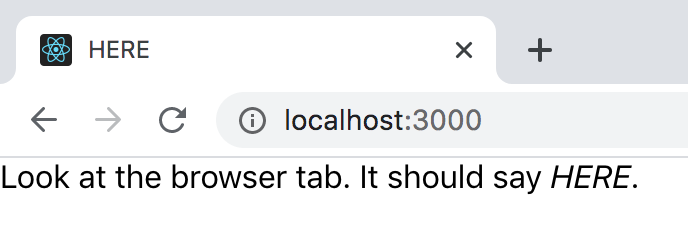
import { useEffect } from "react";

function App() {
  useEffect(() => {
    // Changes what is says in the browser tab
    document.title = "HERE";
  });

  return (
    <div>
      Look at the browser tab. It should say <em>HERE</em>.
    </div>
  );
}
By default, effects occur every time after a component renders.
useEffect(() => {
  // code for side effect goes here
}, []);
To perform an effect only once, after a component mounts (renders for the first time):
You will frequently do this with AJAX requests where you only need to load data once.
import { useState, useEffect } from "react";
import axios from "axios";

function App() {
  const [users, setUsers] = useState([]);

  // AJAX request
  useEffect(() => {
    axios("https://reqres.in/api/users?page=1")
      .then(response => {
        setUsers(response.data.data);
      });
  }, []); // The [] stops the AJAX request from occurring after each render

  return (
    <div>
      {/* Loops through each one and displays the user on the page */}
      {users.map(user => {
        const key = `user-${user.id}`;
        const name = `${user.first_name} ${user.last_name}`;
        return (
          <div key={key}>
            <img src={user.avatar} alt={name} />
            <p>{name}</p>
          </div>
        );
      })}
    </div>
  );
}
Basic AJAX request with useEffect
By default, effects occur every time after a component renders.
To perform an effect when a single prop changes only:
useEffect(() => {
  // code for side effect goes here
}, [props.myProp]);
To perform an effect when a single value in state changes only:
useEffect(() => {
  // code for side effect goes here
}, [myValue]);
By default, effects occur every time after a component renders.
To perform an effect when at least one of a given list of prop and/or state changes:
useEffect(() => {
  // code for side effect goes here
}, [prop.myProp, myValue1, myValue2]);
useEffect(() => {
return () => {
// code for side effect goes here
};
}, []);To perform an effect only once, after a component unmounts (renders for the last time):
By default, effects occur every time after a component renders.
This is commonly used to remove event listeners, cancel active network requests, invalidate timers and cleaning up DOM elements.
import React, { useEffect } from 'react';

const UnmountEffect = () => {
  useEffect(() => {
    // Effect occurs when the component mounts
    console.log('Component has mounted! 🏗️');

    return () => {
      // Cleanup code for side effect goes here
      console.log('Component will unmount! 🧹');
      // Example: remove event listener
      window.removeEventListener('resize', handleResize);
    };
  }, []);

  const handleResize = () => {
    console.log('Window resized! 📏');
  };

  useEffect(() => {
    // Adding event listener when component mounts
    window.addEventListener('resize', handleResize);

    return () => {
      // Cleanup event listener when component unmounts
      window.removeEventListener('resize', handleResize);
    };
  }, []);

  return (
    <div>
      <h1>Unmount Effect Example 🧼</h1>
      <p>Check the console to see mount and unmount messages.</p>
    </div>
  );
};

export default UnmountEffect;
By default, effects occur every time after a component renders.
useEffect(() => {
  console.log('Component has mounted! 🏗️');
  window.addEventListener('resize', handleResize);

  return () => {
    console.log('Component will unmount! 🧹');
    window.removeEventListener('resize', handleResize);
  };
}, []);
To perform an effect only once, after a component unmounts (renders for the last time):
useEffect(() => {
  console.log('Component has mounted! 🏗️');
  window.addEventListener('resize', handleResize);

  return () => {
    console.log('Component will unmount! 🧹');
    window.removeEventListener('resize', handleResize);
  };
}, []);
This is commonly used to remove event listeners, cancel active network requests, invalidate timers and clean up DOM elements.