Blazor
Joris Lops
A component-based SPA framework that archieves interactivity with C#

Examples + Exercises: https://github.com/jorislops/BlazorCourse
1 Introduction to Blazor
Material
- https://github.com/jorislops/BlazorCourse
- Onderaan de README.md
staan de opgaven per week om met de concepten te oefenen!
- Onderaan de README.md
What we need for Blazor
- Requirements:
- IDE = Integrated Development Environment
- Rider (academic license)
- Visual Studio 2022+
- .NET 10+ SDK
- Check the version in the console with
- dotnet --version
- Check the version in the console with
- Time and commitment to learn and practice.
- Learn by doing!
- IDE = Integrated Development Environment
YouTube
Blazor support multipe Render Modes
- Render mode is previously named Hosting Model
- We only use InteractiveServerRenderMode
-
Why: it's the easiest method otherwise you have to learn an extra set of skills!
- The WebAssembly (ClientSide/WASM) mode is more complex!

Creating the project
Visual Studio
Blazor Web App
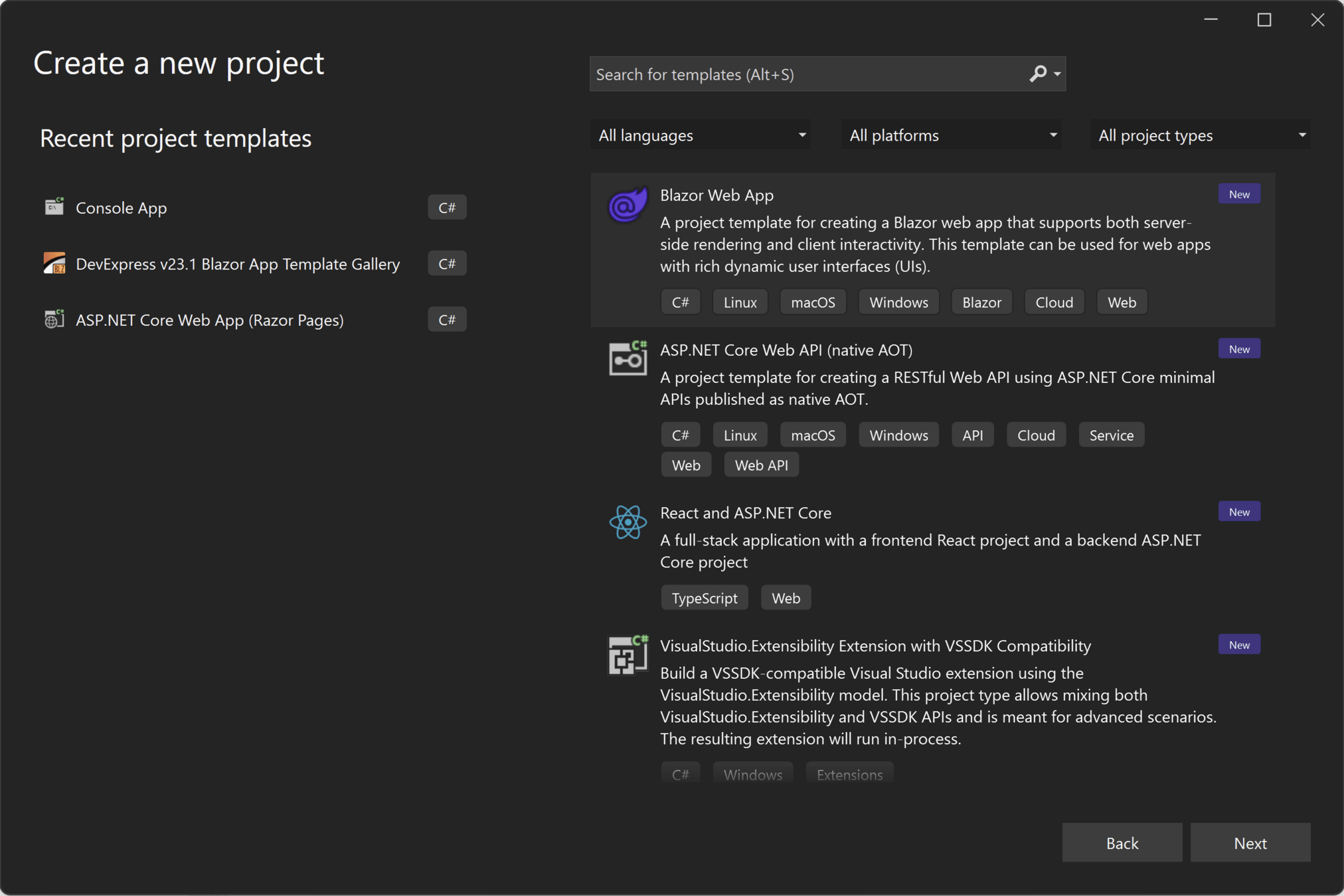
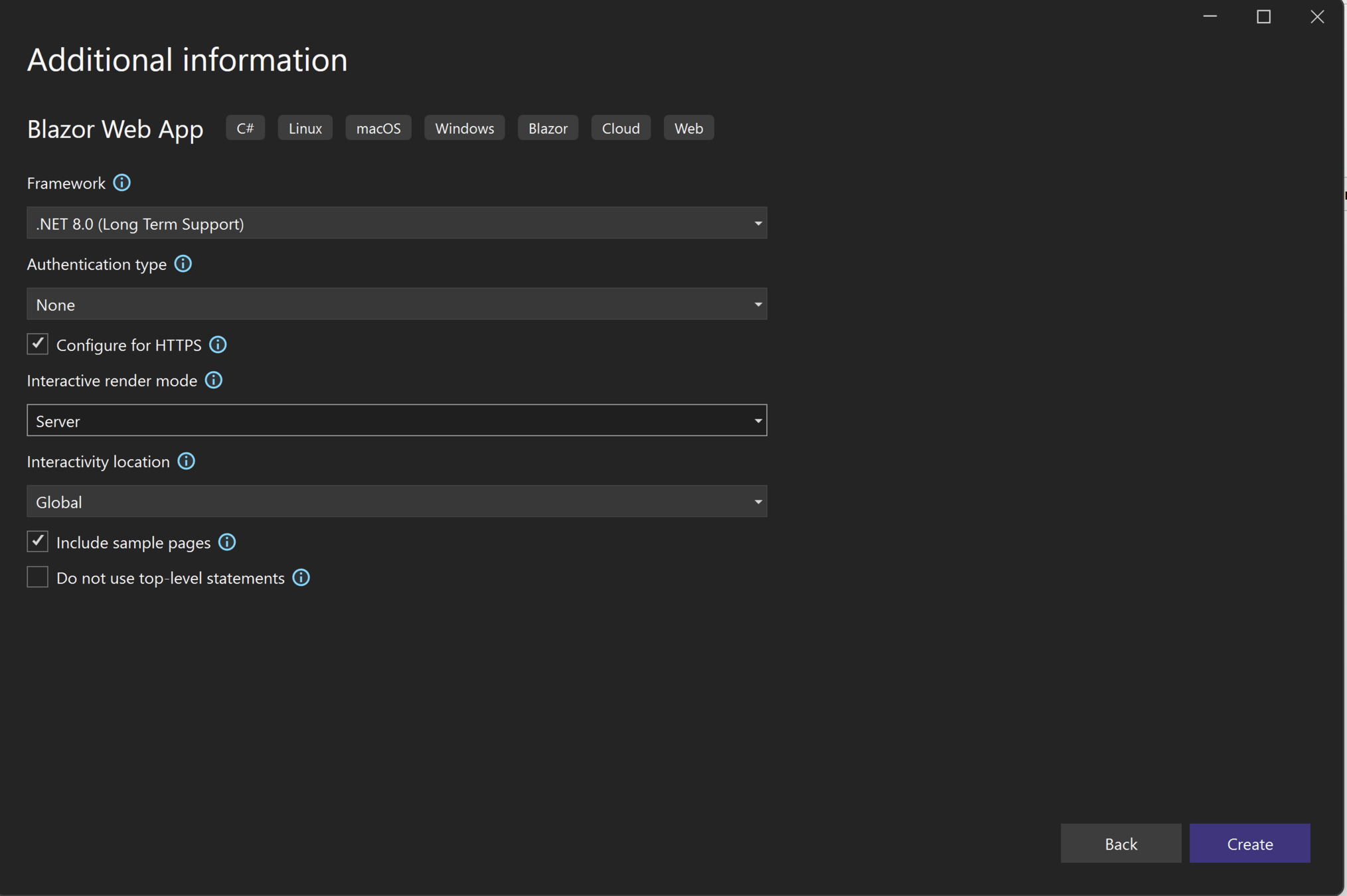
Creating the project
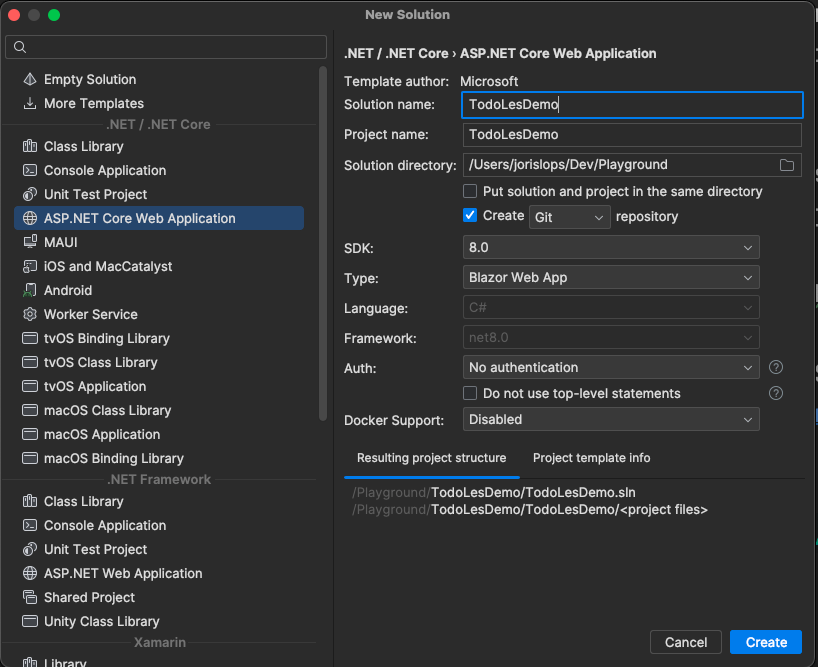
Creating the project in Rider
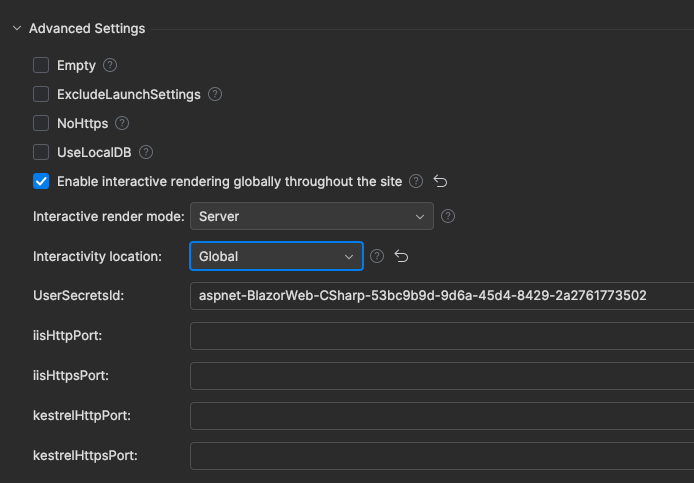
10.0 (or higher)
Creating the project in Rider
We need to set the Render Mode globally (if we use Rider)
//check in Program.cs if the last line is presented
app.MapRazorComponents<App>()
    .AddInteractiveServerComponents();
Enable (Check) Interactive Server Render Mode
In the example project, check and copy
- App.razor
See next slide
Disable Pre Rendering
- Pre Rendering is important for SEO
- Problem page logic is rendered twice, this makes it harder to debug
- So let's disable it in development mode!
//App.razor
@inject IWebHostEnvironment WebHostEnvironment


<!DOCTYPE html>
<html lang="en">

<head>
    <meta charset="utf-8"/>
    <meta name="viewport" content="width=device-width, initial-scale=1.0"/>
    <base href="/"/>
    <link rel="stylesheet" href="bootstrap/bootstrap.min.css"/>
    <link rel="stylesheet" href="app.css"/>
    <link rel="stylesheet" href="BlazorCourse.styles.css"/>
    <link rel="icon" type="image/png" href="favicon.png"/>
    <script type="module" src="https://cdn.jsdelivr.net/npm/@@fluentui/web-components@@2.5.16/dist/web-components.min.js"></script>
    <HeadOutlet @rendermode="new InteractiveServerRenderMode(prerender:
    									!WebHostEnvironment.IsDevelopment())"/>
</head>

<body>
<Routes @rendermode="new InteractiveServerRenderMode(prerender:
										!WebHostEnvironment.IsDevelopment())"/>
<script src="_framework/blazor.web.js"></script>
</body>

</html>
Let start with a demo
Navigate to the /counter.razor
Blazor is Component based framework
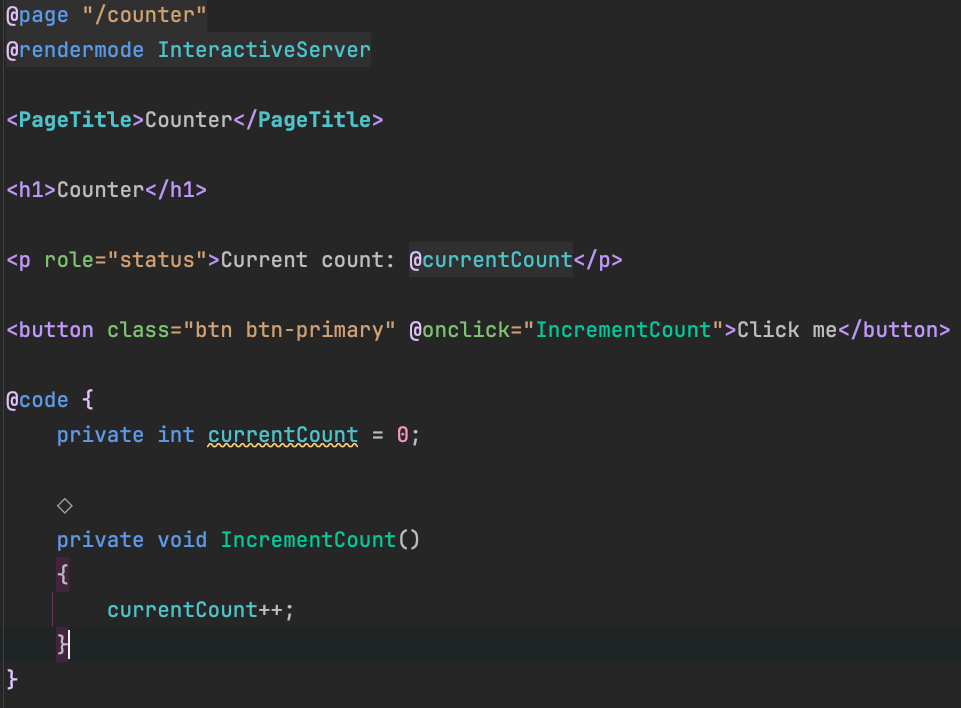
Directives
Markup (Razor)
Logic
Binding
Binding
!rendermode
not need
global!
Directives == @
Directives
Markup (Razor)
Logic
Binding
Binding
Directives are built-in macros that alter the transpiled C# code that is generated from Razor mark-up. Directives are used by preceding the identifier with the @ symbol, the identifier being what we'd typically expect to be either the name of an HTML attribute or the name of a component's property.
Razor Syntax
- Razor = C# + HTML
- x.razor file extension!
- Every time we need to switch to C# mode we need the @
- Razor is smart it switches back to HTML automatically when HTML tags are detected
Take a look at RazorSyntax.razor
or demo!
<ul>
    @{
        string[] names = [ "Joris", " ", "Nick", "Jos", "Dick" ];
    }
    @foreach (var name in names)
    {
        if (string.IsNullOrWhiteSpace(name))
        {
            <li>Empty name</li>
        }
        else
        {
            <li>@name</li>
        }
    }
</ul>
Todo demo
Binding
-
Binding = connect code with Martup (Razor)
- One-way binding: reading a variable/property
- if the variable/property changes this will be rendered
- One-way binding: reading a variable/property
<h2>One way binding</h2>
<p>@_dateTimeMessage</p>
@code {
    readonly string _dateTimeMessage = "The date and time is: " + @DateTime.Now;
}-
- Two-way binding:
- @bind or @bind-Value
- Reading and writing values
- Related to events (next slide)
- Two-way binding:
<h2>Two way binding</h2>
<input @bind=_name size="100"/>
<p>@_name</p>
@code {
    string _name = "Change the text and click outside the input field (or press enter) and you see the changes!";
}Two way binding + events
<input @bind="_name2" @bind:event="oninput"  size="100"/>
<p>@_name2</p>

<h2>Two way binding, with C# (Blazor) event</h2>
<input value="@_name3" @oninput=@(e => _name3 = e.Value.ToString()) size="100"/>
<p>@_name3</p>
@code {
    string _name3 = "Change the text and you see the changes immediately! This time with a C# event.";
}
@bind:event="JavaScript event"
or
@oninput=@(C# code to execute)
There is a new way: bind:set, bind:get
Two way binding + set, get, after
options:
- bind:get + bind:set
- bind + bind:after
Relatively new (introduced in .NET 7), better?
Binding Objects
-
Binding is also possible with Objects :-)
- use the dot notation
Events
- We have seen multiple events in the two-way binding examples
- Some events are not related (directly) to data-binding.
- @onclick
- @onmouseover
Events - From MS docs
Delegate event handlers
Specify delegate event handlers in Razor component markup with @on{DOM EVENT}="{DELEGATE}" Razor syntax:
- The
{DOM EVENT}placeholder is a DOM event (for example,click). - The
{DELEGATE}placeholder is the C# delegate event handler.
For event handling:
- Asynchronous delegate event handlers that return a Task are supported.
- Delegate event handlers automatically trigger a UI render, so there's no need to manually call
StateHasChanged. - Exceptions are logged.
Events
A component-based SPA framework that archieves interactivity with C#
Draw the idea on the board!
How Blazor Works & Project Structure
Let's view the files one by one
2 Forms and Validation & Databases
Form
- Input from the user
- In Blazor we use <EditForm>
- Model (the instance of an object that we want to change)
- OnValidSubmit event when the input is correct
- Validation is discussed later
- Don't forget to include a button (type="submit") :-)
- In Blazor we use <EditForm>
<EditForm Model="_newTodo" OnValidSubmit="AddTodo">
    <InputText @bind-Value="_newTodo.Title"/>
    <InputTextArea @bind-Value="_newTodo.Description"/>
    <InputCheckbox @bind-Value="_newTodo.IsDone"/>
    <button type="submit">Add</button>
</EditForm>
Form + Bootstrap
- Of course, we can mix this with Bootstrap, the previous slides were simple. This makes us focus on the core principles.
    <div class="card mb-4">
        <div class="card-header">Add</div>
        <div class="card-body">
            <EditForm Model="_newTodo" OnValidSubmit="AddTodo">
                <div class="mb-3">
                    <label class="form-label" for="new-title">Title</label>
                    <InputText id="new-title" class="form-control" @bind-Value="_newTodo.Title"/>
                </div>
                <div class="mb-3">
                    <label class="form-label" for="new-description">Description</label>
                    <InputTextArea id="new-description" class="form-control" @bind-Value="_newTodo.Description"/>
                </div>
                <div class="form-check mb-3">
                    <InputCheckbox id="new-isdone" class="form-check-input" @bind-Value="_newTodo.IsDone"/>
                    <label class="form-check-label" for="new-isdone">Done</label>
                </div>
                <button type="submit" class="btn btn-success">Add</button>
            </EditForm>
        </div>
</div>Validation
- Validation == check if the input is correct
- To inform the user when input is incorrect
- To prevent invalid input from entering the system
- Database
- Assumptions in code (like type, range, etc..)
- if assumptions are incorrect
- bugs
- runtime errors/exception
- if assumptions are incorrect
- Always check input @
- Client-side
- Server-side
The Blazor Rendering mode we use is server side. This makes life easier!
Validation Options
- Three options
- By yourself (this isn't an option, maybe only in simple cases)
- Use the default Blazor offers
- Use a third-party library (FluentValidation)
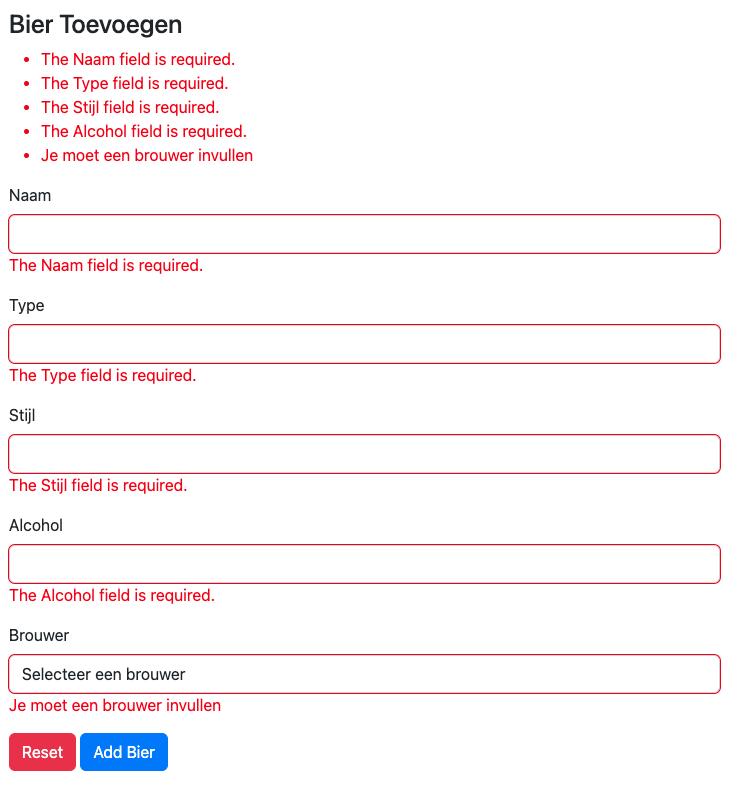
Validation Default Blazor
- The following steps should be done
- Attribute (Annotation) the Model
- Create a Property or private field that can be used inside the form
public class Bier
{
    public int Biercode { get; set; }

    [Required, MinLength(2, ErrorMessage = "Naam moet minimaal twee charachters bevatten"), MaxLength(50)]
    public string Naam { get; set; } = null!;

    [Required, MinLength(2), MaxLength(30)]
    public string Type { get; set; } = null!;

    [Required, MaxLength(20)]
    public string Stijl { get; set; } = null!;

    [Required, Range(0, 16, ErrorMessage = "Alcoholpercentage moet tussen 0 en 16 liggen")]
    public double Alcohol { get; set; }

    [Required(ErrorMessage = "Je moet een brouwer invullen")]
    public int? Brouwcode { get; set; }

    public Brouwer Brouwer { get; set; } = null!;
}- Create the form <EditorForm Model="_bier">
private Bier _bier = new Bier();<EditForm Model="_bier" OnValidSubmit="AddBierToDb">
<DataAnnotationsValidator></DataAnnotationsValidator>
<ValidationSummary></ValidationSummary>
<div class="mb-3">
<label for="naam" class="form-label">Naam</label>
<InputText class="form-control" id="naam" @bind-Value="_bier.Naam"/>
<ValidationMessage For=@(() => _bier.Naam)/>
</div>
<div class="mb-3">
<label for="type" class="form-label">Type</label>
<InputText class="form-control" id="type" @bind-Value="_bier.Type"/>
<ValidationMessage For=@(() => _bier.Type)/>
</div>
<div class="mb-3">
<label for="stijl" class="form-label">Stijl</label>
<InputText class="form-control" id="stijl" @bind-Value="_bier.Stijl"/>
<ValidationMessage For=@(() => _bier.Stijl)/>
</div>
<div class="mb-3">
<label for="alcohol" class="form-label">Alcohol</label>
<InputNumber class="form-control" id="alcohol" @bind-Value="_bier.Alcohol"/>
<ValidationMessage For=@(() => _bier.Alcohol)/>
</div>
<div class="mb-3">
<label for="brouwer" class="form-label">Brouwer</label>
<InputSelect class="form-control" id="brouwer" @bind-Value="_bier.Brouwcode">
<option value="">
Selecteer een brouwer
</option>
@foreach (var brouwer in _brouwers)
{
<option value="@brouwer.Brouwcode">@brouwer.Naam</option>
}
</InputSelect>
<ValidationMessage For=@(() => _bier.Brouwcode)/>
</div>
<button class="btn btn-danger" type="reset">Reset</button>
<button class="btn btn-primary" type="submit">Add Bier</button>
</EditForm>- Create a method that when the form is successful do something useful.
<EditForm Model="_bier" OnValidSubmit="AddBierToDb">FluentValidation
To use FluenValidation we need
Blazored.FluentValidation
Just install it and add it (using) to the page or _Import.razor
@using Blazored.FluentValidation
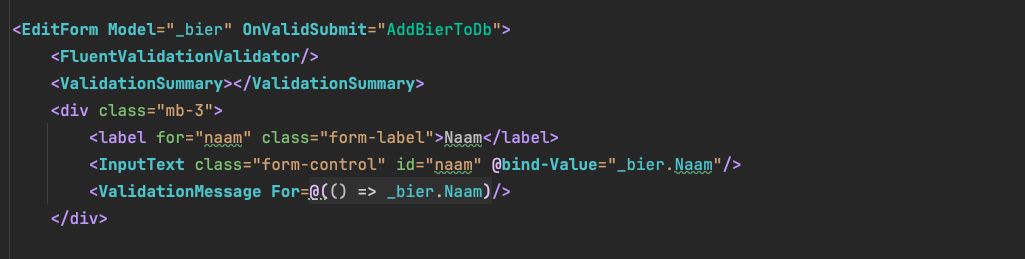
Make sure to use the
<FluentValidationValidator>
Fluent Validation
- Has more features and is not polluting the model with validation Annotations.
- Fluent Validation integration for Blazor:
First, we need to create a Validator!
public class BierValidator : AbstractValidator<Bier>
{
    public BierValidator()
    {
        RuleFor(b => b.Naam).NotEmpty()
            .WithMessage("Error message From BierValidator.cs")
            .MinimumLength(2).WithMessage("omvang te klein")
            .MaximumLength(50).WithMessage("omvang te groot");
        RuleFor(b => b.Type).NotEmpty()
            .WithMessage("Error message From BierValidator.cs").MinimumLength(2).MaximumLength(30);
        RuleFor(b => b.Stijl).NotEmpty().MaximumLength(20);
        RuleFor(b => b.Alcohol).NotEmpty().InclusiveBetween(0, 16);
        RuleFor(b => b.Brouwcode).NotEmpty();
    }
}
Add validation to the running example
public class TodoItem
{
    public int Id { get; set; }

    public int? ParentId { get; set; }

    [Required(ErrorMessage = "Title is required"),
     MinLength(2, ErrorMessage = "Title must be at least 2 characters long")]
    public required string Title { get; set; } = null!;
<EditForm Model="_newTodo" OnValidSubmit="AddTodo">
<DataAnnotationsValidator/>
<div class="mb-3">
<label class="form-label" for="new-title">Title</label>
<InputText id="new-title" class="form-control" @bind-Value="_newTodo.Title"/>
<ValidationMessage For="() => _newTodo.Title" class="text-danger"/>
</div>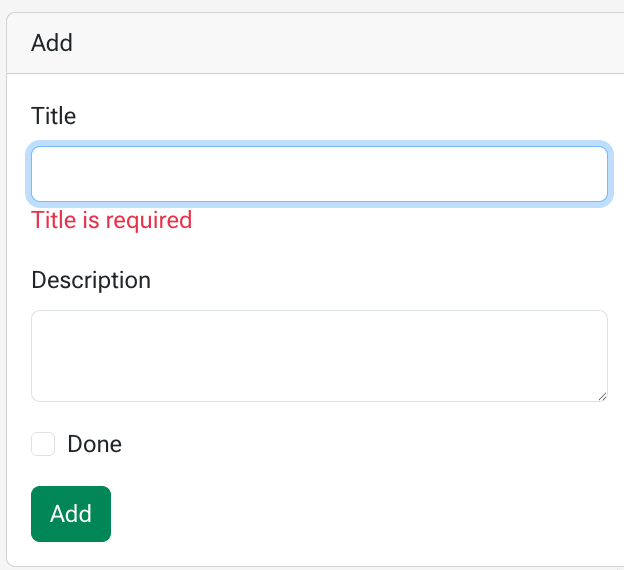
2 Using Database in Blazor with SQL Kata
SQLKata Architecture
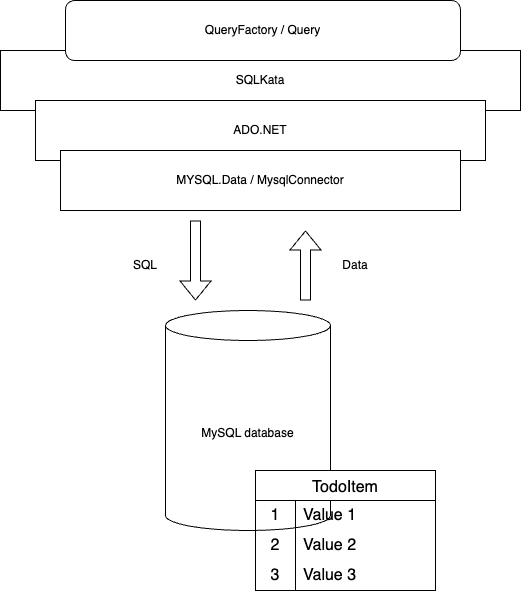
using var queryFactory = GetQueryFactory();
var query = queryFactory.Query("TodoItem")
.Where("ParentId", null);
if (!string.IsNullOrWhiteSpace(_filterModel.Search))
{
query.WhereLike("Title", $"%{filterModel?.Search}%");
}
if (_filterModel.IsDone)
{
query.Where("IsDone", _filterModel.IsDone);
}
IEnumerable<TodoItem> todos = query.Get<TodoItem>(); private static QueryFactory GetQueryFactory()
{
var connectionString =
ConfigurationHelper.Configuration.GetConnectionString("todo")!;
var connection = new MySqlConnection(connectionString);
QueryFactory queryFactory =
new QueryFactory(connection, new MySqlCompiler());
queryFactory.Logger = Console.WriteLine;
return queryFactory;
}ConnectionStrings
- There are configuration files in Blazor
- appsetting.json (used by all environments)
- appsetting.Development.json (overwrites values for development)
- appsetting.{Enviroment}.json
- The connectionstrings are specified in the "ConnectionStrings": {}
{
"Logging": {
"LogLevel": {
"Default": "Information",
"Microsoft.AspNetCore": "Warning"
}
},
"AllowedHosts": "*",
"ConnectionStrings": {
"bieren": "Server=localhost;Database=bieren;Uid=root;Pwd=Test@1234!;",
"todo": "Server=localhost;Database=TodoBlazorCourse;Uid=root;Pwd=Test@1234!;"
}
}
Get a connectionstring
- To access values from the appsetting.json files we need an IConfiguration
- A little trick, create a class with a static variable to store the IConfiguration in
- Use this in the Program.cs
- Now we can get the connectionString as follows:
public class ConfigurationHelper
{
public static IConfiguration Configuration { get; set; } = null!;
}var app = builder.Build();
ConfigurationHelper.Configuration = app.Configuration;var connectionString = ConfigurationHelper.Configuration.GetConnectionString("todo");A simple example
@page "/todo-without-repository"
@using MySqlConnector
@using SqlKata.Compilers
@using SqlKata.Execution
<h3>Todo Without Repository</h3>
@foreach (var todo in _todos)
{
<p>@todo.Title</p>
}
@code {
private List<TodoItem> _todos = null!;
protected override void OnInitialized()
{
base.OnInitialized();
var connectionString = ConfigurationHelper.Configuration.GetConnectionString("todo")!;
var queryFactory = new QueryFactory(new MySqlConnection(connectionString), new MySqlCompiler());
var query = queryFactory
.Query("TodoItem");
_todos = query.Get<TodoItem>().ToList();
}
}Repository
- The problem: components get cluttered with db code
- Some components need a lot of database interaction (db-code)
- Multiple components need the same db-code
- So code duplication: we need to avoid this
- Don't Repeat Yourself (DRY) & many more reasons
- So code duplication: we need to avoid this
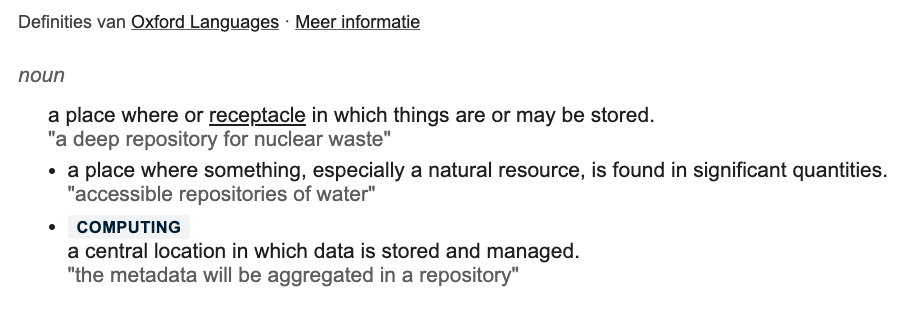
- Solution store database-related code in a central place
- We call this a repository
- Repository = repo
- Repo per entity
- We call this a repository
- Entity is C# class that is stored inside a database (table)
- For example TodoItem
CRUD
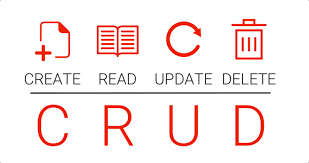
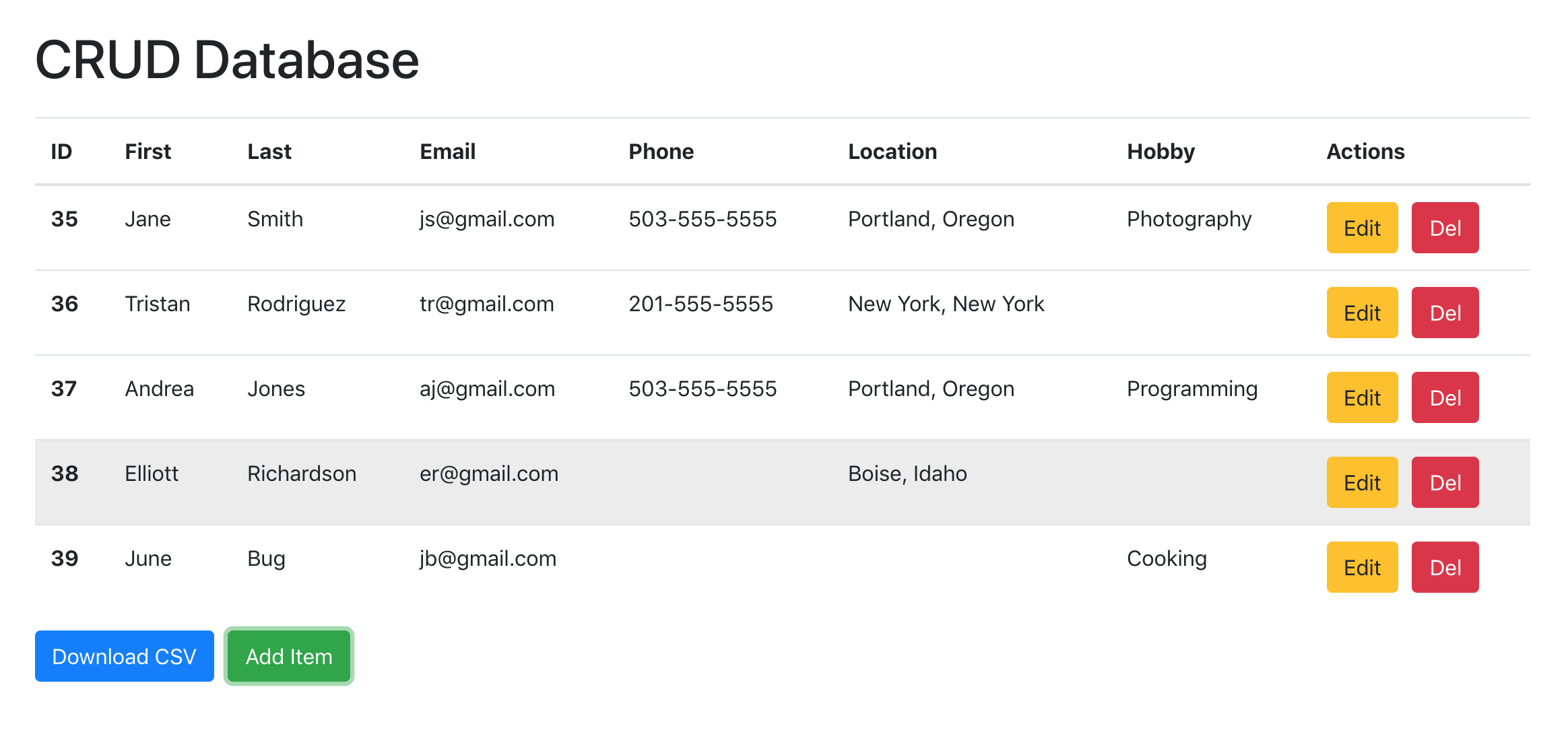
| CRUD | Repository | SQL |
|---|---|---|
| Create | Add(...) | INSERT |
| Read | GetById(id), GetAll(), Get(), etc | SELECT |
| Update | Update(...) | UPDATE |
| Delete | Delete/Remove | DELETE |
With no-repository (CRUD)
@page "/todo-no-repository"
@using MySqlConnector
@using SqlKata.Compilers
@using SqlKata.Execution
<div class="container py-4">
<h3 class="mb-4">SimpleTodo</h3>
<div class="card mb-4">
<div class="card-header">Todo items</div>
<ul class="list-group list-group-flush">
@foreach (var todo in _todos)
{
<li class="list-group-item d-flex justify-content-between align-items-center gap-2">
<span>@todo.Title</span>
<button type="button" class="btn btn-sm btn-outline-primary" @onclick="@(() => Edit(todo))">Edit</button>
<button type="button" class="btn btn-sm btn-outline-primary" @onclick="@(() => Delete(todo))">Delete</button>
</li>
}
</ul>
</div>
@if (_todoToEdit is not null)
{
<div class="card mb-4">
<div class="card-header">Update</div>
<div class="card-body">
<EditForm Model="_todoToEdit" OnValidSubmit="UpdateTodo">
<div class="mb-3">
<label class="form-label" for="edit-title">Title</label>
<InputText id="edit-title" class="form-control" @bind-Value="_todoToEdit.Title"/>
</div>
<div class="mb-3">
<label class="form-label" for="edit-description">Description</label>
<InputTextArea id="edit-description" class="form-control" @bind-Value="_todoToEdit.Description"/>
</div>
<div class="form-check mb-3">
<InputCheckbox id="edit-isdone" class="form-check-input" @bind-Value="_todoToEdit.IsDone"/>
<label class="form-check-label" for="edit-isdone">Done</label>
</div>
<button type="submit" class="btn btn-primary">Update</button>
</EditForm>
</div>
</div>
}
<div class="card mb-4">
<div class="card-header">Add</div>
<div class="card-body">
            <EditForm Model="_newTodo" OnValidSubmit="AddTodo">
                <DataAnnotationsValidator/>
                <div class="mb-3">
                    <label class="form-label" for="new-title">Title</label>
                    <InputText id="new-title" class="form-control" @bind-Value="_newTodo.Title"/>
                    <ValidationMessage For="() => _newTodo.Title" class="text-danger"/>
                </div>
<div class="mb-3">
<label class="form-label" for="new-description">Description</label>
<InputTextArea id="new-description" class="form-control" @bind-Value="_newTodo.Description"/>
</div>
<div class="form-check mb-3">
<InputCheckbox id="new-isdone" class="form-check-input" @bind-Value="_newTodo.IsDone"/>
<label class="form-check-label" for="new-isdone">Done</label>
</div>
<button type="submit" class="btn btn-success">Add</button>
</EditForm>
</div>
</div>
<div class="card">
<div class="card-header">Filter</div>
<div class="card-body">
<EditForm Model="_filterModel" OnValidSubmit="FilterData">
<div class="mb-3">
<label class="form-label" for="filter-search">Search</label>
<InputText id="filter-search" class="form-control" @bind-Value="@_filterModel.Search"/>
</div>
<div class="form-check mb-3">
<InputCheckbox id="filter-isdone" class="form-check-input" @bind-Value="_filterModel.IsDone"/>
<label class="form-check-label" for="filter-isdone">Only done</label>
</div>
<button type="submit" class="btn btn-secondary">Filter</button>
</EditForm>
</div>
</div>
</div>
@code {
class FilterModel
{
public string? Search { get; set; } = null;
public bool IsDone { get; set; } = false;
}
private IEnumerable<TodoItem> _todos = [];
private FilterModel _filterModel = new FilterModel();
private TodoItem? _todoToEdit = null;
private TodoItem _newTodo = new TodoItem
{
Title = ""
};
protected override void OnInitialized()
{
base.OnInitialized();
_todos = LoadData(_filterModel);
}
private IEnumerable<TodoItem> LoadData(FilterModel? filterModel)
{
using var queryFactory = GetQueryFactory();

var query = queryFactory.Query("TodoItem")
   .Where("ParentId", null);

if (!string.IsNullOrWhiteSpace(_filterModel.Search))
{
   query.WhereLike("Title", $"%{filterModel?.Search}%");
}

if (_filterModel.IsDone)
{
	query.Where("IsDone", _filterModel.IsDone);
}

IEnumerable<TodoItem> todos = query.Get<TodoItem>();
return query.Get<TodoItem>();
}
private void FilterData(EditContext editContext)
{
_todos = LoadData(_filterModel);
}
private void Edit(TodoItem todo)
{
_todoToEdit = todo;
}
private void UpdateTodo(EditContext editContext)
{
using var queryFactory = GetQueryFactory();
queryFactory.Query("TodoItem")
.Where("Id", _todoToEdit.Id)
.Update(new
{
Title = _todoToEdit.Title,
Description = _todoToEdit.Description,
IsDone = _todoToEdit.IsDone
});
_todos = LoadData(_filterModel);
}
private void AddTodo(EditContext obj)
{
using var queryFactory = GetQueryFactory();
queryFactory.Query("TodoItem")
.Insert(new
{
ParentId = _newTodo.ParentId,
Title = _newTodo.Title,
Description = _newTodo.Description,
IsDone = _newTodo.IsDone,
CompletedAt = _newTodo.IsDone ? (DateTime?)DateTime.UtcNow : null
});
_todos = LoadData(_filterModel);
}
private void Delete(TodoItem todo)
{
using var queryFactory = GetQueryFactory();
queryFactory.Query("TodoItem")
.Where("Id", todo.Id)
.Delete();
_todos = LoadData(_filterModel);
}
    private static QueryFactory GetQueryFactory()
    {
        var connectionString =
        	ConfigurationHelper.Configuration.GetConnectionString("todo")!;
        var connection = new MySqlConnection(connectionString);
        QueryFactory queryFactory =
        	new QueryFactory(connection, new MySqlCompiler());
        queryFactory.Logger = Console.WriteLine;
        return queryFactory;
    }
}The problem: (Page)Components get cluttered with db code and lots of UI code (UI Problem we solve in next lesson)
With repository (CRUD)
@page "/todo-with-repository"

@using BlazorCourse.Components.Pages.Databases.TodoExample.Repositories
<div class="container py-4">
    <h3 class="mb-4">SimpleTodo</h3>

    <div class="card mb-4">
        <div class="card-header">Todo items</div>
        <ul class="list-group list-group-flush">
            @foreach (var todo in _todos)
            {
                <li class="list-group-item d-flex justify-content-between align-items-center gap-2">
                    <span>@todo.Title</span>
                    <button type="button" class="btn btn-sm btn-outline-primary" @onclick="@(() => Edit(todo))">Edit</button>
                    <button type="button" class="btn btn-sm btn-outline-danger" @onclick="@(() => Delete(todo))">Delete</button>
                </li>
            }
        </ul>
    </div>

    @if (_todoToEdit is not null)
    {
        <div class="card mb-4">
            <div class="card-header">Update</div>
            <div class="card-body">
                <EditForm Model="_todoToEdit" OnValidSubmit="UpdateTodo">
                    <DataAnnotationsValidator/>
                    <div class="mb-3">
                        <label class="form-label" for="edit-title">Title</label>
                        <InputText id="edit-title" class="form-control" @bind-Value="_todoToEdit.Title"/>
                        <ValidationMessage For="() => _todoToEdit.Title" class="text-danger"/>
                    </div>
                    <div class="mb-3">
                        <label class="form-label" for="edit-description">Description</label>
                        <InputTextArea id="edit-description" class="form-control" @bind-Value="_todoToEdit.Description"/>
                    </div>
                    <div class="form-check mb-3">
                        <InputCheckbox id="edit-isdone" class="form-check-input" @bind-Value="_todoToEdit.IsDone"/>
                        <label class="form-check-label" for="edit-isdone">Done</label>
                    </div>
                    <button type="submit" class="btn btn-primary">Update</button>
                    <button type="button" class="btn btn-secondary ms-2" @onclick="() => _todoToEdit = null">Cancel</button>
                </EditForm>
            </div>
        </div>
    }

    <div class="card mb-4">
        <div class="card-header">Add</div>
        <div class="card-body">
            <EditForm Model="_newTodo" OnValidSubmit="AddTodo">
                <DataAnnotationsValidator/>
                <div class="mb-3">
                    <label class="form-label" for="new-title">Title</label>
                    <InputText id="new-title" class="form-control" @bind-Value="_newTodo.Title"/>
                    <ValidationMessage For="() => _newTodo.Title" class="text-danger"/>
                </div>
                <div class="mb-3">
                    <label class="form-label" for="new-description">Description</label>
                    <InputTextArea id="new-description" class="form-control" @bind-Value="_newTodo.Description"/>
                </div>
                <div class="form-check mb-3">
                    <InputCheckbox id="new-isdone" class="form-check-input" @bind-Value="_newTodo.IsDone"/>
                    <label class="form-check-label" for="new-isdone">Done</label>
                </div>
                <button type="submit" class="btn btn-success">Add</button>
            </EditForm>
        </div>
    </div>

    <div class="card">
        <div class="card-header">Filter</div>
        <div class="card-body">
            <EditForm Model="_filterModel" OnValidSubmit="FilterData">
                <div class="mb-3">
                    <label class="form-label" for="filter-search">Search</label>
                    <InputText id="filter-search" class="form-control" @bind-Value="@_filterModel.Search"/>
                </div>
                <div class="form-check mb-3">
                    <InputCheckbox id="filter-isdone" class="form-check-input" @bind-Value="_filterModel.IsDone"/>
                    <label class="form-check-label" for="filter-isdone">Only done</label>
                </div>
                <button type="submit" class="btn btn-secondary">Filter</button>
            </EditForm>
        </div>
    </div>
</div>

@code {
    class FilterModel
    {
        public string? Search { get; set; } = null;
        public bool IsDone { get; set; } = false;
    }

    private readonly TodoRepository _repository = new();
    private IEnumerable<TodoItem> _todos = [];
    private FilterModel _filterModel = new FilterModel();
    private TodoItem? _todoToEdit = null;
    private TodoItem _newTodo = new TodoItem { Title = "" };

    protected override void OnInitialized()
    {
        base.OnInitialized();
        _todos = LoadData(_filterModel);
    }

    private IEnumerable<TodoItem> LoadData(FilterModel filterModel)
    {
        return _repository.Get(filterModel.Search, filterModel.IsDone);
    }

    private void FilterData(EditContext editContext)
    {
        _todos = LoadData(_filterModel);
    }

    private void Edit(TodoItem todo)
    {
        _todoToEdit = todo;
    }

    private void UpdateTodo(EditContext editContext)
    {
        _repository.Update(_todoToEdit!);
        _todoToEdit = null;
        _todos = LoadData(_filterModel);
    }

    private void AddTodo(EditContext obj)
    {
        _repository.Add(_newTodo);
        _newTodo = new TodoItem { Title = "" };
        _todos = LoadData(_filterModel);
    }

    private void Delete(TodoItem todo)
    {
        _repository.Remove(todo.Id);
        _todos = LoadData(_filterModel);
    }
}
The problem: (Page)Components get cluttered with db code and lots of UI code (UI Problem we solve in next lesson)
Load related Queries
Zie BierRepository.cs
GetIncludeBrouwer()
3 Component-Based Development
YouTube
-
Recap:
-
Blazor in .NET 8 | | Ep 1. What is Blazor
-
Blazor in .NET 8 | Ep 4. Two Types of Components
- Routable Components = Page Compoment (@page)
- (Non Routable) Components
-
-
How Blazor Works in .NET 8
- Ep14 until include Ep18
-
Blazor Tutorial - Ep11 - EventCallback and how it is different from delegate
Blazor is a Component based framework
Directives
Markup (Razor)
Logic
Binding
Binding
Blazor is a Component based framework
-
What Are Blazor Components?
- Blazor components are the fundamental building blocks of a Blazor application.
- They encapsulate units of functionality and are often used to render parts or entire pages of your application’s user interface (UI).
- Components can be nested, reused, and shared among projects.
- generated with copilot
Component consist of:
- piece of "UI functionality" with:
- Markup (HTML + C#)
- State (Variables + Properties)
- Style (CSS)
So why a component?
- like a class it abstracts away the internals
- reusability & composability
Joris
Using Components
Take a look:
/simple-component-example
The name of the component is the filename:
- <DayComponent/> filename DayComponent.razor
Components - State
Simple definition of state:
The values that the instance-variables have!
Components
- Demo Let's create a counter
- Parameter initial
- Parameter increment
- EventCallback
- Parameter condition when to trigger event
- Let's add RenderFragement, overrides the counter markup
Components
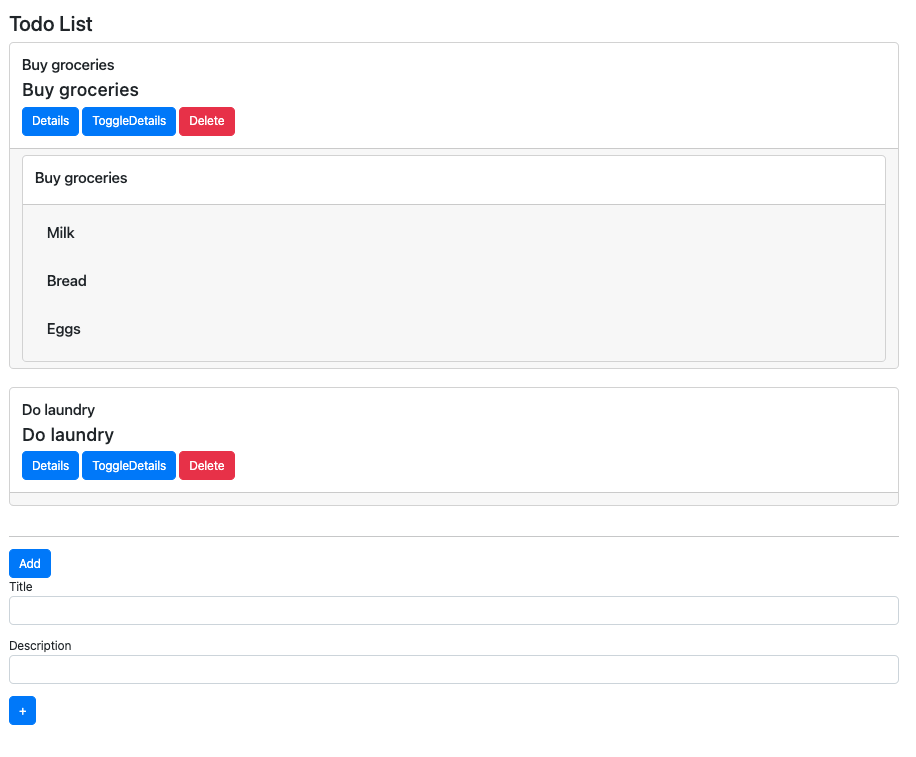
- Blue = a page component
- @page "/todo-list-db"
- Red = a <TodoCard> component
- Black = a <AddTodoForm> component
- Yellow = a <TodoDetails> component
Components "communicate" with each other:
- Parameters (input)
- EventCallback (output)
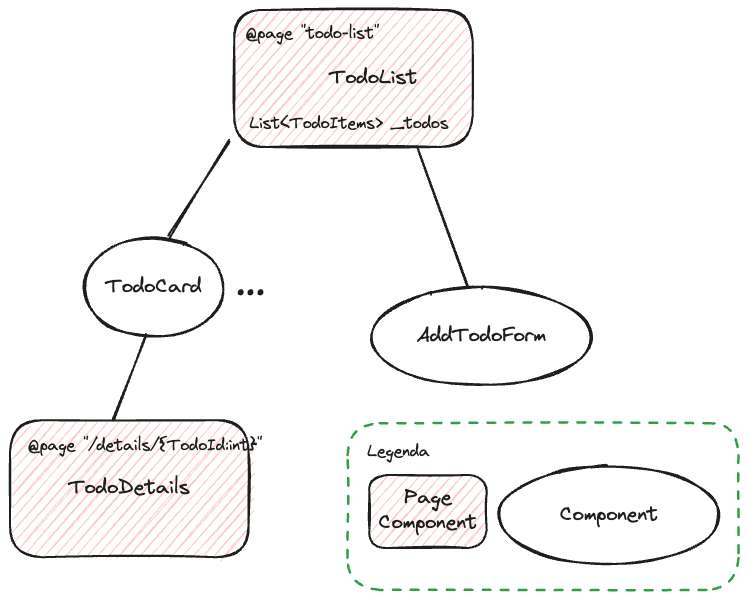
Components
- Parent and Child
- Composition
Components- Communication
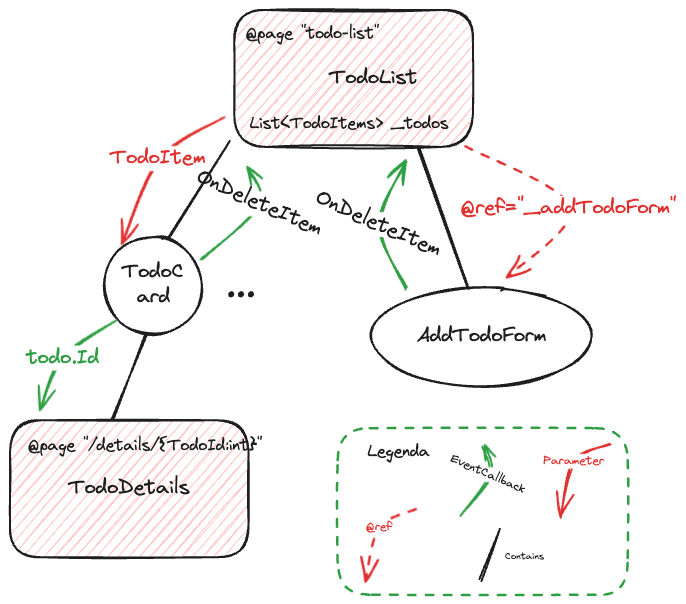
Communication
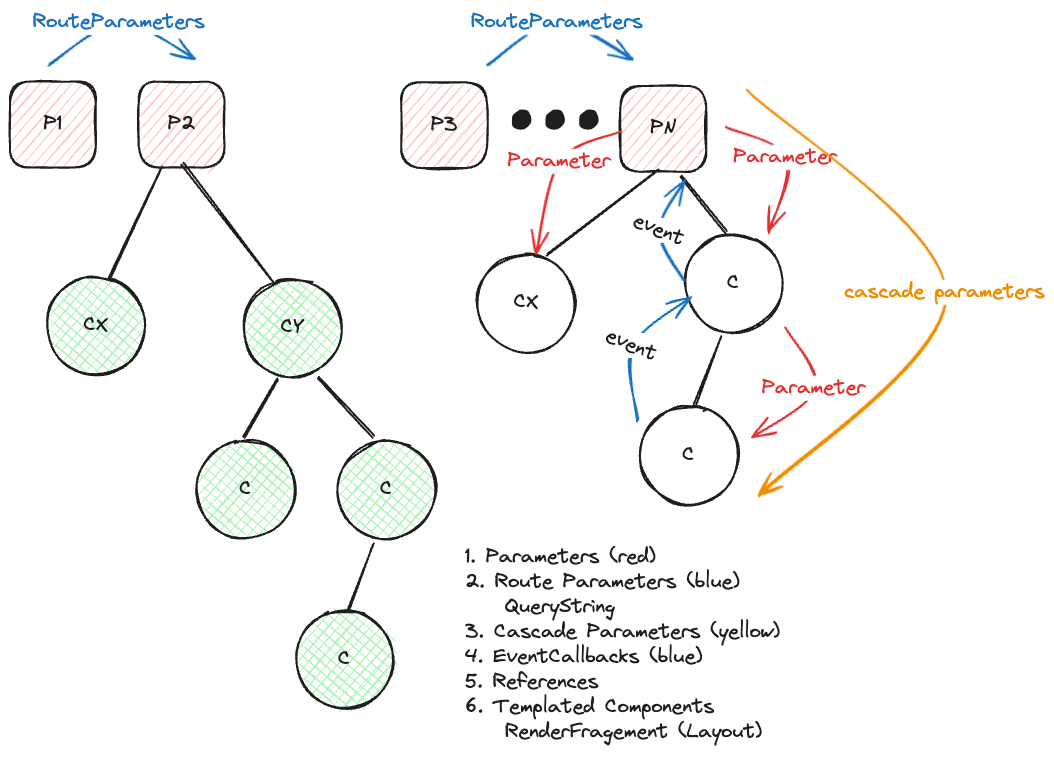
Components - Parameters
- Parameter
[Parameter, EditorRequired]
public TodoItem Item { get; set; }
Make it required! (if not optional)
- To use a parameter

Component - Events
- Event in the component
Make it required! (if not optional)
- To use an event
[Parameter, EditorRequired]
public EventCallback<TodoItem> OnDeleteItem { get; set; }
private void DeleteItem(TodoItem item)
{
// Call the delete method from the parent component
OnDeleteItem.InvokeAsync(item);
}- Trigger the event from the component
Chained Parameters
- Two way Data Binding
- PropertyName is a Parameter
- [PropertyName]Changed is a EventCallback<T>
- Take a look at the example and the component
https://www.youtube.com/watch?v=oG5TOxiaEpM
Component - Ref
<AddTodoForm
    @ref="_addTodoForm"
OnAdd="AddNewTodo"></AddTodoForm>- Using the @ref="_addTodoForm"
- calling the method ToggleVisibility() from <AddTodoForm> component
<button class="btn btn-primary"
        @onclick=@(() => _addTodoForm.ToggleVisibility())>Add</button>
- @Ref (reference) can be useful for calling methods on Components
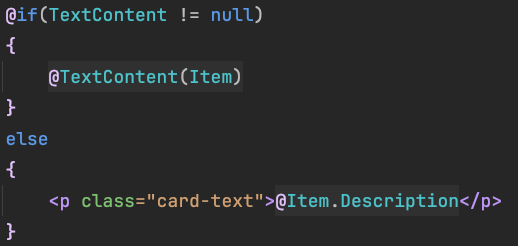
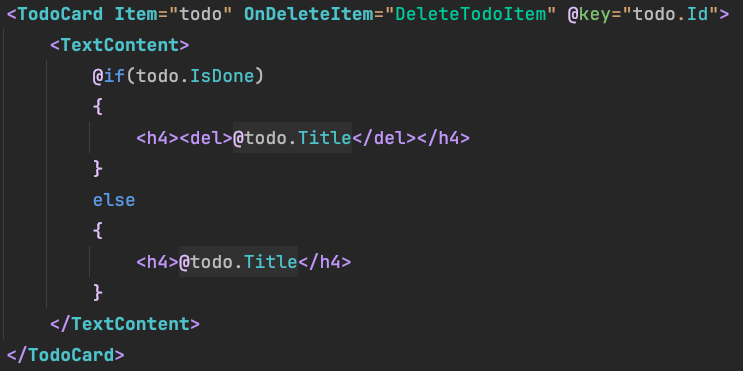
RenderFragment
- RenderFragment - can contain html/razor
- a special type
- To use a RenderFragement in the compontent
[Parameter]
public RenderFragment<TodoItem>? TextContent { get; set; }- Use the Renderfragment from parent
Code Seperation
Seperate UI & Code
See SimpleComponentPartialExample.cs and SimpleComponentPartialExample.razor
Demo Let's recreate the Todo Database example
- Model the TodoItem
- Nested list of TodoItems
- First, let's create a Repository
- Displays todo item
- Add todo item
- Delete todo item
- Navigate to the details page
Routing Parameters
An example
Take a look at:
- TodoRepository.cs
- /TodoListDb.razor
- TodoDetailDb.razor
The Razor pages should focus solely on the UI, not on database operations. If we didn’t use a repository to separate that logic, the Razor files would quickly become large and difficult to read.
Components - OnParametersSet
When the parameter changes, the OnParametersSet() function is called.
Use this to initialize components
Use OnInitialize() to initialize pagecomponents.
Query String Parameters
Route Parameters
@page "/todo-details-db/{TodoId:int}"
[Parameter] //Route Parameter & Component Parameter
public int TodoId { get; set; }
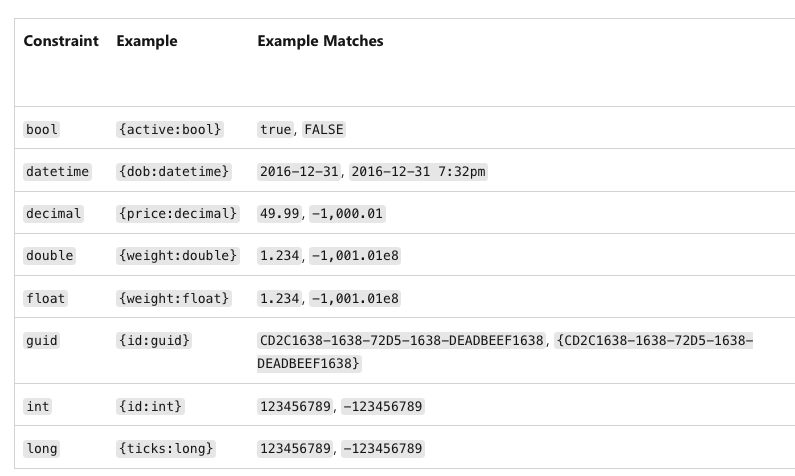
- syntax:
{paramName:constraint}
- optional parameter:
{Text?}
[] public string? Text { get; set; }
4 Routing & Using a UI library (Blazor Boostrap)
Routing
Diagram on Board
SPA = Single Page Application
Show the routing:
App.razor --> Routes.razor --> MainLayout -> Body (razor page)
Layout
Take a look at this image:
Blazorschool has some interesting tutorials!
Generic Components
Generic classes:
- List<T> is a list of type T
- For example List<int>, List<Customer>
- T is called the Type Parameter
This idea can also be applied to Blazor components:
T (the Type Parameter) is called TItem in BLazor
<Grid TItem="Beer"
      Class="table table-hover table-bordered table-striped"
      DataProvider="CustomersDataProvider"
      AllowSorting="true"
      AllowPaging="true"
      AllowFiltering="true"
>
Generic Components
Let's take a look at
A more advanced example (also includes cascade parameters to make nesting of components possible)
Do we have to make those components ourselves?
No, not invented here syndrome!
4 - UI Component Libraries
There are many good UI Component libraries, some are free (open-source), and most of them have a demo page with code examples!
-
Blazor Bootstrap
- FluentUI (Microsoft)
- https://www.fluentui-blazor.net/CodeSetup
- Radzen
- Blazorise
- Syncfusion
- MudBlazor
There are many more!
Blazor Bootstrap Example
See Blackboard: /blazor-bootstrap-datagrid
Let's do a demo!
Lifecycle Events
Every component has Lifecycle events.
The most famous one:
protected override void OnInitialized()
{
    base.OnInitialized();
    _treeDataSource =     NavigationTreeData.GetNavigationTree();
    NavigationManager.LocationChanged += LocationChanged;
}
OnInitialized: load data + register events.
Only once per Component/Page
Lifecycle Events
Every component has Lifecycle events.
Take a look at:
https://blazor-university.com/components/component-lifecycles/
SetParameters(ParameterView parameters): When a parameter changes here we "can skip OnParametersSet", i.e. not send them to OnParametersSet() (not calling base.SetParametersAsync(parameters))
OnParameterSet(): When a parameter of a component changes.
OnAfterRender(...): after rendering (DOM is complete), for working with JavaScript
After an event a component is rerenderd!
InvokeAsync(StateHasChanged): To trigger rerender a component,
when update is not detected by the component.
5 State Management in Blazor
YouTube
For demo:
/parent-child-and-service-example
Why State Management?
- Demo the counter problem
The problem
- sibling components can't share state
- components that are far away from each other can't share state
What is state
For a component:
it's variables and property values
For an application:
- Variables and properties that are important for the application and can be used across multiple components
- In other words, different components use the same variables/properties.
- The solution to this is that we make a service or cascade parameters
How Blazor Works
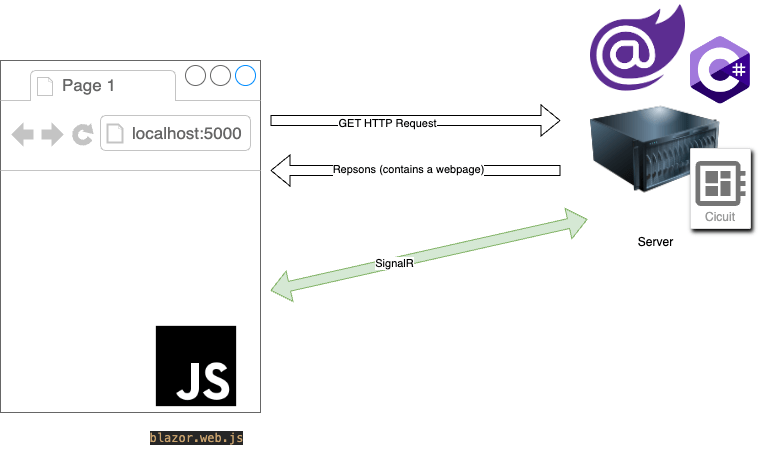
For each user (tab in the browser) one circuit
Circuit is a piece of memory to hold state information
Where to manage state?
Client-side
url
Browser Storage (localStorage, sessionStorage)
cookies
Server-side
database
url
Service
Cascade Parameters
State Demo
LoginService, see Blackboard (Les 4)
URL
For transient data representing navigation state, model the data as a part of the URL. Examples of user state modeled in the URL include:
- The ID of a viewed entity.
- The current page number in a paged grid.
The contents of the browser's address bar are retained:
- If the user manually reloads the page.
- If the web server becomes unavailable, and the user is forced to reload the page in order to connect to a different server.
For information on defining URL patterns with the @page directive, see ASP.NET Core Blazor routing and navigation.
URL
- RouteParameters
- From page to page (@page)
- Two options
- QueryString (little bit hard in Blazor)
- localhost:5000/product?name=blender&price<100
- RouteSegements
- locahost:5000/product/blender/price100/
- QueryString (little bit hard in Blazor)
URL Querystring

- QueryString = ?key1=value1&key2=value2
- QueryString is temporary (one-time usage, it's not stored automatically)
- If you want to use them again you have to create them again
- QueryString values are strings (so we can't store anything in it)
- we need to convert to the right type
- User can see the query string so it's better to have a descriptive meaning
- Querystring parameters are optional (you can't enforce them and a user may remove them) ==> C# we need to use the nullable types (int?)
Creating URL to navigate
The normal way (HTML/Razor):
@{
    var link = brouwer.Naam;
    if (brouwer.AantalBrouwersZelfdeNaam > 1)
    {
        link += $"/{brouwer.Land}";
    }
}
<a href="/Bier/@link">Show Beers</a>
Creating URL with Navigation Manager
We need to obtain the Navigation Manager
@inject NavigationManager NavigationManager
Blazor code calls a method (GoToBeerPage) that needs navigation
<button class="btn btn-primary" @onclick="@(() => GoToBeerPage(brouwer))">
Show Beers</button>
Use the Navigation Manager to navigate to another page
    private void GoToBeerPage(BrouwerVm brouwer)
    {
        var link = brouwer.Naam;
        if (brouwer.AantalBrouwersZelfdeNaam > 1)
        {
            link += $"/{brouwer.Land}";
        }
        NavigationManager.NavigateTo($"/Bier/{link}");
    }
When to use: when you need navigation from C# code
QueryStrings in Blazor
- By hand (not recommended, case sensitive + casting)
        var uriAsString = NavigationManager.Uri;
        var url = new Uri(uriAsString);
        var queryString = url.Query; // returns "?Brouwcode=someInt"
        var queryParameters = HttpUtility.ParseQueryString(queryString);

        //Query parameters are always strings and the key (Brouwcode) is case sensitive!!
        var brouwcodeAsString = queryParameters["Brouwcode"]; // returns "someInt"
        if (int.TryParse(brouwcodeAsString, out var brouwcode))
        {
            Brouwcode = brouwcode;
        }
The prefered (Blazor-way): [Parameter, SupplyParameterFromQuery]
[Parameter, SupplyParameterFromQuery]
public int? CodeFromBrouwer { get; set; }
Route Parameters (Segments)
@page "/bier"
@page "/bier/{Brouwcode:int}"
@page "/bier/{Brouwnaam}/{Land}"
@page "/bier/{Brouwnaam}"
[Parameter] public int? Brouwcode { get; set; }

[Parameter] public string? Brouwnaam { get; set; }

[Parameter] public string? Land { get; set; }
Cascade Parameters
zie antwoord codepilot, plaatje op het bord (&vorige sheets)
https://copilot.microsoft.com/
blazor cascade parameters
Use-cases:
- complex components (big tree)
- a trick to create a complex component composition
- (Global) (app) state
- I prefer the service method (personal taste)
Cascade Parameters or Service?
In summary, use cascading parameters when you want to pass data within a specific component hierarchy, and use a service with events when you need to manage global state or communicate between unrelated components. Choose the approach that best fits your specific use case!
https://copilot.microsoft.com/
Blazor when to use a service with events or cascade parameters?
Service to Share state
Example of Login
See Blackboard
Demo it
Draw a picture
Message Service
.NET 7 Blazor 🔥 Component Communication (Parameters, EventCallbacks & States/Services) State/Service starts @ 9:20
We can register for a service
and a service maintains Action(s) to which consumer can register
publis-subscribe pattern (event)