Dapper
See Blackboard
Examples + Exercises:
Bronnen
Lesson 1
- Dapper Architecture
- Connect to the database
- Example with Todo
- Several "Query" Methods
- Simple CRUD
Dapper
- Dapper - a simple library to interact with a database
- Translates to "goed verzorgd"
- A simple object mapper for .NET
- C# <----> SQL
- Dapper is a NuGet library that you can add in to your project that will enhance your ADO.NET connections via extension methods on your DbConnection instance. This provides a simple and efficient API for invoking SQL, with support for both synchronous and asynchronous data access, and allows both buffered and non-buffered queries.
Dapper makes it easy to work with a relational database from C#!
ADO.NET
- Dapper extends (builds on top of) ADO.NET
- extension methods
- ADO.NET makes it possible to connect to different relational database (MySQL, SqlServer, Oracle, etc)
- DbConnection
- DbCommand
- DbDataReader
- DbCommand
- DbConnection
- First, we take a look at an ADO.NET Example
- Keep in mind this is more difficult than Dapper
- Dapper makes ADO.NET easier to use
Dapper Example
    public class ActorInfo
    {
        public string Firstname { get; set; } = null!;
        public string Lastname { get; set; } = null!;
    }

    public ActorInfo GetActorInfoById(int actorId)
    {
        string sql = "SELECT FirstName, LastName FROM Actors WHERE ActorId = @ActorId";
        string connectionString = "server=localhost;port=3306;database=Movies;user=root;password=Test@1234!";

		using var connection = new MySqlConnection(connectionString);

        //Dapper in action
        var actor = connection.QuerySingle<ActorInfo>(sql, new {ActorId = actorId});

        return actor;
    }
Only one line! To interact with the database! :-)
Dapper Architecture
- Driver contains Connection
- Connectionstring
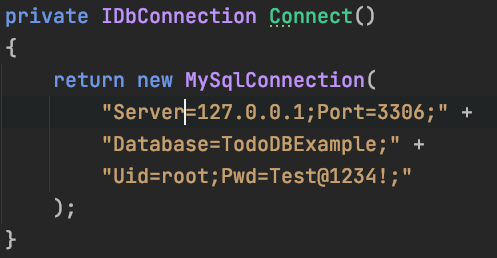
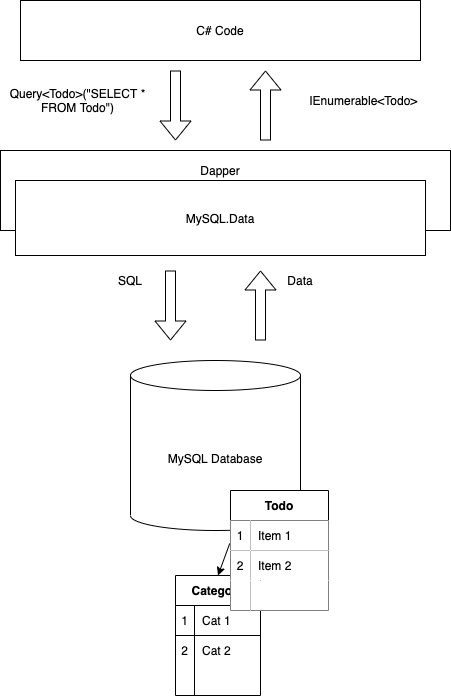
Driver
MySqlConnector
Installation
- Install a database
- Other Tools:
- Dapper - a simple library to interact with a database
- Install Dapper
-
dotnet add package Dapper
-
- Install a driver (MySql.Data)
-
dotnet add package MySql.Data
-
- Go, start programming
DB Tools 101
- Demo
- Commit after edit/update/delete!
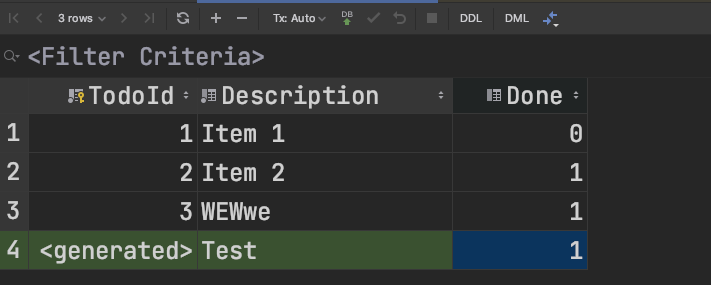

Dapper
- Go, start programming
- Steps:
- 1 Make connection
- Connection String
- https://www.connectionstrings.com/
- Docs from vendor
- Connection String
- 2 Execute some SQL
- Query or Command (Execute() method)
- 3 Do something useful with the result
- 1 Make connection
var connectionString = "Server=127.0.0.1;Port=3306;Database=Examples;Uid=root;Pwd=Test@1234!;"
// Step 1
using var db = new MySqlConnection(connectionString);

// Step 2
List<Todo> todos = db.Query<Todo>("SELECT * FROM Todo")
		.ToList();

/// Step 3
foreach(var todo in Todos)
{
   Console.WriteLine(todo.Name);
}
Class <----> Table
Column names and Properties must match!
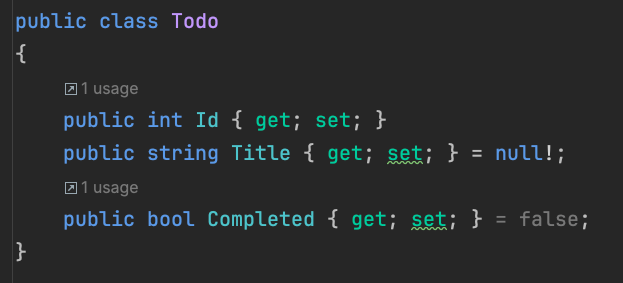
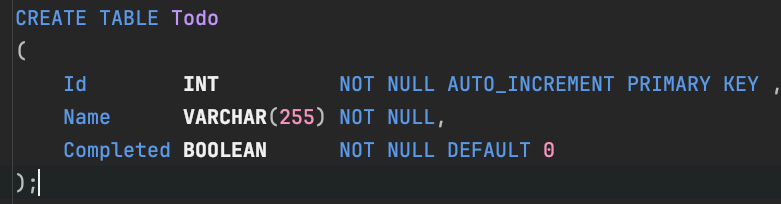
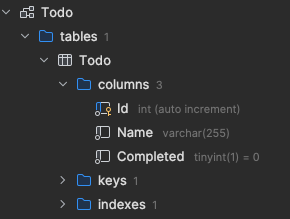
Primary Key
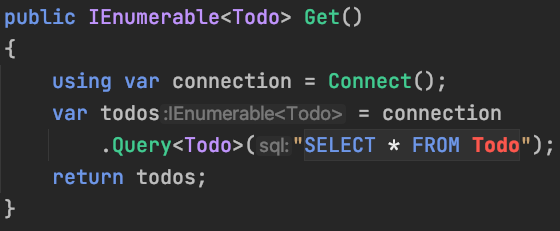
SELECT ... FROM Todo
-
using var
- when the method Get() is finished, the connection is disposed
- disposable pattern == resource (connection) management
- List<T> is an IEnumerable<T>, (comparison)
- use ToList() to convert to a List<T>
- Query<T> converts the result of the query to IEnumerable<T>, where T is a class
    public static List<Todo> Get()
    {
        using var connection = new MySqlConnection(GetConnectionString());
        return connection.Query<Todo>("SELECT Id, Name, Completed FROM Todo")
                         .ToList();
    }
Column names and Properties must match!
- Advice specifiy the colmn Name (no *)
    public static List<Todo> Get()
    {
        using var connection = new MySqlConnection(GetConnectionString());
        return connection.Query<Todo>("SELECT Id, Name, Completed FROM Todo")
                        .ToList();
    }
Rider
-
Rider IDE for C#
- Has code completion for SQL!
- Detects if a string has SQL and checks it against the database structure!
- Free Educational Licenses
Demo & code completion (choose schema)

Demonstration of
- Demo of the Exercises in GitHub classroom
- Link in is Blackboard
The homework assignments are mandatory:
- 3 exercises files
- with test
On the exam (tentamen):
3 exercises (one from each exercise file/lesson)
Aftekenen in werkcollege of classrooms
QuerySingleOrDefault() + Parameter
- QuerySingleOrDefault<Todo>(sql, param)
- returns one Todo or null (nullable is ?)
-
SQL Parameter placeholder (@Id)
- start with @
- Filled by: new {Id = id}
- anonymous object
public static Todo? Get(int id)
{
	string sql = "SELECT Id, Name, Completed FROM Todo WHERE Id = @Id";
	using var connection = new MySqlConnection(GetConnectionString());
	return connection.QuerySingleOrDefault<Todo>(sql, new { Id = id });
}
ExecuteScalar<T>
-
One value one record
- ExecuteScalar<T>(...)
- Strange name :-)
- ExecuteScalar<T>(...)
    public static int NumberOfTodos()
    {
        using var connection = new MySqlConnection(GetConnectionString());
        return connection.ExecuteScalar<int>("SELECT COUNT(*) FROM Todo");
    }
Delete
- Execute(sql, param) return numRowsEffected
- INSERT, UPDATE, DELETE (without selecting the changed row)
- Most of the time: delete records with the Primary Key (Id)
    public static void Delete(int id)
    {
        using var connection = new MySqlConnection(GetConnectionString());
        var sql = "DELETE FROM Todo WHERE Id = @Id";
        connection.Execute(sql, new { Id = id });
    }
Insert
- INSERT
- ExecuteScalar<int>(sql, param) --> numRowEffected
- It's a good idea to return the PK after an insert
- SELECT LAST_INSERT_ID();
- Parameters are mapped automatically
public static int Create(Todo todo)
{
    using var connection = new MySqlConnection(GetConnectionString());
    var sql = "INSERT INTO Todo (Name, Completed) VALUES (@Name, @Completed); " +
              "SELECT LAST_INSERT_ID();";
    var id = connection.ExecuteScalar<int>(sql, todo);
    return id;
}
Update + Select
- Same idea as with the insert
- LAST_INSERT_ID() can't be used (insert only)
	public static Todo? UpdateAndSelect(Todo todo)
    {
        var sql = "UPDATE Todo SET Name = @Name, Completed = @Completed WHERE Id = @Id; "
                  +"SELECT Id, Name, Completed FROM Todo WHERE Id = @Id";

        using var connection = new MySqlConnection(GetConnectionString());
        // var updatedTodo = TodoDemo.Get(todo.Id);
        var updatedTodo = connection.QuerySingle<Todo>(sql);
        return updatedTodo;
    }
CRUD

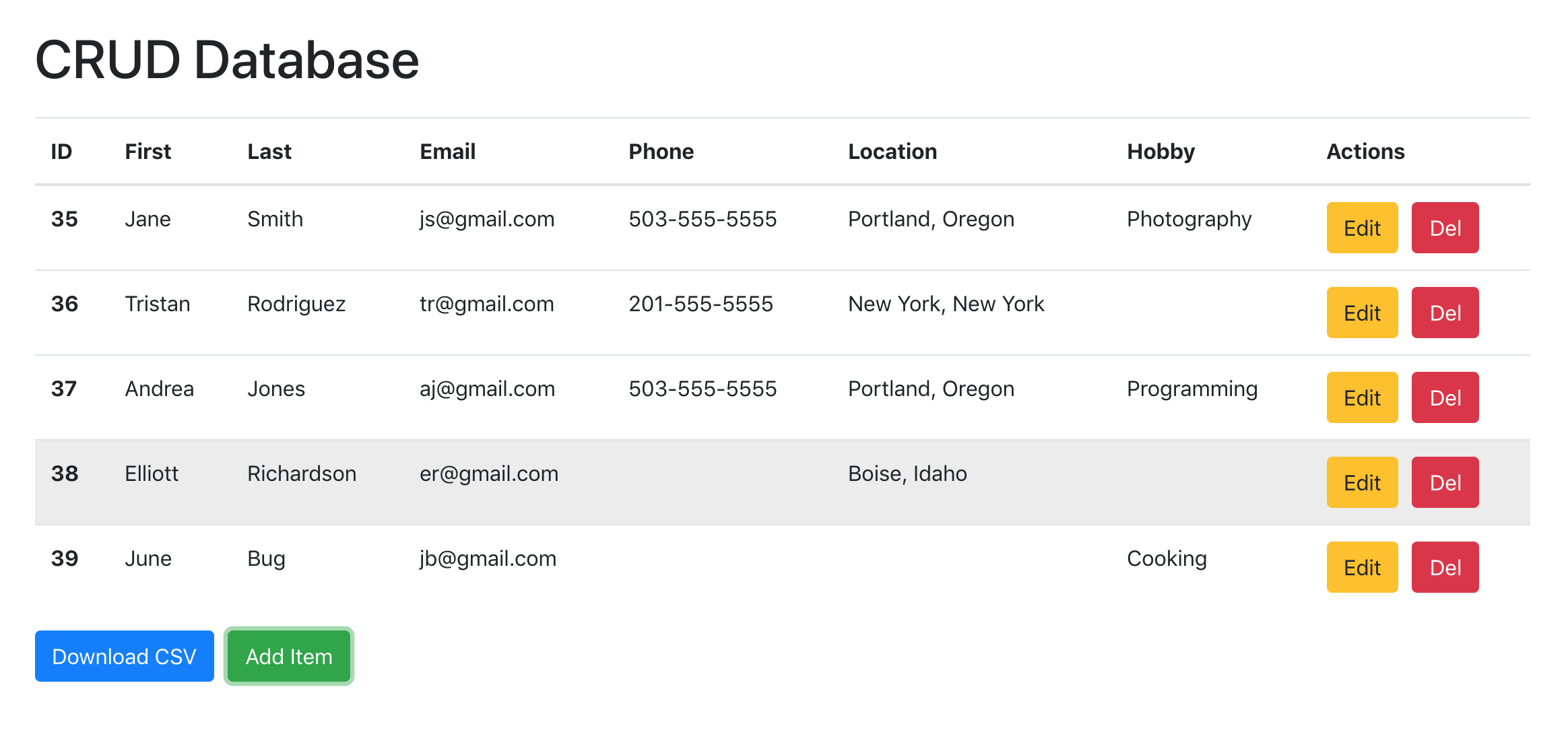
| CRUD | Repository | SQL |
|---|---|---|
| Create | Add(...) | INSERT |
| Read | GetById(id), GetAll(), Get(), etc | SELECT |
| Update | Update(...) | UPDATE |
| Delete | Delete/Remove | DELETE |
When to use which method
- Take a look at the dapper documentation
- Tip:
Column names and Properties don't match --> Alias
- Alias in SQL
- As keyword
- May be replaced by space
- As keyword
- When to use
- Column names and properties don't match
- Calculated column
- Ambiguity in columns (join)
SELECT CONCAT(FirstName, ' ', LastName) As Fullname
FROM Actors
Query --> Class
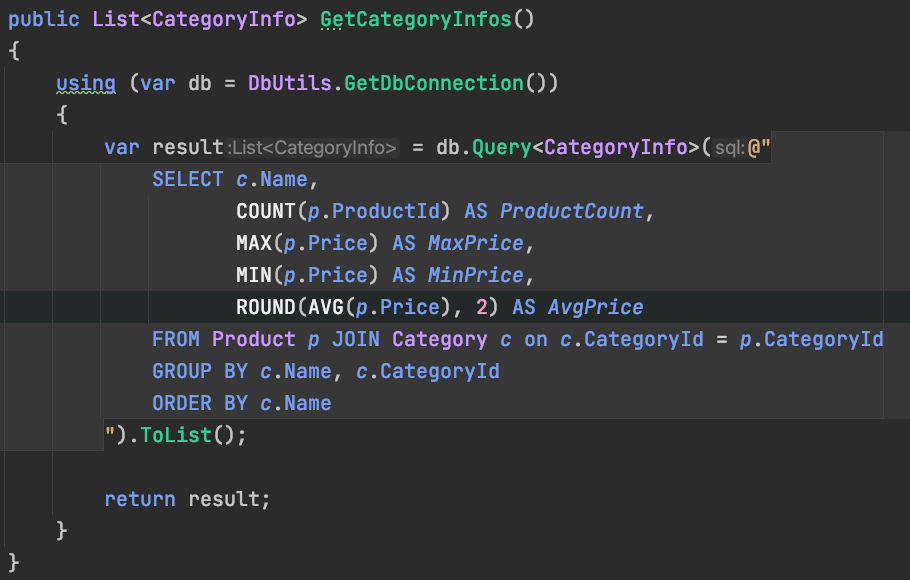
- Map to class
- Property in class should match column name (AS keyword)
Examples and Exercises
See Blackboard.
Try to make a start with the Exercises in Github Classrooms
If you need help: Werkcollege
Signing off on homework: Werkcollege.
Lesson 2
- SQL Injection
- Parameters
- NULL Trick
- Views
-
Automatic Column mapping
- SqlMapper.SetTypeMap(...)

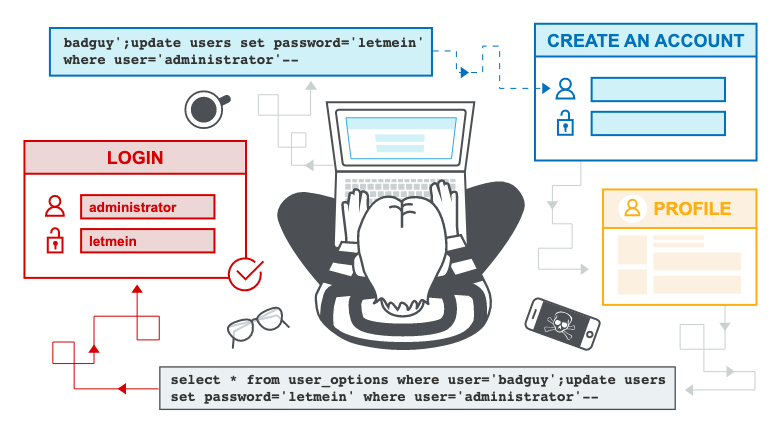
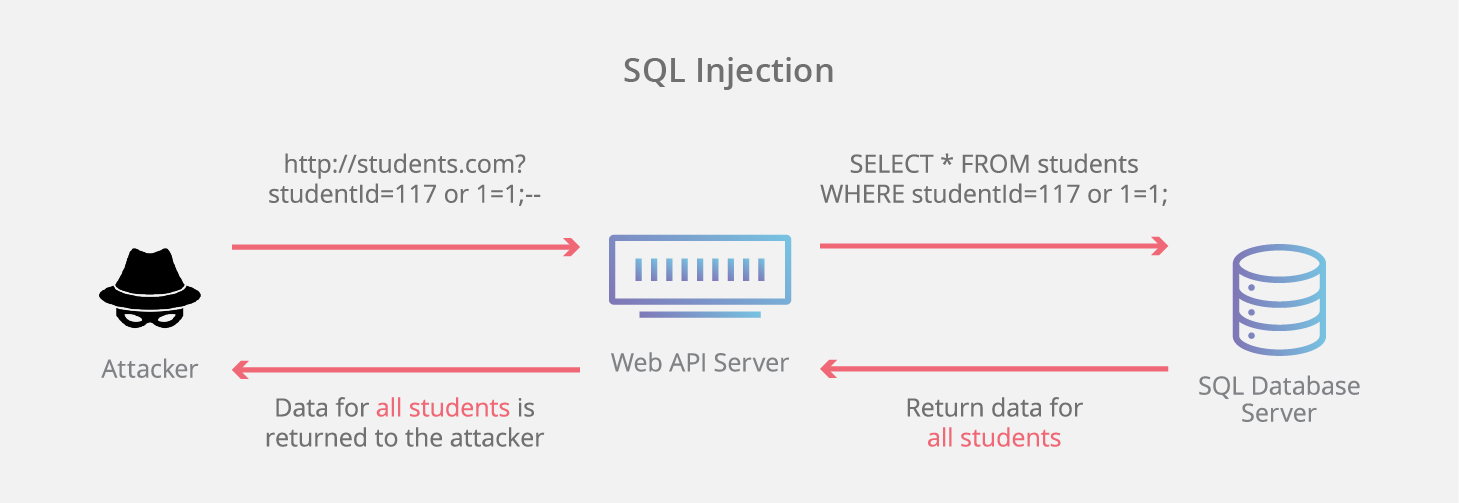
SQL Injection
Simple explanation:
Longer explanation:
SQL Injection
- Don't make your own SQL strings
- @"SELECT ... WHERE Description LIKE ${descr}"
- "SELECT ... WHERE Description LIKE" +descr"
- Add "Desc 1' OR 1 = 1; --" on the querystring (filter)

public List<Todo> GetWithSQLInjection(string filter)
{
    var todos = new List<Todo>();
    try
    {
        //De code is anders, omdat SQL injectie anders alsnog wordt tegengehouden
        using (var connection = Connect())
        {
            //Doe dit nooit zelf een querystring in elkaar zetten!
            //!!!SQL INJECTIE!!! Alle gegevens kunnen gestolen worden, etc :-(
            var sql = @"SELECT TodoId, Description, Done
                FROM Todo WHERE Description LIKE '%" + filter + "%'";

            //todos = connection.Query<Todo>(sql).ToList();

            var reader = connection.ExecuteReader(sql);
            while (reader.Read())
            {
                todos.Add(new Todo()
                {
                    TodoId = reader.GetInt32(0),
                    Description = reader.GetString(1),
                    Done = reader.GetBoolean(2)
                });
            }
        }
    }
    catch (Exception ex)
    {
        Console.WriteLine(ex.Message);
    }

    return todos;
}
SQL Injection

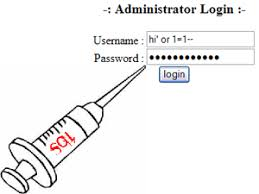
To Prevent SQL Injection
Always, Use Prepared Statement (Dapper will do this for us!) in combination with Parameter Placeholders!

Parameter Placeholders
-
Use (Query) Parameter Placeholders
-
for example: @Description, @Done
-
-
Use a prepare statements
-
Creates an SQL statement that can be executed on the server (Dapper will do this for us)
-
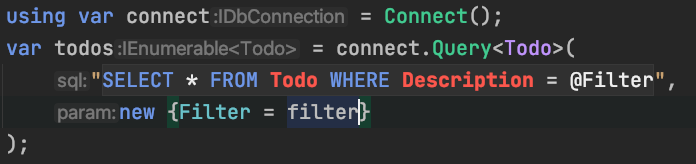
!!SQL Injection Prevented!!
Views
-
Abstraction
-
Complex queries are made easier (readable)
- Multiple views in one query
-
Complex queries are made easier (readable)
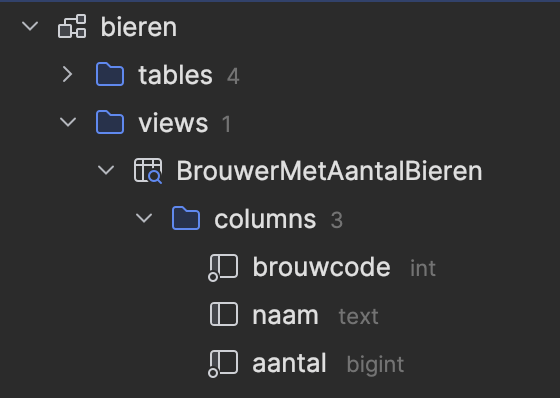
- Virtual tables
- CREATE VIEWS NameOfView AS (SELECT ....)
- SELECT only
CREATE VIEW BrouwerMetAantalBieren AS
(
    SELECT br.brouwcode, br.naam, COUNT(b.naam) AS aantal
    FROM bier b
             JOIN brouwer br on b.brouwcode = br.brouwcode
    GROUP BY br.brouwcode, br.naam
    ORDER BY aantal DESC
);


SELECT brouwcode, naam, aantal
FROM
    BrouwerMetAantalBieren
WHERE
    aantal > 10;
Views
    public class BrouwerMetAantalBieren
    {
        public int Brouwcode { get; set; }
        public string Naam { get; set; } = null!;
        public int Aantal { get; set; }
    }

    public static List<BrouwerMetAantalBieren> GetBrouwersMetAantalBieren()
    {
        var sql = """
                    SELECT brouwcode, naam, aantal
                    FROM BrouwerMetAantalBieren
                    WHERE aantal > 10
                  """;
        using var connection = new MySqlConnection(GetConnectionString());
        return connection.Query<BrouwerMetAantalBieren>(sql).ToList();
    }
CREATE VIEW BrouwerMetAantalBieren AS
(
SELECT br.brouwcode, br.naam, COUNT(b.naam) AS aantal
FROM bier b
JOIN brouwer br on b.brouwcode = br.brouwcode
GROUP BY br.brouwcode, br.naam
ORDER BY aantal DESC
);
Optional Parameters
    public List<FilmListSlower> GetFilmListSlowerWithCategoryParameterAndRating
    									(string category, string rating)
    {
        using var connection = new MySqlConnection(GetConnectionString());
        var sql = """
                    SELECT fid as FilmId, title as Title, description as Description, category as Category, price as Price,
                           length as Length, rating as Rating, actors as Actors
                    FROM nicer_but_slower_film_list
                    WHERE category = @Category
                        AND rating = @Rating
                  """;
        var films = connection.Query<FilmListSlower>(sql, param:
            			new {Category = category, Rating = rating});
        return films.ToList();
    }
Not optional
- Solutions:
- if statements (not preferable)
- NULL-trick
- SQL Builder (overkill for simple conditions)
Optional Parameters - NULL Trick
    public List<FilmListSlower> GetFilmListSlowerWithCategoryParameterAndRatingOptionalParameter
        (string category = null, string rating = null)
    {
        using var connection = new MySqlConnection(GetConnectionString());
        var sql = """
                    SELECT fid as FilmId, title as Title, description as Description, category as Category, price as Price,
                           length as Length, rating as Rating, actors as Actors
                    FROM nicer_but_slower_film_list
                    WHERE
                        (@Category IS NULL OR category = @Category) -- trick with IS NULL and OR to make the parameter optional! Make sure to use parentheses!
                        AND
                        (@Rating IS NULL OR rating = @Rating)
                  """;
        var films = connection.Query<FilmListSlower>(sql, param: new {Category = category, Rating = rating});
        return films.ToList();
    }
Automatic Column Mapping
- No more alias in SELCT
SELECT 	address_id AS AddressId, address AS Address1, address2 AS Address2, district AS District,
		city_id AS CityId, postal_code AS PostalCode, phone AS Phone, last_update AS LastUpdate
FROM address
SELECT a.*
FROM address- No more alias in SELECT
Dapper doesn't know how to map from a database column to a property in a class
- unless they are the same
-
or Dapper needs a little help
- SqlMapper.SetTypeMapper(typeof(Address), mappingDictionary);
- No more alias in SELCT
Automatic Column Mapping -
Address.SetTypeMapper();
using var connection = DbHelper.GetConnection();
return connection.Query<Address>("SELECT a.* FROM address a;").ToList();
Alternative with attributes: https://gist.github.com/senjacob/8539127
DbHelper.SetTypeMapper<Address>(new Dictionary<string, string>()
{
	{ "address_id", "AddressId" },
	{ "address", "Address1" },
	{ "address2", "Address2" },
	{ "district", "District" },
	{ "city_id", "CityId" },
	{ "postal_code", "PostalCode" },
	{ "phone", "Phone" },
	{ "last_update", "LastUpdate" },
});
The heavy lifting is done in the DbHelper.SetTypeMapper<Type>() method.
Lesson 3
- N+1 Problem
- Relationships
- Using Query<T1, T2, TR>
- multi-mapping
- one-to-one
- one-to-many
- many-to-many
- multiple levels
- Optional (LEFT JOIN / NULL)
- multi-mapping
SQL ----> C#
- C# is Object-Oriented (class-based) Programming (OOP)
-
classes --> create object instances
- nested hierarchies:
- by composition
- nested hierarchies:
-
classes --> create object instances
-
Relational Database
- SQL is used to query a database
-
the result from a SELECT query is a row-based collection of records
- result-set, result-table
-
The problem (Object–relational impedance mismatch):
- The result from a Query is a flat structure
- OOP classes are nested hierarchies
SQL <----> C#
- Let's visualize
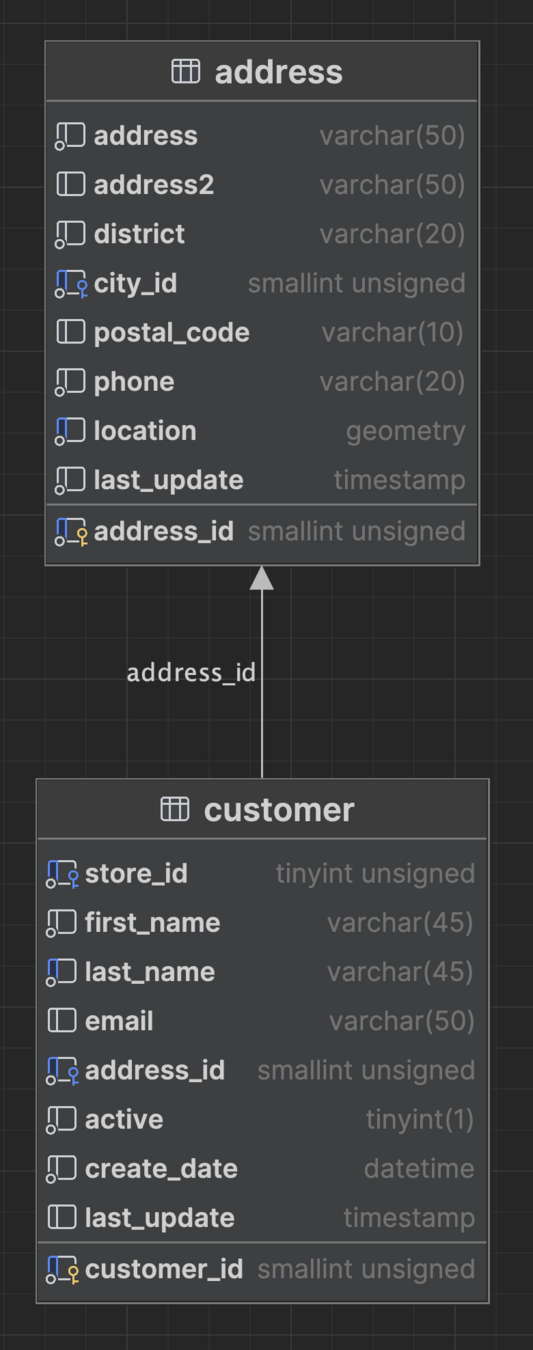
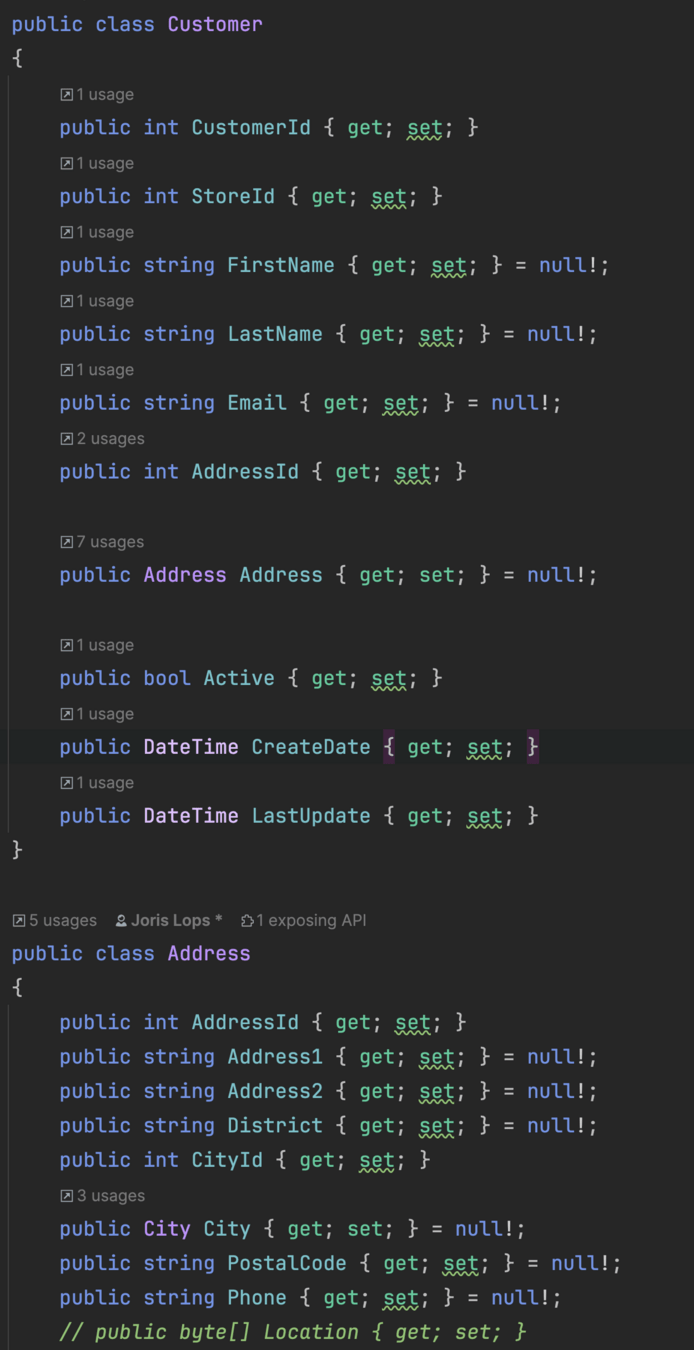
FK
Reference to Address
N+1 Problem
- Performance problem
- 1 Query for the customer and N queries for the address of each customer (foreach loop)
- N = number of customers
//Examples3_1to1Relationships.cs
public List<Customer> GetCustomersWithAddressNPlusOneProblem()
    {
        string sql =
            $"""
             SELECT customer_id AS {nameof(Customer.CustomerId)}, store_id AS {nameof(Customer.StoreId)},
             		first_name AS {nameof(Customer.FirstName)}, last_name as {nameof(Customer.LastName)},
			 		address_id AS {nameof(Customer.AddressId)},
             		...
             FROM customer
             ORDER BY customer_id
             LIMIT 3
             """;
        using var connection = new MySqlConnection(GetConnectionStringForShop());
        var customers = connection.Query<Customer>(sql)
            .ToList();  //1 Query
        foreach (var customer in customers) // N Queries
        {
            var sqlAddress = """
                      SELECT address_id AS AddressId, address AS Address1, address2 AS Address2, district AS District,
							 ...
                      FROM address
                      WHERE address_id = @AddressId
                      """;

            //Every time we execute this query, we have to go to the database and get the address.
            //This is called the N+1 problem, because we have 1 query to get the customers and N queries to get the addresses.
            var address = connection.QuerySingle<Address>(sqlAddress, new
            {
                AddressId = customer.AddressId
            });
            customer.Address = address;
        }

        return customers.ToList();
    }
How to solve N+1
- Use one query
- But how do we split each record (the result) over two objects?
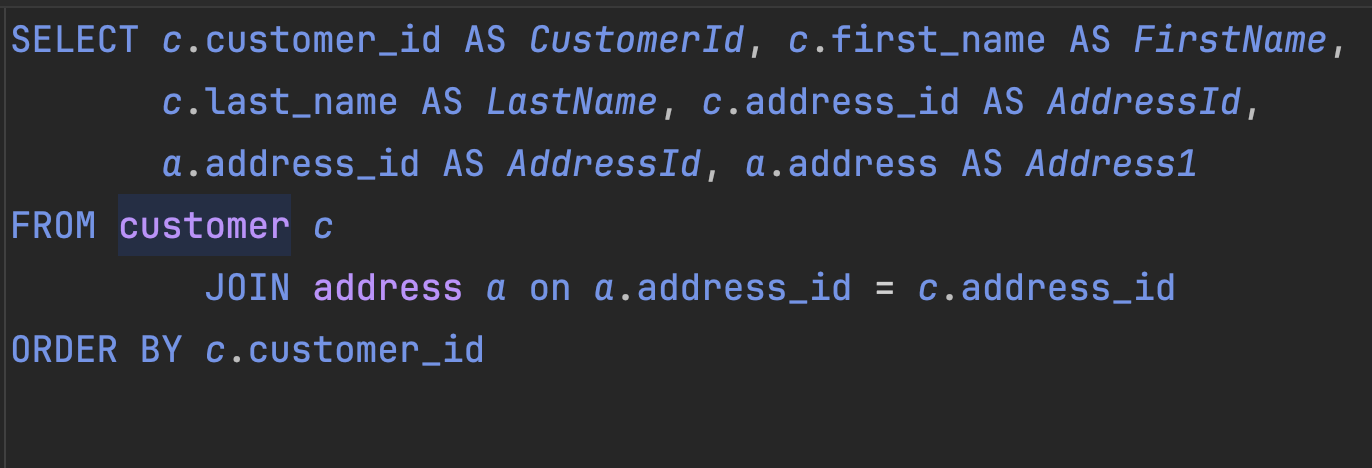

1 - to - 1 relationship
public class Customer
{
    public int CustomerId { get; set; }

    public int StoreId { get; set; }
    public Store Store { get; set; }

    public string FirstName { get; set; }
    public string LastName { get; set; }
    public string Email { get; set; }

    public int AddressId { get; set; }
    public Address Address { get; set; }

    public int Active { get; set; }
    public DateTime CreateDate { get; set; }
    public DateTime LastUpdate { get; set; }
}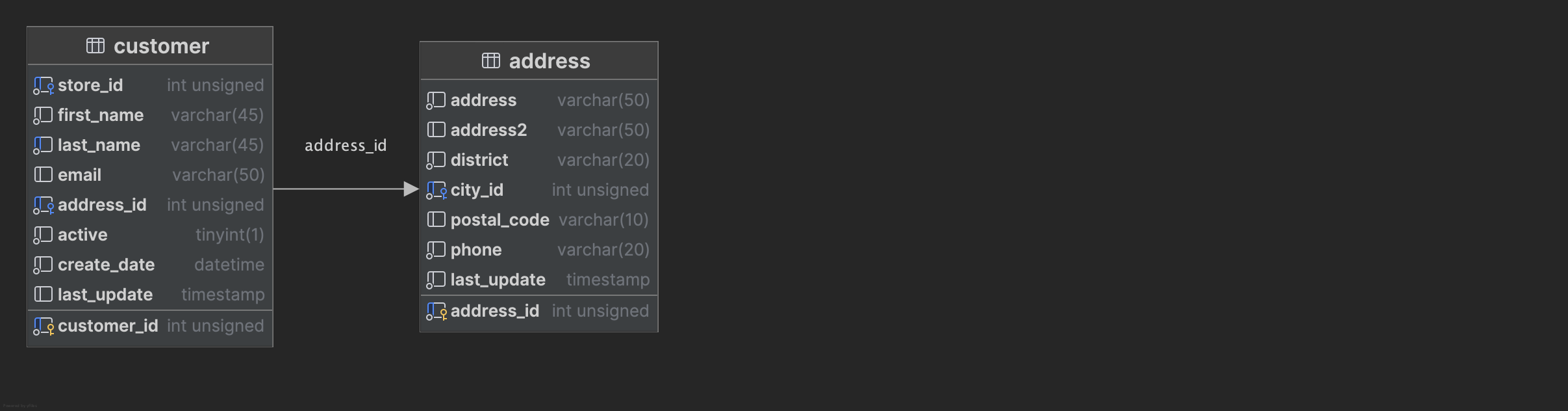
Result type
The Dapper way
- Introduce a splitOnColmun in the query
- Use the method:
- Query<Customer, Address, Customer>("sql query", map: ...., splitOn: "AddressSplit")
- Returns a IEnummerable<Customer> (List<Customer>)
- Query<Customer, Address, Customer>("sql query", map: ...., splitOn: "AddressSplit")
splitOn:
    //Example3_1to1Relationships.cs
    public List<Customer> GetCustomerIncludeAddress()
    {
        string sql =
            """
                SELECT
                    c.customer_id AS CustomerId, -- rest of customer columns...

                'AddressSplit' AS AddressSplit,

                    a.address_id AS AddressId, a.address AS Address1, -- rest of address columns...

                FROM customer c
                    JOIN address a on a.address_id = c.address_id

                ORDER BY c.customer_id
            """;

		using IDbConnection connection = DbHelper.GetConnection();
        List<Customer> customers = connection.Query<Customer, Address, Customer>(
            sql,
            map: (customer, address) =>
            {
                customer.Address = address;
                return customer;
            },
            splitOn: "AddressSplit")
            .ToList();
        return customers;
    }
Split
Dapper needs to know how to map columns to objects
The Dapper way
List<Customer> customers = connection.Query<Customer, Address, Customer>(
	sql,
	map: (customer, address) =>
	{
		customer.Address = address;
		return customer;
	},
splitOn: "AddressSplit").ToList();- (customer, address) => { ... return customer; }
- is a function without a name (anonymous function, lambda expression)
- Examples (inc1, sum, Linq (Where))
- map: & splitOn: named parameters
- improves readability
- The coupling between the customer and address is accomplished in the map function
The Dapper way
List<Customer> customers = connection.Query<Customer, Address, Customer>(
	sql,
	map: (customer, address) =>
	{
		customer.Address = address;
		return customer;
	},
splitOn: "AddressSplit").ToList();- This is a one-to-one relationship
- Each customer has one address
- This is relatively easy
How about 1-n and n-n relationships
That's a bit harder with Dapper
1 - N Relationships
- Let's take a look at the examples.
- In my opinion, only the Dictionary approach is feasible
- why: we don't want duplicated store instance
- sql returns all customer, and store combinations
- Query<T1,T2,TR>(sql, map, splitOn)
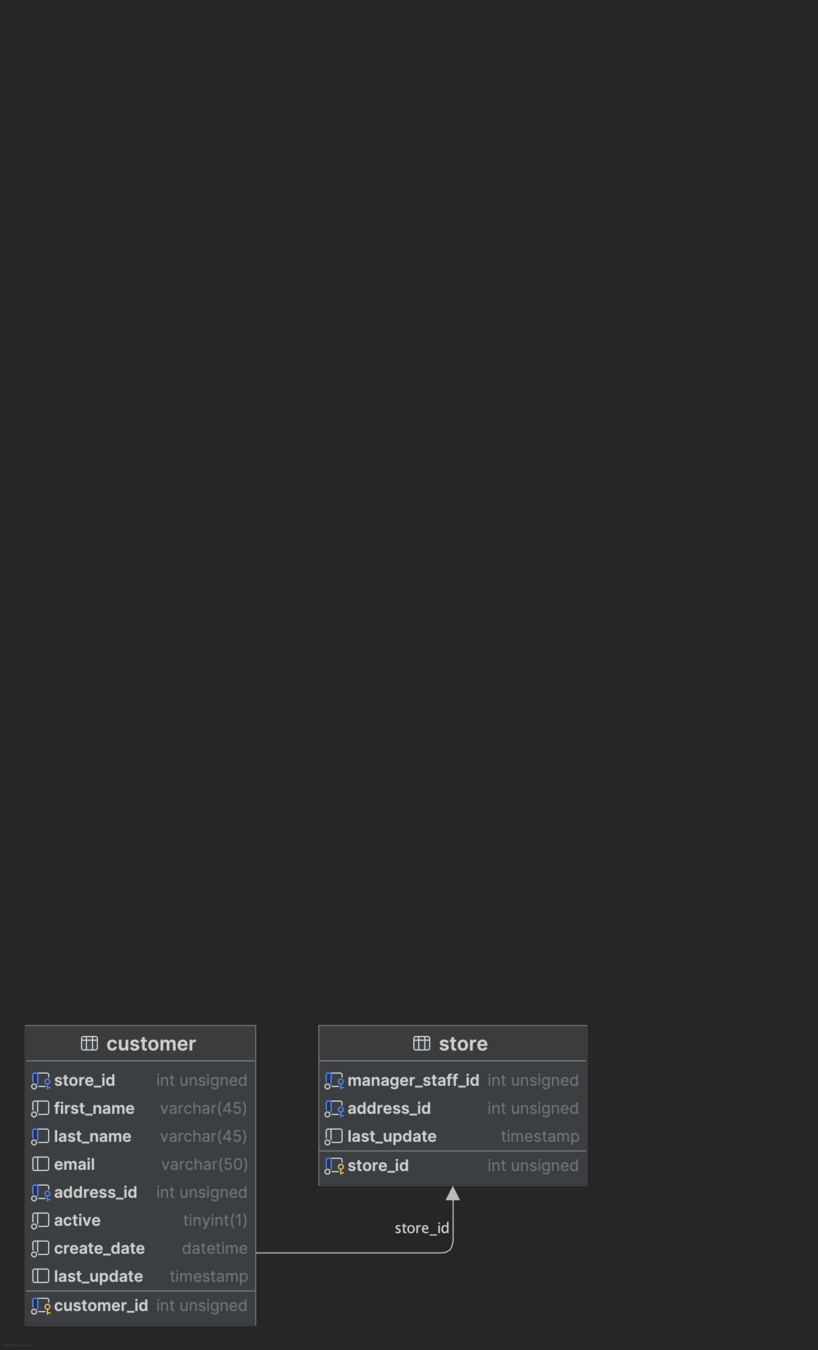
SQL != Objects
- Objects in C# are hierarchies
- SQL returns all customer, and store combinations

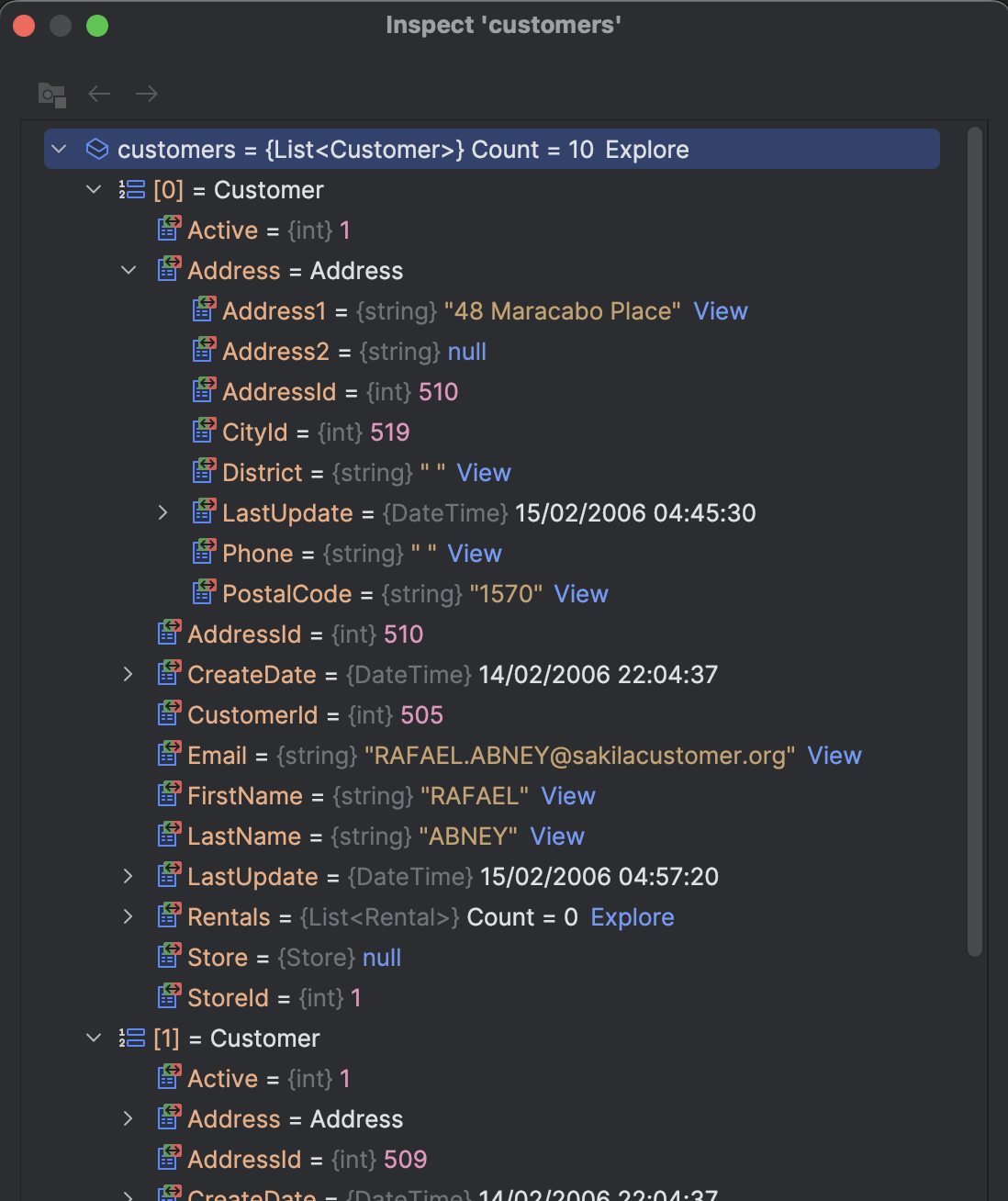
1 - N Relationships
public class Customer
{
    public int CustomerId { get; set; }

    public int StoreId { get; set; }
    public Store Store { get; set; }

    public string FirstName { get; set; }
    public string LastName { get; set; }
    public string Email { get; set; }

    public int AddressId { get; set; }
    public Address Address { get; set; }

    public int Active { get; set; }
    public DateTime CreateDate { get; set; }
    public DateTime LastUpdate { get; set; }
}
public class Store
{
public int StoreId { get; set; }
public int ManagerStaffId { get; set; }
public int AddressId { get; set; }
public DateTime LastUpdate { get; set; }
public List<Customer> Customers { get; set; }
= new List<Customer>();
}1 - N Relationships
SELECT
    c.customer_id AS CustomerId,
    c.store_id AS StoreId,
    c.first_name AS FirstName,
    -- rest of customer columns

    '' AS 'StoreSplit',

    s.store_id AS StoreId,
    s.manager_staff_id AS ManagerStaffId
    -- rest of store columns
FROM customer c JOIN store s ON c.store_id = s.store_id
ORDER BY c.customer_id
LIMIT 10
!!Duplicate Stores!!

Dictionary
- Duplicate records (Store)
- We need to save the Stores in a Dictionary
- Represents a collection of keys and values
- Dictionary<int, Store>
- Represents a collection of keys and values
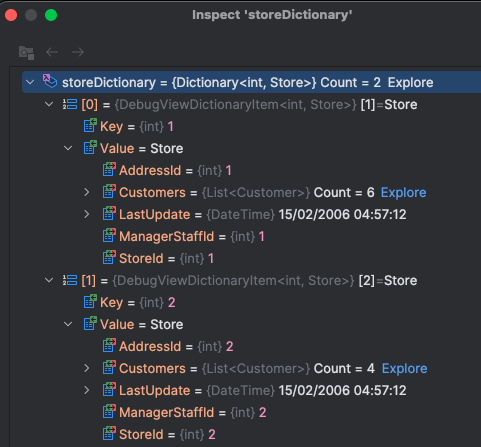
Key = store id (pk of Store)
Value = Store
Dictionary C#
Declaration:
Check if a value exists for a key:
Get value for a key:
else
Set value for a key:
Dictionary<int, Store> storeDictionary = new Dictionary<int, Store>(); store = storeDictionary[store.StoreId];if(storeDictionary.ContainsKey(store.StoreId)) {else {
storeDictionary.Add(store.StoreId, store);
}Dictionary in map
Dictionary<int, Store> storeDictionary = new Dictionary<int, Store>();
using IDbConnection connection = DbHelper.GetConnection();
List<Customer> customers = connection.Query<Customer, Store, Customer>(
sql,
map: (customer, store) =>
{
if(storeDictionary.ContainsKey(store.StoreId))
{
store = storeDictionary[store.StoreId];
}
else {
	storeDictionary.Add(store.StoreId, store);
}
//store maintains a list of customers
store.Customers.Add(customer);
customer.Store = store;
return customer;
},
splitOn: "StoreSplit").ToList();if we don't use a dictionary we get duplicated stores, they look the same but are not the same!!
1 to N reversed
1 store has many customers
Dictionary<int, Store> storeDictionary = new Dictionary<int, Store>();
        using IDbConnection connection = DbHelper.GetConnection();
        List<Store> stores = connection.Query<Store, Customer, Store>(
            sql,
            map: (store, customer) =>
            {
                if(storeDictionary.ContainsKey(store.StoreId))
                {
                    store = storeDictionary[store.StoreId];
                }
                else
                {
                    storeDictionary.Add(store.StoreId, store);
                }

                store.Customers.Add(customer);
                return store;
            },
            splitOn: "CustomerSplit")
            .Distinct() // remove duplicates, remember the SQL returns each store, customer combination
            .ToList();
        return stores;
string sql =
"""
SELECT
s.store_id AS StoreId, -- rest of store columns
'' AS 'CustomerSplit',
c.customer_id AS CustomerId,
c.store_id AS StoreId -- rest of customer columns
FROM store s JOIN customer c
ON s.store_id = c.store_id
ORDER BY c.store_id
""";1 to N reversed
Remove duplicates:
- A store has many customers
- remember the SQL returns each store, customer combination
- The Distinct() removes the duplicate stores!
- The duplicates are the same instances
...
            },
            splitOn: "CustomerSplit")
            .Distinct() // remove duplicates, remember the SQL returns each store, customer combination
            .ToList();
        return stores;
N to N Relationship
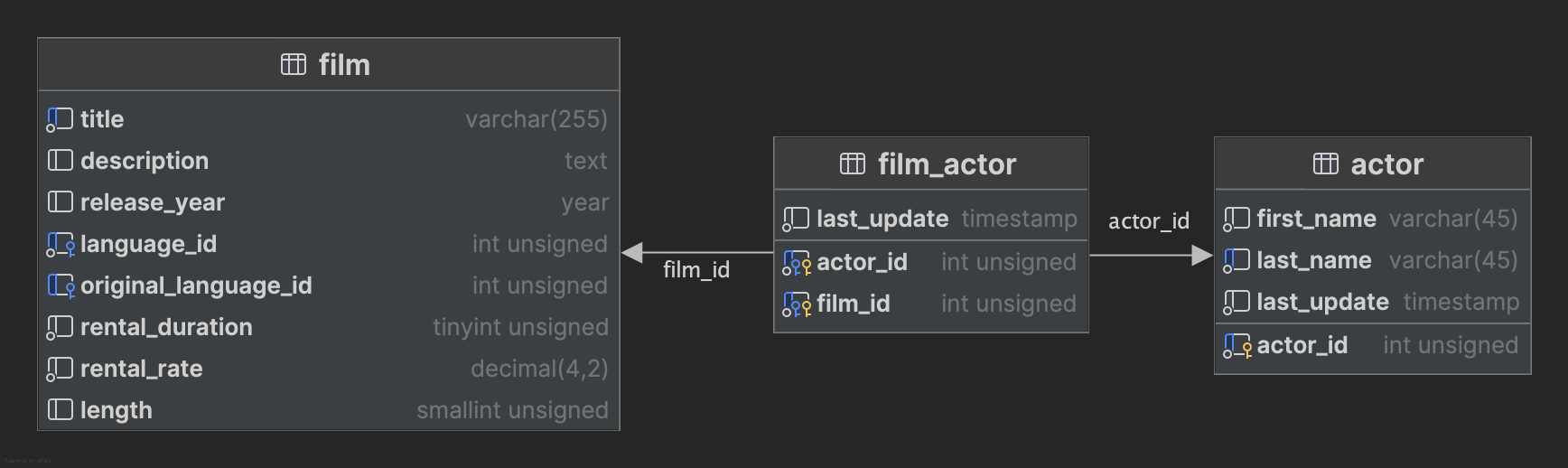
public class Film
{
    public int FilmId { get; set; }
    public string Title { get; set; }
	// other properties

    public List<Actor> Actors { get; set; }
    	= new List<Actor>();
}
public class Actor
{
public int ActorId { get; set; }
public string FirstName { get; set; }
public string LastName { get; set; }
public DateTime LastUpdate { get; set; }
public List<Film> Films { get; set; } =
new List<Film>();
}N to N Relationship
string sql =
    """
     SELECT
         a.actor_id AS ActorId,
         -- rest of actor columns
         '' AS 'FilmSplit',
         f.film_id AS FilmId,
         -- rest of film columns columns
     FROM actor a
        JOIN film_actor fa ON a.actor_id = fa.actor_id
            JOIN film f ON fa.film_id = f.film_id
     ORDER BY a.last_name, a.first_name, f.title
    """;

using IDbConnection connection = DbHelper.GetConnection();
Dictionary<int, Actor> actorDictionary = new Dictionary<int, Actor>();
List<Actor> actors = connection.Query<Actor, Film, Actor>(
    sql,
    map: (actor, film) =>
    {
        if(actorDictionary.ContainsKey(actor.ActorId))
        {
            actor = actorDictionary[actor.ActorId];
        }
        else
        {
            actorDictionary.Add(actor.ActorId, actor);
        }

        actor.Films.Add(film);
        return actor;
    },
    splitOn: "FilmSplit")
    .Distinct() // remove duplicates, remember the SQL return each actor, film combination
    .ToList();
return actors;
Multiple Levels
        string sql =
            """
            SELECT
                ....
            FROM customer c
                    LEFT JOIN rental r ON c.customer_id = r.customer_id
                        LEFT JOIN inventory i ON r.inventory_id = i.inventory_id
                            LEFT JOIN film f ON i.film_id = f.film_id
            ORDER BY c.customer_id, f.title
            """;

        IDbConnection connection = DbHelper.GetConnection();
        Dictionary<int, Customer> customerDictionary = new Dictionary<int, Customer>();
        List<Customer> customers = connection.Query<Customer, Rental, Inventory, Film, Customer>(
            sql,
            map: (customer, rental, inventory, film) =>
            {
                if (customerDictionary.ContainsKey(customer.CustomerId))
                {
                    customer = customerDictionary[customer.CustomerId];
                }
                else
                {
                    customerDictionary.Add(customer.CustomerId, customer);
                }

                if (rental.RentalId != 0) // check if rental exists, some customers don't have rentals!!
                {
                    rental.Inventory = inventory;
                    inventory.Film = film;

                    customer.Rentals.Add(rental);
                }

                return customer;
            },
            splitOn: "CustomerSplit, RentalSplit, InventorySplit") //the split on parameter is used to split the result set,
                                                                   //not that multiple columns are used (seperated by a comma)
            .Distinct() // don't forget to remove duplicates (each customer, rental, inventory, film combination)
            .ToList();
Optional Relationship
map: (customer, rental, inventory, film) =>
{
    if (customerDictionary.ContainsKey(customer.CustomerId))
    {
        customer = customerDictionary[customer.CustomerId];
    }
    else
    {
        customerDictionary.Add(customer.CustomerId, customer);
    }

    if (rental.RentalId != 0) // check if rental exists, some customers don't have rentals!!
    {
        rental.Inventory = inventory;
        inventory.Film = film;

        customer.Rentals.Add(rental);
    }

    return customer;
},
Some Customers don't have Rentals
- Dapper doesn't understand "null"
- trick to solve (check pk != 0)
Populating both sides of a relationship!
Try to avoid it, it's not needed most of the time.
But if you want you need to check for duplicates in the map function. This can be done with Any(...) method.
List<Beer> beers = connection.Query<Beer, Brewer, Beer>(sql, (beer, brewer) =>
    {
        if (!breweryDictionary.TryGetValue(brewer.BrewerId, out Brewer? brewerEntry))
        {
            breweryDictionary.Add(brewer.BrewerId, brewer);
            brewerEntry = brewer;
        }

        beer.Brewer = brewerEntry;

        if (!brewerEntry.Beers.Any(x => x.BeerId == beer.BeerId))
        {
            brewerEntry.Beers.Add(beer);
        }

        return beer;
    }, splitOn: "BrewerId")
Recap
- 1 to 1 relationships = simple
- 1 to n && n to n = use a dictionary
- remember the map function returns a value in the list for each record in the query --> sometimes we need a Distinct().
- Be careful with optional relationships (NULL)
- LEFT JOIN
- check if the object is filled
- if(rental.RentalId != 0) { ... }