COMP1701-004
fall 2023
lec-10

The slog begins




RECALL
Here is some code:
a = input("Arglebargle? ")

b = ipsie <= IPSIE_UPPER_LIMIT

c = a * fnord(a, b)

d = globbo(18.3, 11) and not (bamboozle() == "hotbox!")
If we assume that this code runs just fine, answer these questions:
- What are the types of a, b, c, and d?
- What functions are called with no arguments? 1 arg? More than 1?
- What are the return types of each function - and how do you know?
- Write the function headers for the functions in lines 3, 5, and 7.
Use type hints.
let's talk about these things today:
⦾ code review
⦾ tying up loose ends
⦾ trace illustrating global vs local scope
⦾ import / from import
⦾ docstrings
code review
I took a wander through labs and assignments and found a few things to talk about.
Remember: you are not your code.
"Code reviews are methodical assessments of code designed to identify bugs, increase code quality, and help developers learn the source code."
- GitLab, What are code reviews, and how do they work?
Before we begin, though:
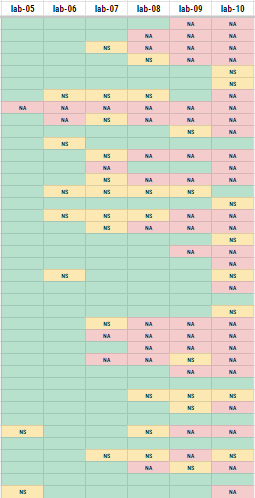
Here's what people seem to be doing with the labs.
GREEN are "completed" (?!!!) as of yesterday.
YELLOW are started, but haven't been pushed . So what?
RED haven't been attempted.
Neither mostly red - nor mostly green! - are guarantees of anything. But if I had to put some money down, I'm playing green.
I apologize if I seem negative when I comment on your work....
def inflation(price_today: int, price_last_year: int) -> float:
  inflation_rate = ((price_today - price_last_year) / price_last_year) * 100
  return inflation_rate
lab-07
- How are the variable and function names?
- How are the type hints?
- Any suggested improvements?
I'd suggest making this a one-liner. Otherwise 😁
def semiperimeter_calculation(side_a: float, side_b: float, side_c: float) -> float:
    sp = (side_a + side_b + side_c)/2
    return sp

def area_calculation(sp: float, side_a: float, side_b: float, side_c: float) -> float:
    area = (sp*((sp - side_a)*(sp - side_b)*(sp - side_c))) ** 0.5
    return area

side_a = float(input("Enter the length of side a: "))
side_b = float(input("Enter the length of side b: "))
side_c = float(input("Enter the length of side c: "))
sp = semiperimeter_calculation(side_a, side_b, side_c)
area = area_calculation(sp, side_a, side_b, side_c)

print(f'''The area of a triangle with side lengths of
	{side_a:.2f}, {side_b:.2f}, {side_c:.2f} is {area:.2f}.''')
lab-07
- How are the variable and function names?
- How are the type hints?
- Any suggested improvements?
Bring in main(). Don't need "calculation". Don't pass in semip.
import math

# Rounding a number up to the nearest whole number.
# Using the math.ceil() method, as found from:
# "Python Round to Int - How to Round Up or Round Down to Nearest Whole Number"
# https://www.freecodecamp.org/news/how-to-round-numbers-up-or-down-in-python/.
def cake_time(temp: int, d: float) -> int:
    cake_time = math.ceil(20 + 350 * (area(d) - area(6)) / (2 * temp))
    print(f'Your cake should take about {cake_time} minutes to bake.')
    return cake_time

def area(diameter: float) -> float:
    cake_pan_area = math.pi * (1/4) * diameter ** 2
    return cake_pan_area

def main() -> None:
    oven_temp = int(input("Enter the temperature in °F (between 300 and 450): "))
    cake_pan_diameter = float(input("Enter the cake pan diameter "))
    cake_pan_area = area(cake_pan_diameter)

    cake_time(oven_temp, cake_pan_diameter)

main()
lab-08
Don't print in cake_time and one-liner it. Otherwise, good stuffs!
triangle_num = int((num_items * (num_items + 1) / 2))lab-09
Saw quite a bit of this - both here and on the midterm!
What can we use here instead of the cast?
def redact(redacted_name:str,d:str, '#' )->None:
    redacted_name= name.replace('dog','#')
    print(redacted_name)
lab-09
Names are important! And functions are meant to be general-purpose things, not tailored towards one specific set of inputs.
print(f"Final values for stock purchased at ${str(stock_round_down)} {stock_remainder}/4 and held for {str(time_held)} years \nat {str(growth_input)}% growth rate: ${str(fv_round_down)} {str(fv_remainder)}/4 (${str(npv_optimistic_round_down)} {str(npv_optimistic_remainder)}/4 in today's dollars.)")asg-02
Long lines of anything are hard to keep in our brains, and \n can be hard to miss and get lost in the noise.
Doing casts/calculations inside an f-string can be hard to follow.
Break up into multiple prints, use variables to hold the results of casts and calculations
def net_present_value(conservative_FV: float, number_of_years:float) -> float:
    FV = conservative_FV
    i = 0.033
    t = number_of_years
    conservative_NPV = FV *(1+i)**-t
    return conservative_NPV
asg-02
No need to store parameters in different local variables - UNLESS you mean to change them somehow.
def Future_value(starting_value: float, number_of_years: float, conservative_growth: float) -> float:
    PV = starting_value
    t = number_of_years
    r = conservative_growth /100
    FV = PV *(1+r)**t
    conservative_FV = FV
    return conservative_FV
Let's do the big trace from lec-08 together.
It'll provide a chance to discuss the topic of scope, and be good practice to boot.
PTS_PER_GOLD = 3
PTS_PER_SILVER = 2
PTS_PER_BRONZE = 1

def gold_pts(g):
  g = g + 1
  return g * PTS_PER_GOLD

def silver_pts(s):
  s = s - 1
  return s * PTS_PER_SILVER

def bronze_pts(b):
  b = b # No, this doesn't make sense.
  return b * PTS_PER_BRONZE

def total_pts(g,s,b):
  return gold_pts(g) + silver_pts(s) + bronze_pts(b)

def main():
  gold = 1
  silver = 2
  bronze = 3
  PTS_PER_BRONZE = 1000
  tp = total_pts(gold, silver, bronze)
  print(tp, bronze, silver, gold)

gold = 3
silver = 1
bronze = 2

main()

print(gold, silver, bronze)- Why track the function names?
- Why the boxes?
- What variables are global? Local?
- What benefits does using main() have?

import A / from A import B
We won't got into a lot of detail about these, but a little detail won't hurt.
# use debugger to see what's going on

import math

a = math.ceil(2.4)
b = math.factorial(4)
c = math.isclose(0.1 + 0.2, 0.3)

print(a, b, c)
We use import when we want to use functions located in a library.
import random

a = random.randint(3, 10)
b = random.choice(['Bob', 'Mariko', 'Said', 'Hatoon'])
c = random.uniform(0.0, 100.0)

print(a, b, c)
We can use libraries created by third parties, like Python's math and random.
When we import blah as seen here, Python creates a global variable that we can use anywhere in the entire script to access the functions we want.
compares floats "safely"
We can also use import inside function bodies if we want to.
def roll() -> int:
  import random
  return random.randint(1, 6)

def main() -> None:
  # These 2 calls to roll() are OK
  print(roll())
  print(roll())

  # This will blow up, though. Why?
  print(random.randint(1, 10))

main()
When we import random as seen here, Python creates a local variable that we can only use inside the function.
# use debugger to see what's going on

from math import ceil, factorial, isclose

a = ceil(2.4)
b = factorial(4)
c = isclose(0.1 + 0.2, 0.3)

print(a, b, c)
We can import only specific functions from the library using the from A import B syntax.
from random import randint, choice, uniform

a = randint(3, 10)
b = choice(['Bob', 'Mariko', 'Said', 'Hatoon'])
c = uniform(0.0, 100.0)

print(a, b, c)
When we use from blah import blah as seen here, we now only have access to specific functions.
This looks a bit cleaner and makes the code more expressive.
You'll see imports in action in many of our labs, now that you know what to look for.
import pytest
from redactor import redact
import pytest
from triangular_scoring import scoreimport hello
out, _ = capsys.readouterr()
assert out == "Hello, world!\n"docstrings
Or, how to make your functions clearer.
What is a docstring?
A docstring is a string literal that occurs as the first statement in a module, function, class, or method definition.
We only are going to concern ourselves with docstrings attached to functions.
def foo() -> None:
  "Wait, so THIS is a docstring?!?"
  print("foo de foo")
This might not seem very helpful - and this particular one definitely isn't.
Let's give a more useful example.
def area(diameter: float) -> float:
  """Return the area of a circle, given its diameter."""
  from math import pi

  radius = diameter / 2
  return pi * radius ** 2
A more useful docstring
Using triple quotes in docstrings is a convention you should follow.
The simplest form of docstring is simply a one-line summary of what the function does.
def cake_time(oven_temp: int, pan_diameter: float) -> int:
  """Return the number of minutes (rounded up) to bake a cake."""

  time = 20 + (350 * (area(pan_diameter) - area(6))) / (2 * oven_temp)
  return math.ceil(time)
Sometimes one line isn't enough
This one-liner raises quite a few questions!
What unit for temperature? For diameter? Is this for real, or made up? What's with all the magic numbers?
Once we start writing more complex docstrings, we have options - because there are numerous docstring formats out there.
I'm going to use the NumPy/SciPy format, because I like it. I'm not nearly arrogant enough to say it's "the best".
def cake_time(oven_temp: int, pan_diameter: float) -> int:
  """Return the number of minutes (rounded up) to bake a cake."""
This page talks about the sections available. It also provides a somewhat-useful example at the top in the Note.
def cake_time(oven_temp: int, pan_diameter: float) -> int:
  """Return the number of minutes (rounded up) to bake a cake.

  This is a made-up function (hence all the funky math),
  and does not actually return a useful result.

  Parameters
  ----------
  oven_temp : int
  	Temperature of the oven, in degrees Farenheit.
  pan_diameter : float
  	Diameter of the cake pan, in inches.

  Returns
  -------
  int
  	The number of minutes, rounded up, required to bake the cake.

  """
short summary
extended summary
parameters
returns
def landing_point(angle: float, velocity: float) -> float:
    """Computes the horizontal distance a projectile will travel.

    Uses projectile kinematics to determine the horizontal distance
    travelled by a projectile when launched at some `angle` with
    some `velocity`.

    This, by the way, is an example of a formal NumPy/SciPy docstring.
    It is supposed to be written in a very specific format
    (see https://numpydoc.readthedocs.io/en/latest/format.html), and
    then turned into formal documentation by software tools.

    Parameters
    ----------
    angle : float
        Launch angle of projectile from horizontal, in degrees.
    velocity : float
        Launch velocity of projectile, in meters / second.

    Returns
    -------
    float
        Distance travelled by projectile along horizontal, in meters.
    """
Another example
What's the difference between docstrings and comments?
- Comments are a way to convey useful information about the code inside a function.
- Docstrings are a way to convey useful information about what a function does and how to use it.
For one, there is a difference of purpose:
And there is another cool difference as well...
docstrings provide an additional bonus: they can be displayed via help()
def cake_time(oven_temp: int, pan_diameter: float) -> int:
  """Return the number of minutes (rounded up) to bake a cake.

  This is a made-up function (hence all the funky math),
  and does not actually return a useful result.

  Parameters
  ----------
  oven_temp : int
  	Temperature of the oven, in degrees Farenheit.
  pan_diameter : float
  	Diameter of the cake pan, in inches.

  Returns
  -------
  int
  	The number of minutes, rounded up, required to bake the cake.

  """
Let's toss this into a Codespace and see what happens....
Practice creating docstrings going forward; documentation doesn't go away in future courses, though the format changes.
Besides, you'll need to create them for part 2 of assignment three. :)

RECAP RECAP
What did we talk about?
