COMP3512
winter 2024
lec-js-09
Have you SPoT'd?
Ours closes tonight @ 23:59.
Where's Waldo Jordo?
JP incommunicado
⚠️
⚠️
⚠️
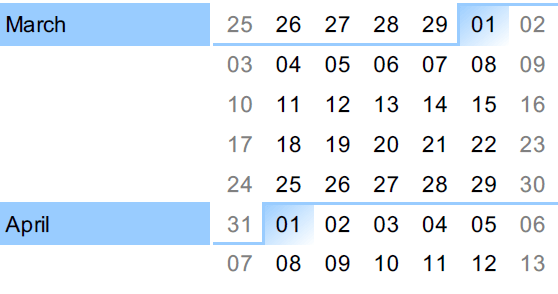
April 5th: Project Submission
April 11th: Final Exam
⚠️
🔖
🔖
🔖
🔖
🔖
We will be in B107 next Wednesday (2023-03-27).
I'll be staying there until 8 or 9.
About that MovieCollection mentioned in Milestone 6
TL;DR
It's not a requirement on the final Project.
let's talk about these things today:
Promise chains and (maybe) async/await
RECALL
- We can call an API using fetch(). Usually we just call it with a URI, but sometimes we can add some options.
- fetch() returns an object called a Promise.
- The Promise has a state and a result...but they're not properties we can access directly.
- The fetch() seems to return immediately, even though we know the API call takes a long time to respond!
- The Promise seems to change over time.
- Promises have 3 commonly-used methods: catch(), finally(), and then().
- then() is by far the most common of them all.
- then() takes in a callback.
- The callback will receive, ninja-like, a single argument - the inaccessible [[PromiseResult]] of the Promise which called then().
- ⚠️In the specific case of a Promise returned from a fetch(), that result is a Response object - in our case, the response from the API endpoint!
- The callback will be "armed" with the result and placed in a queue when the operation the Promise was trying to do was successful.
- Code involving Promises seems to behave asynchronously.
- The Response object that's passed in to a fetch()'s Promise's then() has a method called json().
- The json() method does NOT return JSON. It returns a Promise. FML.
console.log("synchronous code starts now");

import { Endpoint } from "./endpoint.js";

function airportApiResponsePromiseFromFetch(uri) {
  let airportApiResponsePromise = fetch(uri);
  console.log("fetch() result:", airportApiResponsePromise);
  return airportApiResponsePromise;
}

function airportPromiseFromResponse(airportApiResponse) {
  let airportPromise = airportApiResponse.json();
  console.log("json() result:", airportPromise);
  return airportPromise;
}

function logAirport(airport) {
  console.log("our airport is", airport);
}

let airportApiResponsePromise = airportApiResponsePromiseFromFetch(
  Endpoint.FAST,
);
let airportPromise = airportApiResponsePromise.then(airportPromiseFromResponse);
airportPromise.then(logAirport);

console.log("synchronous code ends now");
What do we see in the console?
00-recall
Since you only have 2 weekends left to work on the Project, I thought it important to make sure you have examples of code that deals with these following 2 requirements.

I won't get to Promise.all today; that will be for Monday.
Recipe
Modding the DOM via a Promise chain
Our App
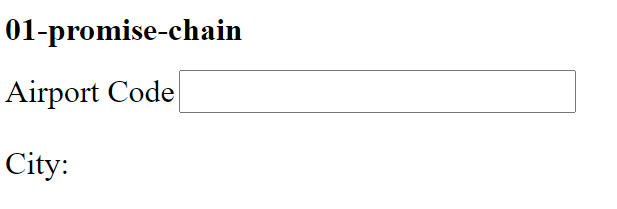
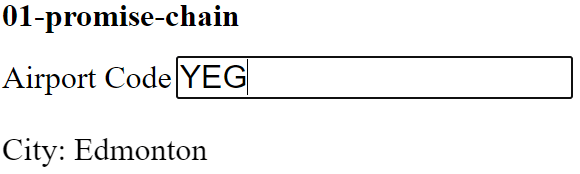
Once three letters are entered in the Airport Code box, the airport API endpoint is queried, and the resulting city is shown.
01-promise-chain
CommonElems.codeEntry.addEventListener("input", handleCodeEntry);

function handleCodeEntry(inputEvent) {
  let currentCode = inputEvent.target.value;
  inputEvent.target.value = currentCode.toUpperCase();

  if (currentCode.length === 3) {
    displayCityWhenAvailable(currentCode);
  } else {
    CommonElems.city.textContent = "";
  }
}
Wishful coding at work.
I like naming things involving Promises "doBlahBlahWhenAvailable" because it captures the idea that I'm not in control of when something I need is available! I'm just saying "could you please do some things for me when the stuff I need is ready?"
function displayCityWhenAvailable(code) {
  let uri = Endpoint.for(code);

  apiResponseFromFetch(uri)
    .then(airportFromApiResponse)
    .then(cityFromAirport)
    .then(displayCity);
}
Once we have ONE function that runs asynchronously (hi, fetch()!), then every piece of code that relies on the value that the original function returns must also be asynchronous.
Each then() returns a Promise that will EVENTUALLY have a [[PromiseResult]] - the return value of the callback!
Implementing our "WhenAvailable" with a Promise chain
function displayCityWhenAvailable(code) {
  let uri = Endpoint.for(code);

  apiResponseFromFetch(uri)
    .then(airportFromApiResponse)
    .then(cityFromAirport)
    .then(displayCity);
}
function airportFromApiResponse(airportApiResponse) {
let airportPromise = airportApiResponse.json();
return airportPromise;
}function cityFromAirport(airport) {
return airport.city;
}function displayCity(city) {
CommonElems.city.textContent = city;
}The last then() in this kind of recipe will use a callback that populates the DOM somehow. This callback doesn't need to return anything, since we don't need any further then()s!
function apiResponseFromFetch(uri) {
  return fetch(uri);
}
We could start the chain with fetch()...but I personally do this because I can name things more clearly for my aging brain.
I can technically omit this, since our displayCity method could just access airport.city itself. Still, if the API object was complex (hi, Project!), the technique illustrated here can be very useful.
There's 2 tricky things happening here! First off, what does json() return? For the second, see the Return value entry for then() in the MDN docs.
I prefer to use function declarations in my chains, because then I can be very explicit about what is flowing from then() to then().
Can't I do this instead?
function displayCityWhenAvailable(code) {
  let uri = Endpoint.for(code);

  fetch(uri)
    .then((airportApiResponse) => airportApiResponse.json())
    .then((airport) => airport.city)
    .then(displayCity);
}
Sure...but ask yourself, "Do I really understand what's flowing between the then()s"?
If you do decide to go this route, at the very least, name your parameters expressively!
Recipe
Modding the DOM via a Promise chain with error handling
Our App
Assume that we want to display a message if an unknown/invalid code is entered.
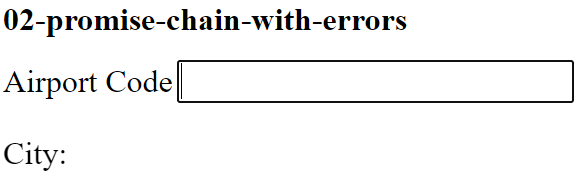
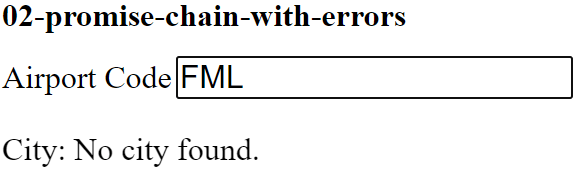
We'll need to make 3 simple changes to handle this case.
function airportFromApiResponse(airportApiResponse) {
  // This could also be airportApiResponse.status != "200"
  if (!airportApiResponse.ok) {
    throw new Error("Response doesn't contain a valid airport.");
  }

  let airportPromise = airportApiResponse.json();
  return airportPromise;
}
function displayCityWhenAvailable(code) {
let uri = Endpoint.for(code);
apiResponseFromFetch(uri)
.then(airportFromApiResponse)
.then(cityFromAirport)
.catch(errorMsgFromBadApiResponse)
.then(displayCity);
}function errorMsgFromBadApiResponse(apiErrorMsg) {
console.log(apiErrorMsg);
return "No city found.";
}CHANGE 1
Throw an error when the Response says it has one.
CHANGE 2
Log the error message (optional), and pass on the value we want to display in the DOM.
CHANGE 3
Add a catch() into the chain.
02-promise-chain-with-errors
function airportFromApiResponse(airportApiResponse) {
// This could also be airportApiResponse.status != "200"
if (!airportApiResponse.ok) {
throw new Error("Response doesn't contain a valid airport.");
}
let airportPromise = airportApiResponse.json();
return airportPromise;
}CHANGE 1
Throw an error when the Response says it has one.
function errorMsgFromBadApiResponse(apiErrorMsg) {
console.log(apiErrorMsg);
return "No city found.";
}CHANGE 2
Log the error message (optional), and pass on the value we want to display in the DOM.
function displayCityWhenAvailable(code) {
  let uri = Endpoint.for(code);

  apiResponseFromFetch(uri)
    .then(airportFromApiResponse)
    .then(cityFromAirport)
    .catch(errorMsgFromBadApiResponse)
    .then(displayCity);
}CHANGE 3
Add a catch() into the chain.
🤔Could we move the catch() right after the first then()?


BRAIN BREAK
async/await
The await keyword "unwraps" a Promise so that you can access the [[PromiseResult]] - when it's available, of course.
You're allowed to use await only if it's inside a function marked async, or if it's outside a function and in a script loaded via type="module".
await used outside a function
let response = await fetch(Endpoint.for("yyc"));
console.log(response);
This code...
...produces this in the console.
You may feel some some elation at this point.
And may be wondering if there's a catch. 😏
Wait until the Promise is fulfilled, then return the result.
await used in a function
async function responseFromApi(code) {
  let response = await fetch(Endpoint.for(code));
  return response;
}

console.log(responseFromApi("yyc"));
You might try to do something like this...
...which produces this in the console.
That prior elation may be gone now.

🤔Why is this happening? How do we fix it?
Recipe
Modding the DOM via async/await
Let's do our prior (non error-handling) App code using async/await.
04-promise-chain-to-await
async function displayCityWhenAvailable(code) {
  let uri = Endpoint.for(code);

  let apiResponse = await apiResponseFromFetch(uri);
  let airport = await airportFromApiResponse(apiResponse);
  let city = await cityFromAirport(airport);
  displayCity(city);
}
This feels a lot like our usual kind of synchronous coding, right?
This is great, in a way, because it puts us back in our comfort zone...which is nice and cozy, right?
Warnings
- Avoid just sprinkling await all over the place in the hopes that it will magically fix things: that's a sign that you don't understand what's happening!
- Realize that while async/await can make things feel more comfortable, you do need to get out of your comfort zone and dig into Promises if you want to do web design for a living!

Let's do a trace while our brains are (somewhat) fresh.
// Log the airport represented by the JSON inside
// an aiportApiResponse.
function logAirport(airportApiResponse) {
  let airportPromise = airportApiResponse.json();
  console.log("immediately after json()", airportPromise);
  airportPromise.then(log);
}

// Console.log something with a message.
function log(whatever) {
  console.log("log callback now logs", whatever);
}

let airportApiResponsePromise = fetch(Endpoint.FAST);
console.log("immediately after fetch()", airportApiResponsePromise);

airportApiResponsePromise.then(logAirport);
console.log("just before stack is empty", airportApiResponsePromise);
The callbacks you pass to then() have an important effect on the behaviour of further then()s chaining off of it.
The return value of the callback becomes the result passed into the next then() callback.
This allows you to "flow" information from an initial Promise (in our case, the one generated by fetch()), through multiple refinements until it reaches the final then() callback.
response
airport
displayCityairportPromiseresponsePromise.then()
.then()