Visual Studio Code for Everyone
Joshua Lin (@konekoya)
Topics included in this talk
- What is VS Code (Visual Studio Code)?
- Why VS Code?
- The basic
- command palette
- Preferences
- Plugins
- Integrated Terminal
- VS Code !== Visual Studio
- An Editor not a full blown IDE
- Open Source
- Microsoft 😳
- First released in 2015
- Based on Electron (Node.js)
What is VS Code?
- Free, open sourced, and a great community
- Fast, better performance
- Good support for modern Front-End languages and frameworks
- Basically, VS Code is an improved version of SublimeText and Atom combined 🤘
Why VS Code?
State of JS 2017
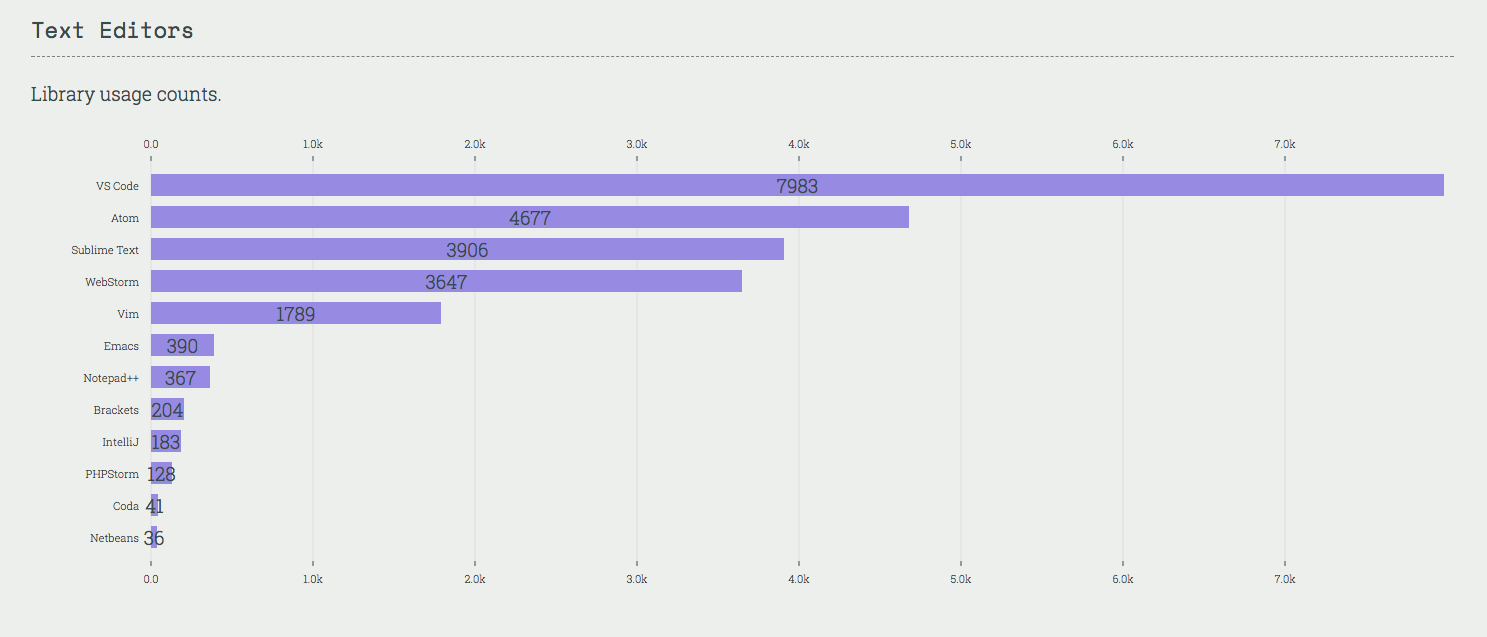
Most popular text editor for FrontEnd development
- Open form terminal
- Open, close, delete and create new file and collapse folders
- Jump between files
- Split panes
- Search with Symbol
- Toggle Sidebar
- Search, global search and replace
The basic
- Peek, go to definition and find all references
- Auto complete
- Auto import
- Snippets
- Multiple cursors
More on basic
- Finding and running specific command
- Reload
Command palette
- Search and add new settings
- Change keybindings
- Change color theme
Preferences
- Color themes
- Sublime Text Keymap
- Open in browser
- npm Intellisense
- Import Cost
- EditorConfig
- Advanced New File
- File Utils
- ESlint
- Vim
Plugins
- Open in current location
- Use the shell