Linux pour les nuls
Antoine LECLERC (krishenk)
Cybersecurity student at ESAIP

1. Arborescence
2. Utilisateurs et groupes
3. Permissions
1. Arborescence
Arborescence
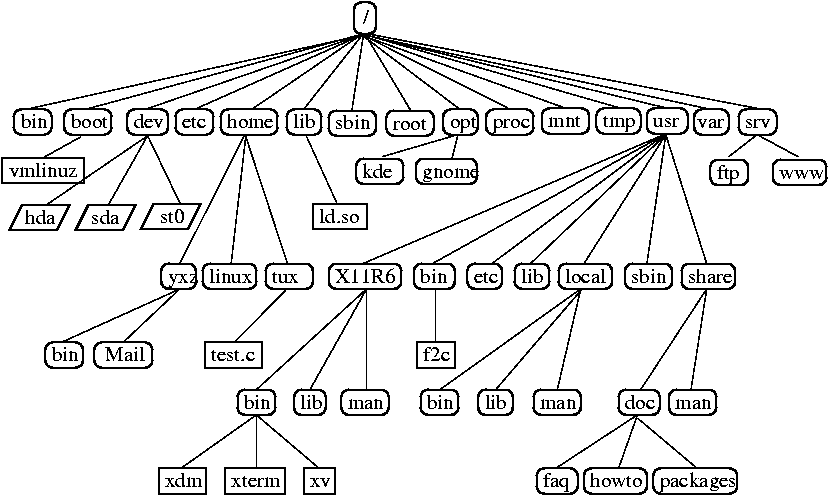
1. Arborescence
Répertoires

1. Arborescence
Dossiers spéciaux
root@a9a914d24a89:~# ls -la
total 28
drwx------ 1 root root 4096 Oct 23 09:16 .
drwxr-xr-x 1 root root 4096 Oct 23 08:59 ..
-rw-r--r-- 1 root root   64 Oct 23 09:15 topsecret.txt
root@a9a914d24a89:~# ls -la
total 28
drwx------ 1 root root 4096 Oct 23 09:16 .
drwxr-xr-x 1 root root 4096 Oct 23 08:59 ..
-rw-r--r-- 1 root root   64 Oct 23 09:15 topsecret.txt
. Désigne le dossier actuel
.. Désigne le dossier parent
. Désigne le dossier actuel
.. Désigne le dossier parent
1. Arborescence
Dossiers
Chemin relatif vs chemin absolu
root@a9a914d24a89:~# pwd
/root

root@a9a914d24a89:~# ls -la
total 28
drwx------ 1 root root 4096 Oct 23 11:18 .
drwxr-xr-x 1 root root 4096 Oct 23 11:25 ..
drwxr-xr-x 2 root root 4096 Oct 23 11:17 secret

root@a9a914d24a89:~# cd /root/secret/
root@a9a914d24a89:~/secret#

root@a9a914d24a89:~# cd secret/ # égale à ./secret/
root@a9a914d24a89:~/secret#
1. Arborescence
Fichiers





Dossier
Fichier
Lien symbolique
Fichier spécial (character)
Fichier spécial (block)
1. Arborescence
Fichiers
Comment cacher des fichiers ?
$ touch .secret
$ ls -l
total 0
$ ls -la
total 40
drwx------ 1 root root 4096 Nov  7 07:56 .
drwxr-xr-x 1 root root 4096 Oct 20 08:22 ..
-rw------- 1 root root 5474 Oct 23 08:57 .bash_history
-rw-r--r-- 1 root root  571 Apr 10  2021 .bashrc
-rw-r--r-- 1 root root  161 Jul  9  2019 .profile
-rw-r--r-- 1 root root    0 Nov  7 07:56 .secret
drwx------ 2 root root 4096 Oct 18 07:12 .ssh
-rw------- 1 root root 7737 Oct 20 08:16 .viminfo
-rw-r--r-- 1 root root  170 Oct 23 08:38 .wget-hsts
2. Utilisateurs et groupes
Utilisateurs et groupes
2. Utilisateurs et groupes
Fichiers intéressants
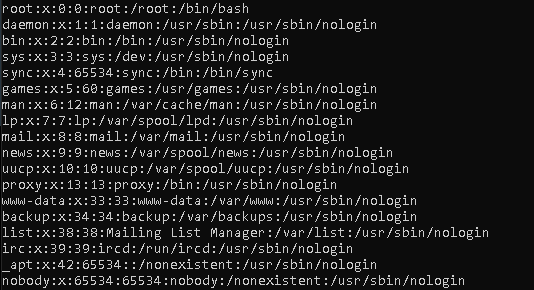
/etc/passwd
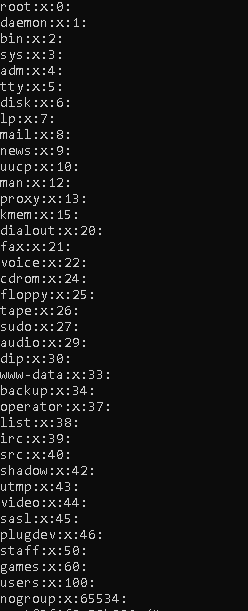
/etc/group
2. Utilisateurs et groupes
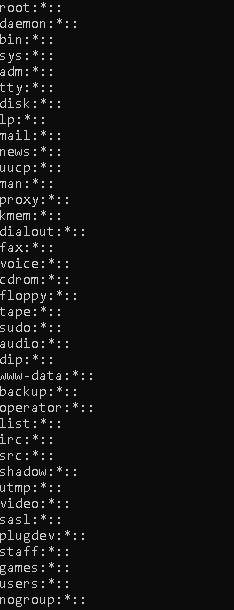
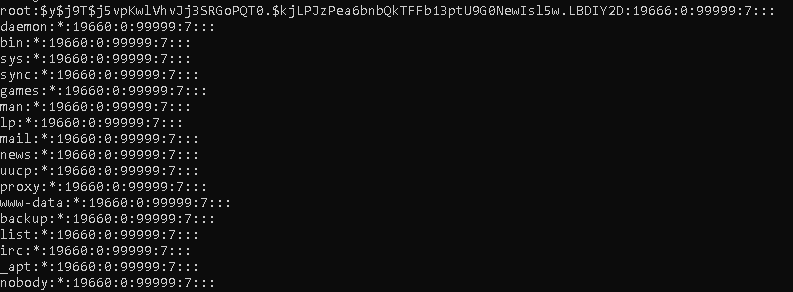
Fichiers intéressants
/etc/shadow
/etc/gshadow
2. Utilisateurs et groupes
Mot de passe
pseudo:mdp:tempsDernierMdp:minJour:maxJour:alerteJour:Inactive:Expire
sai:$6$YTJ7JKnfsB4esnbS$5XvmYko[...]VJVkeg1:19446:0:99999:7:::
$6$YTJ7JKnfsB4esnbS$5XvmYko[...]VJVkeg1
$algoHash$sel$hash
2. Utilisateurs et groupes
Types d'utilisateurs
root : UID = 0, GID = 0
deamon : UID = 1-999, GID = 1-999
user : UID = 1000-X, GID = 1000-X
# useradd -U user1 -m -d /home/user1 -s /bin/bash
# id
2. Utilisateurs et groupes
Son identité
Real (Réelle) : Permet de savoir quels documents est accessible à l'utilisateur
Effective (Efficace) : Utiliser pour déterminer les permissions d'accès aux fichiers (Modifiable)
Saved (Enregistré) : Utiliser pour sauvegarder le EUID, lors d'un changement de privilège
RUID/RGID
EUID/EGID
SUID/SGID
2. Utilisateurs et groupes
Changer son identité
Change les 3 identités de l'utilisateur vers le "username"
- SUID programme
- Sans "
–", seulement l'identité (UID, GID) est changée, l'environnement reste le même (ex. startup files ne sont pas exécutées) - Sans "username", "root" est utilisé par default
- Si root execute
su, pas de mot de passe nécessaire - Peut être utilisé pour une seule action
$ su – userx –c ”touch X” # X will be owned by userx in ~userx
$ su userx –c ”touch X” # X will be owned by userx in .
2. Utilisateurs et groupes
Sudoers
- Exécuter une commande avec les privilèges (identités) d'un autre utilisateur
- Par défaut "root"
- Configuration possible via
/etc/sudoers
# sudo command [-u username] [-g group]2. Utilisateurs et groupes
Sudoers
/etc/sudoers
## sudoers file.
##
## This file MUST be edited with the 'visudo' command as root.
## Failure to use 'visudo' may result in syntax or file permission errors
## that prevent sudo from running.
##
## See the sudoers man page for the details on how to write a sudoers file.
##

##
## Host alias specification
##
## Groups of machines. These may include host names (optionally with wildcards),
## IP addresses, network numbers or netgroups.
# Host_Alias	WEBSERVERS = www1, www2, www3

##
## User alias specification
##
## Groups of users.  These may consist of user names, uids, Unix groups,
## or netgroups.
# User_Alias	ADMINS = millert, dowdy, mikef

##
## Cmnd alias specification
##
## Groups of commands.  Often used to group related commands together.
# Cmnd_Alias	PROCESSES = /usr/bin/nice, /bin/kill, /usr/bin/renice, \
# 			   /usr/bin/pkill, /usr/bin/top
# Cmnd_Alias	REBOOT = /sbin/halt, /sbin/reboot, /sbin/poweroff

##
## Defaults specification
##
## You may wish to keep some of the following environment variables
## when running commands via sudo.
##
## Locale settings
# Defaults env_keep += "LANG LANGUAGE LINGUAS LC_* _XKB_CHARSET"
##
## Run X applications through sudo; HOME is used to find the
## .Xauthority file.  Note that other programs use HOME to find
## configuration files and this may lead to privilege escalation!
# Defaults env_keep += "HOME"
##
## X11 resource path settings
# Defaults env_keep += "XAPPLRESDIR XFILESEARCHPATH XUSERFILESEARCHPATH"
##
## Desktop path settings
# Defaults env_keep += "QTDIR KDEDIR"
##
## Allow sudo-run commands to inherit the callers' ConsoleKit session
# Defaults env_keep += "XDG_SESSION_COOKIE"
##
## Uncomment to enable special input methods.  Care should be taken as
## this may allow users to subvert the command being run via sudo.
# Defaults env_keep += "XMODIFIERS GTK_IM_MODULE QT_IM_MODULE QT_IM_SWITCHER"
##
## Uncomment to use a hard-coded PATH instead of the user's to find commands
# Defaults secure_path="/usr/local/sbin:/usr/local/bin:/usr/sbin:/usr/bin:/sbin:/bin"
##
## Uncomment to restore the historic behavior where a command is run in
## the user's own terminal.
# Defaults !use_pty
##
## Uncomment to send mail if the user does not enter the correct password.
# Defaults mail_badpass
##
## Uncomment to enable logging of a command's output, except for
## sudoreplay and reboot.  Use sudoreplay to play back logged sessions.
## Sudo will create up to 2,176,782,336 I/O logs before recycling them.
## Set maxseq to a smaller number if you don't have unlimited disk space.
# Defaults log_output
# Defaults!/usr/bin/sudoreplay !log_output
# Defaults!/usr/local/bin/sudoreplay !log_output
# Defaults!REBOOT !log_output
# Defaults maxseq = 1000

##
## Runas alias specification
##

##
## User privilege specification
##
root ALL=(ALL:ALL) ALL
user1  host1=(root)  /usr/sbin/shutdown
user3 ALL=(user4,user5) /bin/kill,/bin/pkill

## Uncomment to allow members of group wheel to execute any command
# %wheel ALL=(ALL:ALL) ALL

## Same thing without a password
# %wheel ALL=(ALL:ALL) NOPASSWD: ALL

## Uncomment to allow members of group sudo to execute any command
# %sudo	ALL=(ALL:ALL) ALL

## Uncomment to allow any user to run sudo if they know the password
## of the user they are running the command as (root by default).
# Defaults targetpw  # Ask for the password of the target user
# ALL ALL=(ALL:ALL) ALL  # WARNING: only use this together with 'Defaults targetpw'

## Read drop-in files from /etc/sudoers.d
@includedir /etc/sudoers.d
3. Permissions
Permissions
| r | w | x |
|---|---|---|
| 4 | 2 | 1 |
rwxrwxrwx
Propriétaire
Groupe
Autres
$ ls -l
$ stat
$ chmod
-rw-r--r-- 1 root root 161 Jul 9 2019 .profile
3. Permissions
Umask
Quels sont les permissions par défaut ?
On soustrait la permission maximum par défaut (0666 dossier et 0777 fichier)
avec la valeur du umask (0022)*
*Par défaut
3. Permissions
Permissions spéciales
Utilisateur + s(pécial)
- SUID
- Exécute le fichier avec les droits du propriétaire
# ls -l /usr/bin/passwd
-rwsr-xr-x 1 root root 68248 Nov  4 00:29 /usr/bin/passwd
3. Permissions
Permissions spéciales
Groupe + s(pécial)
- SGID
- Fichier : Exécute avec les droits du groupe
- Dossier : Les fichiers créés hériteront du groupe du dossier parent
# ls -l /usr/bin/wall
-rwxr-sr-x 1 root tty 22544 Nov  4 00:29 /usr/bin/wall
3. Permissions
Permissions spéciales
Autres + t
- Sticky bit
- Dossier : Tout fichier créé ne pourra être supprimé que par son propriétaire
# ls -ld /tmp
drwxrwxrwt 18 root root 500 Nov  8 14:54 /tmp
4. Outils
Comment s'entrainer ?

ou rejoignez-nous via le pôle étudiant !
University CTF 2023: Brains & Bytes de HackTheBox

08 decembre, 14:00 - 10 decembre, 22:00
Pose ta question, tu seras idiot une seconde. Ne la pose pas, tu seras idiot toute ta vie.
Albert Einstein