PATTERNS THAT BOOST OUR FRAMEWORKS





Why?
-
Everything is changing very fast!

2009...
-
JQuery, Tapestry, Flash, Flex, Backbone, ie...

2013...
-
AngularJS

2016...
-
Angular, Android

Today...
-
React, Stencil, Flutter, ie... :(

A solution?

A solution?
-
Following the SOLID principles :
-
Building software designs...
-
More understandable
-
Easier to maintain
-
Easier to extend
-
Contents
-
A list of commonly used patterns ;)
-
Starting by a well known structural pattern...
1. MVC
1. MVC
-
A long, long time ago...
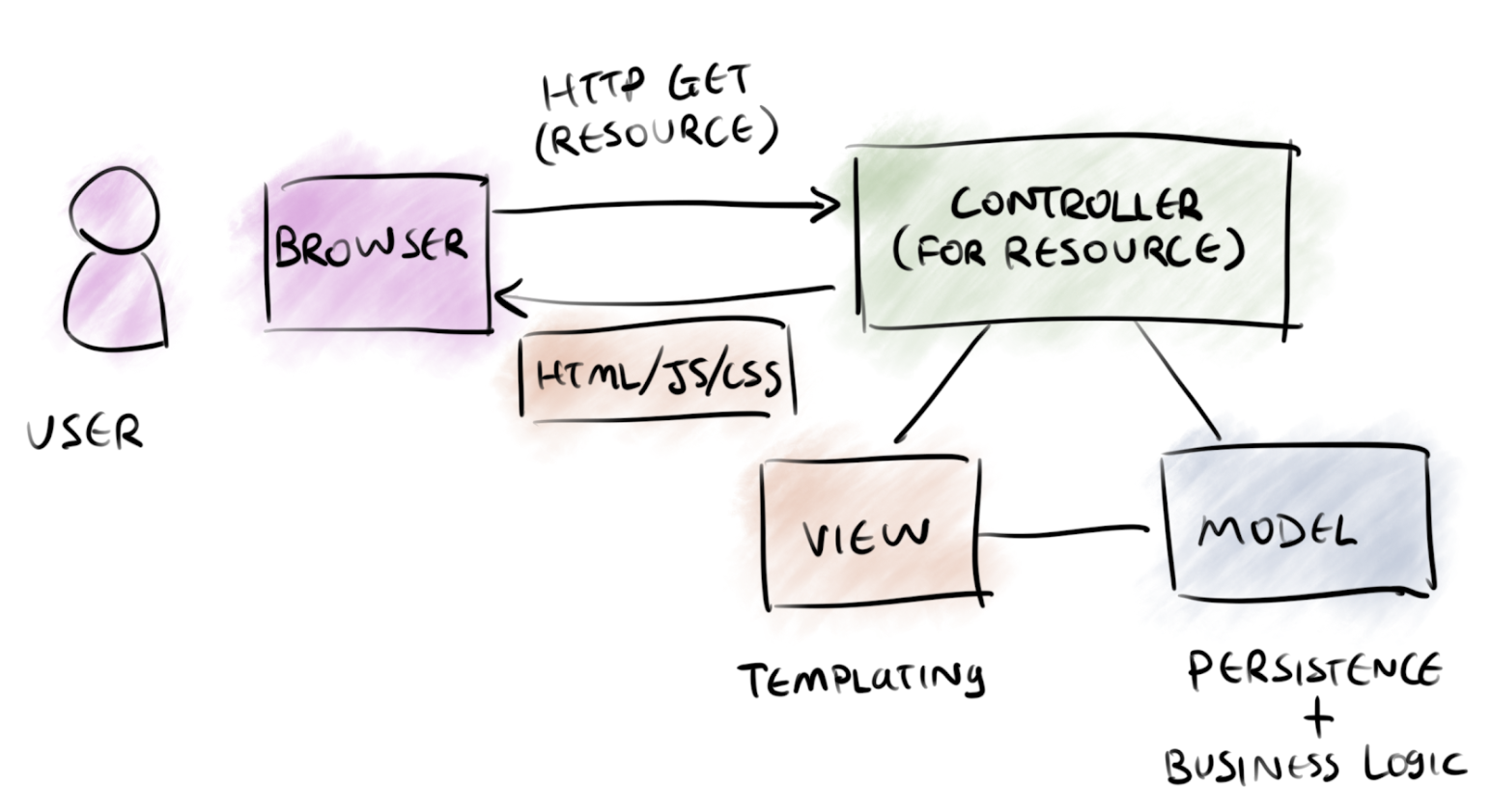
1. MVC
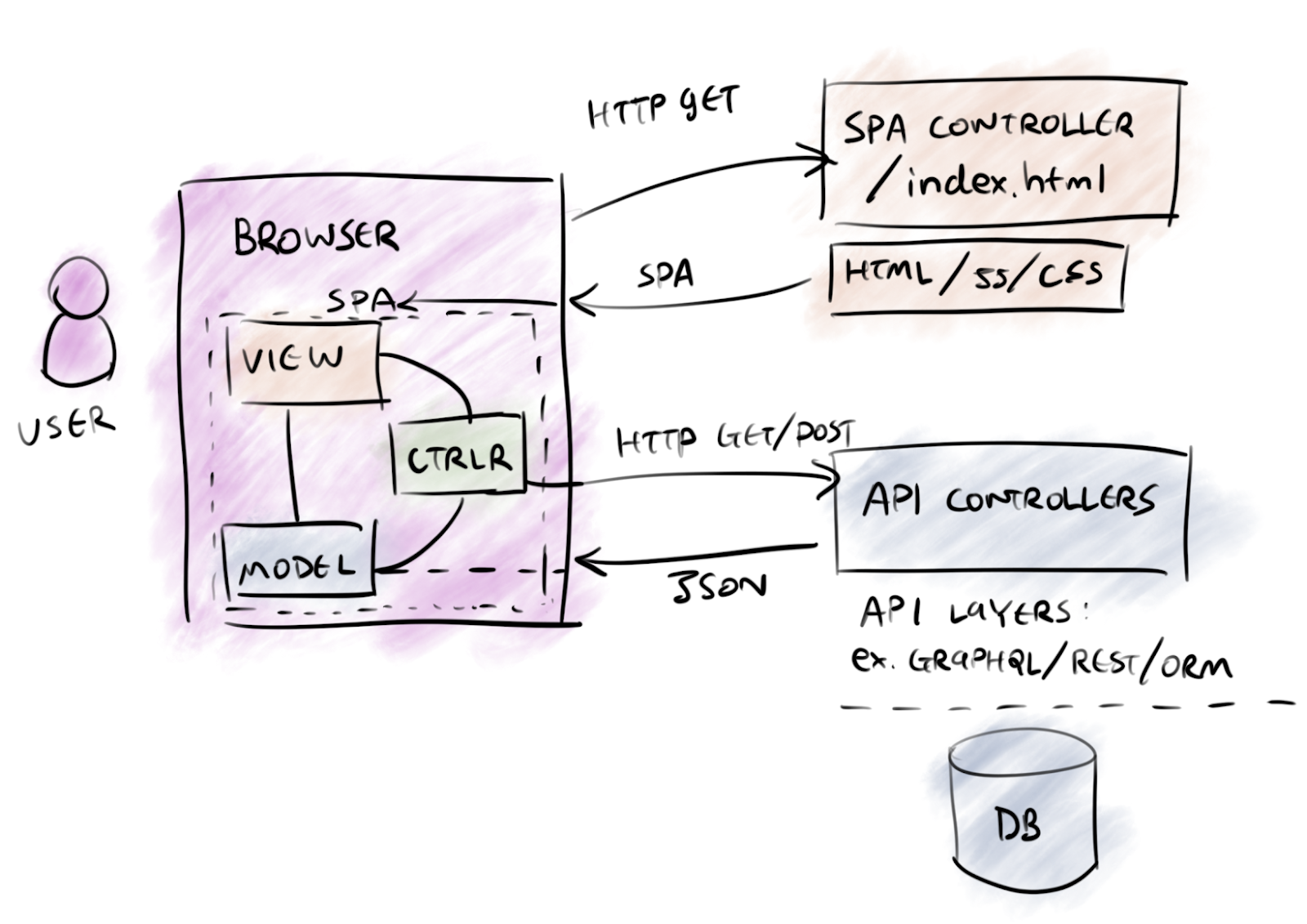
1. MVC
-
Angular :
-
View
-
Controller
-
Model
-
HTML Template
-
Component
-
Service
-
React :
-
View
-
Controller
-
Model
-
View
1. MVC
<div>
  <app-user-search (changed)="onCriteriaChanged($event)">
  </app-user-search>

  <app-users-list [users]="users$ | async"
    (select)="onSelectUser($event)">
  </app-users-list>
</div>
-
"View"
1. MVC
@Component({
  templateUrl: './main-page.component.html',
  styleUrls: ['./main-page.component.scss'],
  changeDetection: ChangeDetectionStrategy.OnPush
})
export class MainPageComponent implements OnInit {

  users$: Observable<User[]>;

  constructor(private userService: UserService) {}

  ngOnInit() {
    this.users$ = this.userService.fetchUsers();
  }
}-
"Controller"
1. MVC
@Injectable()
export class UserService {
  constructor(@Inject(USER_API_URL) private urlUsers: string,
              private http: HttpClient) {}

  fetchUsers(criteria: UserCriteria): Observable<User[]> {
    return this.http.get<User[]>(this.urlUsers);
  }
}-
"Model"
1. MVC
-
Other structuring patterns :
-
MVP (Model - View - Presenter)
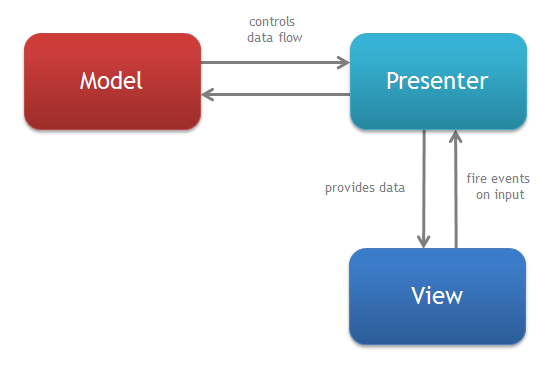
1. MVC
-
Other structuring patterns :
-
MVVM (Model - View - ViewModel)
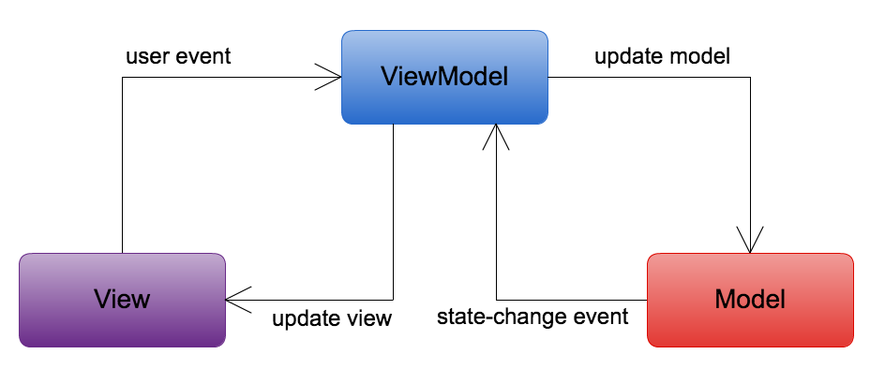
1. MVC
-
MVVM Android :
class ViewModelActivity : AppCompatActivity() {
    override fun onCreate(savedInstanceState: Bundle?) {
        // Obtain the ViewModel component.
        UserModel userModel = ViewModelProviders.of(getActivity())
                                                .get(UserModel.class)

        // Inflate view and obtain an instance of the binding class.
        val binding: UserBinding =
          DataBindingUtil.setContentView(this, R.layout.user)

        // Assign the component to a property in the binding class.
        binding.viewmodel = userModel
    }
}
1. MVC
-
MVVM Android :
<CheckBox
    android:id="@+id/rememberMeCheckBox"
    android:checked="@{viewmodel.rememberMe}"
    android:onCheckedChanged="@{() -> viewmodel.rememberMeChanged()}" />
2. REACTIVE PrograMMING
2. Reactive Programming
-
Asynchronous data streams
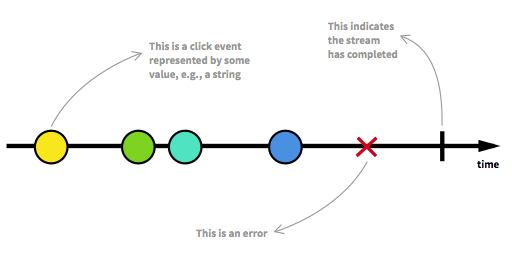
2. Reactive Programming
-
Everything is a stream :
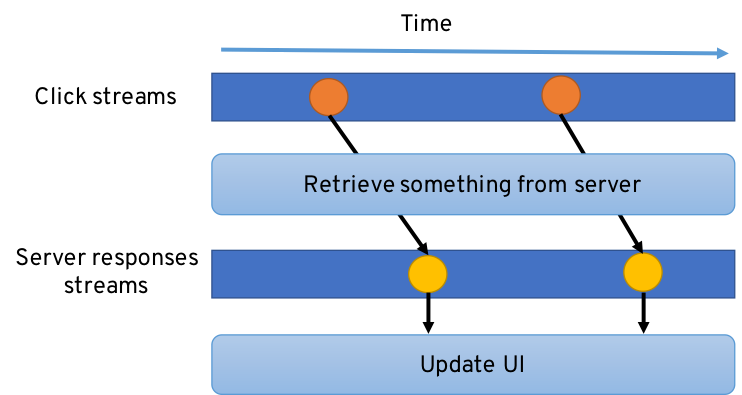
2. Reactive Programming
-
Declarative approach using :
-
Pure functions
-
Iterator pattern
-
const products$: Observable<Product[]> =
      fromEvent(this.input.nativeElement, 'keyup')
    .pipe(
        map(event => event.target.value),
        filter((search: String) => search.length > 2),
        debounceTime(250),
        distinctUntilChanged(),
        switchMap(search => this.fetchProducts(search))
    );
2. Reactive Programming
-
ReactiveX implementations :
-
RxJS
-
RxJava
-
RxKotlin
-
RxDart
-
RxPython
-
...
-

2. Reactive Programming
-
Common uses :
-
Angular HttpClient, ReactiveForms...
-
Android LiveData
-
Flutter FutureBuilder/StreamBuilder
- ...
-
2. Reactive Programming
-
Heavily depends on...
Observer pattern
3. OBSERVER
3. Observer
-
Event handling :
-
Observers
-
Subjects
3. Observer
-
Event handling :
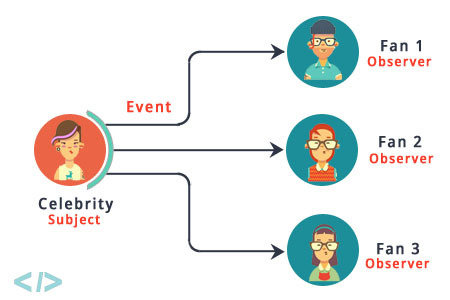
3. Observer
-
Subject :
-
Observer :
-
registerObserver(observer)
-
unregisterObserver(observer)
-
notifyObservers()
-
notify()
3. Observer
-
Main goal :
Separation of concerns
4. SINGLETON
4. Singletons
-
Single instance
-
Coordinate actions across the system
-
Perfect to store data
-
Lazy construction
4. Singletons
-
Angular Services
-
Business specific
-
Transverse
-
@Injectable()
export class UserService {

  constructor(@Inject(USER_API_URL) private urlUsers: string,
              private http: HttpClient) {}

  fetchUsers(): Observable<User[]> {
    return this.http.get<User[]>(this.urlUsers);
  }
}
4. Singletons
-
Angular Services
-
Easy to use...
-
Thanks to Dependency Injection
-
@Component({
  templateUrl: './detail-page.component.html',
  styleUrls: ['./detail-page.component.scss'],
  changeDetection: ChangeDetectionStrategy.OnPush
})
export class DetailPageComponent implements OnInit {

  users$: Observable<User[]>;

  constructor(private userService: UserService) {}

  ngOnInit() {
    this.users$ = this.userService.fetchUsers();
  }
4. Singletons
-
Angular Services
-
Best place to store business data
-
@Injectable()
export class UserService {

  private _users$: Observable<User[]>;

  get users$(): Observable<User[]> {
    return this._users$;
  }

  constructor(@Inject(USER_API_URL) private urlUsers: string,
              private http: HttpClient) {
    this._users$ = this.http.get<User[]>(this.urlUsers).pipe(
      shareReplay()
    );
  }
}
4. Singletons
-
Redux Store
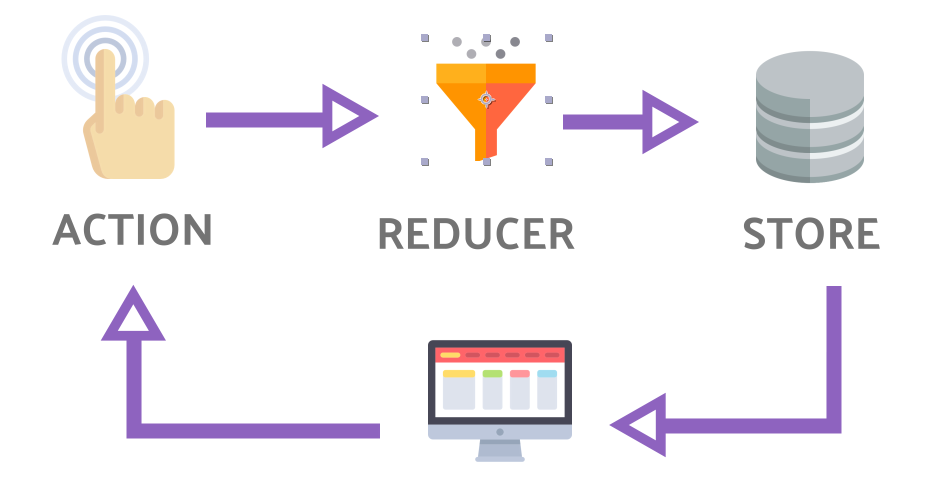
4. Singletons
⚠️ Warning ⚠️
-
Testability -
Dependency hiding
-
Concurrency
5. FACTORY
5. FACTORY
-
Creational pattern
-
One interface and several implementations
-
Using the Right implementation for a given case
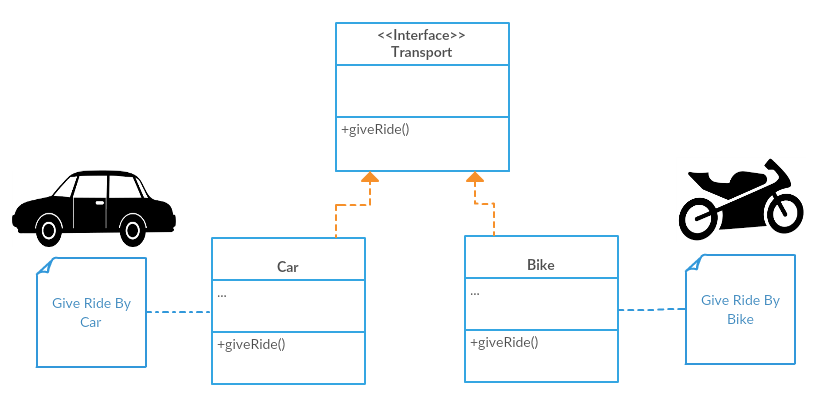
5. FACTORY
-
Generally used with a DI mechanism :
-
Angular services
-
Android libraries (Dagger 2, Koin)
-
Flutter libraries (Inject)
-
5. FACTORY
-
Angular Injection Tokens :
// user.service.ts
export const USER_SERVICE =
       new InjectionToken<UserService>('USER_SERVICE');

export interface UserService {
  fectchAll(): Observable<User[]>;
  fectchOne(): Observable<User>;
}
5. FACTORY
-
Angular module :
// app.module.ts
@NgModule({
  declarations: [AppComponent],
  imports: [
    ...
  ],
  providers: [
    { provide: USER_SERVICE, useClass: UserServiceHttpImpl },
    ...
  ],
  bootstrap: [AppComponent]
})
export class AppModule {}
5. FACTORY
-
Angular Environments
// app.module.ts
@NgModule({
  ...
  providers: [
    { provide: USER_SERVICE, useClass: environment.userServiceImpl },
    ...
  ]
})
export class AppModule {}
// environment.ts
{
userServiceImpl: UserServiceHttpImpl
}6. STRATEGY
6. STRATEGY
-
Encapsulates a family of algorithms
-
Makes them interchangeable.
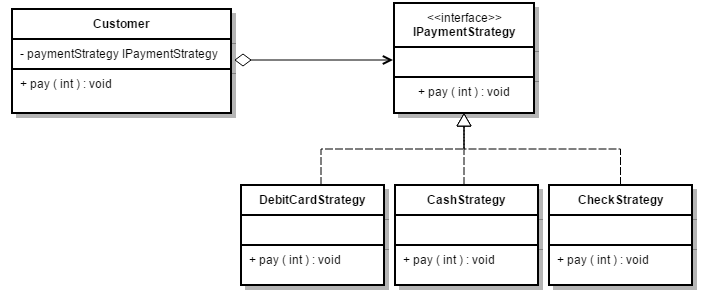
6. STRATEGY
-
In a component architecture :
-
Dumb - Smart components
- Presentational - Container components
-
// detail-page.component.ts
<div class="user-detail-content" *ngIf="user$ | async as user">
  <h1>{{ user.firstName }}</h1>
  <app-user-form [user]="user" (validate)="onValidate($event)">
  </app-user-form>
</div>
7. DECLARATIVE UI
7. Declarative UI
-
The new standard in front development?
-
Declarative API to define UI components
export default class App extends Component {

  ...

  render() {
    return (
      <div>
        <Header />
        <List items={this.state.items} />
        <Footer />
      </div>
    );
  }
}
7. Declarative UI
-
More than just "UI" components :
@override
Widget build(BuildContext context) => FutureBuilder<Restaurant>(
  future: restaurantService
    .fetchRestaurantDetail(context: context, restaurant: restaurant)
    .then((restaurant) => restaurantService.fetchRestaurantRatings(
       restaurant: restaurant,
       limit: 4
      )),
  builder: (context, snapshot) {
    if (snapshot.hasError) print(snapshot.error);
    return snapshot.hasData
      ? RestaurantWidget(restaurant: snapshot.data)
      : AppProgressIndicator();
 });
7. Declarative UI
-
At last on Android :
-
Android Jetpack Compose
-
class ComposeActivity : Activity() {
    override fun onCreate(savedInstanceState: Bundle?) {
        super.onCreate(savedInstanceState)
        setContent { CraneWrapper { MyApp() } }
    }

    @Composable
    fun MyApp() {
        MaterialTheme {
            Text(
              text = "Hello world!",
              style = +themeTextStyle { h3 }
            )
        }
    }
}
Question :
I have developed a components library and want to implement a "disabled" and "tabIndex" state on all of them... ?
8. MIXIN
8. MIXIN
-
Solves a common Class limitation :
-
Single Super Class
-
Share a common behavior between different classes
-
8. MIXIN
-
Mixins can be done in Typescript
-
But it can be a bit tricky
-
Used in some component libraries (Angular Material) to define common behavior such as "color", "disabled"...
8. MIXIN
-
Well implemented in Dart 2.X :
mixin Coder {
  void code() {
    print("Trying to use design patterns...");
  }
}

class Laurent extends Person with Coder {}

void main() {
  const laurent = Laurent();
  laurent.code();
}
8. MIXIN
-
With interface default implementations in Kotlin :
interface Developer {

  fun code() {
    ...
  }
}

class UserCodeEnSeine : User, Developper {
  ...
}
8. MIXIN
-
React hooks are Mixins done right :
function Example() {
  const [count, setCount] = useState(0);

  return (
    <div>
      <p>Vous avez cliqué {count} fois</p>
      <button onClick={() => setCount(count + 1)}>
        Cliquez ici
      </button>
    </div>
  );
}
conclusion
To conclude...
-
Patterns are the first thing to learn.
-
Frameworks use them to solve common software development problems.
-
Their implementation differs, but the logic remains the same.