Architecting for Explorers
Organise your Drupal site with Content Hubs
Hi, I'm Lindsay.
lg@monkii.com
aethr on d.o.
What are content hubs?
- central locations in your site
- typically at the root level of your menu
- provide an overview of a section of content
- guide users to most relevant content
- provide a rich visual experience
when are they useful?
- medium to large sized sites (50+ nodes)
- significant proportion of "first visit" users
- visually engaging experience is important
- site lends itself to Explorers and First Timers
When aren't they useful?
- very small sites (< 10 nodes)
- top level nav is probably fine!
- users who know exactly what they want
- users who know how to get what they need
- large, un-wieldy menus are actually great for this!
- PC Case Gear
What are Explorers?
User Personas is a UX technique for
identifying different types of users
For a recent science magazine we had:
- Fan - reads every edition
- First timer - first visit, reads current edition
- Explorer - casually browses by topic
- Researcher - focused on a specific topic
Different personas will use the site in different ways.
What do Explorers Need?
Explorers and First Timers don't
always know what they are looking for.
Explorers
- broad interest in the organisation or topic
- no set agenda
- curious
First timers
- may not know what they are looking for
- might visit a site for one thing and never return
Explorers need guides
Your site's content producers are the "locals"
- know the site content better than anyone
- aware of changes because they are making them
- basic menus and pages are a bit clunky
So we (devs) build the tools they need to enable this role:
Content Hubs
Getting started
-
Organise content into sections
- Actual breakdown will vary from site to site
- No more than 5 root-level sections (if possible)
- Hierarchies are great!
- There is no hierarchy too deep for an Explorer
- (that is a total lie, please be sensible!)
- But seriously hierarchies are great for Explorers
- At each level only a few choices
- They will find the right path to what they need
Let's Implement it!
For ACCA we created three "meta" content types:
Hub Hero Free tile
We call these "meta" content types because:
- don't contain unique content of their own
- simply reference or augment existing content
Content creators use these to draw attention to pages or nodes that contain important content.
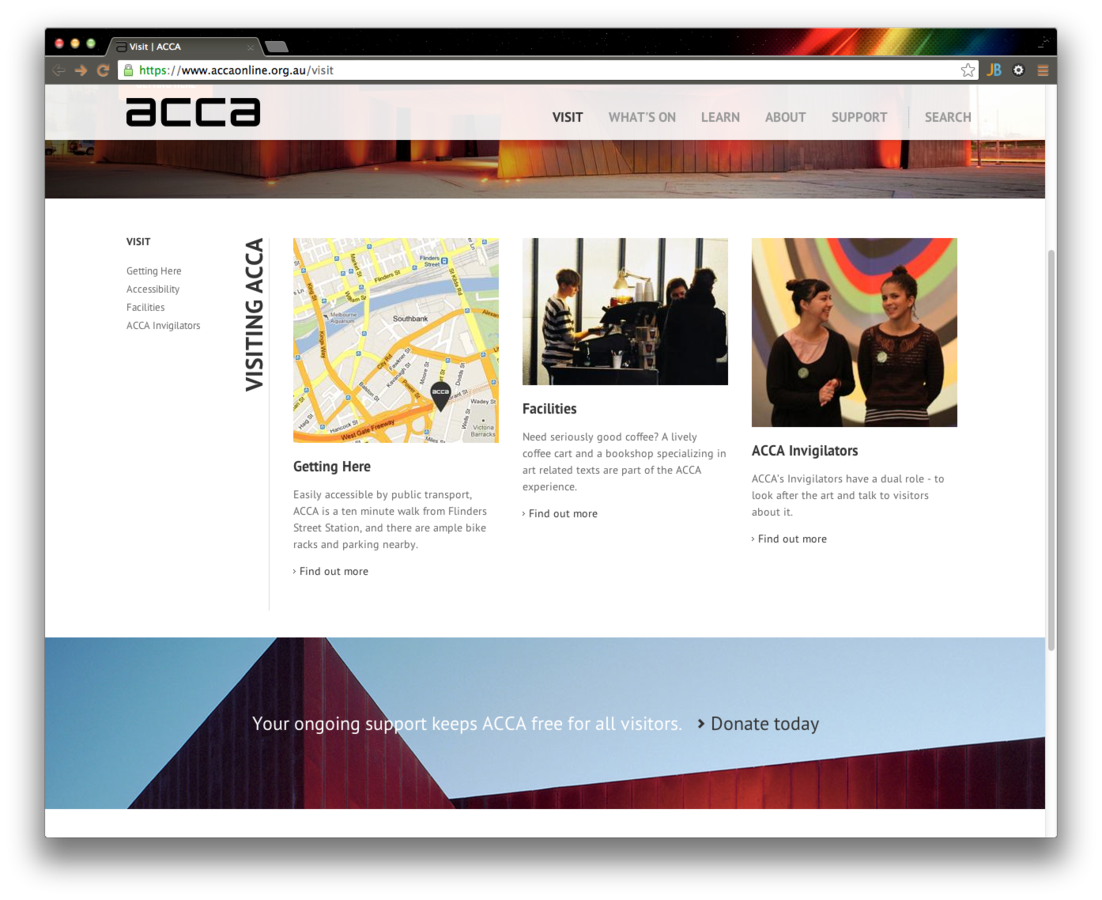
Hub
- Title
- Hero
- Tiles
- Entity reference
- Tiles subheading
- Menu link
- Path alias
Hub
Hero
- Entity reference
- Rendered as Full content
Featured Tiles
- Entity reference
- Rendered as Masonry Tile
- Label
- Replaced with value from Tiles subheading field
Hub
Sidebar menu
- Displays Hub menu item and children
- Custom block on ACCA
- Menu block module would be perfect for this
Hub
That's it!

Hero
- Title
- Body text
- Hero image
- Image (with Media field selector)
- Call to action (2x)
- Custom colour
- Colorfield (with Colorbox)
Hero
Hero image
- Disable display in node fields (set to hidden)
- Create a wrapper in hook_node_view()
<php
  $node->content['hero_image_wrapper_start'] = array(
    '#markup' => "<div style='background: url($hero_image);'>",
    '#weight' => -1000,
  );
  $node->content['hero_image_wrapper_end'] = array(
    '#markup' => '</div>',
    '#weight' => 1000,
  );
Hero
Highlight colour
- Custom field formatter
<?php
function theme_acca_core_field_formatter_highlight_color_style($vars) {
  $highlight_color = $vars['element']['rgb'];
  $node = $vars['entity'];

  $highlight_css =<<<CSS
#node-{$node->nid} .highlight {
  color: {$highlight_color};
}
CSS;

  // Include the CSS inline
  drupal_add_css($highlight_css, array('type' => 'inline'));

  // No need to return as the CSS has already been included
}
HERO
Prevent Direct Access
<?php
  if (arg(0) == 'node' && arg(1) == $node->nid && !user_access('administer content')) {
    drupal_not_found();
    drupal_exit();
  }
Not Searchable
- Enable Search configuration
- Only grant "Hero: Search content of this type" permission to content creator roles
- Grant search permissions for all normal node types
Free tile
- Title
- Body text
- Tile image
- Image
- Call to Action
-
Link
Free tile
- Disable direct view and searching
- Tile image displays as link
- If the Call to action URL is populated, swap out the node link in the Tile image field
<?php $cta_url = $node->field_cta[$node->language][0]['url'];// Swap out the link path before the element is rendered $node->content['field_tile_image'][0]['#path']['path'] = $cta_url;
Masonry tile View mode
- Default view modes are great!
- Many core and contrib modules use Teaser view mode
- We don't want to make radical changes!
- Any node type should be viewable as a tile so...
Masonry tile view mode
<?php
function hook_entity_info_alter(&$entity_info) {
  // Add a new view mode for masonry tile listings
  $entity_info['node']['view modes']['tile'] = array(
    'label' => t('Masonry Tile'),
    'custom settings' => TRUE,
  );
}
MASONRY TILE VIEW MODE
Set field display settings for every content type!
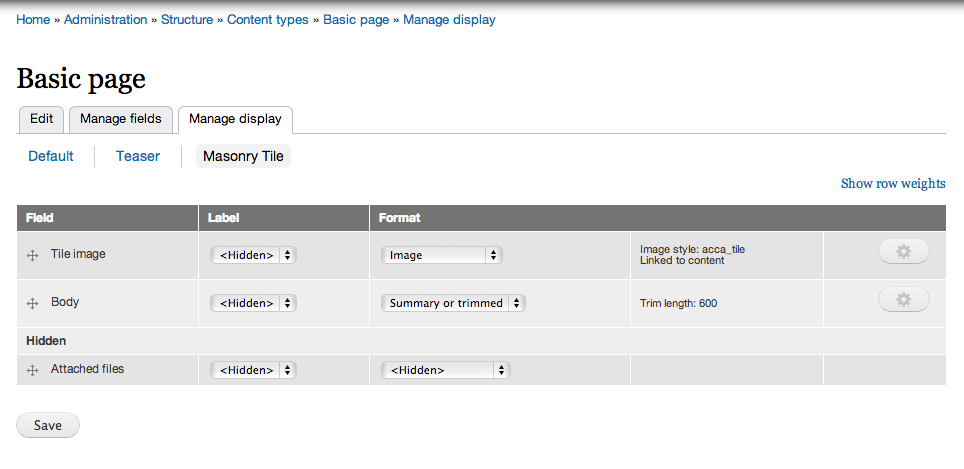
MASONRY TILE VIEW MODE
Prepare the field
<?php
function acca_core_preprocess_field(&$vars) {
  if ($vars['element']['#field_name'] == 'field_tiles') {
    $vars['classes_array'][] = 'tiles-container';
    libraries_load('masonry');
    drupal_add_js(drupal_get_path('module', 'acca_core') .'/js/acca.masonry.js');
  }
}
Using MAsonry.js
Initialise Masonry
acca.masonry.js:
(function ($) {
  Drupal.behaviors.masonry_tiles = {
    attach: function (context, settings) {

      $('.tiles-container > .field-items', context).masonry();

    }
  }
}) (jQuery);
You can also pass lots of configuration options to Masonry. Check the Masonry docs for more information.
Finished product
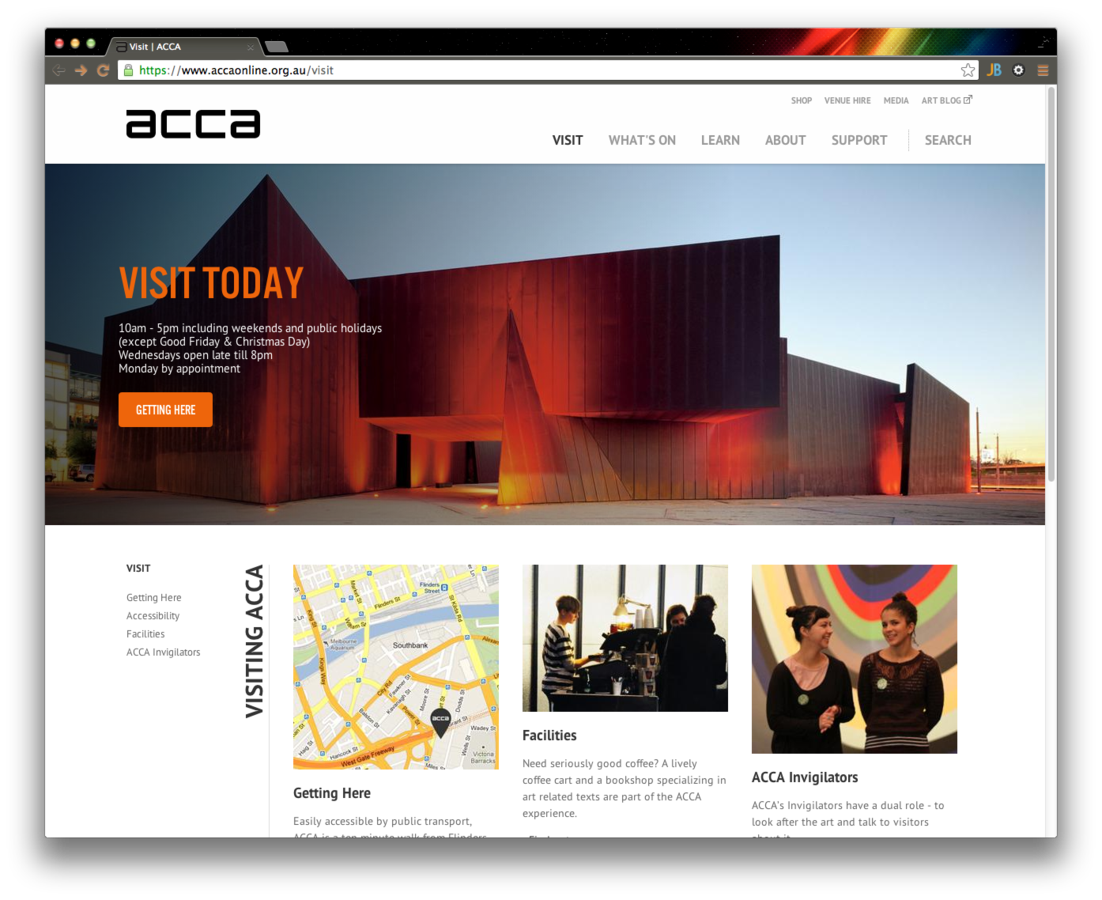
Positive outcomes
- All primary content types now display as Tiles
- Enables innovative designs
- Content creators have lots of freedom
- Structure menus logically
- Still provide easy access to deeply nested pages
- Update Hubs easily as often as they want
- Can even link offsite using Free tiles
- Don't have to worry about writing HTML
- Engaging visual style is refreshing for users
That's all folks!

Lindsay Gaines
lg@monkii.com