php 初階 - 課程一
Benson Lu
2014

PHP
Hypertext Preprocessor
課程目標
BUILDING
A
DYNAMIC WEBSITE
課程目標
<!DOCTYPE html>
<html>
  <head>
    <link type='text/css' rel='stylesheet' href='style.css'/>
    <title>PHP!</title>
  </head>
  <body>
    <img src="http://i1061.photobucket.com/albums/t480/ericqweinstein/php-logo_zps408c82d7.png"/>
    <div class="header"><h1>
      <?php
      $welcome = "Let's get started with PHP!";
      echo $welcome;
      ?>
    </h1></div>
    <p><strong>Generate a list:</strong>
      <?php
      for ($number = 1; $number <= 10; $number++) {
        if ($number <= 9) {
            echo $number . ", ";
        } else {
            echo $number . "!";
        }
      }; ?>
    </p>
    <p><strong>Things you can do:</strong>
      <?php
        $things = array("Talk to databases",
        "Send cookies", "Evaluate form data",
        "Build dynamic webpages");
        foreach ($things as $thing) {
            echo "<li>$thing</li>";
        }

        unset($thing);
      ?>
    </p>
    <p><strong>This jumbled sentence will change every time you click Submit!<strong></p>
    <p>
      <?php
        $words = array("the ", "quick ", "brown ", "fox ",
        "jumped ", "over ", "the ", "lazy ", "dog ");
        shuffle($words);
        foreach ($words as $word) {
            echo $word;
        };

        unset($word);
      ?>
    </p>
  </body>
</html>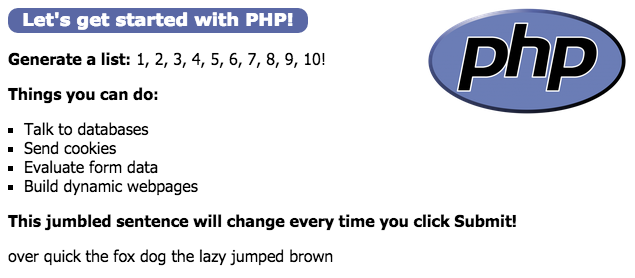
基本要求
HtML
&
CSS
Stack
Database
MySQL
Scripting Language
PHP
Apache
Web Server
Operating System
安裝
PHP
php -vAMPPS (ALL)
XAMPP (ALL)
PHP-OSX (Mac – PHP Only)
Bitnami Stacks (All)
WAMP (Windows)
Zend Server Community Edition (All)
PHP + MySQL + Apache
(MAC 內建)
Syntax
<?php ⋯⋯ ?>
所有程式碼都寫在這裏面
然後儲存成
xxx.php
基本輸出
echo
<?php
    echo "Hello, Welcome to Asukademy!";
?>
Hello, Welcome to Asukademy!
基本輸出
echo
<?php
    echo "Hello, Welcome to Asukademy!";
?>
Hello, Welcome to Asukademy!
基本輸出
echo
<!DOCTYPE html>
<html>
    <head>
	</head>
	<body>
        <p>
          <?php

          ?>
        </p>
	</body>
</html>
Now You Try Try
基本輸出
.
串接符號
<?php
    echo "Hello," . " " . "Welcome to Asukademy!";
?>
Hello, Welcome to Asukademy!
變數
$ 錢號
<?php
    $cutie, $_beauty, $my_cutie, $my_12_wife, $doctorKerP;
?>錢號後第一個字元隻能為字母或底線( _ )
<?php
    $12shadesOfGrey;
    ShotShotShot;
    $less is more;
    $think-big;
?>
變數
=
指定值
<?php
    $name = "Benson";   // 字串
    $age = 23;          // 整數
    $male = true;       // Boolean
    $weight = 79.9;     // 浮點數
?>
練習
<?php
    $name = "Benson";
    $age = 23;
    $male = true;
    $weight = 79.9;

    // You Try Try
    $info_a = "My name is" + $name;
    $info_b = "My name is" . $name;
    $info_c = "My age is" + $age;
    $info_d = "My age is" . $age;
?>
練習
<table border="1" cellpadding="5" cellspacing="0">
    <thead>
        <tr>
            <td>Name</td>
            <td>Age</td>
            <td>Weight</td>
            <td>Male</td>
        </tr>
    </thead>

    <tbody>
        <tr>
            <td><?php echo $name ?></td>
            <td><?php echo $age ?></td>
            <td><?php echo $weight ?></td>
            <td><?php echo $male ?></td>
        </tr>
    </tbody>
</table>
數學運算
雙元運算子(binary operator)
<?php
    $result = 5 + 7;
    $result = 5 - 7;
    $result = 5 * 7;
    $result = 5 / 7;
    $result = 5 % 7;
?>
單元運算子(unary operator)
<?php
    $result = $a++;
    $result = $a--;
?>
數學運算
myAge = 27, yourAge = 23
myAge + yourAge =
Now You Try Try
使用兩個變數 $myAge, $yourAge
在螢幕上印出
你的答案
比較
比較運算子(comparison operator)
== 等於
!= 不等於
=== 不隻要等於,型態還要一樣
> 大於
< 小於
>= 大於等於
<= 小於等於
比較
邏輯運算子(logical operator)
&& AND
|| OR
! NOT
流程控制
if
<?php
    if (條件式) {
        // do this!
    }
?>
else
<?php
    if (條件式A) {
        // Do this!
    }
    else if (條件式B) {
        // A 如果不成立 B成立
        // Do that
    }
    else {
        // A 如果不成立, B也不成立
        // Do what!
    }
?>
流程控制
switch
<?php
    switch (某個變數) {
        case 條件a:
            // Do this
            break;
        case 條件b:
            // Do that
            break;
        case 條件c:
            // Do what
            break;
        default:
            break;
    }
?>
作業
寫一個 HTML 表單
有三個表單欄位
1. 姓名, 電話, 出身年份 (1987~2015)
2. 跳頁之後判斷年齡
3. 滿十八歲顯示 "xxx 您好, 歡迎光臨"
4. 未滿十八則印出 "小屁孩快回家"
Thank you