Differences to ng1
- Complete Rewrite
- Ironing out bad design decisions
- Angular offers no way to migrate to ng2
- ng1 will loose support soon
- dramatically better performance
- more powerful templating
- simpler APIs
- easier debugging
- even more testable
Why?
How does Angular2 work
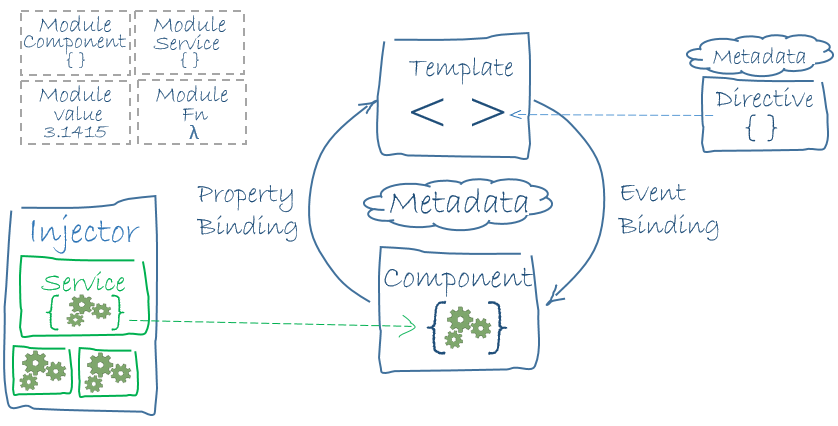
Everything is a Component!
Frontend Tooling





ZoneJS
The Building Blocks of a Component
import {Component} from 'angular2/core';
import {DialogComponent} from './dialog';
import {AppState} from './app.service';

@Component({
	selector: 'app',
        directives: ['DialogComponent']
	template: require('./app.component.html')
})
export class App {

	constructor(public appState: AppState) {}

	ngOnInit() {
		console.log('Initial App State', this.appState.state);
	}

}
Data-Binding
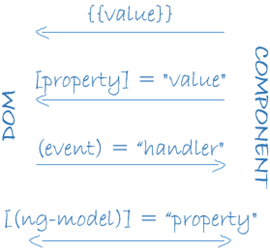
<img [src] = "logo.image">
<dialog [title]="You created a Dialog!">
    <div [ngClass] = "{selected: isSelected}">

    </div>
</dialog>
DEMO TIME
Thank you
Presentation carefully prepared by
Martin Muzatko
@martinmuzatko
More dev stuff by Martin?
Looking for an awesome company to work with?


Questions?
BONUS SLIDES
Lifecycle Events
| ngOnInit |
Initialize the directive/component after Angular initializes the data-bound input properties. |
| ngOnChanges |
Respond after Angular sets a data-bound input property. The method receives a changes object of current and previous values. |
| ngDoCheck |
Detect and act upon changes that Angular can or won't detect on its own. Called every change detection run. |
| ngOnDestroy |
Cleanup just before Angular destroys the directive/component. Unsubscribe observables and detach event handlers to avoid memory leaks. |
Lifecycle Events
Component Based
| ngAfterContentInit |
After Angular projects external content into its view. |
| ngAfterContentChecked |
After Angular checks the bindings of the external content that it projected into its view. |
| ngAfterViewInit |
After Angular creates the component's view(s). |
| ngAfterViewChecked |
After Angular checks the bindings of the component's view(s). |
Templating Mechanism
Many JavaScript expressions are legal template expressions, but not all.
JavaScript expressions that have or promote side effects are prohibited, including:
- assignments (=, +=, -=)
- the new operator
- chaining expressions with ; or ,
- increment and decrement operators (++ and --)
- no support for the bitwise operators | and &
- | - Pipe Operator for extra functionality
- ? - Elvis Operator - performs hasOwnProperty Checks
Templating Mechanism
Context/Scope
Only to "This" Which means if you define a variable in your class:
export class App {
	logo = 'assets/img/logo.png';
	version = '1.5.t';
	os = [
        {
            title: 'Ubuntu',
            vendor: 'Canonical'
        },
        {
            title: 'Windows',
            vendor: 'Microsoft'
        },
        {
            title: 'OS X',
            vendor: 'Apple'
        },
    ]
}
<div>
<img src="{{logo}}">
Version: {{version}}
<ul>
<li *ngFor="#system of os">
{{system.title}} - {{system.vendor}}
</li>
</ul>
</div>RXJS - Observable Pattern
import {Http, HTTP_PROVIDERS} from 'angular2/http';
@Component({
  selector: 'http-app',
  viewProviders: [HTTP_PROVIDERS],
  templateUrl: 'people.html'
})
class PeopleComponent {
  constructor(http: Http) {
    http.get('people.json')
      .map(res => res.json())
      .subscribe(people => this.people = people);
  }
}
Angular2 HTTP Responses are handled with the Observable
Router
Path based
This requires additional server configuration!
Example: /app/view/admin
Location based
Uses the Hash
example: #app/view/admin
Router
Setup
@Component({ ... })
@RouteConfig([
  {path:'/crisis-center', name: 'CrisisCenter', component: CrisisListComponent},
  {path:'/heroes',        name: 'Heroes',       component: HeroListComponent}
])
export class AppComponent { }