Cross Platform
Desktop Apps
with Electron
Martin Hochenwarter
@ grazJS #13
About me
Frontend Developer at Netconomy (Graz)
Team SMD (Smart Devices)
Mobile web sites and Cordova apps
Lots of React, ES6, CSS3, HTML5
My Electron experience
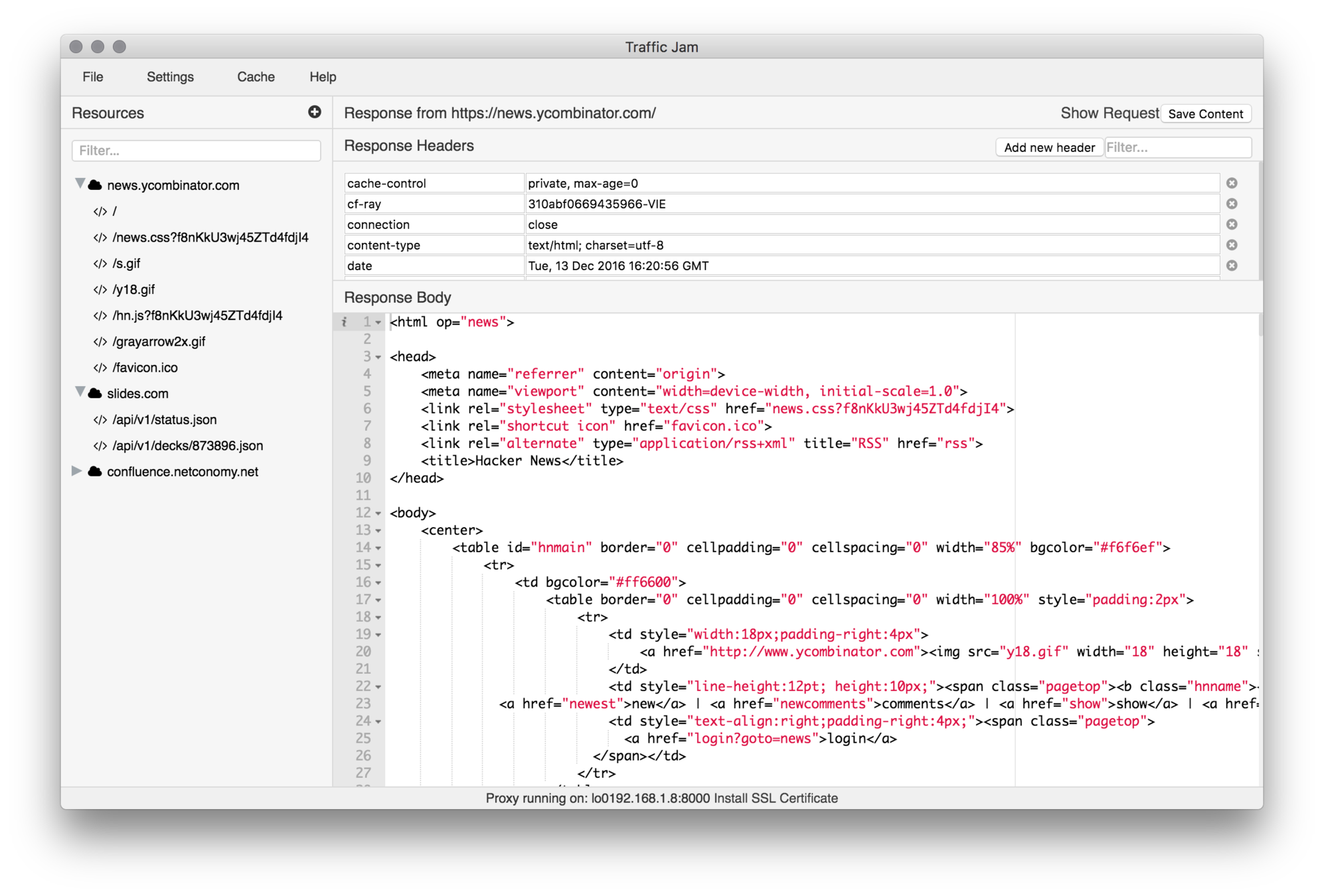
Used Electron for a MITM-Proxy app
React UI, Redux, Ace editor, node MITM proxy, file caching
Up Ahead
Introduction to Electron
Electron basics
Getting started with Electron
Selected Electron API Examples
Debugging Electron Apps
Packaging and Updating Electron Apps
Conclusion
Introduction to
Electron
What is Electron?
-
Open source library developed by GitHub
-
For building cross-platform desktop applications with HTML, CSS, and JavaScript
-
Combines Chromium, Node.js and bindings for native OS functions into a single runtime
-
Started in 2013 as framework for Atom, released 2014
-
Used by many popular desktop apps
Apps based on Electron

Why Electron?
Why Electron?
Node.js
Desktop app development in JS
Access to Node.js libs
Easy Debugging
Huge community

Why Electron?
Chromium
Render GUIs with HTML, CSS and JS
Web frontend frameworks for UI
Responsive UI
Use WebRTC, Webcam + Mic, Push Notifications, ...
Debugging with Devtools

Why Electron?
Electron
Node.js in Chromium with removed Sandbox
Simple IPC
Native menus, notifications, dialogs, ...
Crash reporting
Automatic updates
Great libs for packaging, testing, ...

Electron basics
The Main and Renderer Process
Electron runs main file (main.js) defined in package.json as Main Process
Main Process
Application lifecycle
Native UI Elements (Menu, ...)
Creation of Renderer Processes
Renderer Process
Renders Window, handles UI logic
Hidden background processes
Renderer
Process
Renderer
Process
Main Process
The Main and Renderer Process
Main
Renderer
Application Lifecycle
Application Window
Electron APIs
Node.js APIs
ipc
ipc
Electron APIs
DOM
Node.js
APIs
Creates
Communicates
Electron APIs
Main Process
Renderer Process
Both Processes
ipcMain
app
BrowserWindow
dialog
globalShortcut
Menu, MenuItem
powerMonitor
systemPreferences
Tray
...
ipcRenderer
BrowserWindowProxy
desktopCapturer
File Object
MemoryUsageDetails Object
remote
webFrame
<webview> Tag
window.open Function
clipboard
crashReporter
Display Object
Environment Variables
nativeImage
process
Rectangle Object
screen
shell
ShortcutDetails Object
Synopsis
Getting started with Electron
Electron Quick Start
# Clone this repository
git clone https://github.com/electron/electron-quick-start

# Go into the repository
cd electron-quick-start

# Install dependencies
npm install

# Run the app
npm start
package.json - Define main file, package infos and dependencies
main.js - Code for main process
index.html - UI to render and code for renderer process
Minimal Electron boilerplate to get started and try things
Electron boilerplates
Clone the repo to try a simple app.
Boilerplate to kickstart creating an app.
Scaffold out an app boilerplate.
Comprehensive boilerplate which even generates installers.
Boilerplate based on React and webpack.
ClojureScript boilerplate for creating an app.
Scaffold, run, test, and package your app.
Easily build your app with Vue and common plugins.
A ready to go app template with some useful features built-in.
...
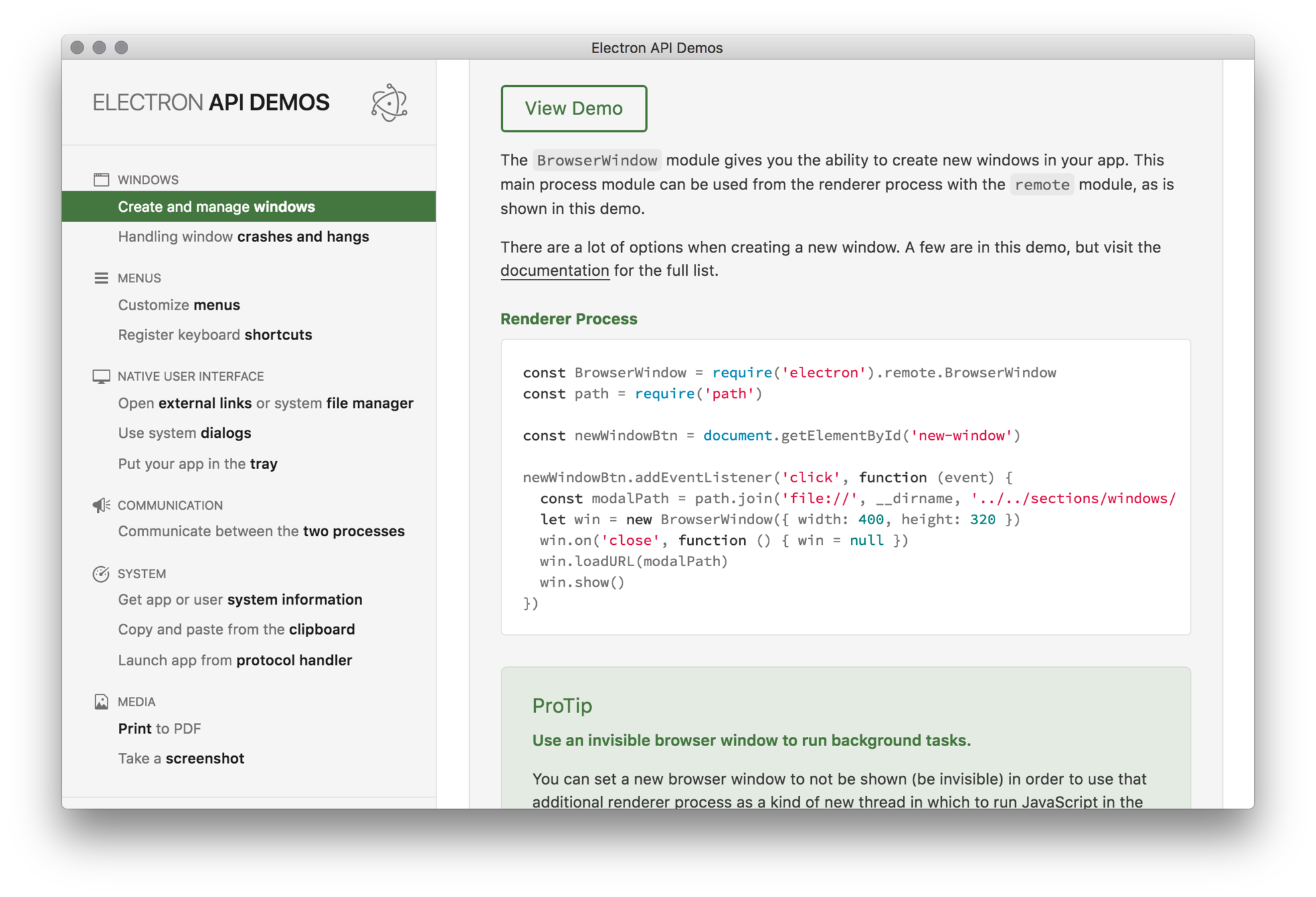
Electron API Demos
git clone https://github.com/electron/electron-api-demos
Demo Electron app with many core API examples and code
Selected
Electron API
Examples
app
Control the application's events lifecycle
-
Handling of emitted events (ready, window-all-closed, quit, ...)
-
Invoking app specific methods (quit, exit, relaunch, focus, ...)
-
Invoking OS specific methods (setBadgeCount, dock.bounce on macOS)
Mind OS specific differences!
// In main process
const {app} = require('electron')

app.on('window-all-closed', () => {
  // Don't quit if macOS
  if (process.platform !== 'darwin') {
    app.quit();
  }
})
BrowserWindow
Creation and management of browser windows (App UI)
-
Each window is a separate process (Renderer Process)
-
Invisible browser windows for background tasks
-
Lots of options for window creation (size, parent, hidden, frameless, ...)
-
Events emitted by objects of BrowserWindow (ready-to-show, close, resize, ...)
-
Handling of parent, child and modal windows (child above parent)
// In main process
const {BrowserWindow} = require('electron');

let win = new BrowserWindow({width: 800, height: 600});

win.on('closed', () => {
  win = null
});
ipcMain and ipcRenderer
Inter-process communication module for synchronous and asynchronous communication between Main and Renderer processes
-
ipcMain for receiving and responding to messages in main process
-
ipcRenderer for sending and receiving messages in renderer process
-
asynchronous messaging is preferred, returns when finished, is non blocking
-
synchronous messaging will block other operations while completing its task!
Use ipc to run background tasks without impacting UI performance
remote
Use main process modules in a renderer process
-
Easy access to modules only available in main process (dialog, menu, ...)
-
Using remote functions or objects == sending synchronous ipc messages
-
Creating object using remote creates an object in main and returns it to renderer
-
Strings, numbers, arrays, buffers are copied over IPC, Objects are shared
-
Electron handles lifetime of shared objects,
if object is leaked in renderer it will also leak in main!
// In renderer process

const {BrowserWindow} = require('electron').remote
let win = new BrowserWindow({width: 800, height: 600})
win.loadURL('https://github.com')
Other interesting modules
Checkout Electron API Demos
Debugging Electron Apps
Debugging Electron Apps
Debugging with VSCode and this launch.json:
{
  "version": "0.2.0",
  "configurations": [
    {
      "name": "Debug Main Process",
      "type": "node",
      "request": "launch",
      "cwd": "${workspaceRoot}",
      "runtimeExecutable": "${workspaceRoot}/node_modules/.bin/electron",
      "program": "${workspaceRoot}/main.js"
    }
  ]
}
Debugging Electron Apps
npm install --save-dev devtronrequire('devtron').install()Inside DevTools console run
Install it into project
Packaging and auto updating Electron Apps
Packaging Electron Apps
Build easily distributable packages of your app
Target multiple platforms
Windows (32/64 bit), macOS, Linux (x86/x86_64)
Supports asar
- Resource obfuscation by packing in tar-like format
- Speeds up require
- Solves long path names issue on Windows
Packaging Electron apps
Package and distribute your Electron app with OS-specific bundles (.app, .exe etc) via JS or CLI
electron-builder (uses electron-packager)
A complete solution to package and build a ready for distribution Electron app for macOS, Windows and Linux with “auto update” support out of the box
Packaging Electron apps
Supports: Code Signing, AutoUpdate ready packaging, Build version management,
Publishing artifacts to GitHub Releases
Target formats:
- All platforms: 7z, zip, tar.xz, tar.lz, tar.gz, tar.bz2, dir (unpacked directory)
- macOS: dmg, pkg, mas (Code Signing only on macOS)
- Linux: AppImage, snap, deb, rpm, freebsd, pacman, p5p, apk
- Windows: NSIS, AppX (Windows Store), Squirrel.Windows (needs Wine)
npm install electron-builder --save-dev
Packaging Electron apps
Quick setup for electron-builder
1. package.json — name, description, version and author
2. Build config in package.json (see all options)
"build": {
  "appId": "your.id",
  "mac": {
    "category": "your.app.category.type"
  },
  "win": {
    "iconUrl": "(windows-only) https link to icon"
  }
}
"scripts": {
"pack": "build --dir", // package folder debugging
"dist": "build" // generates dist packages
}
3. Add 'build' folder in project root, add background.png, icon.icns, icon.ico
4. Add scripts to package.json, run 'npm run dist' to package
Auto updating Electron apps
Distribution Server
Nuts (Node.js, uses GitHub)
Squirrel Updates Server (Node.js, uses GitHub)
Electron Release Server (Node.js, self-hosted, web UI)
Build artifacts (eg for macOS)
.dmg: installer, initial installation
-mac.zip: required for autoUpdater
Some Tips
Tips on Security
- Disable Node integration in all renderers that display remote content (using webPreferences)
- Override and disable eval
- Do not use insertCSS or executeJavaScript with remote CSS/JS
Tips on UI
- Use flexbox layouts
- Use existing web UI frameworks
- You can make your UI responsive
- OS dependent / independent UI
- OS dependent? Use platform class on body
Conclusion
Drawbacks using Electron
Zipped min file size ~40MB
Unzipped min file size ~110MB
Min 40MB RAM / Chromium process
Node.js is slower than native apps
Quite long app start
...
But you get ...
Cross platform desktop apps
Written in JS, CSS3, HTML5
Lots of reusable Node.js libs
Easy app packaging and distribution
Easy auto updates
Good debugging tools