NIAID OCICB CTO IDEA ADVOCATE INITIATIVE
July 1st 2015

What is the problem?
Currently mission critical needs arise that require rapid solutions, where a web application may be the most appropriate solution but under current methodology cannot be delivered in the time boundary.
Delivering solutions quickly for immediate needs
- Create a new rapid delivery methodology
- Focusing on creating solutions that are delivered quickly while maintaining software engineering best practices.
- Reusability of the solutions by maintaining an enterprise wide software repository where solutions can be maintained, reused and repurposed.
Example Implementation
In the next few slides the methodology is not outlined in an over abundance of documentation but implementation and execution.
Delivering solutions quickly for immediate needs
Create a solution in the style outlined with a simple user story using an example open data source.
Project Peachtree
PeachTree as an application is targeted towards the general public and aims to disseminate high level data made available through OpenFDA. Users can explore:
- Top drugs and devices by reported adverse events grouped by type/brand.
- The States that have the most food recalls.
- The ability to search for a brand name drug and see what the most common symptoms reported are.
Scope
Project Peachtree
This project was managed using a mix of Project Management techniques that focus on product. A product centered management approach focuses on delivery and not necessarily strict adherence to methodology.
For planning purposes it was divided into sprints each being one day in length and every two consecutive sprints result in a release.
The CodeBase is housed openly on GitHub under the repo found here: https://github.com/NETESOLUTIONS/peachtree
Scope
Project Peachtree
• Assemble the team together
• Create a Project in GitHub
• Identify the functional requirements for the prototype and create/manage a product backlog
• Study the existing tools providing similar result sets and identify the target audience
• Identify “Human Centered Design” Techniques and Tools
• Study/Analyze the FDA DataSets and APIs
• Create a Technical Architecture Diagram
• Create a working design prototype
• Implement the User Stories based on priority as part of daily sprints
• Write Unit tests for the code
• Setup continuous integration system to automate running of tests
• Set up Continuous monitoring
• Perform usability tests with people
• Create documentation to install and run the prototype
Project Management Tasks
Project Peachtree
• Build a system/tool to report adverse events related to Drugs and Devices
• Provide Summary visualizations in form of charts for all 3 entities – High Priority
• Get TOP 1000 drug names by AE count – High Priority
• Provide Item details including the effects and when it was reported – Medium priority
• Ability to report a side effect – Medium priority
• Search Products (Drugs, Vaccines and Devices) with Adverse Effects – LOW Priority
• Ability to add alerts for a specific entity for updated AE – Low priority
• Provide Filter capability – Low Priority
• Get count of patient reactions related to a drug – Low priority
• Return the list of All Drugs – High Priority
• Request Top 1000 pharmacy classed by count of AEs – Low priority
• Build a page with Food recalls – Add summary visualization for Top 10 recalls per state – Medium priority
• Add sort filter on Drugs Page – Medium priority
List of Requirements & Priorities
Project Peachtree
Timeline
June 2015
21
• Identify Scope and Data Sets
• Put the team together
• Setup GitHub repository
Project Kickoff Meeting

Project Kick Off
June 2015
21
Project Peachtree
Timeline
June 2015
22
•
Setup the Project framework
•
Create the Team channel in Slack
•
Develop the use case - Create a page for returning the list of TOP 1000 drugs
•
Automated test framework added to repository
Sprint 1
Project Peachtree
Timeline
June 2015
23
• Create working design prototype for Backlog Items
• Set up Continuous Monitoring
• Create wireframes for Sprint 3 and Sprint 4 Items
• Start putting the usability tests
Sprint 2
Project Peachtree
Timeline
June 2015
24
•
Develop the use case – Design and Implement Dashboard
•
Develop the use case - Visualize summary charts (adverse effects) for all drugs over time
•
Deploy to Cloud using Heroku
•
Start working on Digital Playbook checklist
Sprint 3
Project Peachtree
Timeline
June 2015
25
• Develop use case – Visualize summary charts for Top 10 food recalls per US state
• Setup PostGres SQLDB
• Design PeachTree Icon and integrate
• Publish the complete set of usability tests
• Update US Digital Service Playbook Checklist
Sprint 4
Project Peachtree
Timeline
June 2015
26
• Develop Use case – Drugs Page reporting Adverse Effects
• Integrate the DB with application for future enhancements
• Develop Use case – Map visualization for Food Recalls
Sprint 5
Project Peachtree
Timeline
June 2015
29
•
Develop the use case - Map Visualization
•
Complete Digital Services Playbook
Sprint 7
Project Peachtree
Timeline
June 2015
30
• Develop the use case - User authentication and authorization
Sprint 8
Project Peachtree
Tech Stack and Tools
- Server Side
- Data Back End
- Client Side
- UI Frameworks/Font Libraries
- Hosting
- Other Tools
* Non-Open Source Technology
Project Peachtree
Architecture Diagram
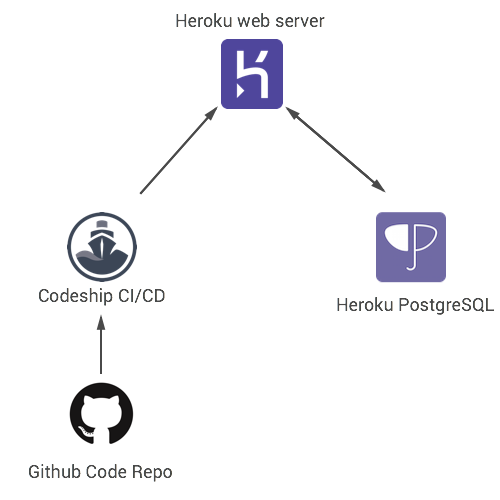
* Note all images are property of Heroku, Codeship and Github.
Commits trigger Codeship to run automated tests after cloning the repository
Code is hosted on Github Repository
If all tests are succesfull the code is deployed to the heroku webserver
Finally a cloud backend is bundled with the web server to facilitate persistent data storage
Project Peachtree
Live Prototype
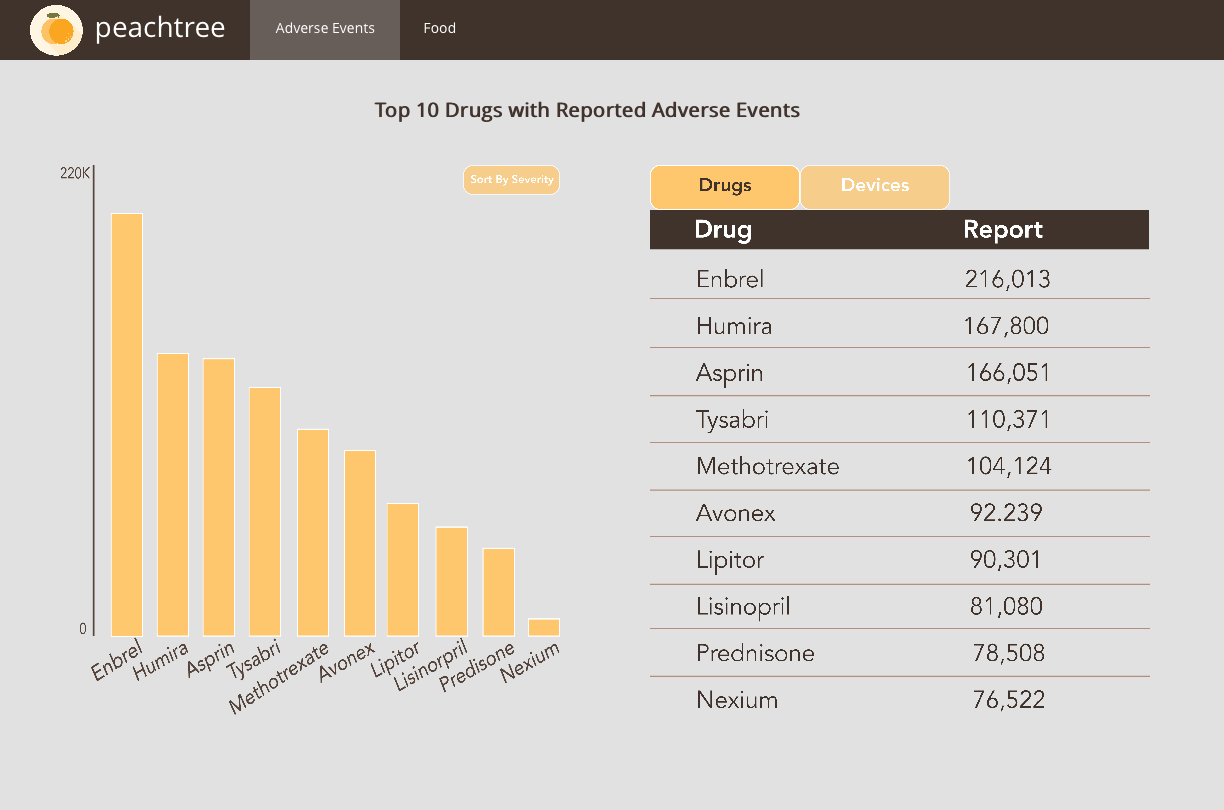
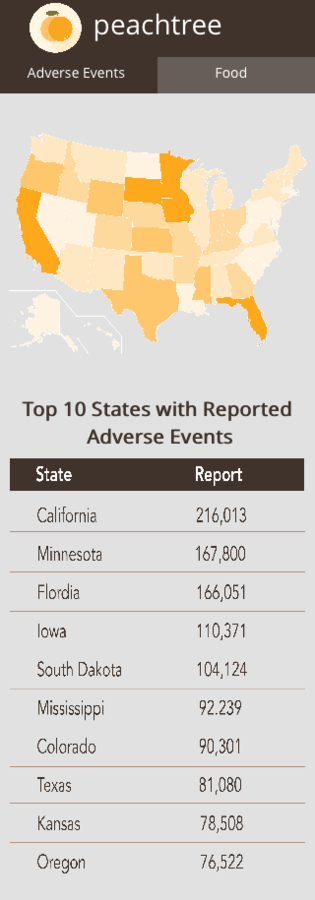

Responsive Mobile First Design Principles
Delivered using interactive UI/UX prototyping tools that allow for iterative feedback.
Project Peachtree
Live Deployed Demo