LIKELION at 인하대
#6
인하대학교 운영진 채민균

오늘 할 것은
간단한 MVC + CR + AWS S3
CRUD 란?
데이터 처리기능을 다음과 같이 4가지로 구분해 놓은 것.
C : Create
R : Read
U : Update
D : Delete
CRUD 란?
'데이터베이스에 변화를 가져오는가'를 기준으로 다음과 같이 나눌 수 있다.
R : Read
C : Create
U : Update
D : Delete
그리고 우리는 오늘 CR 만 다뤄볼 것이다.
데이터베이스란?
여러 사람들이 공유하고 사용할 목적으로 통합 관리되는 정보의 집합
관계형 데이터베이스
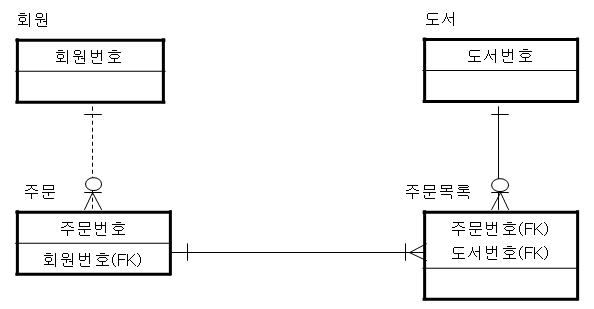
데이터끼리 관계를 맺어놓고 사용할 수 있는 데이터베이스
SQL(Structed Query Language)
데이터 베이스가 알아들을 수 있는 언어.
ㅋ 근데 우리는 잘 몰라도됨^^ㅋ
왜 때문이냐면ㅋ 레일즈가 알아서 해줌^^
루비로 코드짜서 실행하면 그게 sql로 바뀌고 그게 데이터베이스에서 실행됨.
실습ㅋ
우리는 오늘 이런걸 만들거에요.ㅎㅎ
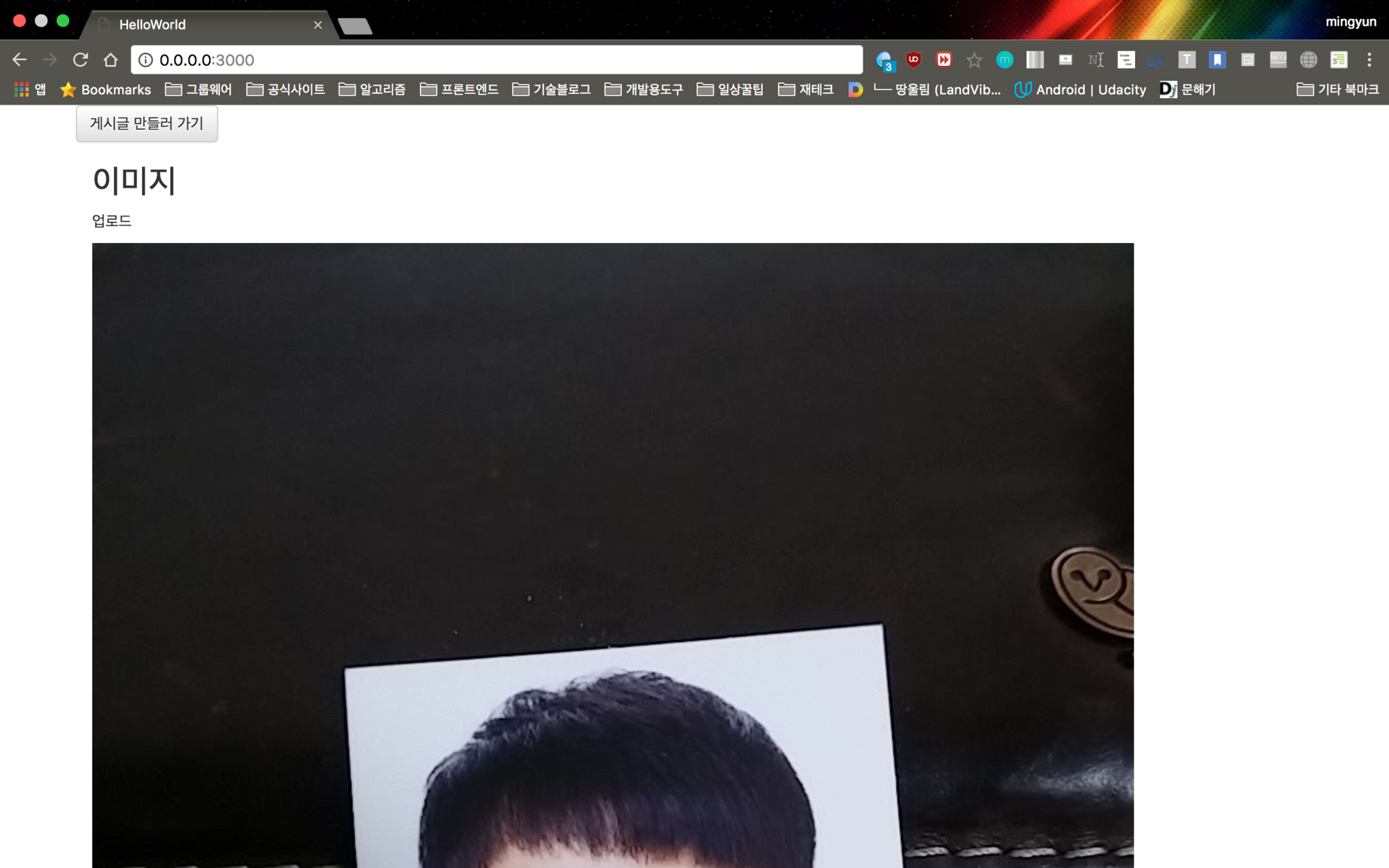
루트 페이지
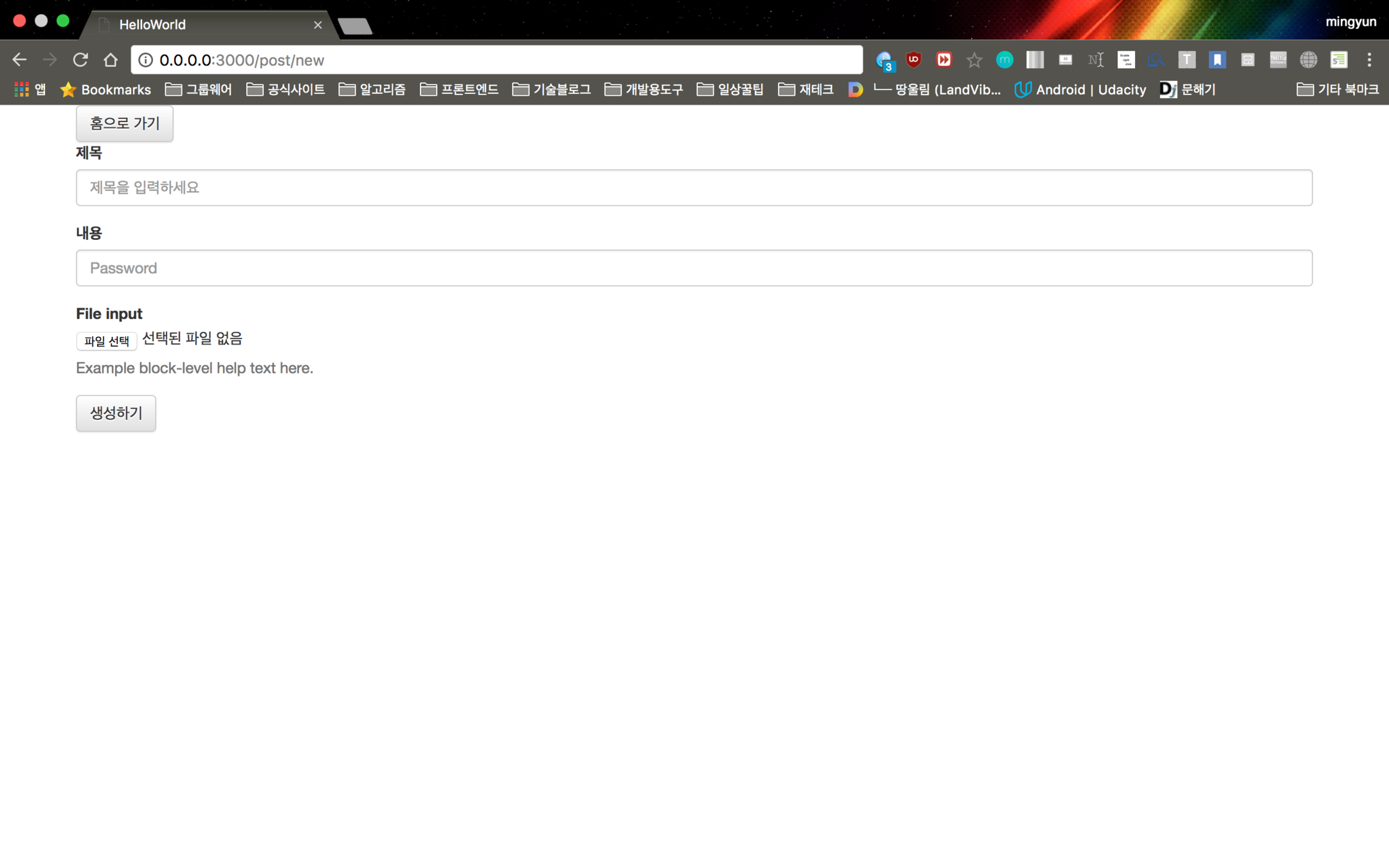
게시글 생성페이지
게시글이 다 보여지는 홈페이지를 만들거야
$ rails g controller home index
게시글을 만드는 페이지를 만들거야
$ rails g controller post new
게시글을 저장하고 불러올 수 있는 모델을 만들거야
$ rails g model post
posts |
|---|
string : title |
게시글에는 제목과 내용이 있었으면 좋겠어!
class CreatePosts < ActiveRecord::Migration[5.0]
  def change
    create_table :posts do |t|
      t.string :title
      t.string :content
      t.timestamps
    end
  end
end
$rails db:migrate
Rails.application.routes.draw do
  get 'home/index'
  get 'post/new'
end
home/index 가 가장 기본이 되는 루트페이지 였으면 좋겠어!
Rails.application.routes.draw do
  root 'home#index'
  get 'post/new'
end
bootstrap CDN 과 jquery CDN 을 views/layouts/application.html.erb 에 다음과 같이 추가하자
<!DOCTYPE html>
<html>
<head>
  <title>HelloWorld</title>
  <%= csrf_meta_tags %>
  <script src="https://ajax.googleapis.com/ajax/libs/jquery/3.2.0/jquery.min.js"></script>
  <!-- Latest compiled and minified CSS -->
  <link rel="stylesheet" href="https://maxcdn.bootstrapcdn.com/bootstrap/3.3.7/css/bootstrap.min.css" integrity="sha384-BVYiiSIFeK1dGmJRAkycuHAHRg32OmUcww7on3RYdg4Va+PmSTsz/K68vbdEjh4u" crossorigin="anonymous">
  <!-- Optional theme -->
  <link rel="stylesheet" href="https://maxcdn.bootstrapcdn.com/bootstrap/3.3.7/css/bootstrap-theme.min.css" integrity="sha384-rHyoN1iRsVXV4nD0JutlnGaslCJuC7uwjduW9SVrLvRYooPp2bWYgmgJQIXwl/Sp" crossorigin="anonymous">
  <!-- Latest compiled and minified JavaScript -->
  <script src="https://maxcdn.bootstrapcdn.com/bootstrap/3.3.7/js/bootstrap.min.js" integrity="sha384-Tc5IQib027qvyjSMfHjOMaLkfuWVxZxUPnCJA7l2mCWNIpG9mGCD8wGNIcPD7Txa" crossorigin="anonymous"></script>
</head>

<body>
<%= yield %>
</body>
</html>
Bootstrap 에서
Form, Button
가져다 쓰기!
form 태그와 input 태그
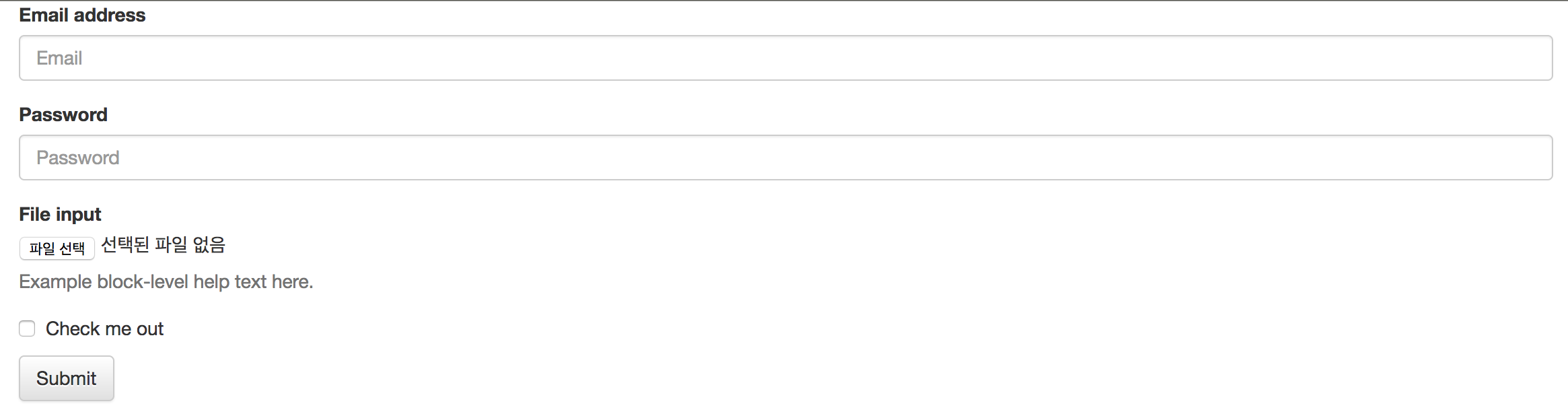
bootstrap 에서 basic form 을 복붙하면 이런 화면이 생성이 됨.
form 태그와 input 태그
<form action="" method="" enctype="">
    //input tags
</form>
form 태그 : 사용자로부터 정보를 입력받을 때 사용하는 태그
option으로 action과 method, enctype 이 있고 몇 개 더 있는데 우리는 이 세 개만 볼꺼임.
action은 이 정보를 어느 url로 던질건지. default:form 태그가 있는 페이지
method은 [GET/POST] 중 택1. default:GET
enctype은 인코딩을 뭐로 할지. default:url-encoded
form 태그와 input 태그
<div class="form-group">
      <label>제목</label>
      <input type="text" name="title" class="form-control" placeholder="제목을 입력하세요">
</div>
주의!
위의 input 태그 안의 name option 값을 입력을 해줘야만 params[:title] 로 받은 url에서 처리를 할 수가 있음.
Live Coding
AWS S3 란?
Simple Storage Service 의 약자로 이미지 혹은 동영상 파일들을 저장하고 불러올 때 사용하는 저장소이다.
carrierwave, fog-aws 란?
둘 다 gem 이다. 즉 라이브러리라는 말인데 라이브러리란 제 3자가 미리 만들어 놓은 좋은 도구들을 의미한다. 따라서 자기이 원하는 기능을 만들기에 적합한 라이브러리가 있다면 적극 활용을 추천한다.
carrierwave, fog-aws 사용하기
실습ㅋ
1. 라이브러리 준비하기
2. 이미지 업로드 할 수 있게 틀 짜기
3. carrierwave랑 fog-aws 세팅
4. 이미지 업로드하기
5. 이미지 불러와서 보여주기
1. 라이브러리 준비하기
# See https://github.com/fog/fog-aws
gem 'fog-aws'
# See https://github.com/carrierwaveuploader/carrierwave
# This gem provides a simple and extremely flexible way to upload files from Ruby applications.
gem 'carrierwave', '~> 1.0'
다음과 같이 gemfile에 두 개의 gem을 추가하고 터미널에 다음의 명령어를 써준다.(gem을 불러다 쓸 때에는 적어도 어디에 이 gem에 대한 정보들이 있는지 url 이라도 주석으로 적어주는 게 좋다.)
$ bundle install이 명령어는 gemfile에 명시되어 있는 라이브러리를 내 로컬에 불러서 사용하겠다는 의미이다.
2. 이미지 업로드 할 수 있게 틀 짜기
boootstrap 에서 form 부분 복붙
t.string :img_urldb/migrate/시간_create_post.rb 에 다음 코드 추가
3. carrierwave랑 fog-aws 세팅
$ rails generate uploader imguploaders라는 폴더에 img_uploader.rb 라는 파일이 생겼다.
storage :filestorage :fogdef store_dir
"uploads/#{model.class.to_s.underscore}/#{mounted_as}/#{model.id}"
end
def store_dir
    "uploads/"
end
3. carrierwave랑 fog-aws 세팅
config/initializers 폴더에 fog.rb 라는 파일 만들고 다음코드 복붙ㄱ
CarrierWave.configure do |config|
  config.fog_provider = 'fog/aws'                        # required
  config.fog_credentials = {
      provider:              'AWS',                        # required
      aws_access_key_id:     '',                        # required
      aws_secret_access_key: '',                        # required
      region:                'ap-northeast-2',                  # optional, defaults to 'us-east-1'
      host:                  '',             # optional, defaults to nil
      endpoint:              'https://s3.ap-northeast-2.amazonaws.com' # optional, defaults to nil
  }
  config.fog_directory  = ''                          # required
  config.fog_public     = true                                        # optional, defaults to true
  config.fog_attributes = { 'Cache-Control' => "max-age=#{365.day.to_i}" } # optional, defaults to {}
end
3. carrierwave랑 fog-aws 세팅
class ApplicationController < ActionController::Base
  # protect_from_forgery with: :exception
end
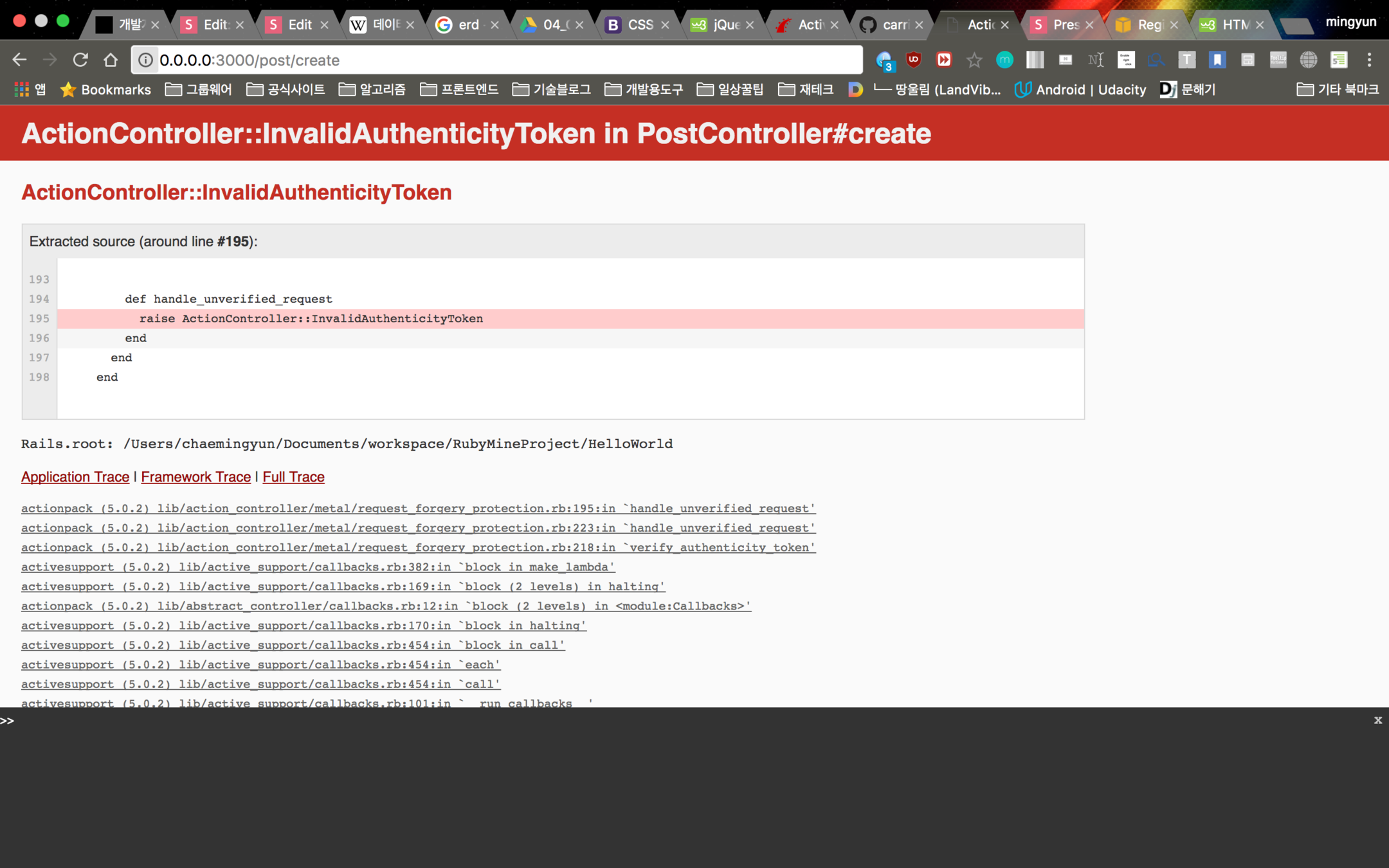
이부분 주석처리 해놓지 않으면 이미지 올릴 때 다음과 같은 에러가 뜹니다.
이 코드는 해커로 부터 해킹을 방지하기 위한 코드인데 우리한테는 필요가 없으므로... 주석 ㄱㄱ
3. carrierwave랑 fog-aws 세팅
4. 이미지 업로드하기
post방식, enctype="multipart/form-data" 로 해야만 이미지 업로드가 가능
<form action="/post/create" method="post" enctype="multipart/form-data">
5. 이미지 불러와서 보여주기
업로드된 이미지의 url을 데이터베이스에 저장하고, 데이터베이스로 부터 이미지 url을 불러와서 화면에 보여준다.
GET vs POST
언제 POST를 쓸까....?
form 데이터가 민감하거나 사적인 정보를 담고 있으면 무조건 POST 방식을 써라. POST 방식은 서버로 보내진 데이터가 페이지 주소에 나타나지 않으니깐!
큰 사이즈의 데이터를 전송할 때에도 POST 방식을 써라. POST 방식은 사이즈 제한이 없으니깐!
Live Coding
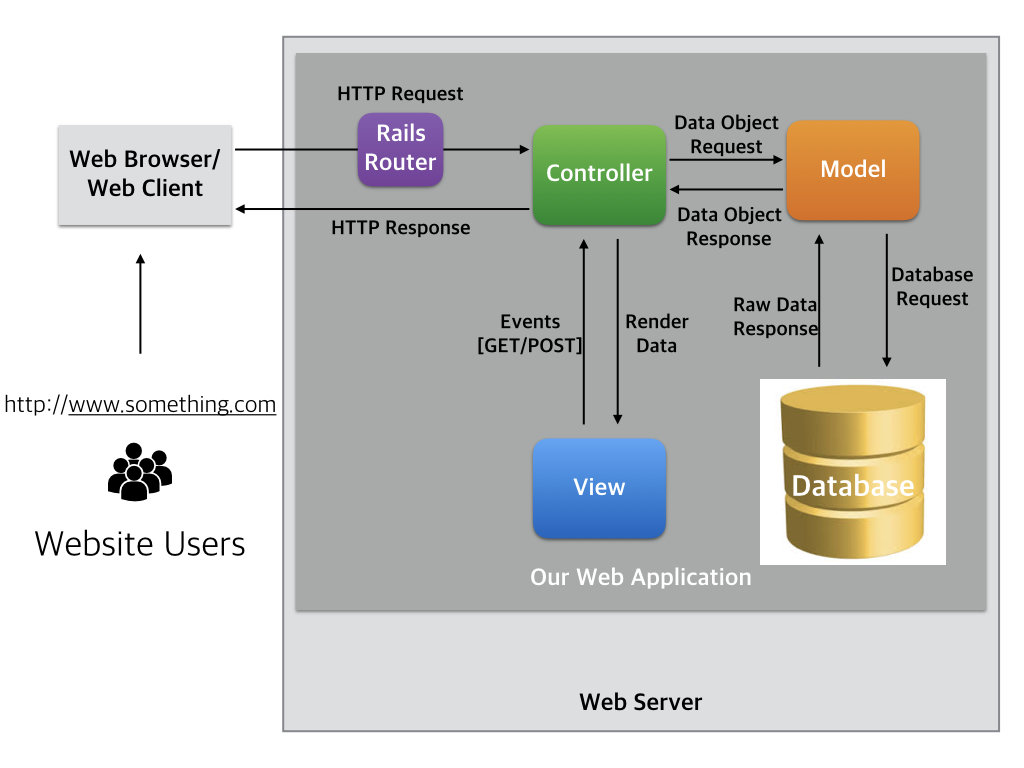
MVC 패턴 이해하기
반복해서 봐야해요.
끝
후 힘들다..