The Language of Shapes
Understanding the (SVG) Path
- Dual-citizen 🇺🇸 🇵🇱
- FE developer
- Data visualization engineer 🎨 📊
- World traveler 🌎
- Outdoors enthusiast 🌲
- Surf/snow/kite-boarder 🏄♀️

Hi, I'm Monica
new passions
new people
new adventures...
switching majors
switching careers
switching countries


THE PATH
^
(super abstract)
THE SVG PATH
^
(slightly less abstract)
What is the SVG?
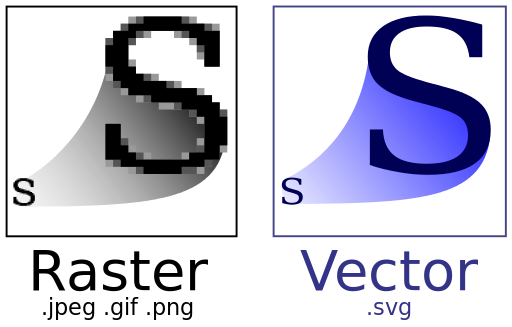
Scalable Vector Graphic
What is the SVG Path?
=
HTML
SVG
text
graphics
<g />
<circle />
<rect />
<line />
<div />
<h1 />
<ul />
<p /><path />Why understand the path?
POTENTIAL
PRACTICALITY
PLEASURE
Why is it difficult to understand the path?
<path fill="none" d="M2.568,7.179H8.96c1.411,0,2.557-1.145,2.557-2.557c0-1.412-1.146-2.557-2.557-2.557H8.534c-0.235,0-0.426,0.19-0.426,0.426c0,0.236,0.191,0.426,0.426,0.426H8.96c0.941,0,1.704,0.763,1.704,1.705S9.901,6.327,8.96,6.327H2.568c-0.236,0-0.426,0.19-0.426,0.426C2.142,6.988,2.333,7.179,2.568,7.179 M15.778,7.179c0-0.941-0.763-1.704-1.704-1.704h-0.427c-0.235,0-0.426,0.19-0.426,0.426c0,0.235,0.19,0.426,0.426,0.426h0.427c0.47,0,0.852,0.382,0.852,0.852c0,0.471-0.382,0.853-0.852,0.853H0.864c-0.236,0-0.426,0.19-0.426,0.426c0,0.235,0.19,0.426,0.426,0.426h13.21C15.016,8.884,15.778,8.12,15.778,7.179 M16.631,9.736H2.568c-0.236,0-0.426,0.19-0.426,0.426c0,0.236,0.19,0.426,0.426,0.426h14.062c0.94,0,1.704,0.764,1.704,1.705s-0.764,1.704-1.704,1.704h-0.427c-0.235,0-0.426,0.19-0.426,0.427c0,0.235,0.19,0.426,0.426,0.426h0.427c1.411,0,2.557-1.145,2.557-2.557S18.042,9.736,16.631,9.736 M10.665,11.44H4.273c-0.236,0-0.426,0.19-0.426,0.426c0,0.236,0.19,0.427,0.426,0.427h6.392c1.412,0,2.557,1.145,2.557,2.557s-1.146,2.557-2.557,2.557h-0.426c-0.236,0-0.426,0.19-0.426,0.426s0.19,0.427,0.426,0.427h0.426c1.883,0,3.41-1.526,3.41-3.409S12.548,11.44,10.665,11.44"></path>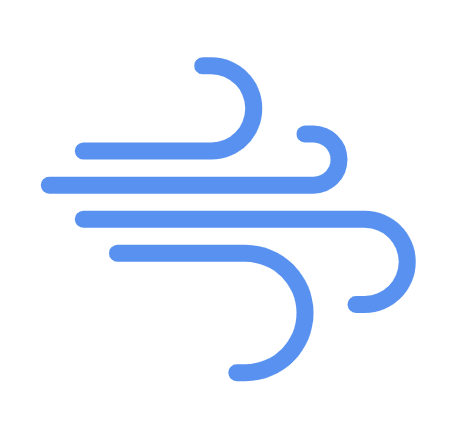
Book
Sentences
Words
Letters
Path
Path data
Commands
Letters and/or Numbers
<path fill="none" d="M 110,10 l 80,80 v -80 h -40"></path>SVG Path Commands
| M | m | L | l |
|---|---|---|---|
| H | h | V | v |
| C | c | S | s |
| Q | q | T | t |
| A | a | Z | z |
move to (x,y)
| M | m | L | l |
|---|---|---|---|
| H | h | V | v |
| C | c | S | s |
| Q | q | T | t |
| A | a | Z | z |
line to (x,y)
| M | m | L | l |
|---|---|---|---|
| H | h | V | v |
| C | c | S | s |
| Q | q | T | t |
| A | a | Z | z |
horizontal line to (x)
| M | m | L | l |
|---|---|---|---|
| H | h | V | v |
| C | c | S | s |
| Q | q | T | t |
| A | a | Z | z |
vertical line to (y)
| M | m | L | l |
|---|---|---|---|
| H | h | V | v |
| C | c | S | s |
| Q | q | T | t |
| A | a | Z | z |
Cubic bezier curves (cX1,cY1 cX2,cY2 eX,eY)
| M | m | L | l |
|---|---|---|---|
| H | h | V | v |
| C | c | S | s |
| Q | q | T | t |
| A | a | Z | z |
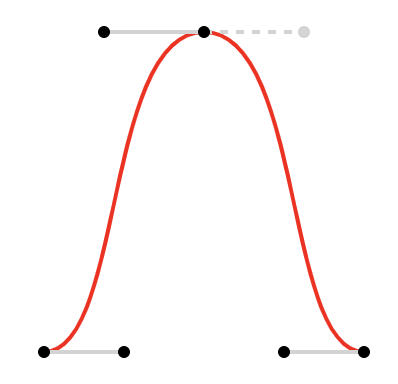
Smooth Cubic bezier curves (cX2,cY2 eX,eY)
| M | m | L | l |
|---|---|---|---|
| H | h | V | v |
| C | c | S | s |
| Q | q | T | t |
| A | a | Z | z |
Quadratic bezier curves (cX,cY eX,eY)
| M | m | L | l |
|---|---|---|---|
| H | h | V | v |
| C | c | S | s |
| Q | q | T | t |
| A | a | Z | z |
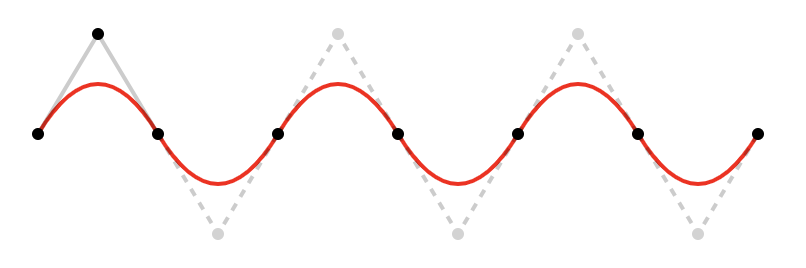
Smooth quadratic bezier curves (eX,eY)
| M | m | L | l |
|---|---|---|---|
| H | h | V | v |
| C | c | S | s |
| Q | q | T | t |
| A | a | Z | z |
Elliptical arcs (rX,rY rotation, arc, sweep, eX,eY)
| M | m | L | l |
|---|---|---|---|
| H | h | V | v |
| C | c | S | s |
| Q | q | T | t |
| A | a | Z | z |
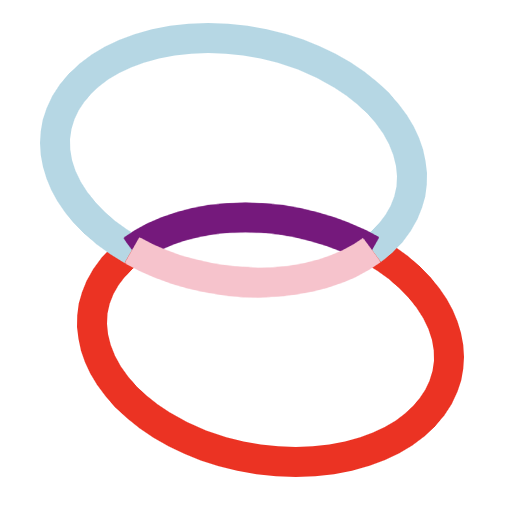
closePath
| M | m | L | l |
|---|---|---|---|
| H | h | V | v |
| C | c | S | s |
| Q | q | T | t |
| A | a | Z | z |
| M | m | L | l |
|---|---|---|---|
| H | h | V | v |
| C | c | S | s |
| Q | q | T | t |
| A | a | Z | z |
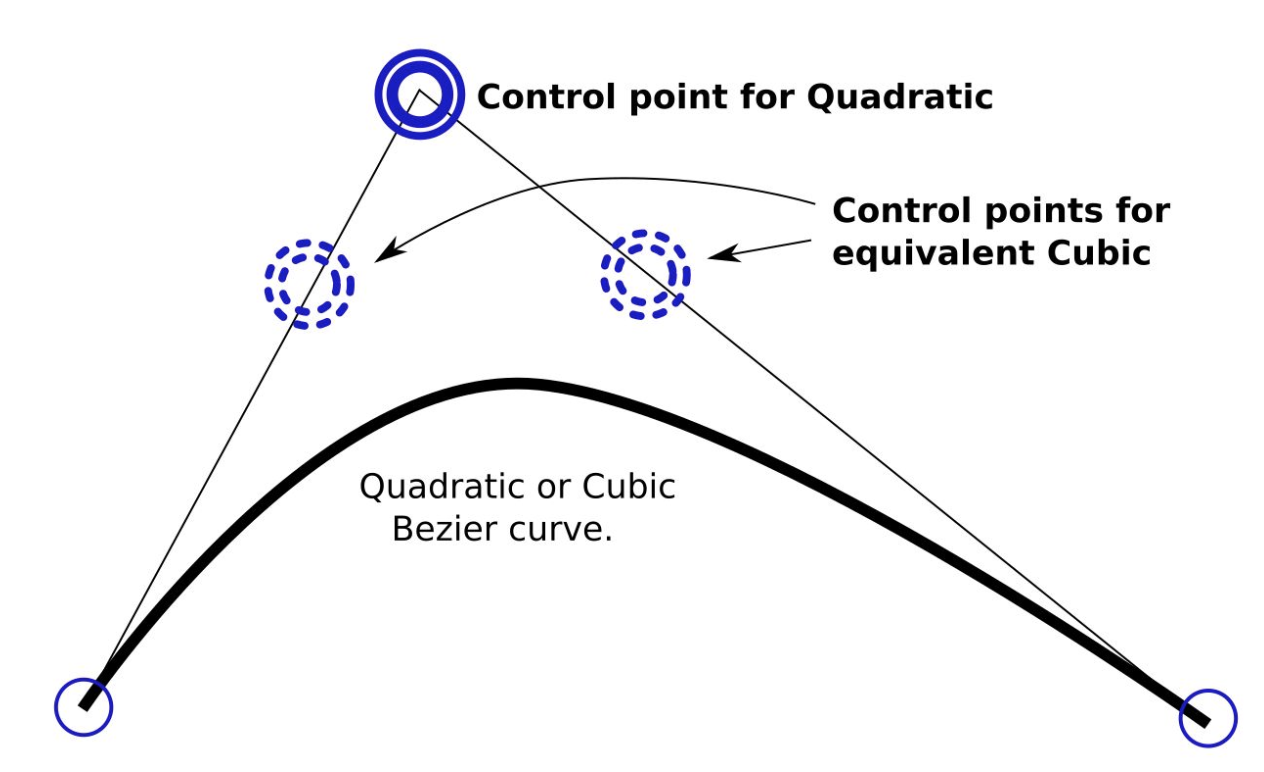
C1 = 2/3C + 1/3P1
C2 = 2/3C + 1/3P2
P1
P2
C
C1
C2
| M | m | L | l |
|---|---|---|---|
| H | h | V | v |
| C | c | S | s |
| Q | q | T | t |
| A | a | Z | z |
| M | m | L | l |
|---|---|---|---|
| H | h | V | v |
| C | c | S | s |
| Q | q | T | t |
| A | a | Z | z |
| M | moveTo | x, y |
| C | curveTo | x, y, x1, y1, x2, y2 |
| A | arcTo | rx, ry, angle, large-arc-flag, sweep-flag, x, y |
| M | moveTo | x, y |
| C | curveTo | x, y, x1, y1, x2, y2 |

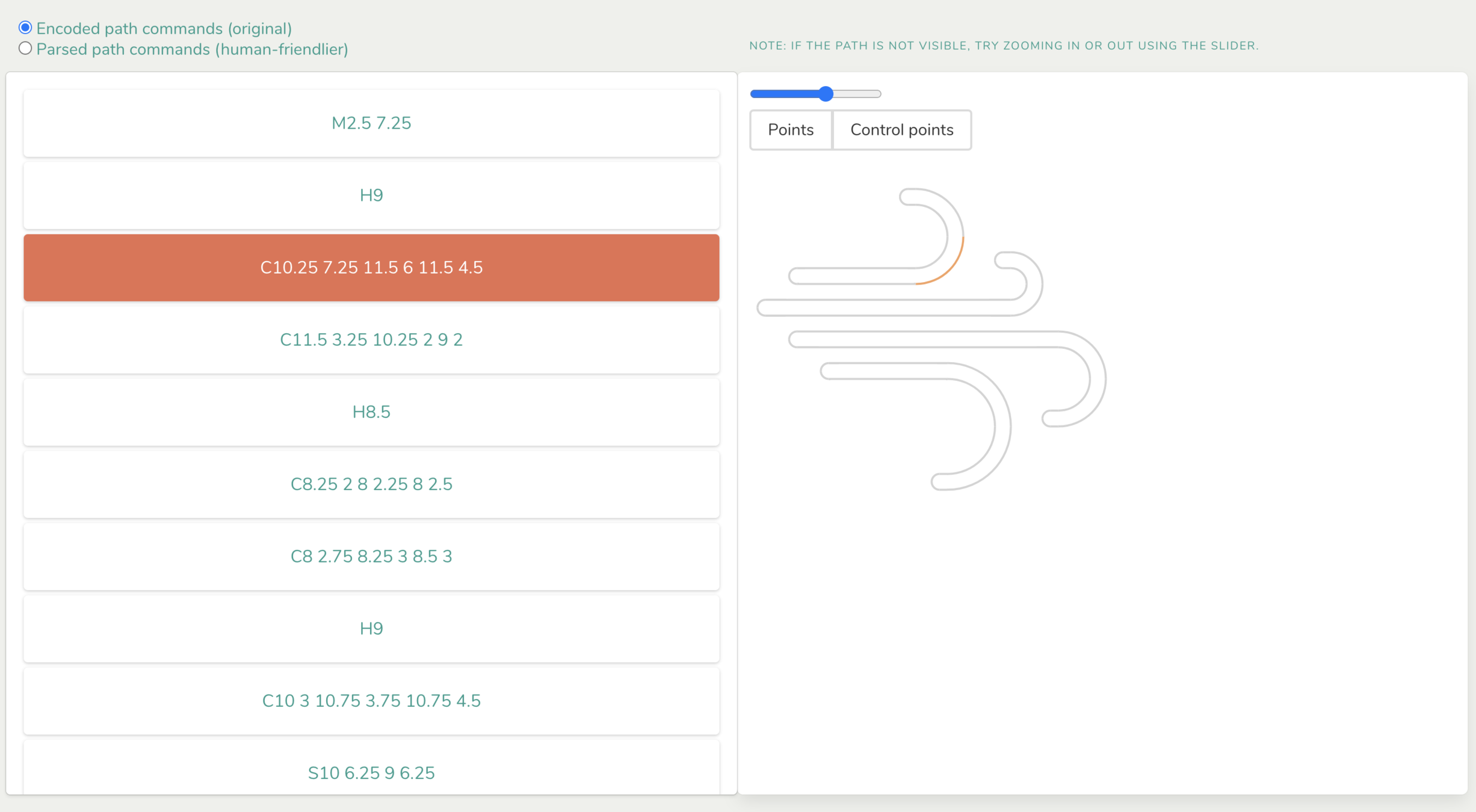
finding our path
<path fill="none" d="M2.568,7.179H8.96c1.411,0,2.557-1.145,2.557-2.557c0-1.412-1.146-2.557-2.557-2.557H8.534c-0.235,0-0.426,0.19-0.426,0.426c0,0.236,0.191,0.426,0.426,0.426H8.96c0.941,0,1.704,0.763,1.704,1.705S9.901,6.327,8.96,6.327H2.568c-0.236,0-0.426,0.19-0.426,0.426C2.142,6.988,2.333,7.179,2.568,7.179 M15.778,7.179c0-0.941-0.763-1.704-1.704-1.704h-0.427c-0.235,0-0.426,0.19-0.426,0.426c0,0.235,0.19,0.426,0.426,0.426h0.427c0.47,0,0.852,0.382,0.852,0.852c0,0.471-0.382,0.853-0.852,0.853H0.864c-0.236,0-0.426,0.19-0.426,0.426c0,0.235,0.19,0.426,0.426,0.426h13.21C15.016,8.884,15.778,8.12,15.778,7.179 M16.631,9.736H2.568c-0.236,0-0.426,0.19-0.426,0.426c0,0.236,0.19,0.426,0.426,0.426h14.062c0.94,0,1.704,0.764,1.704,1.705s-0.764,1.704-1.704,1.704h-0.427c-0.235,0-0.426,0.19-0.426,0.427c0,0.235,0.19,0.426,0.426,0.426h0.427c1.411,0,2.557-1.145,2.557-2.557S18.042,9.736,16.631,9.736 M10.665,11.44H4.273c-0.236,0-0.426,0.19-0.426,0.426c0,0.236,0.19,0.427,0.426,0.427h6.392c1.412,0,2.557,1.145,2.557,2.557s-1.146,2.557-2.557,2.557h-0.426c-0.236,0-0.426,0.19-0.426,0.426s0.19,0.427,0.426,0.427h0.426c1.883,0,3.41-1.526,3.41-3.409S12.548,11.44,10.665,11.44"></path>export const getPathCommandsAsCubicCurves = (pathData) => {
return new SVGPathData(pathData)
.toAbs()
.transform(SVGPathDataTransformer.NORMALIZE_HVZ())
.transform(L_TO_C())
.transform(SVGPathDataTransformer.NORMALIZE_ST())
.transform(SVGPathDataTransformer.A_TO_C())
.transform(SVGPathDataTransformer.QT_TO_C())
.encode();
};
const getSingleSegmentPathData = command => {
if (command.type & SVGPathData.CURVE_TO) {
const { prevX, prevY, x1, y1, x2, y2, x, y } = command;
return `M${prevX} ${prevY} C${x1} ${y1} ${x2} ${y2} ${x} ${y}`;
} else {
return encodeSVGPath(command);
}
}
const getSegments = ({ pathCommands, selectedCommand, highlightedCommand, onMouseOver, onMouseOut, onClick }) =>
pathCommands.map((command, i) => {
const d = getSingleSegmentPathData(command);
return (
<path
onMouseOver={() => onMouseOver(i)}
onMouseOut={onMouseOut}
onClick={() => onClick(i)}
id={i}
className="path-segment"
d={d}
stroke={
i === selectedCommand
? "#e76f51"
: i === highlightedCommand
? "#f4a261"
: "lightgrey"
}
strokeWidth="2px"
fill="none"
key={i}
/>
);
});import { SVGPathData, encodeSVGPath } from "svg-pathdata";Pseudo code:
- parse path data to JSON format
- transform data to absolute
- render single path per command
- scale appropriately
- add onMouseOver for info
- add onChange event to update data
Mission accomplished?
DATA
VISUAL
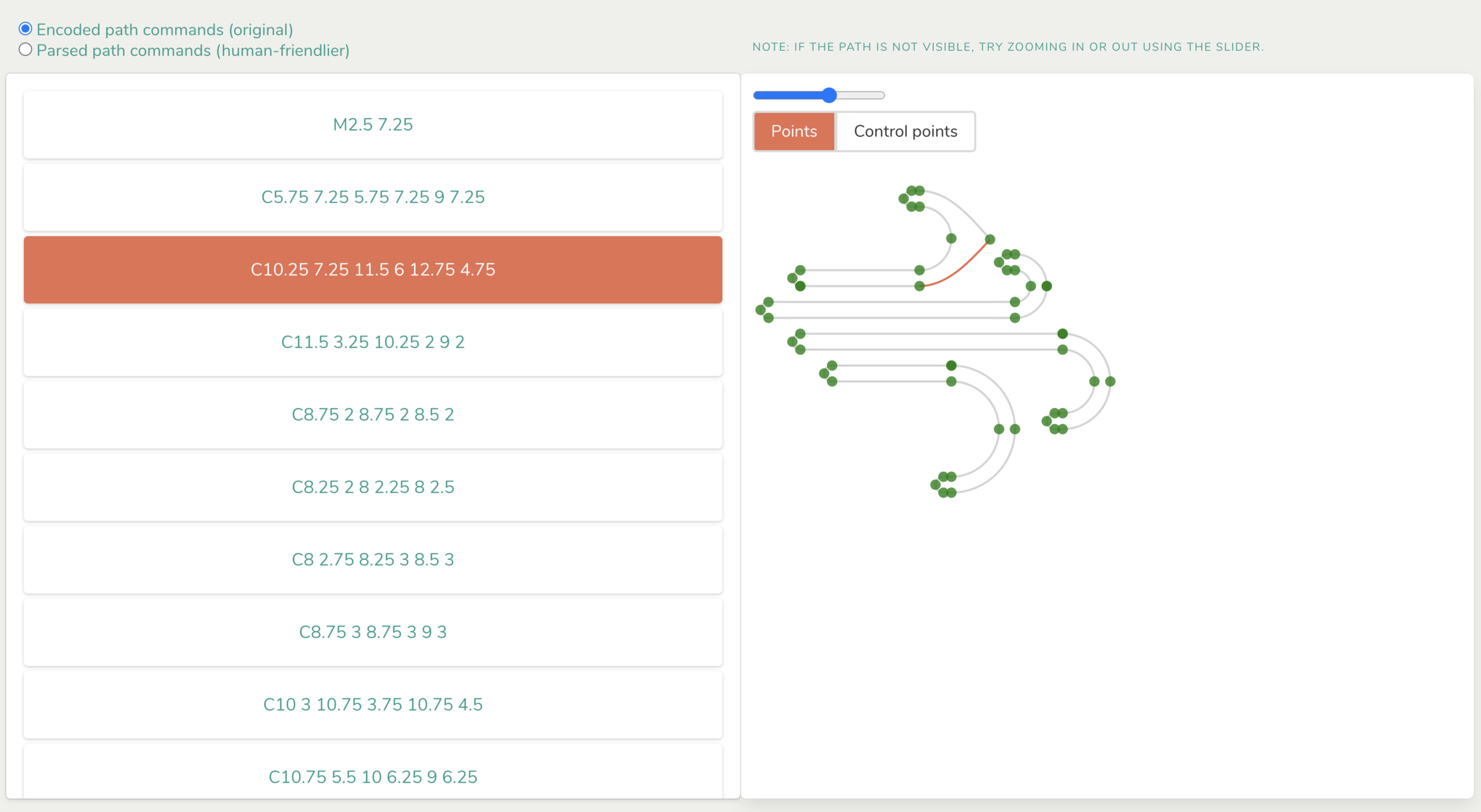
shaping our path
const getPoints = ({ pathCommands, onDrag, onStop, arePointsVisible, areControlPointsVisible }) => {
  const points = pathCommands.map((segment, i) => {
    const { x, y, x1, y1, x2, y2 } = segment;

    const handleDragXY = (e, position) => {
        const { x: posX, y: posY } = position;
        const newPathCommands = pathCommands.map((segment, segmentIndex) => {
          if (i === segmentIndex) {
            return { ...segment, x: posX, y: posY };
          } else if (i === segmentIndex - 1) {
            return { ...segment, prevX: posX, prevY: posY };
          }
          return segment;
        });
        return onDrag(newPathCommands);
      };

    const handleDragX1Y1 = (e, position) => {
      const { x: posX, y: posY } = position;
      const newPathCommands = pathCommands.map((segment, segmentIndex) => {
        if (i === segmentIndex) {
          return { ...segment, x1: posX, y1: posY };
        }
        return segment;
      });
      return onDrag(newPathCommands);
    };

    const handleDragX2Y2 = (e, position) => {
      const { x: posX, y: posY } = position;
      const newPathCommands = pathCommands.map((segment, segmentIndex) => {
        if (i === segmentIndex) {
          return { ...segment, x2: posX, y2: posY };
        }
        return segment;
      });
      return onDrag(newPathCommands);
    };

    return (
      <>
        {arePointsVisible && (
          <Draggable
            axis="both"
            defaultClassNameDragging="dragging"
            position={{ x, y }}
            positionOffset={{ x: -x, y: -y }}
            onStop={onStop}
            onDrag={handleDragXY}
            key={`${i}-xy`}
          >
            <circle
              fill="green"
              opacity="0.8"
              r={5}
              cx={x}
              cy={y}
            />
          </Draggable>
        )}
        {areControlPointsVisible && (
          <>
            <Draggable
              axis="both"
              defaultClassNameDragging="dragging"
              position={{ x: x1, y: y1 }}
              positionOffset={{ x: -x1, y: -y1 }}
              onStop={onStop}
              onDrag={handleDragX1Y1}
              key={`${i}-x1y1`}
            >
              <circle
                fill="red"
                opacity="0.8"
                r={3}
                cx={x1}
                cy={y1}
              />
            </Draggable>
            <Draggable
              axis="both"
              defaultClassNameDragging="dragging"
              position={{ x: x2, y: y2 }}
              positionOffset={{ x: -x2, y: -y2 }}
              onStop={onStop}
              onDrag={handleDragX2Y2}
              key={`${i}-x2y2`}
            >
              <circle
                fill="red"
                opacity="0.8"
                r={3}
                cx={x2}
                cy={y2}
              />
            </Draggable>
          </>
        )}
      </>
    );
  });
  return points;
};
import Draggable from 'react-draggable';Pseudo code:
- represent each command as cubic bezier
- render points defined by command (x,y) (x1,y1) (x2,y2)
- add click-and-drag functionality to these points
- onDrag: update path data held in local state
- onDragEnd: callback to update path data held globally
just imagine the possibilities
The path is beautiful.
Thank you.



Resources / Inspiration
-
svg-pathdata https://www.npmjs.com/package/svg-pathdata
-
Mavo Path Builder: https://mavo.io/demos/svgpath/
-
Why SVGs are awesome according to Sarah Drasner: https://www.youtube.com/watch?v=sxte3WpyO60
-
MDN Path Tutorial: https://developer.mozilla.org/en-US/docs/Web/SVG/Tutorial/Paths
-
MDN Path Docs: https://developer.mozilla.org/en-US/docs/Web/SVG/Element/path
-
D3 curve explorer: http://bl.ocks.org/d3indepth/b6d4845973089bc1012dec1674d3aff8
-
Free SVG icons - http://svgicons.sparkk.fr/
-
“Awaiting the perfect tool” article - https://css-tricks.com/tools-visualize-edit-svg-paths-kinda/
big big props here!