Basic training GeoServer


Introduction
- About zoom
- About us
- Agenda
Zoom help
Download data bundle

About us
About you?
Geoserver day 1
1.1 Server configuration
Installation of Geoserver
Server status
Log files: how to use them
Service configuration
Datum transformations
1.2 Publishing a shapefile
Structure of GEOSERVER_DATA_DIR
Uploading the files to publish
Creating workspaces, data stores, layers
1.3. Styling with SLD
Basic styling of a point layer
Basic styling of a line layer
Basic styling of a polygon layer
Online documentation on SLD
Advanced vectorial styling: filtering and labeling
CartoCSS: a lighter alternative
1.4 Publishing a PostGIS table
Uploading layers to PostGIS from QGIS
Creating a PostGIS data store
Benefits of PostGIS: indexes, functions, triggers
1.5 Publishing a raster layer
Preparing the raster files
File types: Monochromatic (binary), DEM, RGB
Raster symbolization: Color ramps
Publishing heavy raster data: mosaic, pyramid
Geoserver day 2
2.1 Using WMS standard
Content of a GetCapabilities document
GetMap operation
Output formats and their uses
Consumption from QGIS and web
GetLegendGraphic, GetFeatureInfo
GeoServer-specific: CQL_FILTER
2.2 Using WFS standard
Content of a GetCapabilities document
DescribeFeatureType, GetFeature
Output formats and uses
2.3 Tile caching with GeoWebCache
Choosing the appropriate image formats
Defining a custom pyramid
Pre-generating and deleting tiles
Adding "dimensions" to a cache
2.4 Using cache standards (WMTS, WMS-C)
WMTS: GetCapabilities, GetTile
Concept of pyramid
“De facto” Google standard: TMS (or XYZ)
2.5 Getting the most of GeoServer
0. What is GeoServer?
What is a map server?
An Internet Map Server provides maps through the Internet usually as images (???). One standard specification for such a server is the OGC Web Map Service.
Wikipedia, 2006
What is a map server?

What is a map server?
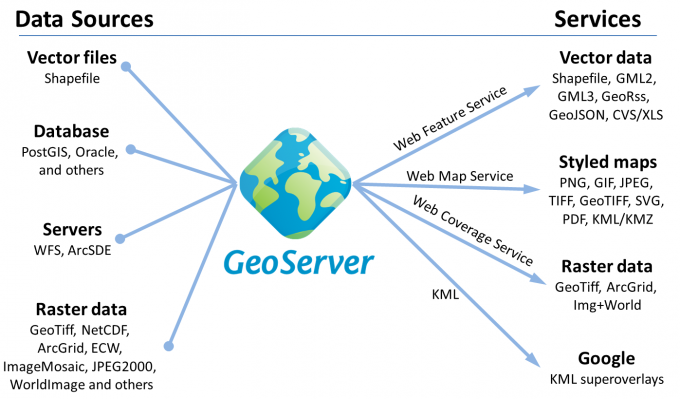
What is GeoServer?
Think free as in free speech, not free beer
R.Stallman
What is GeoServer?
Free / Open source software
What is GeoServer?
Being a community-driven project, GeoServer is developed, tested, and supported by a diverse group of individuals and organizations from around the world.
What is GeoServer?
Designed for interoperability, it publishes data from any major spatial data source using open standards.

What is a map server?
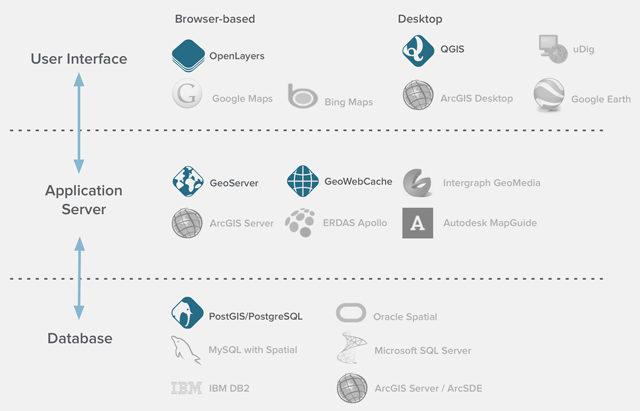
1.1 Server configuration
Up and running
Installing Geoserver
Installing Geoserver
- Java 11 - GeoServer 2.15.x and above (OpenJDK tested)
- Java 8 - GeoServer 2.9.x and above (OpenJDK and Oracle JRE tested)
- Java 7 - GeoServer 2.6.x to GeoServer 2.8.x (OpenJDK and Oracle JRE tested)

Installing Geoserver
Jetty (development):
https://docs.geoserver.org/stable/en/user/installation/win_installer.html
Tomcat (production, WAR): https://docs.geoserver.org/stable/en/user/installation/war.html
Installing Geoserver

Installing Geoserver
docker pull oscarfonts/geoserver

docker run -d -p 8080:8080 -v /path/to/local/data_dir:/var/local/geoserver
 oscarfonts/geoserver
Installing Geoserver
Load balancing
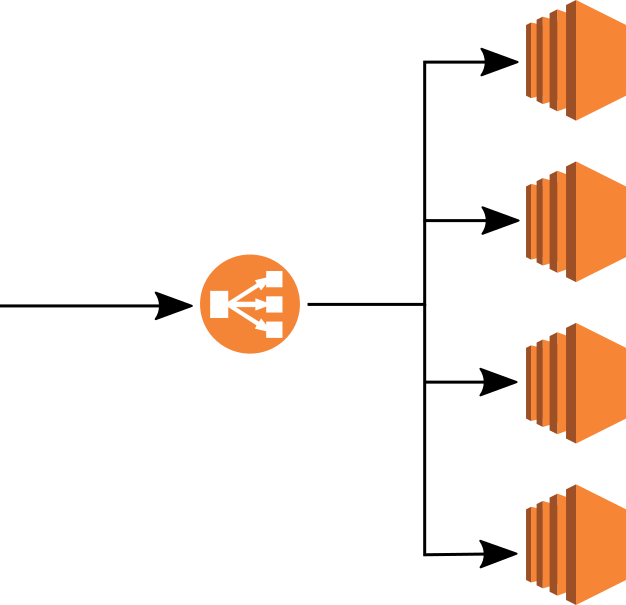
N1
N2
N3
N4
Server status
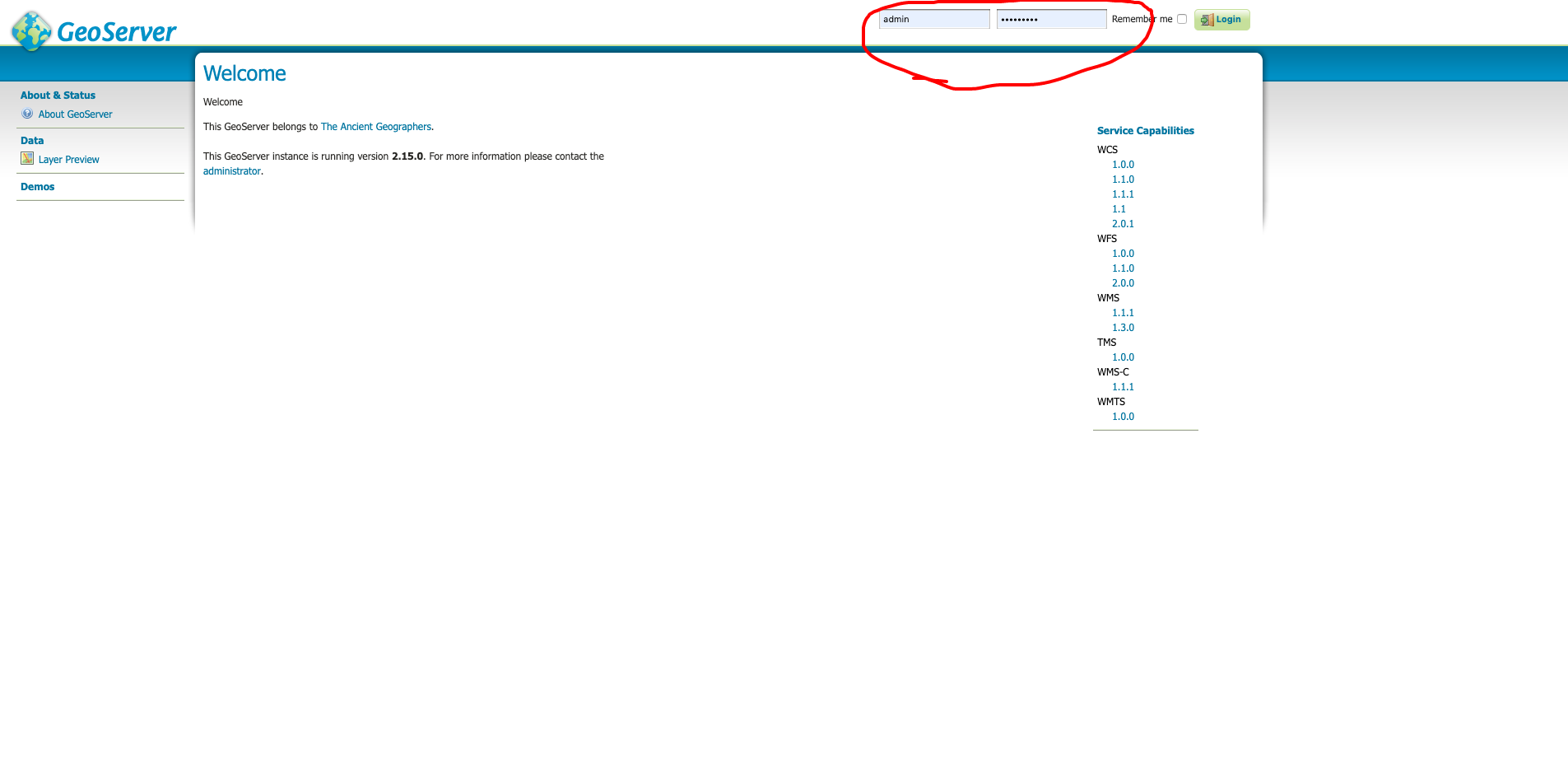
Log in: http://localhost:8080/geoserver
admin/geoserver ? CHANGE IT!
Log file
The log file of an application is a text file where details about the execution of the file are stored. Thus, a log file keeps a history with the details of the operations carried out, with more or less detail. Generally, when an execution error occurs, check this file for details.
Log file
GEOSERVER_DATA_DIR/logging.xml
logs/geoserver.log
User Administration Interface
Log file
Service configuration
GeoServer serves data using standard protocols established by the Open Geospatial Consortium:
- The Web Map Service (WMS) supports requests for map images (and other formats) generated from geographical data.
- The Web Feature Service (WFS) supports requests for geographical feature data (with vector geometry and attributes).
- The Web Coverage Service (WCS) supports requests for coverage data (rasters).
Service configuration
Connect to a WMS service (using QGIS)
https://neo.sci.gsfc.nasa.gov/wms/wms
or see the capabilities in browser:
https://neo.sci.gsfc.nasa.gov/wms/wms?version=1.3.0&service=WMS&request=GetCapabilities
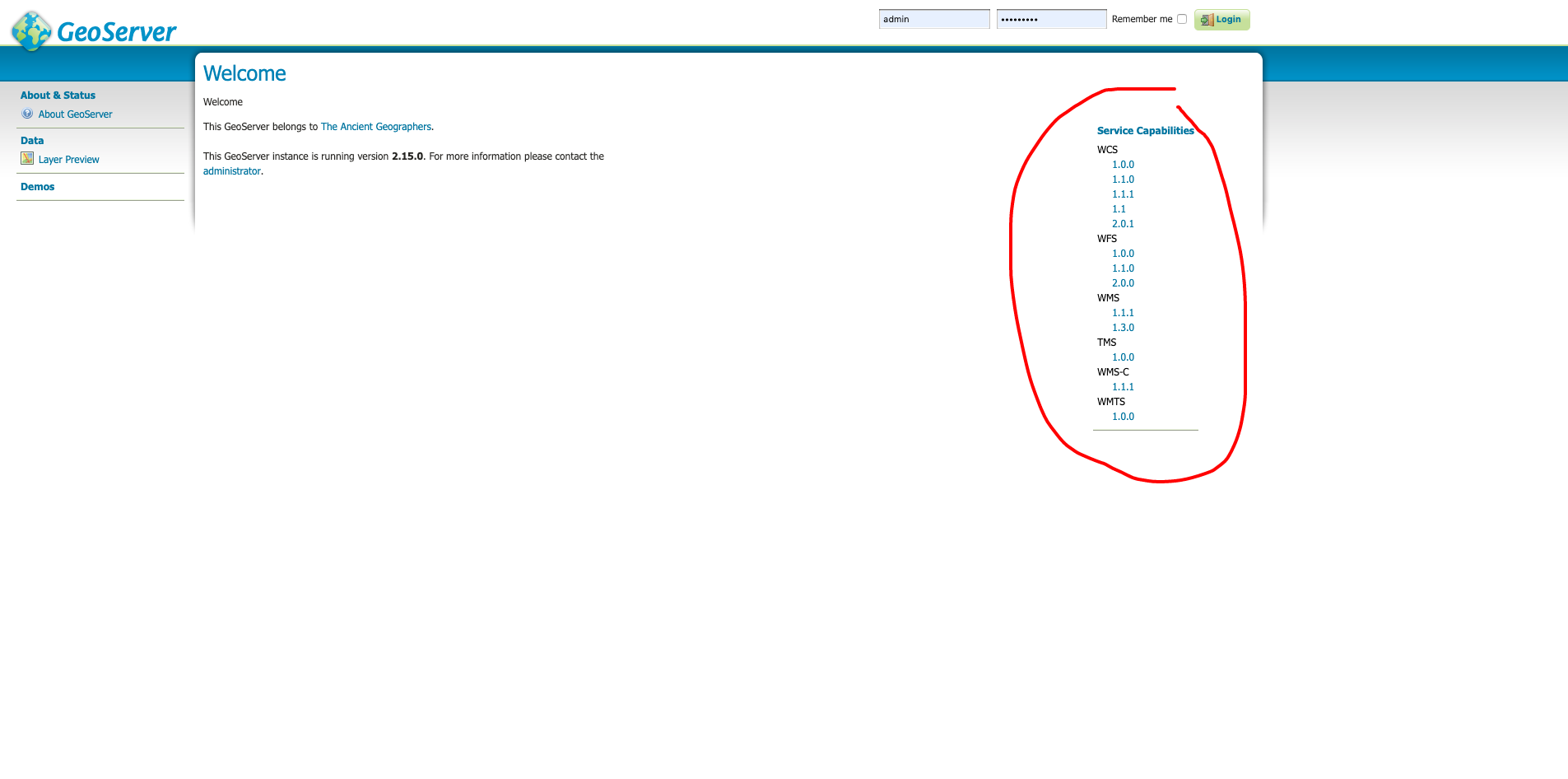
Service configuration
Service configuration
Metadata is important for interoperability!
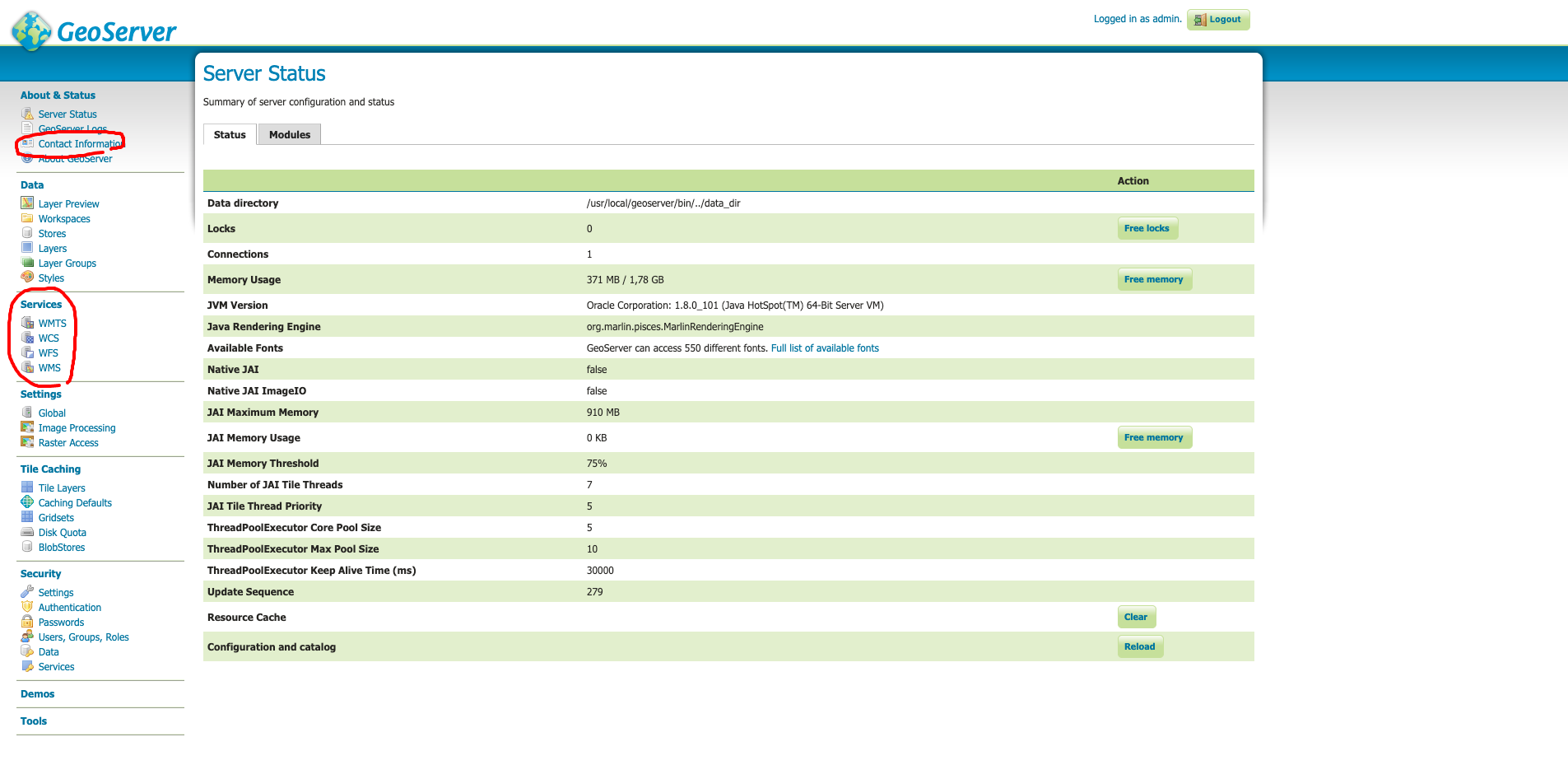
Service configuration
Metadata is important for interoperability!
Datum transformations
If source and target CRSs are refered to a different datum, GeoServer will automatically transform the information. How?
Datum transformations
Custom transformations: use the Reprojection Console
Given a CRS pair, GeoServer will automatically pick the most accurate datum transform from the EPSG database, unless a custom operation is declared
1.2 Publishing a shapefile
Data directory default location
Standalone platform Default/typical location
| Windows (except XP) | C:\Program Files (x86)\GeoServer 2.16.x\data_dir |
| Windows XP | C:Program Files\GeoServer 2.16.x\data_dir |
| Mac OS X | /Applications/GeoServer.app/Contents/Resources/Java/data_dir |
| Linux (Tomcat) | /var/lib/tomcat7/webapps/geoserver/data |
Structure of data directory
Data directory
Everything is stored in data directory. If:
- Relative paths
- Files stored in 'data' subfolder
=> PORTABILITY!
Publishing a shapefile
- Upload the file to the server
- Uncompress and check permissions
- Publish with User Administration Interface
Publishing a shapefile: uploading
#uploading with SSH
scp local_file user@remote_host:remote_file

#example
scp /myfile.zip geoserver@geoserver.geomati.co:~/training/upload
Publishing a shapefile: checking permissions
#check permissions
ls -l

chmod 644 /tmp/myfile.zip
Workspaces, stores, layers
Workspace 1
Data Store A
Data Store B
Layer A1
Layer A2
Layer A3
Layer B1
Layer B2
Publishing a shapefile
Exercise: Publishing a shapefile
Publish nyc_streets.shp (or your own shapefiles) to your local geoserver
http://localhost:8080/geoserver
Exercise: Publishing a directory of shapefiles
Publish all vector data to your local geoserver
http://localhost:8080/geoserver
Create a layer group
Isolated workspaces
1.3 Styling with SLD
Styles
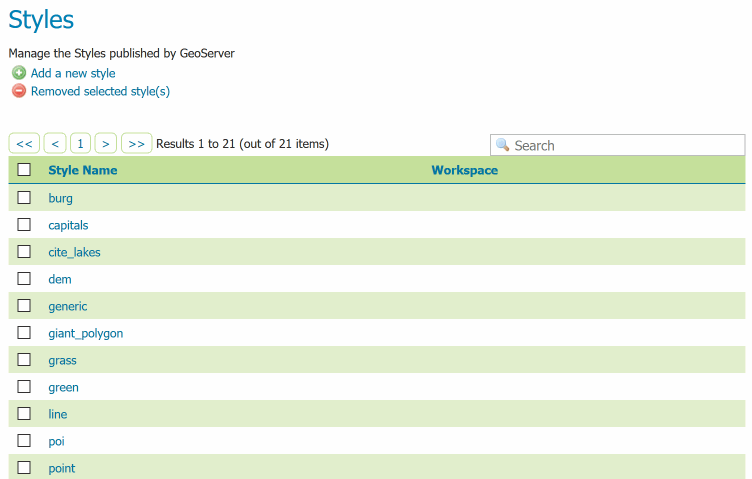
Styles
Style editor
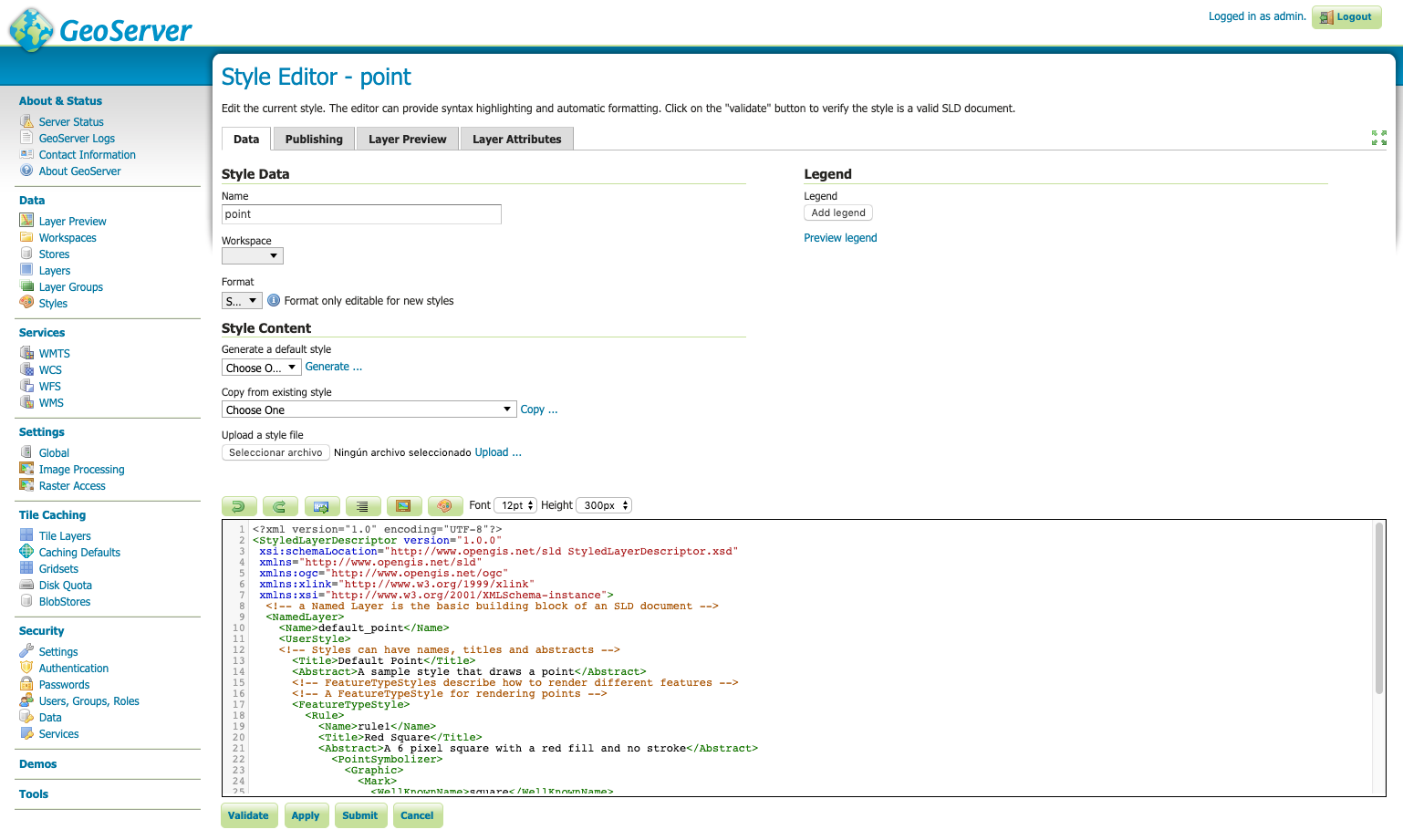
Basic styling of a point layer
<FeatureTypeStyle>
 <Rule>
   <PointSymbolizer>
     <Graphic>
       <Mark>
         <WellKnownName>circle</WellKnownName>
         <Fill>
           <CssParameter name="fill">#FF0000</CssParameter>
         </Fill>
         <Stroke>
           <CssParameter name="stroke">#000000</CssParameter>
           <CssParameter name="stroke-width">2</CssParameter>
         </Stroke>
       </Mark>
       <Size>6</Size>
     </Graphic>
   </PointSymbolizer>
 </Rule>
</FeatureTypeStyle>
Basic styling of a line layer
<FeatureTypeStyle>
 <Rule>
   <LineSymbolizer>
     <Stroke>
       <CssParameter name="stroke">#FF0000</CssParameter>
       <CssParameter name="stroke-width">3</CssParameter>
       <CssParameter name="stroke-dasharray">5 2</CssParameter>
     </Stroke>
   </LineSymbolizer>
 </Rule>
</FeatureTypeStyle>
Basic styling of a polygon layer
<FeatureTypeStyle>
 <Rule>
   <PolygonSymbolizer>
     <Fill>
       <CssParameter name="fill">#000080</CssParameter>
     </Fill>
     <Stroke>
       <CssParameter name="stroke">#FFFFFF</CssParameter>
       <CssParameter name="stroke-width">2</CssParameter>
     </Stroke>
   </PolygonSymbolizer>
 </Rule>
</FeatureTypeStyle>
Exercise
Style:
- Blue dashed line for topp:tasmania_roads
- Point with a red star for topp:tasmania_cities
- Polygons as lines in topp:tasmania_state_boundaries
Documentation on SLD:
SLD Cookbook
Documentation on SLD:
SLD Reference
Labeling
Exercise
Style:
- Label following line for nyc_streets
Filtering
Exercise
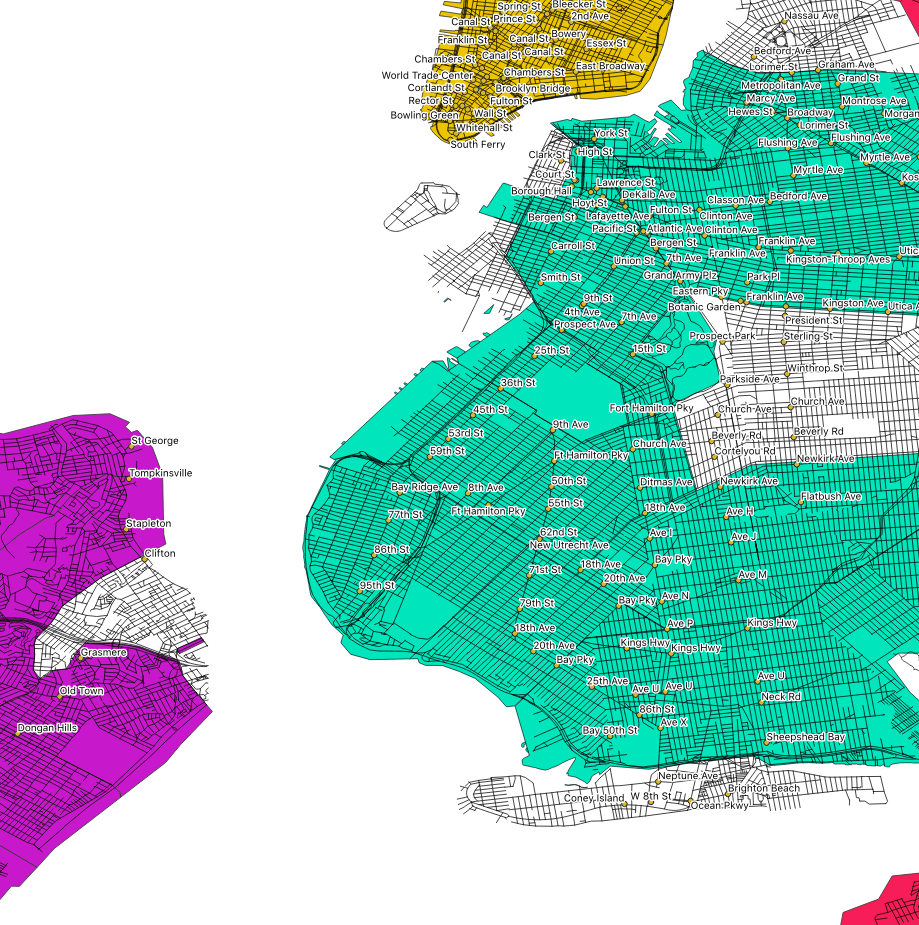
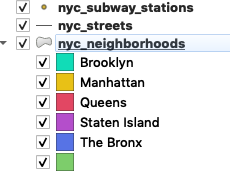
Style nyc_neighbourhoods, nyc_subway stations and nyc_streets:
Exporting SLD from QGIS
CSS: a lighter alternative
1.4 Publishing a PostGIS table
What is PostGIS?

What is PostGIS?
A spatial database is a database that is optimized for storing and querying data that represents objects defined in a geometric space. Most spatial databases allow the representation of simple geometric objects such as points, lines and polygons. Some spatial databases handle more complex structures such as 3D objects, topological coverages, linear networks, and TINs. While typical databases have developed to manage various numeric and character types of data, such databases require additional functionality to process spatial data types efficiently, and developers have often added geometry or feature data types.
Connect to local PostGIS
- Host: localhost
- Service:
- Database: postgres
- Port: 5432
- User: postgres
- Pwd: postgres
Connect via pgAdmin

pg_hba.conf
# TYPE  DATABASE        USER            ADDRESS                 METHOD
local   all             postgres                                ident
local   all             all                                     md5
#only localhost
host    all             all             127.0.0.1/32            md5
#everything open
host    all             all             0.0.0.0/32              md5
#open for a specific BD
host    bd_abierta      all             0.0.0.0/32              md5
Create database
CREATE DATABASE nyc;

CREATE EXTENSION postgis;
Tools to import data
- ogr2ogr
- shp2pgsql
- QGIS, Navicat ...
shp2pgsql (old way)
cd C:\Program Files\PostgreSQL \9.5\bin

shp2pgsql -I -s 26918 C:\Documents\postgis-workshop\data\roads.shp
roads | psql -U postgres -d <DBNAME>
Uploading layers to PostGIS from QGIS
Import
- nyc_streets.shp
- nyc_subway_stations.shp
- nyc_census_blocks.shp
- nyc_neighbourhoods.shp
(be careful with projection)
Creating a PostGIS data store
Connect to remote PostGIS
- Host: geoserver.geomati.co
- Service:
- Database: deimos
- Port: 5432
- User: user_deimos
- Pwd: deimos
PostGIS functions
Exercise
Get all subway stations less than 2kms from lon:-73.85 lat:40.75 in PostGIS
Hint: use ST_Distance or ST_Within
Show the stations on GeoServer
Exercise
SELECT name
FROM nyc_subway_stations
WHERE ST_DWithin(
    geom,
    ST_Transform(ST_GeomFromText('POINT(-73.85 40.75)', 4326), 26918), 2000
);
PostGIS triggers
PostgreSQL trigger can be specified to fire
- Before the operation is attempted on a row (before constraints are checked and the INSERT, UPDATE or DELETE is attempted)
- After the operation has completed (after constraints are checked and the INSERT, UPDATE, or DELETE has completed)
- Instead of the operation (in the case of inserts, updates or deletes on a view)
PostGIS triggers
PostgreSQL Triggers are database callback functions, which are automatically performed/invoked when a specified database event occurs.
1.5 Publishing raster data
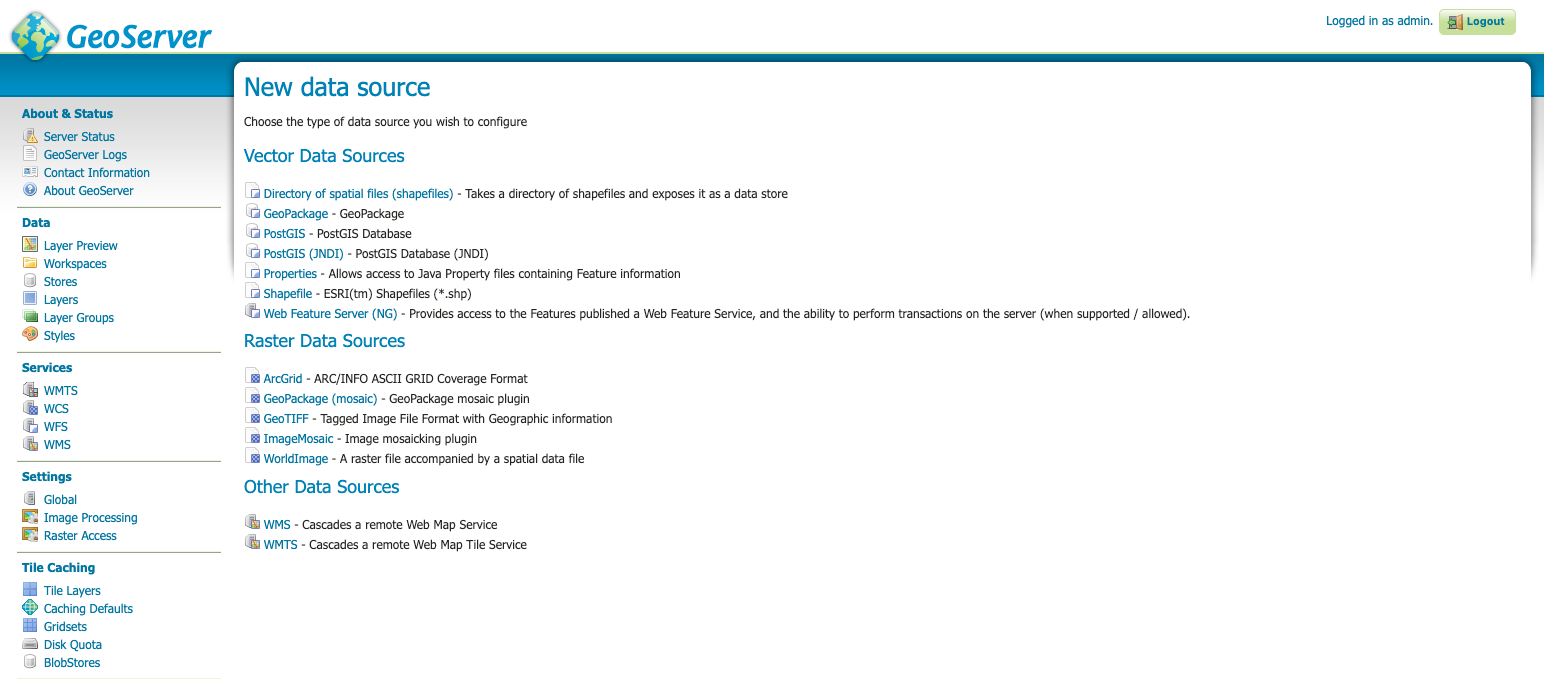
Raster formats
GDAL extension
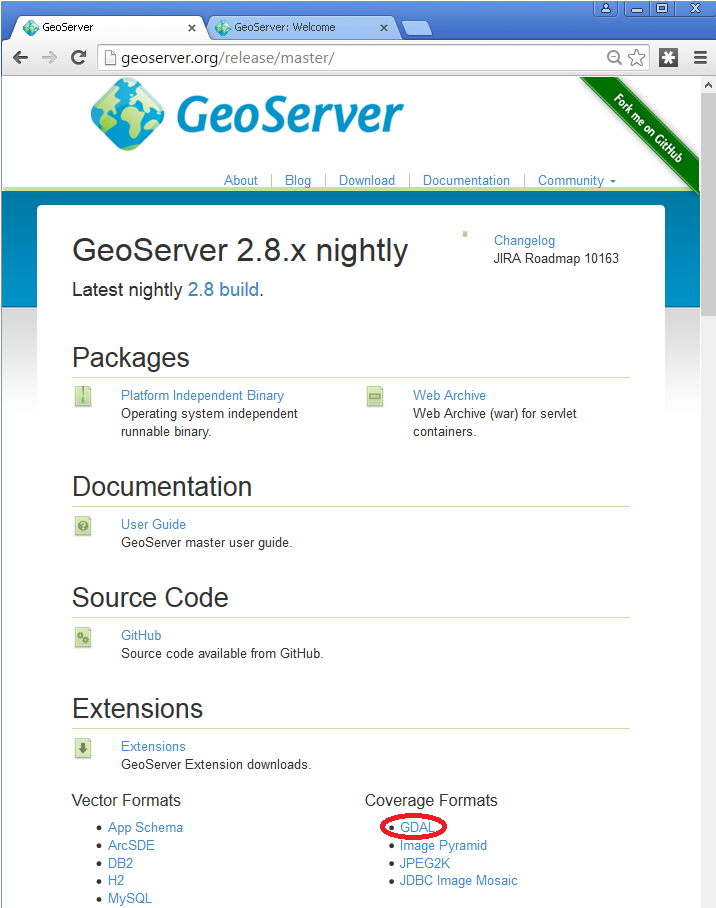
What is GDAL?
GDAL is a translator library for raster and vector geospatial data formats that is released under an X/MIT style Open Source License by the Open Source Geospatial Foundation.
GDAL extension
Installing GDAL extension
cd /var/lib/tomcat8/webapps/geoserver/WEB-INF/lib/
sudo wget https://sourceforge.net/projects/geoserver/files/GeoServer/2.14.2/extensions/geoserver-2.14.2-gdal-plugin.zip
sudo unzip geoserver-2.14.2-gdal-plugin.zip
rm *.txt *.TXT *.zip
chown tomcat8:tomcat8 *.jar
Installing GDAL native libraries
cd /usr/local/geoserver/
mkdir gdal
cd gdal
wget http://demo.geo-solutions.it/share/github/imageio-ext/releases/1.1.X/1.1.8/gdal/gdal-data.zip
unzip gdal-data.zip

mkdir lib
cd lib
wget https://demo.geo-solutions.it/share/github/imageio-ext/releases/native/gdal/1.9.2/linux/gdal192-Ubuntu12-gcc4.6.3-x86_64.tar.gz
tar -xvf gdal192-Ubuntu12-gcc4.6.3-x86_64.tar.gz
GDAL Formats
- DTED, Military Elevation Data (.dt0, .dt1, .dt2): http://www.gdal.org/frmt_dted.html
- EHdr, ESRI .hdr Labelled: <http://www.gdal.org/frmt_various.html#EHdr>
- ENVI, ENVI .hdr Labelled Raster: <http://www.gdal.org/frmt_various.html#ENVI>
- HFA, Erdas Imagine (.img): <http://www.gdal.org/frmt_hfa.html>
- JP2MrSID, JPEG2000 (.jp2, .j2k): <http://www.gdal.org/frmt_jp2mrsid.html>
- MrSID, Multi-resolution Seamless Image Database: <http://www.gdal.org/frmt_mrsid.html>
- NITF: <http://www.gdal.org/frmt_nitf.html>
- ECW, ERDAS Compressed Wavelets (.ecw): <http://www.gdal.org/frmt_ecw.html>
- JP2ECW, JPEG2000 (.jp2, .j2k): http://www.gdal.org/frmt_jp2ecw.html
- AIG, Arc/Info Binary Grid: <http://www.gdal.org/frmt_various.html#AIG>
- JP2KAK, JPEG2000 (.jp2, .j2k): <http://www.gdal.org/frmt_jp2kak.html>
Publishing a RGB GeoTiff
1. Upload file rgb.tiff
2. Create data store in http://localhost:8080/geoserver
3. Publish layer
Publish a NDVI GeoTiff
1. Upload file
2. Create data store
3. Style layer (SLD or QGIS)
4. Publish layer
Publishing a DEM GeoTiff
Example layer: sf:sfdem (Spearfish elevation)
Best practices with raster data
- GeoTiff format is rarely very slow
- Don't reproject: same EPSG as output
- Generate pyramids/overviews (GDAL)
- Use cache (GeoWebCache)
Optimization with GDAL
or QGIS
Create overviews (pyramids)
Ex: gdaladdo -r average abc.tif 2 4 8 16
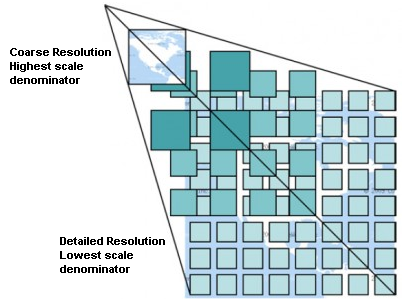
Best advice for rasters
If possible, create cache with GeoWebCache!
Geoserver day 2
2.1 Using WMS standard
Content of a GetCapabilities document
GetMap operation
Output formats and their uses
Consumption from QGIS and web
GetLegendGraphic, GetFeatureInfo
GeoServer-specific: CQL_FILTER
2.2 Using WFS standard
Content of a GetCapabilities document
DescribeFeatureType, GetFeature
Output formats and uses
2.3 Tile caching with GeoWebCache
Choosing the appropriate image formats
Defining a custom pyramid
Pre-generating and deleting tiles
Adding "dimensions" to a cache
2.4 Using cache standards (WMTS, WMS-C)
WMTS: GetCapabilities, GetTile
Concept of pyramid
“De facto” Google standard: TMS (or XYZ)
2.5 Getting the most of GeoServer
2.1 Using Web Map Service (WMS) standard
GS and OGC standards
Designed for interoperability, it publishes data from any major spatial data source using open standards.
OGC standards
- The Web Map Service (WMS) supports requests for map images (and other formats) generated from geographical data.
- The Web Feature Service (WFS) supports requests for geographical feature data (with vector geometry and attributes).
- The Web Coverage Service (WCS) supports requests for coverage data (rasters).
OGC standards
REQUEST (GetMap, GetCapabilities ...)
RESPONSE (image/png, application/json, ...)
CLIENT:
QGIS, ArcGIS, web client (OpenLayers, LeafletJS)
SERVER:
GeoServer, MapServer, QGISServer, ...
OGC standards
WMS REQUEST1
CLIENT:
QGIS, ArcGIS, webpage/ mashup (OpenLayers, LeafletJS)
SERVER1
WFS REQUEST2
SERVER2
WMS REQUEST3
SERVER3
OGC standards
Paradigm: every layer of information can be maintained and published by its producer and can be consumed from multiple clients using OGC Standards.
Web Map Service (WMS)
WMS provides a standard interface for requesting a geospatial map image. The benefit of this is that WMS clients can request images from multiple WMS servers, and then combine them into a single view for the user. The standard guarantees that these images can all be overlaid on one another as they actually would be in reality.
Web Map Service (WMS)
WMS requests can perform the following operations:
| Operation | Description |
| Exceptions | If an exception occur |
| GetCapabilities | Retrieves metadata about the service, including supported operations and parameters, and a list of the available layers |
| GetMap | Retrieves a map image for a specified area and content |
| GetFeatureInfo(optional) | Retrieves the underlying data, including geometry and attribute values, for a pixel location on a map |
| DescribeLayer(optional) | Indicates the WFS or WCS to retrieve additional information about the layer. |
| GetLegendGraphic(optional) |
GetCapabilities
GetCapabilities
- http://geoserver.geomati.co:8080/geoserver/wms?
- service=wms&
- version=1.1.1&
- request=GetCapabilities
GetCapabilities
GetMap
GetMap
- http://geoserver.geomati.co:8080/geoserver/topp/wms?
- SERVICE=WMS&
- VERSION=1.1.1&
- REQUEST=GetMap&
- FORMAT=image%2Fpng&
- TRANSPARENT=true&
- LAYERS=topp%3Atasmania_roads&
- exceptions=application%2Fvnd.ogc.se_inimage&
- SRS=EPSG%3A4326&
- STYLES=&
- WIDTH=768&HEIGHT=641&
- BBOX=145.65673828125%2C-42.944183349609375%2C147.76611328125%2C-41.183624267578125
GetMap
GetMap
GetMap formats
GetMap formats
- png (or gif) for maps
- jpeg for satellite
- pdf for printing
(Layer preview)
Using WMS from QGIS
https://docs.qgis.org/3.4/en/docs/user_manual/working_with_ogc/ogc_client_support.html
GetCapabilities -> GetMap
Exercise
Make a QGIS map with 3 WMS layers
- nyc_subway_stations from http://geoserver.geomati.co:8080
- nyc_census_blocks from http://localhost:8080
- ortho 2018 from https://orthos.dhses.ny.gov/ArcGIS/services/Latest/MapServer/WMSServer?
Using WMS from a web client
Exercise
Make a Leaflet map with 2 WMS layers:
- topp:tasmania_roads from http://geoserver.geomati.co:8080
- ortho 2018 from https://orthos.dhses.ny.gov/ArcGIS/services/Latest/MapServer/WMSServer?
Exercise
Make a Leaflet map with 2 WMS layers
- nyc_subway_stations from http://geoserver.geomati.co:8080
- nyc_streets from http://localhost:8080
GetLegendGraphic
GetLegendGraphic
Exercise
Add the legend of the subway stations layer to Leaflet map with 2 WMS layers
- nyc_subway_stations from http://geoserver.geomati.co:8080
- nyc_streets from http://localhost:8080
WMS Decorations: Watermark
WMS Decorations: Embedded Legend
JSON Legend
Custom Legend
Defined in Style Editor. Make a custom legend (a static image) for subway_stations
GetFeatureInfo
GetFeatureInfo
- http://geoserver.geomati.co:8080/geoserver/topp/wms?
- SERVICE=WMS&
- VERSION=1.1.1&
- REQUEST=GetFeatureInfo&
- FORMAT=image%2Fpng&
- TRANSPARENT=true&
- QUERY_LAYERS=topp%3Atasmania_roads&
- LAYERS=topp%3Atasmania_roads&
- exceptions=application%2Fvnd.ogc.se_inimage&
- INFO_FORMAT=text%2Fhtml&
- FEATURE_COUNT=50&
- SRS=EPSG%3A4326&
- STYLES=&
- WIDTH=101&HEIGHT=101&X=50&Y=50&BBOX=...
GetFeatureInfo
GeoServer-specific parameters
GeoServer-specific parameters
Exercise
Get all subway stations less than 2kms from lon:-73.85 lat:40.75 using CQL_FILTER
(localhost, LayerPreview)
2.2 Using Web Feature Service (WFS) standard
OGC standards
- The Web Map Service (WMS) supports requests for map images (and other formats) generated from geographical data.
- The Web Feature Service (WFS) supports requests for geographical feature data (with vector geometry and attributes).
- The Web Coverage Service (WCS) supports requests for coverage data (rasters).
Web Feature Service (WFS)
WMS requests can perform the following operations:
| GetCapabilities | Generates a metadata document describing a WFS service provided by server as well as valid WFS operations and parameters |
| DescribeFeatureType | Returns a description of feature types supported by a WFS service |
| GetFeature | Returns a selection of features from a data source including geometry and attribute values |
| LockFeature | Prevents a feature from being edited through a persistent feature lock |
| Transaction | Edits existing feature types by creating, updating, and deleting |
Web Map Service (WMS)
WMS requests can perform the following operations:
| Operation | Description |
| Exceptions | If an exception occur |
| GetCapabilities | Retrieves metadata about the service, including supported operations and parameters, and a list of the available layers |
| GetMap | Retrieves a map image for a specified area and content |
| GetFeatureInfo(optional) | Retrieves the underlying data, including geometry and attribute values, for a pixel location on a map |
| DescribeLayer(optional) | Indicates the WFS or WCS to retrieve additional information about the layer. |
| GetLegendGraphic(optional) |
GetCapabilities
Connect from QGIS
Differences between WFS and WMS
WFS downloads the full data! Good or bad?
Differences between WFS and WMS
WFS layers are preferable over WMS layers if you need direct access to the attributes and geometries of the layers. However, considering the amount of data that needs to be downloaded (which leads to speed problems and also a lack of easily available public WFS servers) it’s not always possible to use a WFS instead of a WMS.
GML, KML, SHP or GeoJSON?
Configuring WFS
Exercise
Make a QGIS map with 1 WFS layer
and 1 WMS layer
- nyc_subway_stations as WFS from http://localhost:8080
- nyc_census_blocks as WMS from http://localhost:8080
WFS Demos
GetFeature
- WFS_GetFeatureBBOX
- WFS_GetFeatureIntersects
Exercise
Get nyc_neighbourhood that intersects with point lon:-73.85 lat:40.55 using WFS_Intersects
WFS-T (Transactional)
The basic Web Feature Service allows querying and retrieval of features. A transactional Web Feature Service (WFS-T) allows creation, deletion, and updating of features.
2.3 Tile caching with GeoWebCache
GeoWebCache
GeoWebCache is a tiling server. It runs as a proxy between a map client and map server, caching (storing) tiles as they are requested, eliminating redundant request processing and thus saving large amounts of processing time.

GeoWebCache
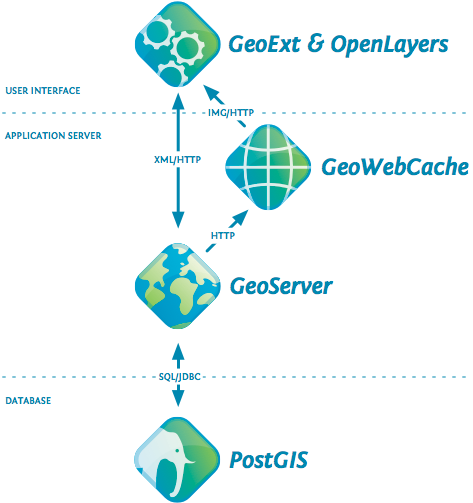
GeoWebCache
We can not store every WMS GetMap request, the combination of BBOX, WIDTH, HEIGHT and layers is huge!
=> we need TILES
GeoWebCache
Configure GeoWebCache
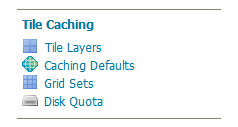
Web Administration Interface
Caching defaults
Which format to use?
- image/jpeg for satellite, ortho
- image/png for transparent map
Caching defaults
- direct integration during normal map viewing: tiles are cached only when they are requested from a client, either through map browsing (such as in OpenLayers) or through manual WMS tile requests.
- by seeding. Seeding is the process where map tiles are generated and cached internally from GeoWebCache. When processed in advance, the user experience is greatly enhanced, as the user never has to wait for tiles to be generated.
Direct integration
Direct integration allows WMS requests served through GeoServer to be cached as if they were received and processed by GeoWebCache.
With direct integration, tile caching is enabled for all standard WMS requests that contain the tiled=true parameter and conform to all required parameters.
Exercise
In your local GeoServer, configure tiles for nyc_census_blocks for EPSG:3857 (aka EPSG:900913).
Warning: keep ZOOM LEVEL below 15 ... it's just training!
Tiling strategy
- Pre-generate (seeding) only small levels of zoom
- Detailed tiles must be cached on-demand.
Where is cache stored?
geoserver_data_dir/gwc
Standalone platform Default/typical location
| Windows (except XP) | C:\Program Files (x86)\GeoServer 2.16.x\data_dir |
| Windows XP | C:Program Files\GeoServer 2.16.x\data_dir |
| Mac OS X | /Applications/GeoServer.app/Contents/Resources/Java/data_dir |
| Linux (Tomcat) | /var/lib/tomcat7/webapps/geoserver/data |
WMS vs caching
Instead of drawing on-demand
we get a few files from the server
Exercise
Make a Leaflet map with 2 WMS layers and check it's cached with GeoWebCache header responses (HIT and MISS)
- nyc_subway_stations (WMS) from http://localhost:8080
- nyc_census_blocks (WMS) from http://localhost:8080
2.4 Using cache standards (WMTS, WMS-C)
WMS-C -> WMTS
WMTS
WMTS
LayerPreview in Tile Caching->Tile Layers
WMTS: Gridsets, Tile Matrix
"Modern" tiling
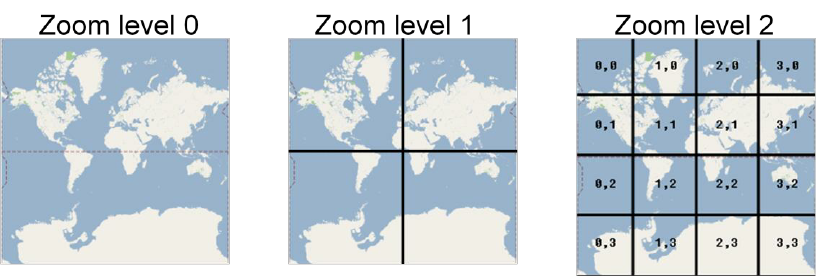
"Modern" tiling
Common mass market solutions implicitly follow this profile by using Google-Mercator CRS, a common topLeftCorner, the same set of TileMatrices and a fix URL template.
WHO SET THE STANDARD?
“De facto” Google standard: TMS (or XYZ)
“De facto” Google standard: TMS (or XYZ)
Exercise
Make a Leaflet map with 1 local WMS layer and a basemap from
2.5 Getting the most of GeoServer
Official documentation
User Manual
Extensions
Mailing lists
How to report a bug
Issue tracker
Final exercise
- Choose 2-3 layers from your computer or download 2-3 layers from CNIG (use .shp or .tiff, not ECW)
- Publish at local Geoserver (http://localhost:8080/geoserver)
- Style via SLD (labels, filtering)
- Build a Leaflet web client that consumes the layers via WMS
- Cache the first levels of zoom of big layers with GeoWebCache
Thank you