Formación Intergraph Spain en PostGIS

marti.pericay@geomati.co
Presentación
- Sobre la formación
- Quiénes somos
- Temario
Descargar data bundle
Calendario
-
Jornada 1 (10/05/2017): introducción PostGIS (Martí Pericay)
-
Jornada 2 (18/05/2017): PostGIS avanzado (Martí Pericay)
-
Jornada 3 (24/05/2017): alta disponibilidad (Jose Vicente Higón)
2.1 Tuning for Spatial
2.1.1 Configuración avanzada
2.1.2 Seguridad, encriptación
2.1.3 Upgrades
2.1.4 Definición de datos: privilegios, Row Security y herencia
2.1.5 Vistas materializadas
2.1.6 Indexación
2.1.7 Secuencias
2.2 Stored Procedures
2.2.1 Funciones
2.2.2 PL/PgSQL
2.2.3 Restricciones
2.2.4 Triggers (validación)
3.1 Backup y restore
3.1.1 Copias de seguridad lógicas (pg_dump y pg_restore)
3.1.2 Copias de seguridad físicas
3.1.3 WAL y archivado continuo
3.1.4 Copias de seguridad online
3.1.5 Restauración en un punto del tiempo (PITR)
3.2 Conexión con otras base de datos
3.2.1 DB links
3.2.2 Foreign data wrapper (Oracle, MySQL, ...)
3.3 Clustering y alta disponibilidad
3.3.1 Sistema de réplica standby (Slony)
3.3.2 Sistema de réplica hot Stand-by (Streaming Replication)
3.3.3 Balanceo de carga con pgPool-II

¿Quiénes somos?
Postgres/PostGIS
1.1 Introducción
1.1.1 PostgreSQL
1.1.2 PostGIS
1.1.3 GDAL/OGR
1.1.4 Open Source: ventajas y desventajas
1.1.5 Licencias OSS
1.1.6 Arquitecturas
1.2 Instalación y configuración
1.2.1 Instalación
1.2.2 Crear BDD: command line, GUI
1.2.3 pg_hba.conf y postgresql.conf
1.2.4 pgAdmin
1.2.5 Importar datos
1.2.6 Otros clientes: QGIS+DBManager, Navicat
1.3 PostGIS vs Oracle
1.3.1 Tipos y conceptos básicos PostgreSQL
1.3.2 PostGIS: geometrías, WKT, WKB
1.3.3 PostGIS: funciones
1.3.4 PostGIS: sistemas de coordenadas
1.3.5 Vistas
1.3.6 Funciones temporales
1.3.7 PostgreSQL: índices
1.3.8 Triggers
1.3.9 PostgreSQL: esquemas
Geodatabase
Core y extensiones
Documentación
Sistemas operativos
Versiones
PostgreSQL
8.x
9.x
PostGIS
1.x
2.x
GDAL
Desde PostGIS 2.0, incluido (Para PostGIS Raster)
https://trac.osgeo.org/gdal/wiki/frmts_wtkraster.html
OGR
1.4 Software libre
Think free as in free speech, not free beer
R.Stallman
Roadmap
Github
Clone, pull request: mantenimiento
1.5 Licencias
- PostgreSQL: PostgreSQL License (BSD/MIT)
- PostGIS: GNU / GPL v2
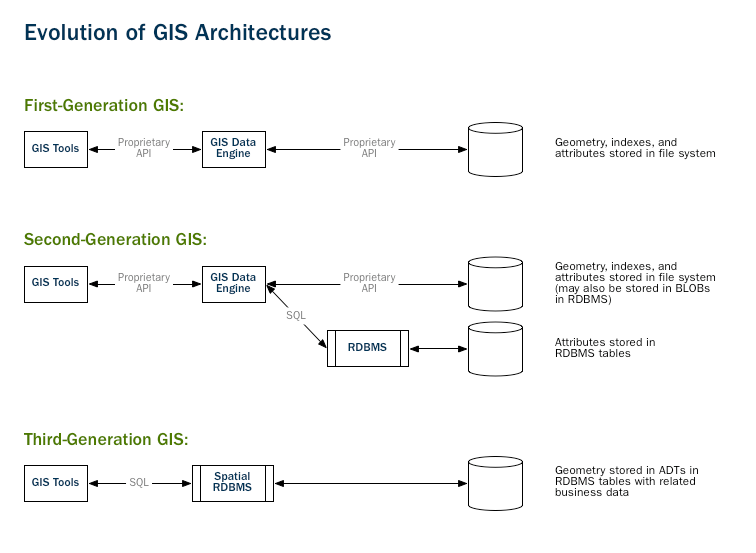
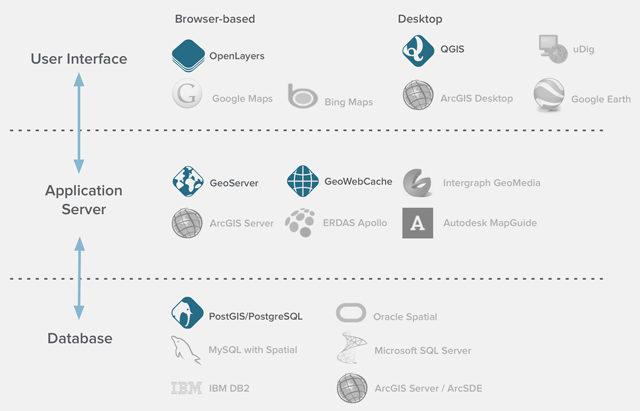
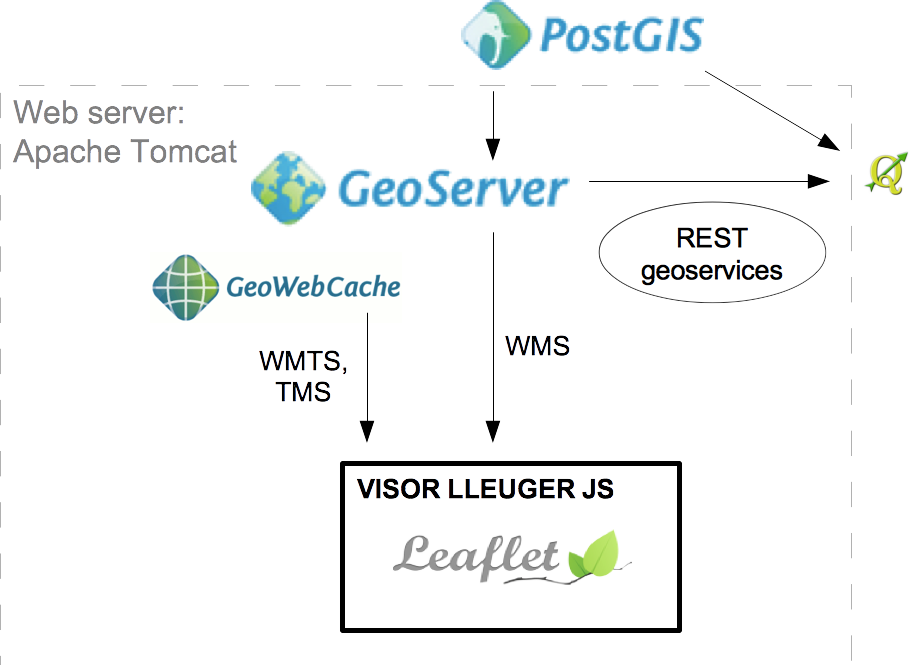
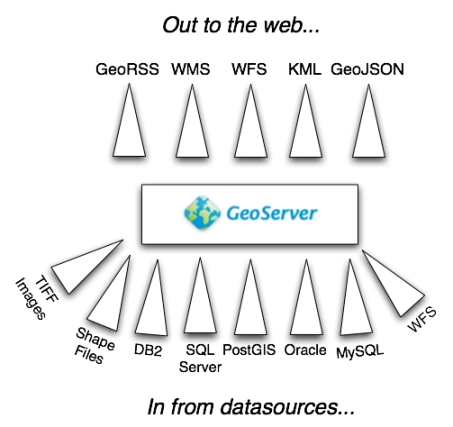
1.6 Arquitecturas
Alta disponibilidad
2. Instalación y configuración
2.1 Instalación Ubuntu
# Instalar darrera versió
apt-get install postgresql postgis

# Instalar versió específica
apt-get install postgresql-9.3-postgis-2.1
# Instalar pgRouting
sudo apt-get install postgresql-9.5-pgrouting
2.1 Instalación Windows
psql
\q: Quit/Exit
\c __database__: Connect to a database
\d __table__: Show table definition including triggers
\dt *.*: List tables from all schemas (if *.* is omitted will only show SEARCH_PATH ones)
\l: List databases
\dn: List schemas
\df: List functions
\dv: List views
\df+ __function__ : Show function SQL code.
\x: Pretty-format query results instead of the not-so-useful ASCII tables
psql - primera BD
CREATE DATABASE prueba;

\c prueba

CREATE TABLE tabla_prueba (
  id SERIAL PRIMARY KEY,
  name VARCHAR(128)
);

ALTER TABLE tabla_prueba ADD COLUMN geom geometry(Geometry, 4326);

-- ERROR?
psql - primera BD
-- Enable PostGIS (includes raster)
CREATE EXTENSION postgis;

SELECT version();
SELECT PostGIS_Version();

-- gdb_template
C:\Program Files\PostgreSQL\9.5\data
postgresql.conf
listen_addresses = '*'

#listen_addresses = 'localhost'
pg_hba.conf
# TYPE  DATABASE        USER            ADDRESS                 METHOD
local   all             postgres                                ident
local   all             all                                     md5
#solo localhost
host    all             all             127.0.0.1/32            md5
#todo abierto
host    all             all             0.0.0.0/32              md5
#abierto para una BD
host    bd_abierta      all             0.0.0.0/32              md5
#host   prova           prova           0.0.0.0/0               md5
Connect to local PostGIS
- Host: localhost
- Service:
- User: postgres
- Pwd:
- Port: 5432
Acceso remoto vía túnel
# TYPE  DATABASE        USER            ADDRESS                 METHOD
local   all             postgres                                ident
local   all             all                                     md5
host    all             all             127.0.0.1/32            md5
listen_addresses = 'localhost'CREATE USER
CREATE USER usuario LOGIN PASSWORD '------'
NOSUPERUSER CREATEROLE;pgAdmin

Ejercicio: CREATE DATABASE gdb_template
Importar datos
- ogr2ogr
- shp2pgsql
- QGIS, Navicat ...
shp2pgsql
cd C:\Program Files\PostgreSQL \9.5\bin

shp2pgsql -I -s 26918 C:\Documents\postgis-workshop\data\roads.shp
roads | psql -U postgres -d <DBNAME>
Importar
- nyc_streets.shp
- nyc_subway_stations.shp
- nyc_census_blocks.shp
3.1 Conceptos PostgreSQL y diferencias con Oracle
Comentarios
-- un comentario
SELECT * FROM nyc_streets

/* otro comentario */
Strings entre comillas simples
SELECT id FROM nyc_streets WHERE type="residential"

SELECT id FROM nyc_streets WHERE type='residential'
Lower-case
SELECT * FROM TablaMayusculas

SELECT * FROM TablaMayusculas

SELECT * FROM "TablaMayusculas"

SELECT * FROM "TablaMayusculas"
¡No uséis mayúsculas ni en tablas ni en campos!
CAST
SELECT CAST(id AS text) FROM nyc_streets WHERE type='residential'

SELECT id::text FROM nyc_streets WHERE type='residential'
LIKE %
SELECT id FROM nyc_streets WHERE type='resid%'SUBQUERIES
SELECT id FROM (SELECT * FROM nyc_streets)SUBQUERIES
SELECT id FROM (SELECT * FROM nyc_streets) -- no funciona!

SELECT id FROM (SELECT * FROM nyc_streets) AS foo
NULL y empty string
In Oracle empty strings and NULL values in string context are the same till latest versions. You can concatenate NULL result with a string and obtain this string as result. In PostgreSQL you will obtain null in this case. In Oracle You need use IS NULL operator to check whether string is empty. In PostgreSQL You will obtain FALSE for empty string and TRUE for NULL.
Data types
Ejercicios nyc_census_blocks
- “What is the population of the City of New York?”
- “What is the population of the Bronx?”
- “For each borough, what percentage of the population is white?”
3.2 PostGIS: geometrías, WKT y WKB
WKT, WKB
- GEOMETRY (abstract superclass)
- POINT (a single coordinate, usually but not necessarily 2 dimensional)
- LINESTRING (a set of two or more coordinates, with a linear interpretation of the path between the coordinates)
- LINEARRING (a linestring of three or more coordinates in which the start and end points are the same, usually not instantiable, but used to build polygons)
- POLYGON (a set of one or more closed linearrings, one exterior ring that defines a bounded area, and a set of interior rings that define exceptions (holes) to the bounded areas)
- MULTIPOINT (a set of points)
- MULTILINESTRING (a set of linestrings)
- MULTIPOLYGON (a set of polygons)
- GEOMETRYCOLLECTION (a heterogeneous set of geometries)
Spatial types
3.3 Funciones PostGIS
Operaciones espaciales
Ejercicio geometría
- Crear una tabla de los condados de NYC (nyc_census_counties) a partir de nyc_census_blocks sabiendo que los cinco primeros dígitos de "blkid" determinan el condado.
Ejercicio geometría
- Crear una tabla de los condados de NYC (nyc_census_counties) a partir de nyc_census_blocks sabiendo que los cinco primeros dígitos de "blkid" determinan el condado.
SubStr(blkid,1,5)
Ejercicio geometría
CREATE TABLE nyc_census_counties AS
SELECT
  ST_Union(the_geom) AS the_geom,
  SubStr(blkid,1,5) AS countyid
FROM nyc_census_blocks
GROUP BY countyid;
Relaciones espaciales
Ejercicios geometría
- Buscar distancia entre Broad St y Christopher St en nyc_subway_stations
- Buscar distancia entre Chambers St y Christopher St en nyc_subway_stations
- Buscar todas las estaciones a menos de 100 metros del punto -74.0, 40.75
Ejercicios geometría
SELECT ST_Distance(
    SELECT geom FROM nyc_subway_stations WHERE name='Chambers St' LIMIT 1,
    SELECT geom FROM nyc_subway_stations WHERE name='Christopher St' LIMIT 1
);
Ejercicios geometría
SELECT name
FROM nyc_subway_stations
WHERE ST_DWithin(
    geom,
    ST_Transform(ST_GeomFromText('POINT(-73.85 40.75)', 4326), 26918),
);