Know everything about Drupal Ajax Framework

About Me
- Mahesh Sankhala, Full Stack Developer at Srijan Technologies PVT LTD
- Working with Drupal from D6, D7 and D8
- I love working with Css and Javascript. Making stuff with React these days


@MutantMahesh
https://www.drupal.org/u/msankhala
Agenda
- What is Drupal ajax Framework?
- Difference between D7 and D8 ajax framework
- What are drupal ajax callback commands?
- Create your custom ajax callback command
Ajax request workflow
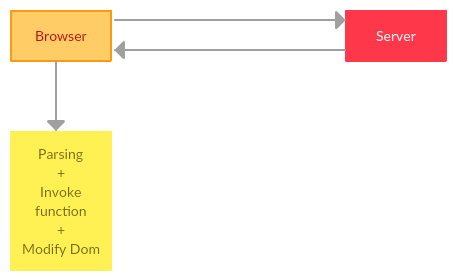
Repetitive task
- Prepare ajax request object specify method and data
- After processing data at server decide format of response
- Proper encoding of HTML string
- Parse response and extract data
- Modify DOM - Prepend, Append, Delete, Show-Hide, Change Style
Ajax framework
- Simplify and standardise this process
- Provide simple API to attach ajax behaviour to any element on page
- Standard way of returning response
- Client side code + Server Side Code
Client Side
- Drupal.ajax() which is essentially a wrapper around $.ajax()
- Takes 3 arguments base, element, element_settings
// misc/ajax.js
Drupal.ajax = function (base, element, element_settings) {
  var defaults = {
    url: 'system/ajax',
    event: 'mousedown',
    keypress: true,
    selector: '#' + base,
    effect: 'none',
    speed: 'none',
    method: 'replaceWith',
    progress: {
      type: 'throbber',
      message: Drupal.t('Please wait...')
    },
    submit: {
      'js': true
    }
  };
 ...
Client Side
- A javascript function under Drupal.ajax.prototype.commands object
- Takes 3 arguments ajax, response, status
// misc/ajax.js

Drupal.ajax.prototype.commands = {
  /**
   * Command to remove a chunk from the page.
   */
  remove: function (ajax, response, status) {
    var settings = response.settings || ajax.settings || Drupal.settings;
    Drupal.detachBehaviors($(response.selector), settings);
    $(response.selector).remove();
  },
  ...
}
Server Side
- PHP function which returns associative array with key 'command' which represent Javascript function name
- Other element of array represent response data
// includes/ajax.inc

function ajax_command_remove($selector) {
  return array(
    'command' => 'remove',
    'selector' => $selector,
  );
}

function ajax_command_append($selector, $html, $settings = NULL) {
  return array(
    'command' => 'insert',
    'method' => 'append',
    'selector' => $selector,
    'data' => $html,
    'settings' => $settings,
  );
}
Attach ajax behaviour to field

Drupal gives 3 ways of making ajax request
- Add 'use-ajax' class to any anchor tag
- Add 'use-ajax-submit' to any form submit button
- Use '#ajax' render element to any field definition
'use-ajax' class on anchor tag
- When using 'use-ajax' class make sure drupal.ajax library is loaded on page.
- The href of the link can contain '/nojs/' as part of the path
$wrapper['link'] = array(
  '#markup' => l(
    t('Click me to load via ajax'),
    '<some/drupal/internal/path>',
    array(
      'attributes' => array('class' => 'use-ajax'),
    )
  ),
);

drupal_add_library('system', 'drupal.ajax');

// or

$wrapper['#attached']['library'] = array(
  array('system', 'drupal.ajax')
);
'use-ajax-submit' class on form submit
- When using 'use-ajax-submit' class make sure drupal.ajax and jquery.form library is loaded on page.
- The form will then be submitted via Ajax to the path specified in the #action and this path may contain '/nojs/' as part of the path.
$form['submit'] = array(
  '#type' => 'submit',
  '#value' => t('Save'),
  '#attributes' => ['class' => ['use-ajax-submit']],
);

drupal_add_library('system', 'drupal.ajax');
drupal_add_library('system', 'jquery.form');

// or

$form['#attached']['library'] = array(
  array('system', 'drupal.ajax')
);
$form['#attached']['library'] = array(
  array('system', 'jquery.form')
);
'#ajax' item on render element
This path may contain '/nojs/' as part of the path.
'#ajax' => array(
  'path' => 'some/drupal/path/nojs', // optional. default to 'system/ajax'.
                                     // If specified, you must set up the menu entry
                                     // and handle the entire callback

  'callback' => 'ajax_response_callback',
  'wrapper' => 'replace_textfield_div', // id of element to replace
  'method' => 'replaceWith' // optional.
  'effect' => 'fade', // optional
  'event' => 'click', // optional
  'prevent' => 'click', // optional
  'progress' => array( // optional
    'type' => 'bar',
    'message' => 'Loading...',
    'url' => '</url/returning/progress/and/message>',
    'interval' => 1000
  ),
),
Server respond with Ajax Commands
function ajax_response_callback() {
  $commands = array();
  $commands[] = ajax_command_append('#selector', "Stuff...");
  $commands[] = ajax_command_replace("#wrapper", "replaced content" );
  return array('#type' => 'ajax', '#commands' => $commands);
}

// include/ajax.inc
function ajax_command_append($selector, $html, $settings = NULL) {
  return array(
    'command' => 'insert',
    'method' => 'append',
    'selector' => $selector,
    'data' => $html,
    'settings' => $settings,
  );
}
Steps to use ajax commands
- Attach ajax behaviour to dom element
- Attach drupal ajax library
- Define a callback function at server side
- Return ajax commands
Ajax Commands in D8
// core/misc/ajax.js

Drupal.AjaxCommands.prototype = {
  remove: function (ajax, response, status) {
    var settings = response.settings || ajax.settings || drupalSettings;
    $(response.selector).each(function () {
      Drupal.detachBehaviors(this, settings);
    })
      .remove();
  },
...
}

// In Drupal 7 it was  Drupal.ajax.prototype.commands = {...}
Client side
Ajax Commands in D8
Server Side
- Ajax Commands are PHP objects that implements Drupal\Core\Ajax\CommandInterface
- Implement a single method render() which returns an array with 'command' key which represent javascript function in Drupal.AjaxCommands.prototype
Steps to use ajax commands in D8
- Attach ajax behaviour to dom element
- Attach drupal ajax library
- Define a route
- Define a controller method or Form
- Create Drupal\Core\Ajax\AjaxResponse object
- Add ajax commands with $response->addCommand method on AjaxResponse object
Enough Talk

Show me code

Create Custom Ajax Command in D8
Questoins


Send Feedback @MutantMahesh