Programming Fundamentals
C++
Introduction
- Muhammad Hafeezullah
- Graduated (BS Computer Science) FAST NUCES
- hafeezgul587@gmail.com
- +92 304 7834611
- What is program
- Need for Programming Languages
- Block Diagram of computer
- Types of Computer System
- Components of Computer
Agenda of 1st Week
- A precise sequence of steps to solve particular problem
What is program?
What is Computer Programming?
Steps to evaluate and solve the problems using computer programming languages.
- Analyze the problem statement, typically expressed a a word problem
How to design a problem
- Divide it into small probelm statements
- Formulate statements and comments in a precise language
- Evaluate and revise the activities in light of checks and tests
- The major need for the programming language is to communicate with the computers
- The programming languages are used to develop an application for performing a specific task, automating things, etc.
Need of Programming Languages
Block Diagram
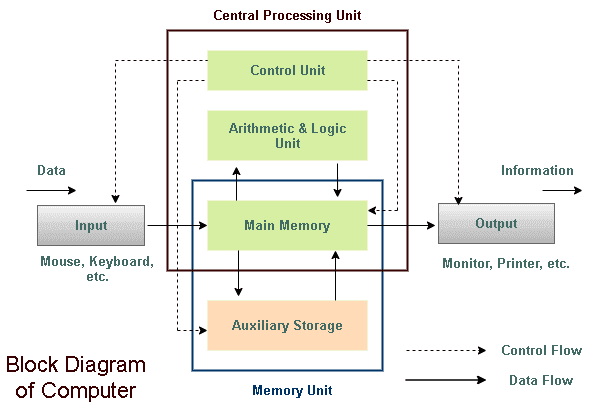
There are different types of computer system:
- Personal computer
- Workstation
- Minicomputer
- Mainframe
- Supercomputer.
Computer System
- A personal computer can be defined as a small
- Inexpensive
- designed for individual user
Personal Computer
- Used for engineering applications
- desktop publishing
- software development
- high quality graphic capabilities
Workstation
- Mid Size computer
- multiprocessing system capable of supporting up to 200 users simultaneously.
Minicomputer
- Powerful computers used primarily by corporate and governmental organizations for critical applications
- more power than supercomputers because they support more simultaneous programs.
Mainframe
- The fastest computer currently available
- Employed for specialized application that requires immense amounts of mathematical calculations.
Supercomputer
There are five basic components of the computer
Basic Components of Computer
- Input Unit
- Output Unit
- Memory Unit
- Control Unit
- Arithmetical and Logical Unit
- A computer language is a formal language used to communicate with a Computer.
- such as a Programming language is a formal language designed to communicate instructions to a machine, particularly a computer.
Computer Languages
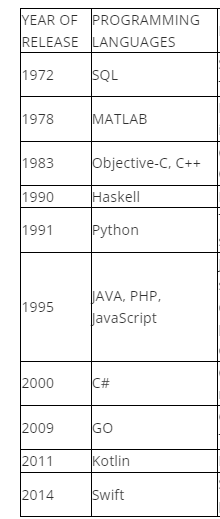
- 1843: The Journey starts from here…!! Ada Lovelace wrote the instructions for the analytical engine
- 1949: Assembly Language
- 1952: Autocode
- 1957: FORTRAN
-
1958: ALGOL
-
1959: COBOL
-
1964: BASIC
-
1964: BASIC
-
1972: C
Evolution of Computer languages
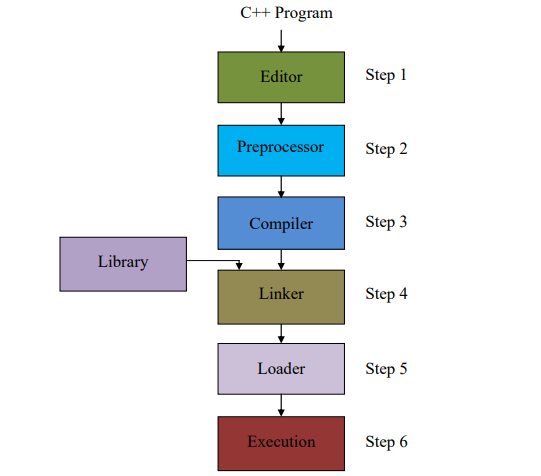
- An integrated development environment (IDE) is a software application that provides comprehensive facilities to computer programmers for software development.
- IDE normally consists of a source code editor, build automation tools, and a debugger
- IDEs contain compiler, interpreter
IDE(integrated development environment )
Processing A C++ program
- Problem Introduction
- Flow chart
- Pseudocode
- Algorithm
Problem Solving
- Major of problems are solvable by computers
- Few things to consider:
- Analysis
- Number and types of inputs
- Output and its type
- Constraints
- Flow Chart
- Pseudocode
- Algorithm
Problem Introduction
Problem Statement: Modified Armstrong Number
Example
A number is considered to be modified Armstrong if it is equal to the sum of digits raised to the power of total number of digits in num and it doesn't end with 0. check if the given number is armstrong or not
For example :153
As 1 + 125 + 27 = 153
- A number is given
- Need to check if the given number is Armstrong number
- Questions
- Ask for the range of the number
- Ask for the type of output expected
- Ask if the total number of digits is given or not
Analysis
- Output
- Type: Boolean (assumed)
- Number of output: 1
I/O
- Input
- Type: Integer
- Number of input: 1
- The number Must not end with 0
- Conditions of Armstrong number
- number of digits is not given (assumed)
Constraints
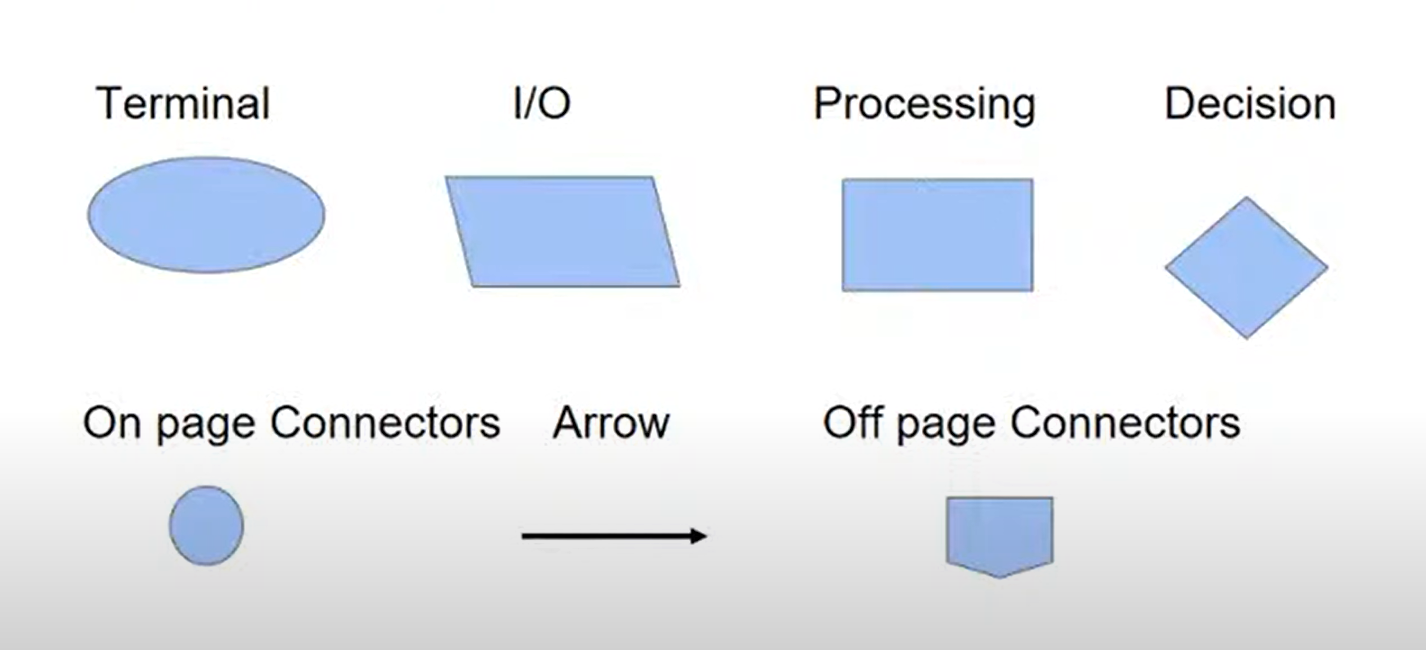
- Pictorial representation of steps to be performed
- Visualization of the problem
- Show clear data flow with help of arrows
- Can be used with non-technical audiences too
- Have a definite start and end point
Flow Chart
Flow chart Symbols
Flow chart for Armstrong number
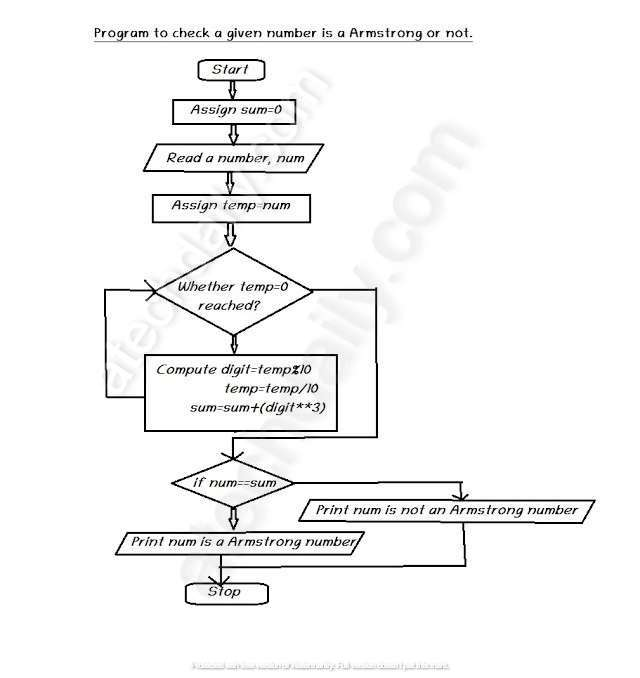
- Pseudocode is a step-by-step approach to problems in simple English
- Easily understandable by the layman and has no programming construct
- It basically maps the flowchart in simple statements
- Serves for documentation purposes which is vital in organizations
Pseudocode
- Input number
- Check the last digit of the number, if it is 0 then return False
- count the total number of digits in the number
- Take each digit and digit raised to power the total number of digits. add it to the sum variable
- Check if the number is equal to the sum obtained, if yes then return True else return False.
Pseudocode - Armstrong Number
- It is more close to the actual programming
- It follows the programming construct to some extent
- The algorithm is independent of any programming language
- It is used to analyze the time complexity
- It helps in further optimization of code
Algorithm
- Step 1: Start
- Step 2: Declare Variable sum, temp, num
- Step 3: Read num from User
- Step 4: Initialize Variable sum=0 and temp=num
- Step 5: If num%10==0 return Fasle
- Step 5: Repeat Until temp>=0
- 5.1 sum=sum + cube of last digit i.e [(num%10)*(num%10)*(num%10)]
- 5.2 temp=temp/10
- Step 6: IF sum==num
- Print "Armstrong Number"
- ELSE Print "Not Armstrong Number"
- Step 7: Stop
Algorithm of checking Armstrong number
What is C++?
C++ Programming Language
-
C++ is a cross-platform language that can be used to create high-performance applications.
-
C++ was developed by Bjarne Stroustrup, as an extension to the C language
-
C++ gives programmers a high level of control over system resources and memory.
- C++ is one of the world's most popular programming languages.
- C++ can be found in today's operating systems, Graphical User Interfaces, and embedded systems.
- C++ is an object-oriented programming language which gives a clear structure to programs and allows code to be reused, lowering development costs.
- C++ is portable and can be used to develop applications that can be adapted to multiple platforms.
- C++ is fun and easy to learn!
- As C++ is close to C, C# and Java, it makes it easy for programmers to switch to C++ or vice versa.
C++ programing lanuage
Why use C++?
- IDE ( for editor named Nodepad)
- A compiler like GCC ( to translate the C++ code into a language that the computer will understand)
Get started with C++
To start with C++ you need
C++ code example
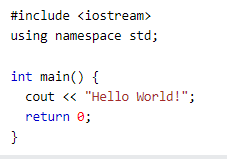
Explaination
#include <iostream>
- means that we can use names for objects and variables from the standard library.
using namespace std
- means that we can use names for objects and variables from the standard library.
Line 3: A blank line. C++ ignores white space. But we use it to make the code more readable.
Line 4: Another thing that always appear in a C++ program, is int main(). This is called a function. Any code inside its curly brackets {} will be executed.
Line 5: cout (pronounced "see-out") is an object used together with the insertion operator (<<) to output/print text. In our example it will output "Hello World".
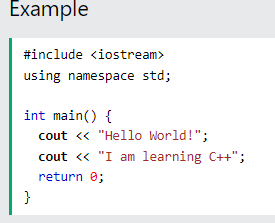
Cout and operator << together use for output
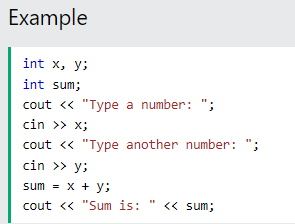
I/O in C++
Cin and operator >> together use for input
- Single line comments
- two forward slashes //
- multi-line comments
- place text between /* and */
- for new line we use endl
C++ Comments and new line
Variables
- variables are containers to assign values (data)
Data types
- int (34)
- double (232.0
- char ('a'
- string ('hafeez')
- bool (true , false)
C++ Variables and Data Types
- Arithmetic
- +, -, / , *, %, ++, --
- Assignment
- =, +=, -=, *=,/=
- Comparison
- ==, !=, <, > , <=, >=
- Logical
- &&, ||, !
Operators
Type cast is basically a conversion from one data type to another. following Two types
- Implicit
- Explicit
Type Conversion (type cast)
-
The work of control structures is to give flow and logic to a program. There are three types of basic control structures in C++.
- sequence Structure
- selection structure
- loop sturcture
Control Structure
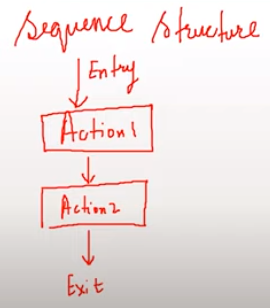
Sequence structure refers to the sequence in which programs execute instructions one after another. An example diagram for the sequence structure is shown in figure.
Sequence Structure
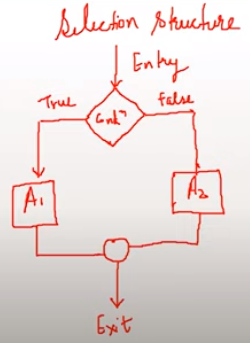
- Selection structure refers to the execution of instruction according to the selected condition, which can be either true or false. There are two ways to implement selection structures, by “if-else statements” or by “switch case statements”. An example diagram for selection structure is shown
Selection Structure
Loop structure refers to the execution of an instruction in a loop until the condition gets false. An example diagram for loop structure is shown in figure.
Loop Structure
A function is a block of code that performs a specific task.
Suppose we need to create a program to create a circle and color it. We can create two functions to solve this problem:
- a function to draw the circle
- a function to color the circle
Dividing a complex problem into smaller chunks makes our program easy to understand and reusable.
There are two types of function:
- Standard Library Functions: Predefined in C++
- User-defined Function: Created by users
Functions in C++
returnType functionName (parameter1,parameter2,...){
    // function body
}
// for example
// function declaration
void greet() {
    cout << "Hello World";
}
Function Declaration
Here,
- the name of the function is
greet() - the return type of the function is
void - the empty parentheses mean it doesn't have any parameters
- the function body is written inside
{}
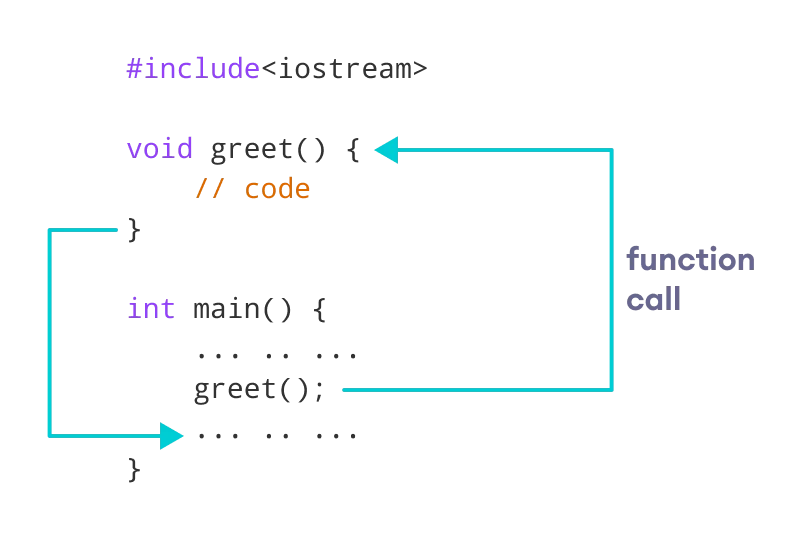
In the previous program, we declared a function named greet(). To use the greet() function, we need to call it.
Here's how we can call the above greet() function.
Calling a function
int main() {
// calling a function
    greet();
}
- a function can be declared with parameters (arguments). A parameter is a value that is passed when declaring a function.
Function Parameters
void printNum(int num) {
    cout << num;
}
int main() {
int n = 7;
// calling the function
// n is passed to the function as argument
printNum(n);
return 0;
}#include <iostream>
using namespace std;
// display a number
void displayNum(int n1, float n2) {
cout << "The int number is " << n1;
cout << "The double number is " << n2;
}
int main() {
int num1 = 5;
double num2 = 5.5;
// calling the function
displayNum(num1, num2);
return 0;}
Example: Function with Parameter
The int number is 5
The double number is 5.5
continued example:
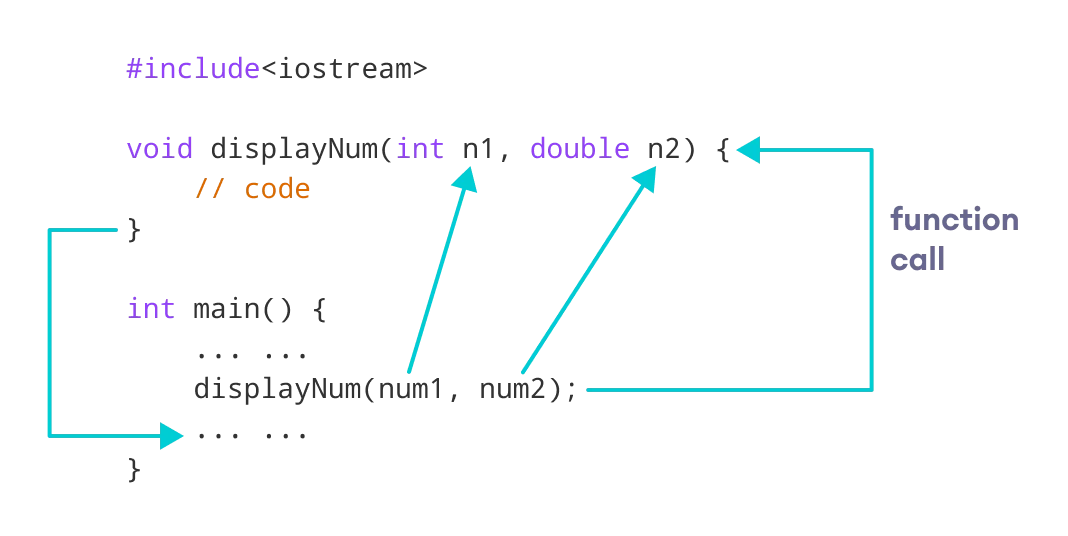
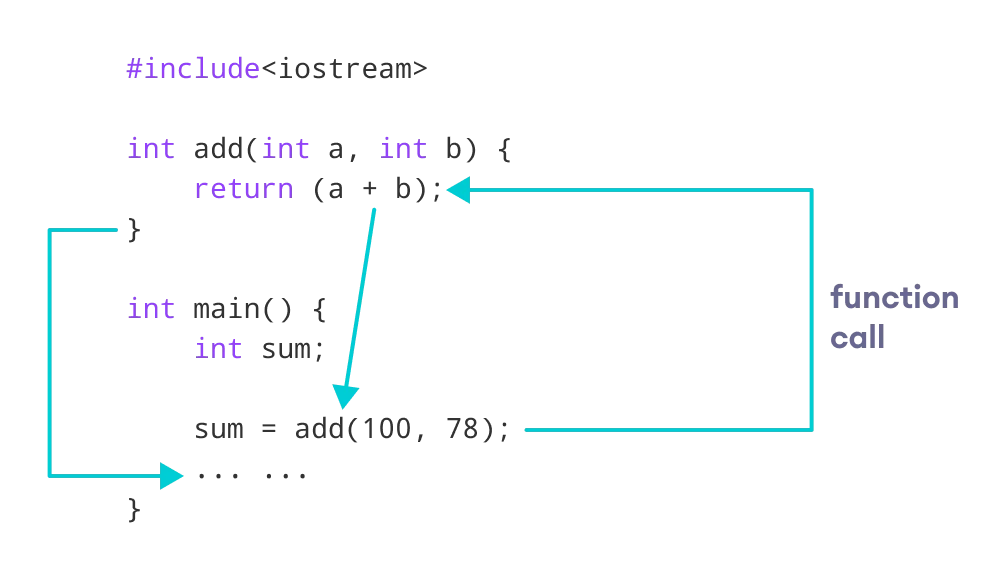
- to return a value from a function, we need to specify the
returnTypeof the function during function declaration. - the
returnstatement can be used to return a value from a function.
Return Statement
// program to add two numbers using a function
#include <iostream>
using namespace std;
// declaring a function
int add(int a, int b) {
    return (a + b);
}
int main() {
    int sum;
    // calling the function and storing
    // the returned value in sum
    sum = add(100, 78);
    cout << "100 + 78 = " << sum << endl;
    return 0;
}
- An array is a variable that can store multiple data of the same type
- suppose a class has 27 students. we need to store the grades of all of them. Instead of creating 27 separate variables, we can simply create an array
-
double grade[27]; -
Here, grade is an array that can hold a maximum of 27 elements of
doubletype.
Arrays
- dataType arrayName[arraySize];
- For Example
- int x[5];
-
int- type of element to be stored - x - name of the array
-
6- size of the array
Declaration of Array
Initialization of an Array
// declare and initialize and array
int x[6] = {19, 10, 8, 17, 9, 15};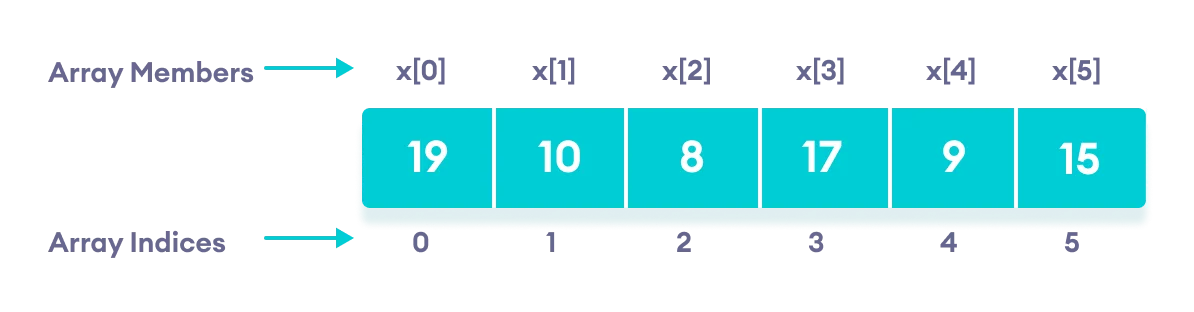
/ Another method to declare and initialize an array
int x[] = {19, 10, 8, 17, 9, 15};
we have not mentioned the size of the array. In such cases, the compiler automatically computes the size.
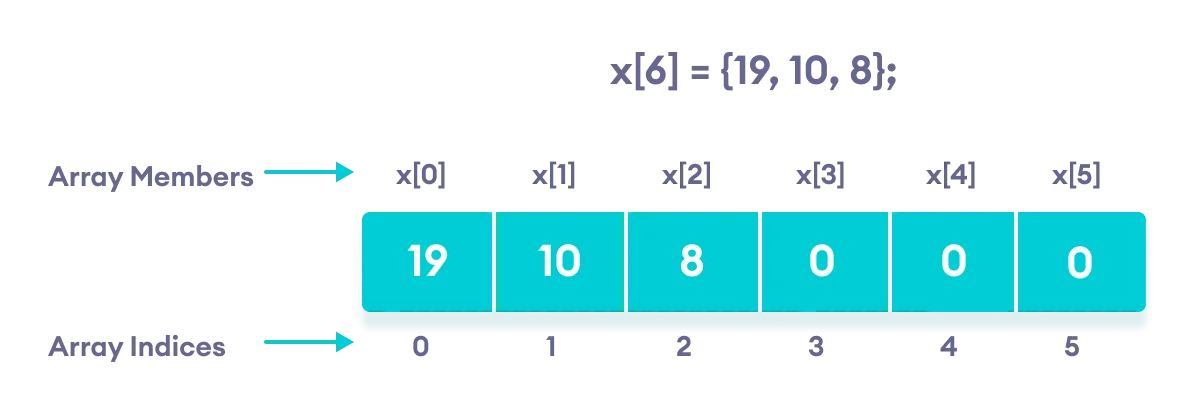
- if an array has a size n, we can store upto n number of elements in the array. However, what will happen if we store less than n number of elements.
Array with Empty members
// store only 3 elements in the array
int x[6] = {19, 10, 8};- Here, the array x has a size of
6. However, we have initialized it with only 3 elements. In such cases, the compiler assigns random values to the remaining places. Oftentimes, this random value is simply0.
- Name of Array
- Index of element
Accessing Individual Array Elements
// Accessing individual elements of the array
Array_name[Index];- Array_name - indicates the name of the array
- Index - indicates the index of the element to be accessed
Insert and print array Elements
int mark[5] = {19, 10, 8, 17, 9}
// change 4th element to 9
mark[3] = 9;
// take input from the user
// store the value at third position
cin >> mark[2];
// take input from the user
// insert at ith position
cin >> mark[i-1];
// print first element of the array
cout << mark[0];
// print ith element of the array
cout >> mark[i-1];#include <iostream>
using namespace std;
int main() {
int numbers[5] = {7, 5, 6, 12, 35};
// Printing array elements // using traditional for loop
for (int i = 0; i < 5; ++i) {
cout << numbers[i] << " ";}
return 0;
}Example;
output
The numbers are: 7  5  6  12  35
Take input from the user and store in an array
#include <iostream>
using namespace std;
int main() {
  int numbers[5];
  cout << "Enter 5 numbers: " << endl; //  store input from user to array
  for (int i = 0; i < 5; ++i) {
    cin >> numbers[i];}
  cout << "The numbers are: "; //  print array elements
  for (int n = 0; n < 5; ++n) {
    cout << numbers[n] << "  ";
  }
  return 0;}
Enter 5 numbers:
11
12
13
14
15
The numbers are: 11 12 13 14 15
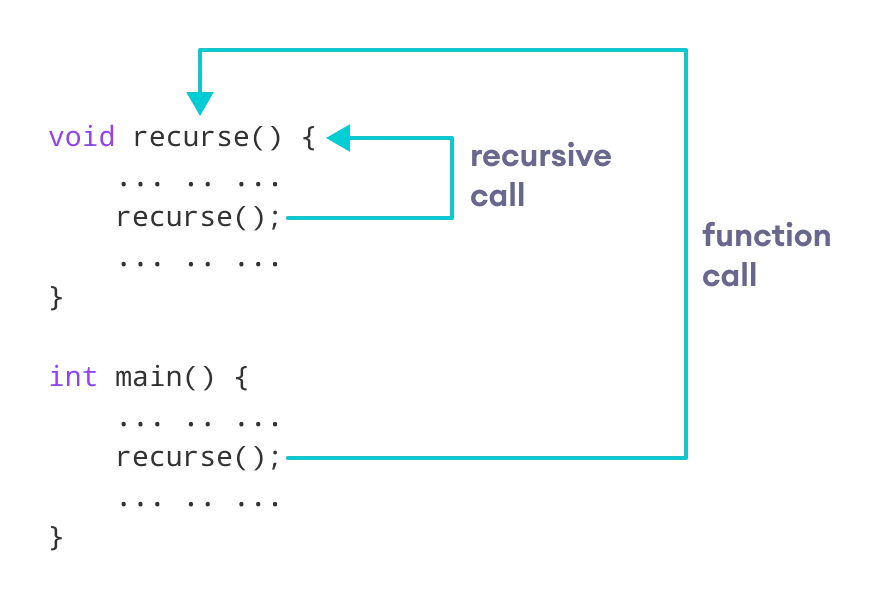
- A function that calls itself is known as recursive funtion
- This technique is called Recursion
Recursion
void recurse(){    ... .. ...
    recurse();
    ... .. ...}
int main(){
    ... .. ...
    recurse();
    ... .. ...}
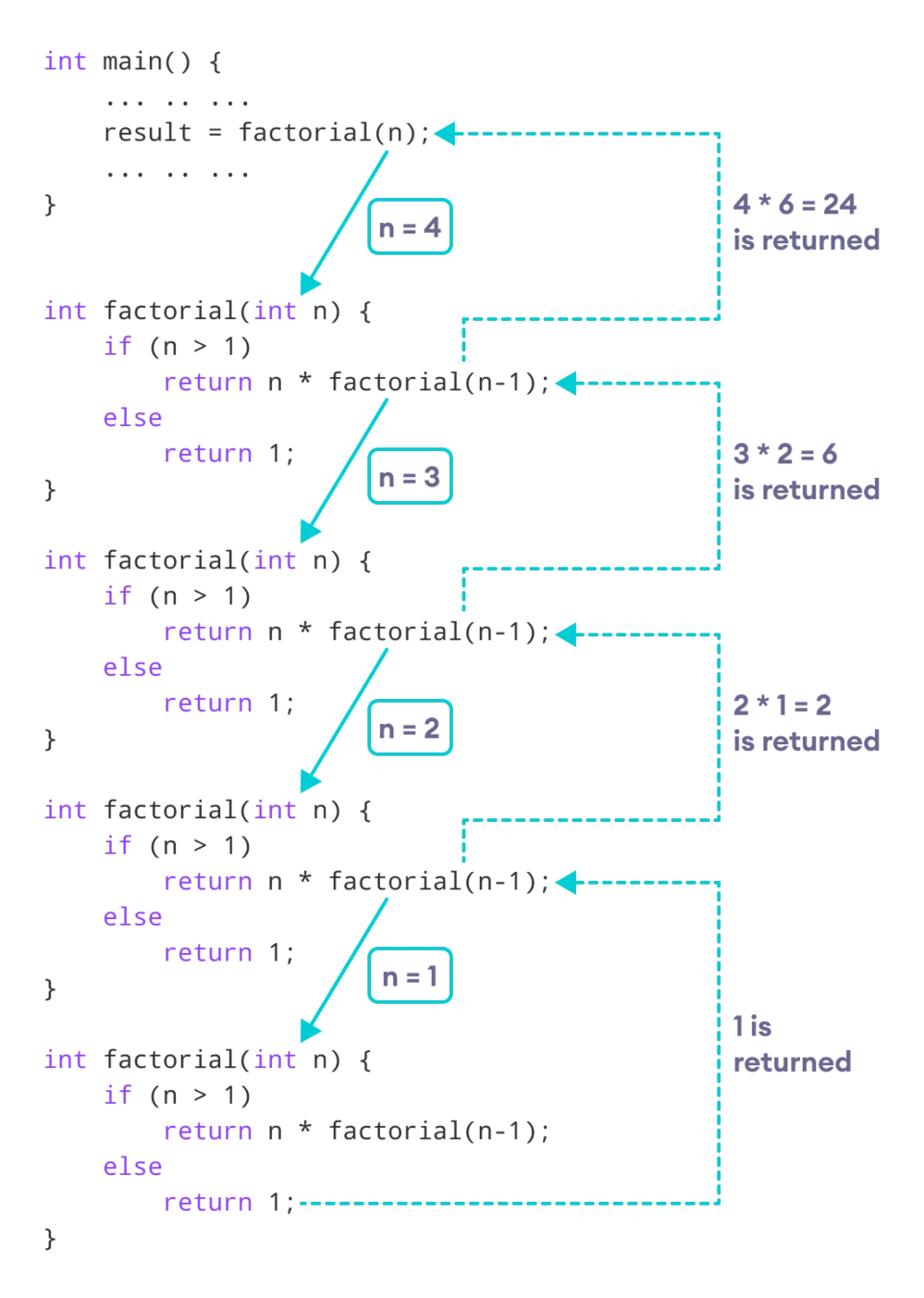
Recursion : Factorial of a number
// Factorial of n = 1*2*3*...*n
#include <iostream>
using namespace std;
int factorial(int);
int main() {
    int n, result;
    cout << "Enter a non-negative number: ";
    cin >> n;
    result = factorial(n);
    cout << "Factorial of " << n << " = " << result;
    return 0;
}
int factorial(int n) {
if (n > 1) {
return n * factorial(n - 1);
} else {
return 1;
}
}Enter a non-negative number: 4
Factorial of 4 = 24
Working of Factorial Program
Character Array (C-string)
- In C++ strings of characters are stored as an array of characters.
- The array is terminated by a special character (null-terminated)
- It is denoted by the escape sequence \0 (ASCII of null character is 0)
- \0 is used to indicate the end of the string
- Hence if a string has n character then it requires an n+1 element array (at last) to store it.
Declaration of Character Array (string array)
- Syntax
- char <stringName/Array_name> [ sizeOfArray+1]
- example
- char name[6+1] = {'H','a','f ','e', 'e', 'z','\0'}
Binary Search
- Binary Search is a searching algorithm for finding an element's position in a sorted array.
- In this approach, the element is always searched in the middle of a portion of an array.
- Binary search can be implemented only on a sorted list of items.
- If the elements are not sorted already, we need to sort them first.
Binary Search Algorithm (Iterative)
do until the pointers low and high meet each other.
    mid = (low + high)/2
    if (x == arr[mid])
        return mid
    else if (x > arr[mid]) // x is on the right side
        low = mid + 1
    else                       // x is on the left side
        high = mid - 1
Binary Search Algorithm (Recursive)
binarySearch(arr, x, low, high)
    if low > high
        return False
    else
        mid = (low + high) / 2
        if x == arr[mid]
            return mid
        else if x > arr[mid]        // x is on the right side
            return binarySearch(arr, x, mid + 1, high)
        else                               // x is on the right side
            return binarySearch(arr, x, low, mid - 1)
Binary Search working
- The general steps for both methods are discussed below
-
Step 1.
- The array in which searching is to be performed is:
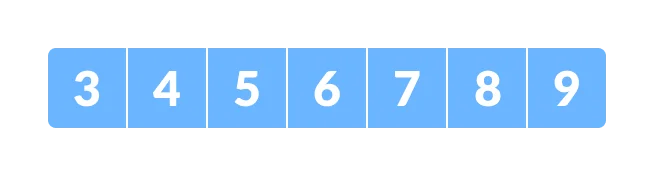
- Let
x = 4be the element to be searched.
Binary Search working
-
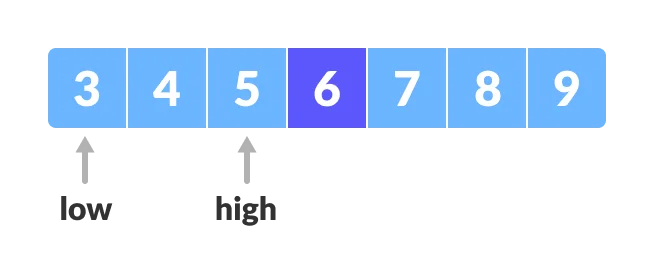
Step 2.
- Set two pointers low and high at the lowest and the highest positions respectively.
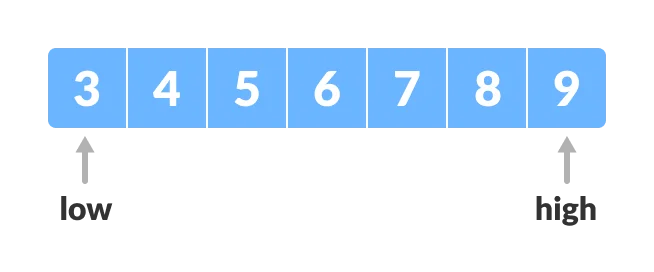
Binary Search working
-
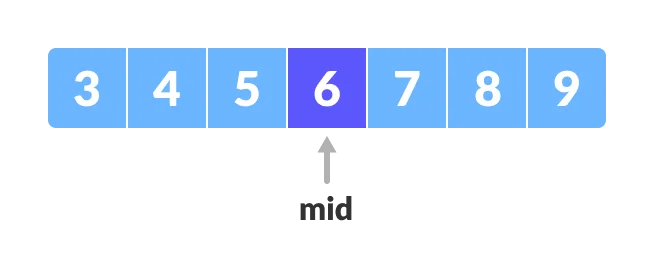
Step 3.
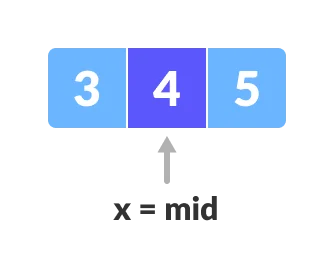
- Find the middle element mid of the array ie.
arr[(low + high)/2] = 6.
- Find the middle element mid of the array ie.
-
Step 4.
- If x == mid, then return mid.Else, compare the element to be searched with m.
- If
x > mid, compare x with the middle element of the elements on the right side of mid. This is done by setting low tolow = mid + 1. - Else, compare x with the middle element of the elements on the left side of mid. This is done by setting high to
high = mid - 1.
-
Step 5
- Repeat steps 3 to 6 until low meets high.
-
x = 4is found.
Binary Search Complexity
-
Time Complexities
-
Best case complexity:
O(1) -
Average case complexity:
O(log n) -
Worst case complexity:
O(log n)
-
Best case complexity:
Bubble Sort
-
Bubble sort is a sorting algorithm that compares two adjacent elements
-
swaps them until they are in the intended order.
-
Just like the movement of air bubbles in the water that rise up to the surface,
-
each element of the array move to the end in each iteration. Therefore, it is called a bubble sort.
Bubble Sort Working
-
Suppose we are trying to sort the elements in ascending order.
-
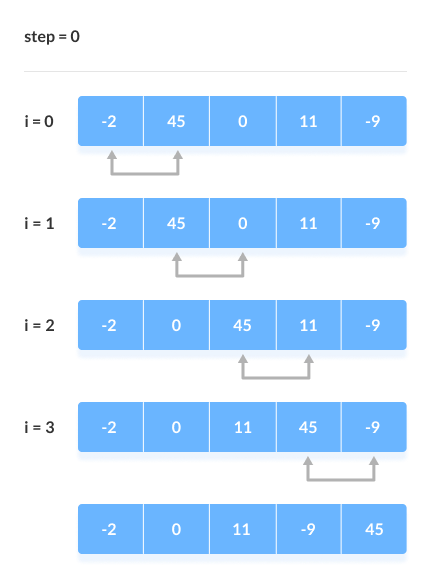
First Iteration (Compare and Swap)
- Starting from the first index, compare the first and the second elements.
- If the first element is greater than the second element, they are swapped.
- Now, compare the second and the third elements. Swap them if they are not in order.
- The above process goes on until the last element
Bubble Sort Working
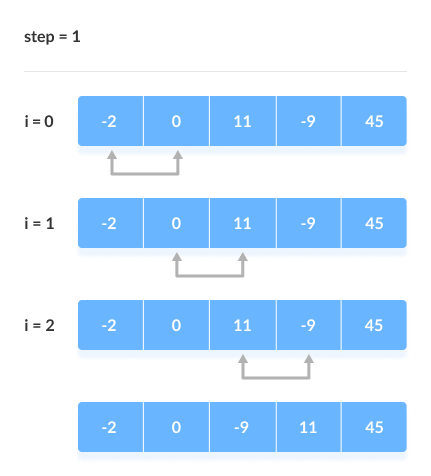
2. Remaining Iteration
The same process goes on for the remaining iterations.
After each iteration, the largest element among the unsorted elements is placed at the end.
Bubble Sort Working
In each iteration, the comparison takes place up to the last unsorted element.
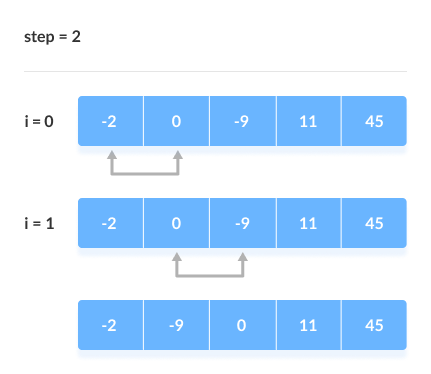
In each iteration, the comparison takes place up to the last unsorted element.
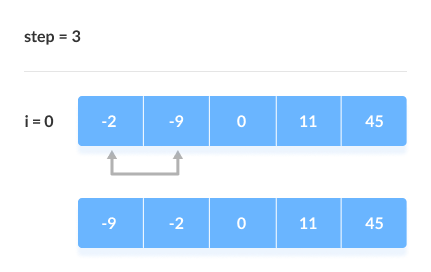
Bubble Sort Complexity
-
Time Complexity
-
Best O(n) Worst O(n2) Average O(n2)
-
-
Hence, the number of comparisons is
-
(n-1) + (n-2) + (n-3) +.....+ 1 = n(n-1)/2
-
-
nearly equals to
n2Hence, Complexity: O(n2)
Also, if we observe the code, bubble sort requires two loops. Hence, the complexity is
n*n = n2
Time Complexity
-
Worst Case Complexity:
O(n2)If we want to sort in ascending order and the array is in descending order then the worst case occurs.
-
Best Case Complexity:
O(n)- If the array is already sorted, then there is no need for sorting.
-
Average Case Complexity:
O(n2)- It occurs when the elements of the array are in jumbled order (neither ascending nor descending).