Protractor (NodeJS) to TestRail
Jason Mavandi
TestRail API
TestRail has an API that lets you do anything that you could do in the UI. http://docs.gurock.com/testrail-api2/start
I wrote a NodeJS Module that wraps that API with Javascript (bluebird) promises called "testrail-promise". Most methods take a JSON object so anything the API can parse can be given to this tool. It does not yet implement the entire API, but has added valuable functionality.
TestRail Terminology
Project - An overall group that holds everything under it. Test cases are restricted to one project
Milestone - An optional grouping of Plans/Runs
Plan - An optional grouping of Runs with specific Cases
Run - A list of results of Cases
Section/Subsection - Folders to hold Cases
Case - An individual test
Getting Started
Lets start a simple NodeJS test
Start by downloading testrail-promise
$ npm install testrail-promiseFind Your Creds
Username is just the email address you log in with.
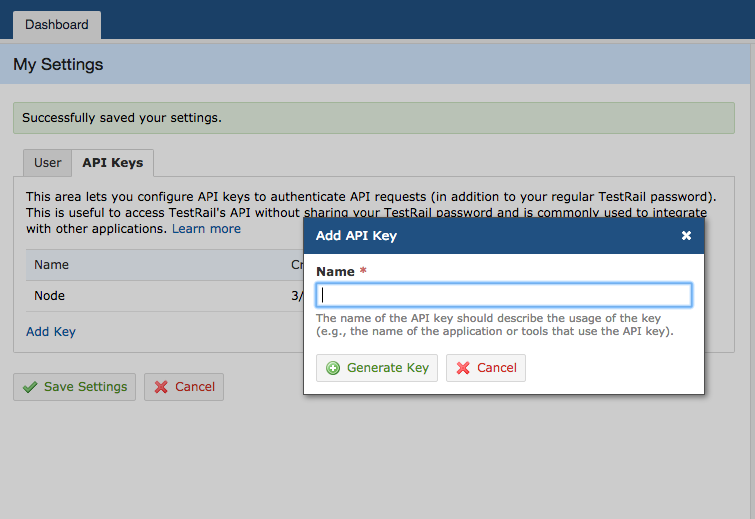
Password can be your password if you want, but you should use an API Key specifically for tis
<TestRail URL>/index.php?/mysettings#
Get all projects
This tests will get all projects inside your instance of TestRail
  var TestRail = require("testrail-promise");
  var tr = new TestRail("<url>", "<user email>", "<password/apikey>");

  //If you get an untrusted certificate error
  tr.allowUntrustedCertificate();

  //Get all Projects
  tr.getProjects()
    .then(function(projects) { console.log(projects); })
    .catch(function(err) { consolel.log("Error:", err) });
demo.js
$ node demo.jsIntegrating with Protractor
Since Protractor is built on NodeJs you can integrate easily.
We will be using Protractor's 'afterEach' function to report results after each test (it) has completed.
ifNeededCreateThenAddResultForCase()
I created a function that simplifies the reporting. It does two main things: lets you use unique strings rather than IDs to find parts, and if needed will automatically create a case before reporting status to the most recent plan run.
There are only 5 required fields: (1-3 must already exist)
1. project (project_id/project_name
2. plan(plan_id/plan_name)
3. section(section_id/section_name)
4. title(can use case_id if case already exists)
5.status(status_id/status_name)
Protractor Example
describe('TestRail Reporter', function(){
    var TestRail = require("testrail-promise");
    var tr = new TestRail("<url>", "<user email>", "<password/apikey>");
    it('Passing', function(){ expect(true).toBeTruthy(); });
    it('Failing', function(){ expect(false).toBeTruthy(); });
    afterEach(function(done){
        reportToTestRail(this).finally(function(){ done(); });
    });
    var reportToTestRail = function(test){
        var obj = {
            "project_name":"<project name>",
            "plan_name":"<test plan>",
            "section_name":"<section/test case folder>",
            "title":test.suite.description + " " + test.description,
            "status":(test.results_.failedCount === 0 ? "passed" : "failed")
        };
        return tr.ifNeededCreateThenAddResultForCase(obj);
    };
});
In your 'afterEach' function you can call 'this' to get info on the test. I prefer to use 'this.results_.failedCount' to get if test have failed, and I create test name by combining the describe (this.suite.description) and it (this.description) strings. This creates two tests 'TestRail Reporter Passing' and 'TestRail Reporter Failing'.