Why you should use MithrilJS
Jason Mavandi
What is Mithril?
My, and soon your, favorite JavaScript Framework.
Quick Framework Comparion
What the comparison shows
- Loading the framework from a CDN
- A GET request
- Repeating over the response
- No compiling
- Inline html
AngularJS
Version 1.6.5
<script src="https://cdnjs.cloudflare.com/ajax/libs/angular.js/1.6.5/angular.min.js"></script>

<div ng-app='ang' ng-controller="angController">
    <div>Angular</div>
    <div>{{name}}</div>
    <div ng-repeat="e in r.data">
        {{e.year.split('-')[0]}} : {{e.number_of_homeless}}
    </div>
</div>

<script>
    var app = angular.module('ang', []);
    app.controller('angController', function($scope, $http) {
        $http.get(utahHomeless).then((r) => $scope.r = r);
    });
</script>
Issues with Angular
- Two places to look at: HTML and JavaScript
- Angular specific component: 'ng-repeat'
- Magic strings
- Templated HTML appears of there are errors
- '{{name}}'
- Errors are hard to find
- HTML errors have no console errors
- JavaScript errors required angular error page
ReactJS
Version 15.6.1
<script src="https://cdnjs.cloudflare.com/ajax/libs/react/15.6.1/react.min.js"></script>
<script src="https://cdnjs.cloudflare.com/ajax/libs/react/15.6.1/react-dom.min.js"></script>

<div id="react"></div>

<script>
    fetch(utahHomeless).then((r) => r.json()).then((r) =>
        ReactDOM.render(Component(r), document.getElementById("react"))
    );

    var Component = (r) => React.createElement('div', null,
        React.createElement('h1', null, 'React'),
        r.map((e) =>
            React.createElement('div', null,
                `${e.year.split('-')[0]} : ${e.number_of_homeless}`
            )
        )
    );
</script>
React looks a little better
HONEST NOTE: I haven't used React much, that was probably a horrible example
- All code is inside JavaScript
- Using a 'map' function instead of 'ng-repeat'
- Errors still go to a React page
- No one actually programs React in JavaScript they use JSX compiled with Babel
MithrilJS
Version 1.1.3
<script src="https://cdnjs.cloudflare.com/ajax/libs/mithril/1.1.3/mithril.min.js"></script>

<div id="mithril"></div>

<script>
    var Component = {
        r : [],
        oninit: (vnode) => {
            m.request(utahHomeless).then((r) => vnode.state.r = r);
        },
        view: (vnode) => [
            m('h1', 'Mithril'),
            vnode.state.r.map(
                (e) => m('', `${e.year.split('-')[0]} : ${e.number_of_homeless}`)
            )
        ]
    };
    m.mount(document.getElementById('mithril'), Component);
</script>
Improvements with Mirthril
- Errors are shown directly in the browser console
- Lifecycle method 'oninit' tells when the request should be made
- The component is reusable
- That JavaScript it how is written by developers
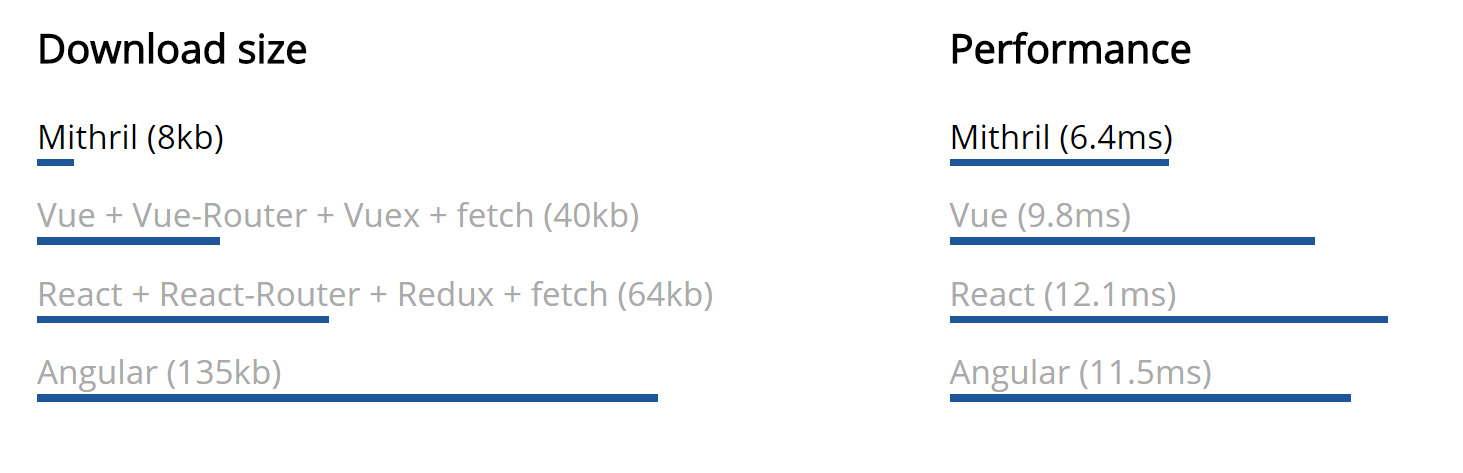
What Mirthril Says
It is small and performant
Demo
Setup
Follow along here or clone my repo to see everything
Web Server
Download Web Server for Chrome
This is just a simple web server. Tell it a folder on your computer, it does the rest.
index.html
<!DOCTYPE html>
<html>
    <head>
        <title>MithrilJS Demo</title>
        <script src="//unpkg.com/mithril/mithril.js"></script>
        <link rel="stylesheet" href="https://cdnjs.cloudflare.com/ajax/libs/font-awesome/4.7.0/css/font-awesome.min.css" integrity="sha256-eZrrJcwDc/3uDhsdt61sL2oOBY362qM3lon1gyExkL0=" crossorigin="anonymous"/>
        <link rel="stylesheet" href="https://cdnjs.cloudflare.com/ajax/libs/bulma/0.4.3/css/bulma.min.css" integrity="sha256-VC9bpAao257nf22leBRLU7AqKGwS9/Ylz8hfpHmOob4=" crossorigin="anonymous" />
        <script src="https://google.github.io/traceur-compiler/bin/traceur.js"></script>
        <script src="https://google.github.io/traceur-compiler/bin/BrowserSystem.js"></script>
        <script src="https://google.github.io/traceur-compiler/src/bootstrap.js"></script>
    </head>
    <body></body>
    <script type="module"> import './app.js';</script>
</html>
What are all those imports?
-
Bulma
- A small CSS Framework built with flex boxes (like Bootstrap, but mobile first)
-
Font Awesome
- An icon system to give the page some flare
-
Traceur
- ES6 compiler (like Babel), mostly for 'import'/'export' but also makes ES6 work on IE...
app.js
m.render(document.body, 'Hello World');Check your page and you should have a "Hello World"
First Component
A reusable piece
HTML in Mithril
- Mithril uses hyperscript syntax
- vnode = m(selector, attributes, children)
- attributes and children are optional
- a selector of an empty string creates a div
- Mithril can you JSX, but you must compile it with Babel
- If you need some help converting your HTML try this
A Simple Button
var button = m('button', 'I am a button!');

m.render(document.body, button);
You should now have a button, but what is the point if it doesn't do anything?
Counter Component
// app.js
var Counter = {
    view: vnode => m('button', 'Count')
};

m.mount(document.body, Counter);- A component is just an object with an attribute 'view' that contains a vnode function
- Make sure to change 'render' to 'mount' since this component will update the page
Finish Counter Component
// app.js
var Counter = {
    count: 0,
    view: vnode => [
        m('button', {
            onclick: _ => vnode.state.count++
        }, 'Count'),
        vnode.state.count
    ]
};

m.mount(document.body, Counter);- The state of a component is contained in 'vnode.state'
- We have an array to hold our two components one is just the count value
- An 'onclick' attribute makes this work
Move component into file
// components/counter.js
export default {
    count: 0,
    view: vnode => [
        m('button', {
            onclick: _ => vnode.state.count++
        }, 'Count'),
        vnode.state.count
    ]
};
// app.js
import Counter from './components/counter.js';
m.mount(document.body, Counter);Note: This is why we added Traceur
Let's reuse it
// app.js
import Counter from './components/counter.js';
m.mount(document.body, {
    view: _ => [
        m(Counter),
        m(Counter)
    ]
});- Mount takes a component so surround your array with an object with view
- Views only hold vnodes so wrap your 'counter' in an 'm()'
- Each counter will count on its own
Surround component in div
// component/counter.js
export default {
    count: 0,
    view: vnode => m('', [
        m('button', {
            onclick: _ => vnode.state.count++
        }, 'Count'),
        vnode.state.count
    ])
};
I don't like our components lined up, so lets wrap each in a div.
Take note of the m('div', [...])
Giving each a name
// component/counter.js
export default {
    count: 0,
    view: vnode => m('', [
        m('button', {
            onclick: _ => vnode.state.count++
        }, vnode.attrs.name || 'Count'),
        vnode.state.count
    ])
};
You can access attributes through 'vnode.attrs'
// app.js
import Counter from './components/counter.js';
m.mount(document.body, {
    view: _ => [
        m(Counter, {name:'Counter 1'}),
        m(Counter, {name:'Counter 2'})
    ]
});
Routing
Single Page Application
Just call m.route
// app.js
import Counter from './components/counter.js';

m.route(document.body, "/home", {
    "/home": {view: _ => "Home" },
    "/counter": Counter
});
We now have two routes
- /home - Just has a string of 'Home'
- /counter - contains our counter
Requests
// components/loader.js
export default {
    view: _ => m('.has-text-centered', [
        m('i.fa.fa-spinner.fa-pulse.fa-5x[aria-hidden="true"]', {
            style: {fontSize: '5rem'},
        }),
        m('span.sr-only', 'Loading...')
    ])
};
Loading Animation
We do not want a blank screen while waiting for a request to come back
Mithril lets you add classes or IDs by using CSS selectors. The '.' means class, and a '#' would be an ID. Other attributes can be added between '[' and ']'. Anything 'fa' is font awesome and the other classes are are from bulma.
// components/request.js
import Loader from './loader.js';
export default {
    oninit: vnode => m.request('https://odn.data.socrata.com/resource/j8a6-qa8k.json')
        .then(r => vnode.state.r = r),
    view: vnode => m('.container', vnode.state.r ?
        vnode.state.r.map(e => m('', JSON.stringify(e)) ) : m(Loader)
    )
};
Request Component
- There is a ternary operator to choose the response or the loader component
- Using 'map' to create a 'div' for each response line
- The lifecycle method 'oninit' makes the request when the component is created before it added to the DOM. If you need the DOM use 'oncreate'
Add A Request Route
// app.js
import Counter from './components/counter.js';
import Request from './components/request.js';

m.route(document.body, "/home", {
    "/home": {view: _ => "Home" },
    "/counter": Counter,
    '/request': Request,
});
Make It Presentable
Tips Though Example
// frame.js
var Header = {
    view: _ => m('', 'This will be a header')
};

export default {
    view: vnode => m('section.hero.is-fullheight.is-light', [
        m('.hero-head.is-info', m(Header)),
        m('.hero-body', vnode.children),
        m('.hero-foot.has-text-centered',
            m('a[href="http://mvndaai.com"][target="_blank"]', 'mvndaai.com')
        )
    ])
};
Header and Footer
- Bulma hero gives us an easy header and footer.
- Other components come through 'vnode.children'
// app.js
import Frame from './components/frame.js';
import Counter from './components/counter.js';
import Request from './components/request.js';

m.route(document.body, "/home", {
    "/home": {view: _ => m(Frame, "Home")},
    "/counter": {view: _ => m(Frame, m(Counter))},
    "/request": {view: _ => m(Frame, m(Request))},
});
Wrapping Routes
Wrap our routes in our new header/footer frame
// frame.js
var Header = {
    view: _ => m('nav.navbar', [
        m('.navbar-brand', [
            m('a.navbar-item[href=/home]', {oncreate: m.route.link}, 'MithrilJS Demo'),
            m('a.navbar-item[href=/counter]', {oncreate: m.route.link}, 'Counter'),
            m('a.navbar-item[href=/request]', {oncreate: m.route.link}, 'Request'),
        ])
    ])
};

...
Navigation Bar
Update our Header component to have naviation
The 'oncreate: m.route.link' lets the href point to a route rather than a URL.
// frame.js
var Header = {
    oninit: vnode => vnode.state.route = m.route.get(),
    view: vnode => m('nav.navbar', [
        m('.navbar-brand', [
            m('a.navbar-item[href=/home]', { oncreate: m.route.link,
                class: vnode.state.route === '/home' ? 'is-active' : '',
            }, 'MithrilJS Demo'),
            m('a.navbar-item[href=/counter]', { oncreate: m.route.link,
                class: vnode.state.route === '/counter' ? 'is-active' : '',
            }, 'Counter'),
            m('a.navbar-item[href=/request]', { oncreate: m.route.link,
                class: vnode.state.route === '/request' ? 'is-active' : '',
            }, 'Request'),
        ])
    ])
};
...
Adding Classes By Route
We want the class 'is-active' only when it is the current route
In a Bulma navbar-item, 'is-active' only highlights on smaller screens
Takeaways
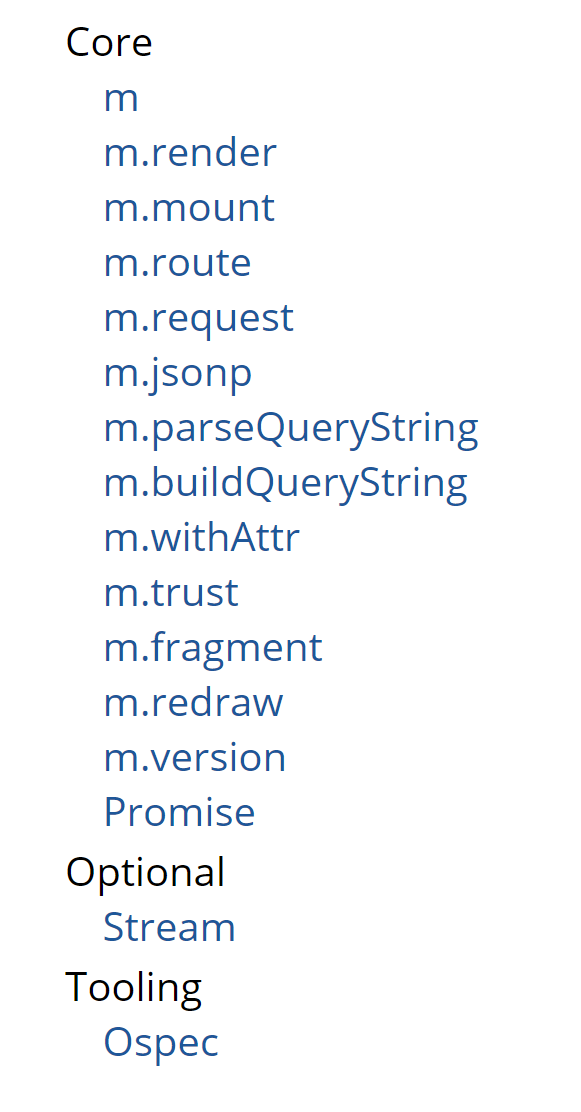
Small
That is the entirety of the API!
You can read and understand the entire thing in a day
8kb
Completely JavaScript
Errors in the browser console!
You can use a linter!
No having to go back and forth with an HTML page!
Everything needed built in
Routing for single page applications
Requests with promises that auto redraw when completed
MIT License
No worries about being sued
Questions?
Comments?
Were you converted?