How to Relive?
florolf
VOC geekend
2018-10-05
What is Relive?
- Automate dumping streams into HLS
- VDR mode while event is in progress
- VOD until release is done
- Unintentional backups
- Could be done using larger DASH/HLS fragment backlog
- We want event awareness
- We want to steer users towards releases
Architecture
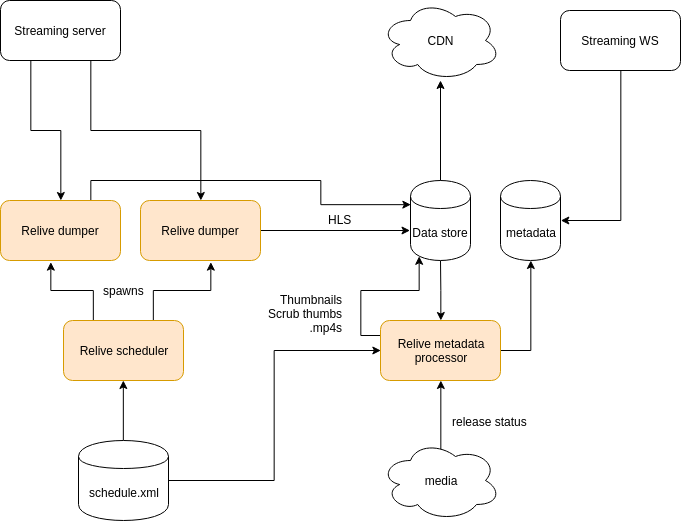
Previously
- Parse HLS generated by nginx-rtmp, copy fragments
- Relatively complex
- Had to run on CDN master
-
"hls" mode
Now
- icedist mode
- Spawns ffmpeg
- Connects to icedist
- Dumps HLS
- Can run anywhere
- Typically still runs on CDN master
VOC setup
- Runs as user relive on live.ber
- Pulls from icedist on live.ber
- Stores fragments to /video/relive
- No automatic cleanup!
(small events)
Setting up Relive for your event
1. Create configuration
- There's a README!
- Configs live in ~/relive/git/configs/
- Name file after your event acronym
- Not mandatory, but I'll be sad if you don't
- Either
- Take a recent config as a sample
- Use gen_event_config.py to autogenerate from streaming WS
1. Create configuration
Note:
- Cronjobs check that directory
- Ideally, only put the file there once you want stuff to happen
- Clean up old configs (move to old/) while you're at it
- Won't delete data, but reduces job churn
1. Create configuration
Note:
- Media conference ID is used to poll "released" status for talks
- This is a number
2. Validate cronjobs
- schedule.xml and (optionally) media-events should pop up in data/project-name/ after a bit
- An empty array should appear in /video/relive/project-name/index.json
- Running jobs manually to debug is safe, see crontab -l -u relive
- Also works if you're impatient
3. Launch scheduler
./launcher.sh project-name
- Should list room mappings and next events
- Check for plausibility
4. Set up steaming WS
- Just pointing RELIVE_JSON to the appropriate place should be enough
- Website will force-refresh indices on rollout
\o/
Future
- It's too complex (hence this talk)
- Pulls together multiple distinct systems
- slightly too UNIXy
- Autoconfiguration / autolaunching?
- DASH integration?