Meet Vagrant
1. What is Vagrant?
2. Providers
3. Provisioners
4. Ansible concepts
5. Example
Content

What is Vagrant ?
Definition:
"Provides an easy to configure, reproducible, and portable work environments built on top of industry-standard technology and controlled by a single consistent workflow to help maximize the productivity and flexibility of you and your team."
What is Vagrant ?
Vagrant is a lightweight, easy to use wrapper that will create a virtual machine, install an OS and pass control to a provisioner script for configuration.
How Vagrant Benefits You ?
1. Developer
- disposable, consistent environment
- use prefered tools (editors, browsers, debuggers, etc.)
- all team members running code in the same environment, against the same dependencies, all configured the same way
How Vagrant Benefits You ?
2. Operations engineer
- consistent workflow for developing and testing infrastructure management scripts
How Vagrant Benefits You ?
3. Designer
- will set up everything automatically
- no worries for configuring environment
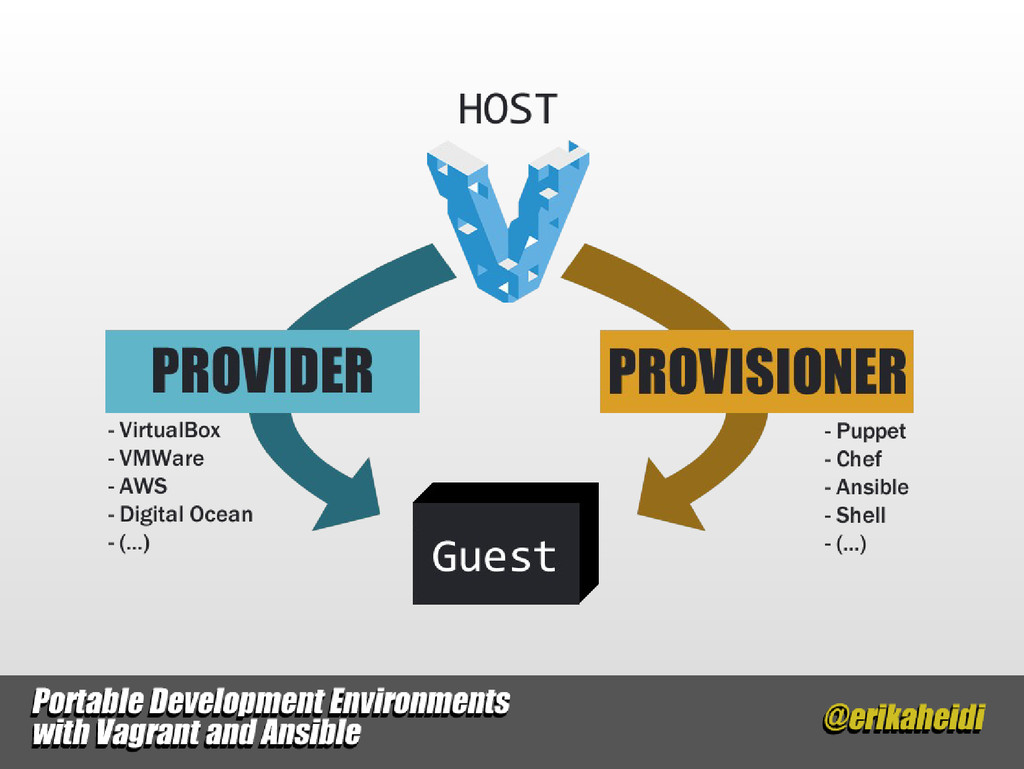
Some of the supported providers are :
- VirtualBox (default)
- VMWare
- AWS
Providers
Providers
Providers
VirtualBox
-
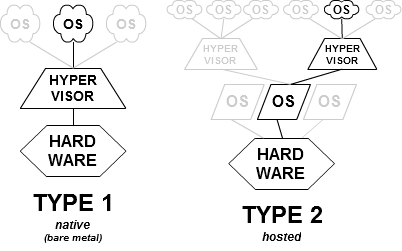
Type 2 hypervisor
(run on a host operating system that delivers all the essential services)
- better for desktop virtualization
- free usage
- high portability
VMware
-
Type 1 hypervisor
(run directly on the hardware itself) better performance, security, availability
- free for non-commercial use
-
better for server virtualization
- supports restricted virtual machines
Provisioners
Is a set of actions to prepare a server with appropriate systems, data and software, and make it ready for network operation.
Provisioning
Can be done with:
- Ansible
- Chef
- Puppet
- shell script
...
Provisioning
Puppet
- Write modules in Ruby or Puppet-specific subset of Ruby
- Push commands let you trigger modifications immediately
- Web UI handles reporting, inventorying, and real-time node management
- Detailed and in-depth reporting on agent runs and node configurations
Chef
- Cookbooks and recipes can leverage the full power of Ruby
- Centralized JSON-based "data bags" allow scripts to populate variables during runtime
- Web UI lets you search and inventory nodes, view node activity, and assign Cookbooks, roles, and nodes
Ansible
- Modules can be written in nearly any language
- No agent required on managed clients
- Web UI lets you configure users, teams, and inventories, and apply Playbooks to inventories
- Extremely simple to set up and get running
Pros
Provisioning
Puppet
- Requires learning Puppet DSL or Ruby
- Installation process lacking in error checking and error reporting
Chef
- Requires knowledge of Ruby programming
- Documentation is sometimes vague
Ansible
- Web UI doesn't tie into an existing Ansible deployment automatically; inventories must be imported
Cons
Provisioning
Puppet
- Free open source version; Puppet Enterprise costs $100 per machine per year
Chef
- Free open source version; Enterprise Chef free for 5 machines, $120 per month for 20 machines, $300 per month for 50 machines, $600 per month for 100 machines, and so on
Ansible
- Free open source version; AWX free for 10 machines, then $100 or $250 per machine per year depending on support
Price
Ansible concepts
- Roles
- Playbook
- Tags
Ansible concepts

Of course not ... grow up !
Ansible concepts
Roles
Ansible has the concept of roles.
A "web" role can be defined which installs Apache and PHP and "db" which installs MySql and then apply them on demand.
Playbook
Is the configuration, deployment, and orchestration language of Ansible.
Tags
Tags sections of a playbook and run just those sections on demand.
Ansible concepts
Ansible galaxy website
Is a free site for finding, downloading, rating, and reviewing all kinds of community developed Ansible roles.
Ansible galaxy command line tool
Command line tool for installing a specific role or installing multiple roles from a file
ansible-galaxy init rolename
ansible-galaxy install username.rolename
ansible-galaxy install -r requirements.txt
Examples
Vagrant commands:
vagrant up
vagrant destroy
vagrant ssh
vagrant halt
Examples
Vagrantfile :
# Use config.yml for basic VM configuration.
require 'yaml'
if !File.exist?('./config.yml')
  raise 'Configuration file not found! Please copy example.config.yml to config.yml and try again.'
end
vconfig = YAML::load_file("./config.yml")

Vagrant.configure(VAGRANTFILE_API_VERSION) do |config|
  config.vm.hostname = vconfig['vagrant_hostname']
  config.vm.network :private_network, ip: vconfig['vagrant_ip']
  config.ssh.insert_key = false

  config.vm.box = "geerlingguy/ubuntu1404"

  # Provisioning configuration for Ansible (for Mac/Linux hosts).
  config.vm.provision "ansible" do |ansible|
    ansible.playbook = "provisioning/playbook.yml"
    ansible.sudo = true
  end

  # VirtualBox.
  config.vm.provider :virtualbox do |v|
    v.name = vconfig['vagrant_hostname']
    v.memory = vconfig['vagrant_memory']
    v.cpus = vconfig['vagrant_cpus']
    v.customize ["modifyvm", :id, "--natdnshostresolver1", "on"]
    v.customize ["modifyvm", :id, "--ioapic", "on"]
  end

  # Set the name of the VM. See: http://stackoverflow.com/a/17864388/100134
  config.vm.define :drupaldev do |drupaldev_config|
  end
end
Reference: https://github.com/geerlingguy/drupal-dev-vm
Examples
Configuration file :
Reference: https://github.com/geerlingguy/drupal-dev-vm
# config.yml
# Vagrant hostname and IP configuration.
vagrant_hostname: drupalremote.dev.local
vagrant_ip: 192.168.88.88

# A list of synced folders, with the keys 'local_path', 'destination', and 'id'.
vagrant_synced_folders:
  - local_path: ~/Sites/drupal
    destination: /drupal
    excluded_paths: [".git/"]
    id: drupal
    type: rsync

# Memory and CPU to use for this VM.
vagrant_memory: 1024
vagrant_cpus: 2

# Other variables in this file will be used during Ansible provisioning.
mysql_root_password: root
drush_version: master

# Comment out any extra utilities you don't want to install.
installed_extras:
  - mailhog
  - memcached
  - phpmyadmin
  - xdebug
  - xhprof

firewall_allowed_tcp_ports:
  - "22"
  - "25"
  - "80"
  - "443"
  - "8025"
  - "8080"
  - "8443"

# Major release of drupal in use (6, 7, 8, etc.). Be sure to update the core
# version inside the drupal.make file if you change the major version here.
drupal_major_version: 7

# The path where Drupal will be downloaded and installed.
drupal_core_path: "/var/www/drupal"

drupal_domain: "drupalremote.dev.local"
drupal_site_name: "Drupal Test Site"
drupal_install_profile: standard

# TODO - REMOVE THIS VARIABLE AFTER ANSIBLE 1.8.3+
drush_keep_updated: yes

drupal_mysql_user: root
drupal_mysql_password: root
drupal_mysql_database: drupal

apache_vhosts:
  - {servername: "{{ drupal_domain }}", documentroot: "{{ drupal_core_path }}"}
  - {servername: "local.xhprof.com", documentroot: "/usr/share/php/xhprof_html"}

php_memory_limit: "256M"
php_display_errors: "On"
php_realpath_cache_size: "1024K"
php_sendmail_path: "/usr/sbin/ssmtp -t"

# Disable main XDebug components unless needed.
php_xdebug_coverage_enable: 0
php_xdebug_default_enable: 0

# Git repo for drupal core
drupal_git_repository: http://git.drupal.org/project/drupal.git
drupal_git_repository_branch: 7.x
Examples
Playbook file :
# playbook.yml
- hosts: all

  vars_files:
    - ../config.yml

  pre_tasks:
    - include: tasks/init.yml

  roles:
    - { role: geerlingguy.firewall, tags: ['firewall'] }
    - { role: geerlingguy.git, tags: ['git'] }
    - { role: geerlingguy.apache, tags: ['apache'] }
    - { role: geerlingguy.mysql, tags: ['mysql'] }
    - { role: geerlingguy.php, tags: ['php'] }
    - { role: geerlingguy.php-pecl, tags: ['php'] }
    - { role: geerlingguy.php-mysql, tags: ['php'] }
    - { role: geerlingguy.composer, tags: ['composer'] }
    - { role: geerlingguy.drush, tags: ['drush'] }
    # Roles to be installed conditionally.
    - {
      role: geerlingguy.memcached,
      when: '"memcached" in installed_extras'
    }
    - {
      role: geerlingguy.php-memcached,
      when: '"memcached" in installed_extras'
    }
    - {
      role: geerlingguy.php-xdebug,
      when: '"xdebug" in installed_extras'
    }
    - {
      role: geerlingguy.php-xhprof,
      when: '"xhprof" in installed_extras'
    }
    - {
      role: geerlingguy.phpmyadmin,
      when: '"phpmyadmin" in installed_extras'
    }
    - {
      role: geerlingguy.daemonize,
      when: '"mailhog" in installed_extras'
    }
    - {
      role: geerlingguy.mailhog,
      when: '"mailhog" in installed_extras'
    }

  tasks:
    - include: tasks/www.yml
    - include: tasks/drupal.yml
Reference: https://github.com/geerlingguy/drupal-dev-vm
Examples
Drupal file :
# drupal.yml
---
- name: Create Drupal database.
  mysql_db: "db={{ drupal_mysql_database }} state=present"

- name: Remove default virtualhost file.
  file:
    path: /etc/apache2/sites-enabled/000-default.conf
    state: absent
  notify: restart webserver

- name: Check if Drupal is already set up.
  stat: "path={{ drupal_core_path }}"
  register: drupal_site

- name: Get the Drupal site with git clone.
  command: "git clone --branch {{ drupal_git_repository_branch }} {{ drupal_git_repository }} {{ drupal_core_path }}"
  when: drupal_site.stat.exists == false
  sudo: no

#- name: Get the Drupal site with git clone.
#  git: repo={{ drupal_git_repository }} dest={{ drupal_core_path }}

- name: Install Drupal (standard profile) with drush.
  command: >
    drush si {{ drupal_install_profile | default('standard') }} -y
    --site-name="{{ drupal_site_name }}"
    --account-name=admin
    --account-pass=admin
    --db-url=mysql://{{ drupal_mysql_user }}:{{ drupal_mysql_password }}@localhost/{{ drupal_mysql_database }}
    chdir={{ drupal_core_path }}
  notify: restart webserver
  when: drupal_site.stat.exists == false
  sudo: no

- name: Install modules with drush.
  command: >
    drush en -y devel
    chdir={{ drupal_core_path }}
  when: drupal_site.stat.exists == false
  sudo: no

- name: Set the custom module directory path for Drupal < 8.
  set_fact:
    drupal_custom_modules_path: "{{ drupal_core_path }}/sites/all/modules/custom"
  when: drupal_major_version|int < 8

- name: Set the custom module directory path for Drupal = 8.
  set_fact:
    drupal_custom_modules_path: "{{ drupal_core_path }}/modules/custom"
  when: drupal_major_version|int == 8

- name: Symlink custom modules directory into place.
  file:
    src: /vagrant/custom_modules
    dest: "{{ drupal_custom_modules_path }}"
    state: link
  sudo: no

- name: Update ownership of all files within drupal_core_path.
  file:
    path: "{{ drupal_core_path }}"
    owner: vagrant
    group: www-data
    mode: 0775
    recurse: yes
Questions?

Thank you !