I've seen the future
It's in my browser
#2
Please explain
Semantics
Separation of concerns
Lesson #2
Selectors
Anatomy of a rule
article p
{
color: white;
background: blue;
}
Anatomy of a rule
article p
{
color: white;
background: blue;
}
Selector
Anatomy of a rule
article p
{
color: white;
background: blue;
}
Declarations
Anatomy of a rule
article p
{
color: white;
background: blue;
}
Properties
Anatomy of a rule
article p
{
color: white;
background: blue;
}
Values
Selector types
Tag
<h1>Title</h1>h1 {
color: red;
}Selector types
Id
<h1 id="title-42">Title</h1>#title-42 {
color: red;
}Selector types
class
<h1 class="article-title">Title</h1>.article-title {
color: red;
}Selector types
Attribute
<button disabled>Submit</button>[disabled] {
color: red;
}Selector types
Attribute
<button disabled="true">Submit</button>[disabled="true"] {
color: red;
}Selector types
Attribute
<article data-tags="politics featured popular">...</article>[data-tags="politics featured popular"] { color: red; }
[data-tags~="featured"] { color: red; }
[data-tags^="poli"] { color: red; }
[data-tags$="ular"] { color: red; }
[data-tags*="cs feat"] { color: red; }Selector types
Universal
* {
    color: red;
}
Selector relationships
Descentant
header .navigation {
    color: red;
}
<header>
<ul class="navigation"></ul>
</header>
<footer>
<ul class="navigation"></ul>
</footer>
Selector relationships
Sequence
div.alert.success {
    color: green;
}
div.alert.error {
    color: red;
}
<div class="alert success">YES</div>
<div class="alert error">NO</div>Selector relationships
Child
article > p {
    color: red;
}

.summary p {
    color: green;
}
<article>
<section class="summary">
<p>...</p>
</section>
<p>...</p>
</article>Selector relationships
Sibling
h1 ~ p {
    color: red;
}
<h1>My title</h1>
<p>My summary</p>
<p>Main text</p>Selector relationships
Adjacent
h1 + p {
    color: red;
}
<h1>My title</h1>
<p>My summary</p>
<p>Main text</p>Grouping selectors
.summary,
.main-text {
    color: red;
}
<p class="summary">My summary</p>
<p class="main-text">Main text</p>.summary {
color: red;
}
.main-text {
color: red;
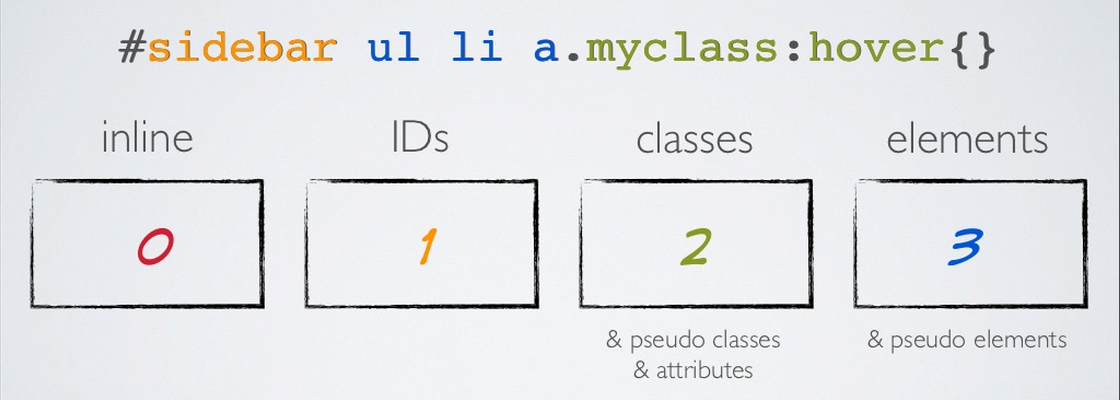
}Specificity