Elasticsearching

What is?
Distributed, highly available documents storage
- search / aggregation / analytics
- suggestions / percolation / geo
- document store
- horizontally distributed
- near real time
- Open Source
- plugins available
How?
Different APIs
• _mappings
• _create
• _update
• _search
• _suggest
• _percolate
• _explain
They say RESTful... but not REST at all
Indices
indices are like databases in relational databases.
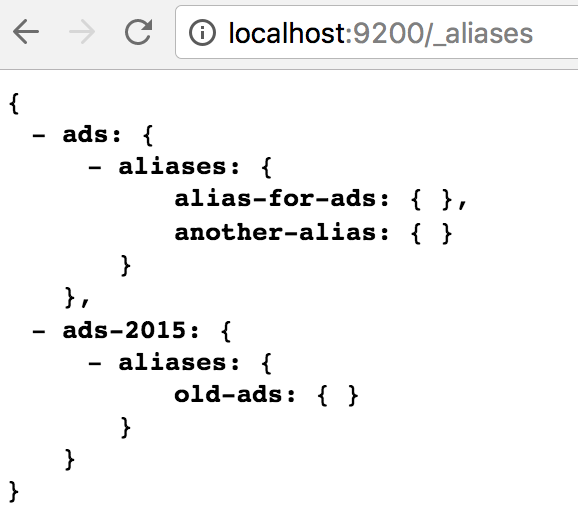
Also, an index can have an alias.
Aliases are useful for reindex operations without changing application code,
Also can be used for grouping multiple indices with the same name or for create something like SQL views.
Updating an alias
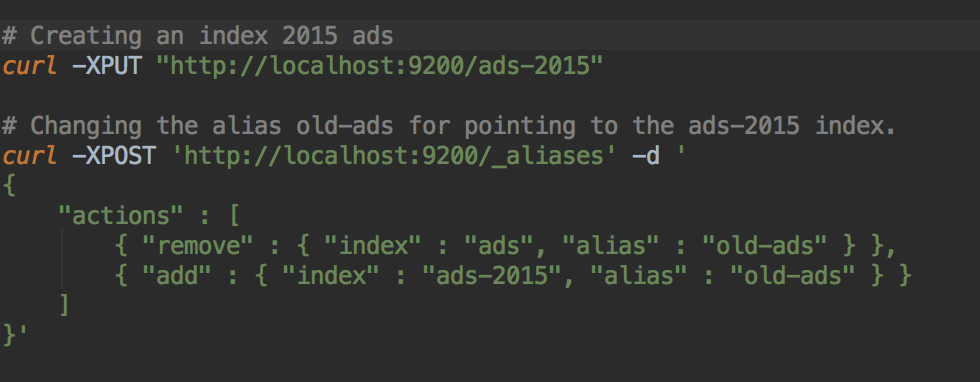
Updating an alias is performed by executing the operation of remove and add the alias, but elastic treats this as an atomic operation.
Index templates
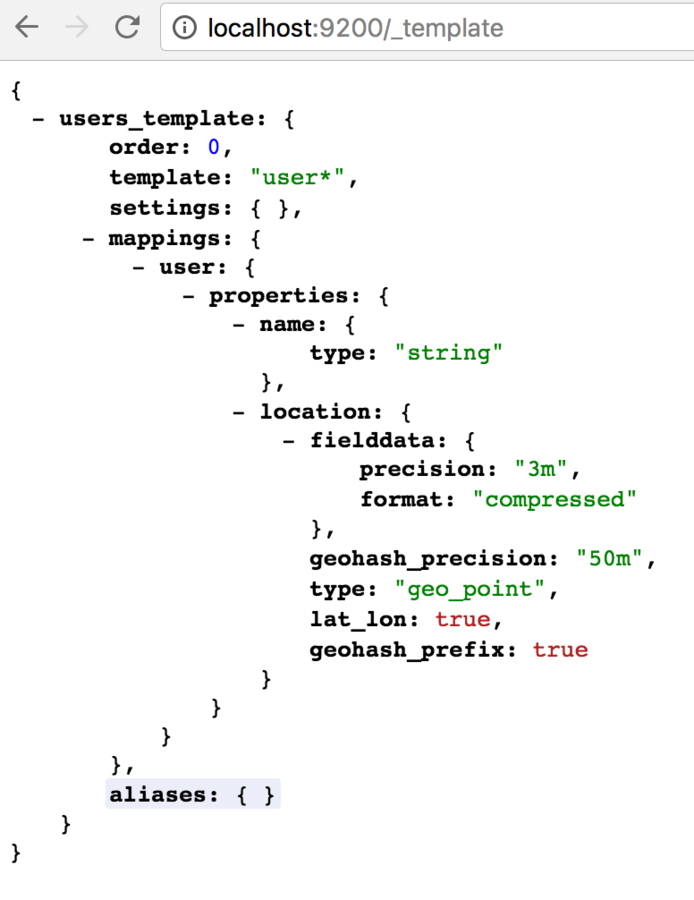
Sometimes, you need to create index on the flight... so, instead of creating the index before inserting your first document, preferred approach is to create an index template.
Sample use case is for logs, when an index per day is created automatically when 1st log line is inserted.
Mappings
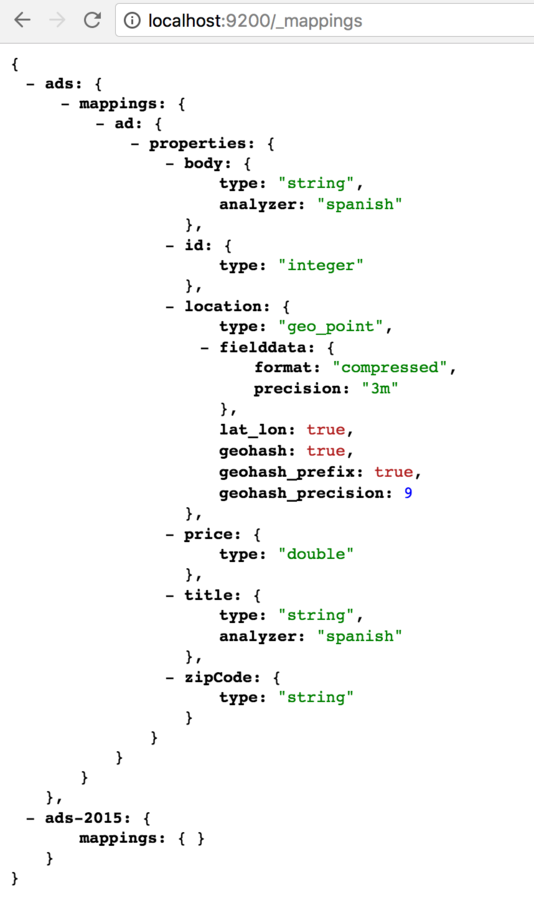
Mappings are like the relational database tables... more or less ;)
Mappings could be auto-created on the first document insert, but this is highly not recommended since you can't control accurately the type that the engine are going to assign to each field.
Updating mapping restrictions
- Can't break existing ones
- Can't remove fields, only add
- Can't change analyzer for string fields
- Can't change geo fields precision
- ...
Fields
Each field type has its own attributes here some examples:
To a string you could set the analyzer (for the language), and you can configure if the field has to be searchable or not... This is a point to take in account, since you can increase the cluster performance by making searchable only the needed fields.
To a date you can specify if you should accept or not malformed dates.
Indexing documents
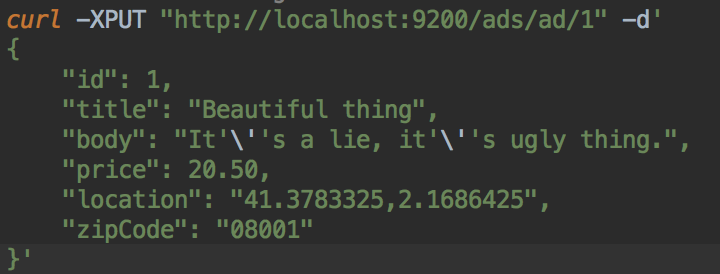
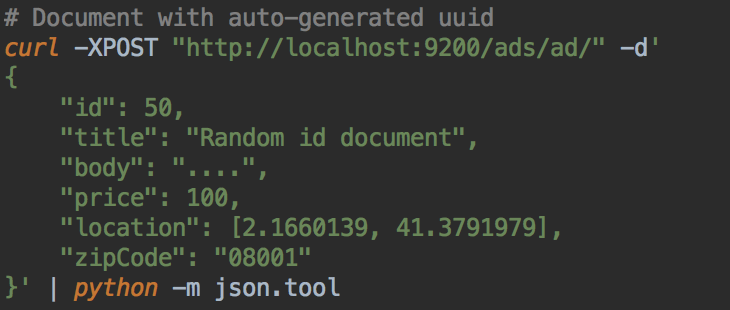
Here you can PUT, or POST documents like any REST api.
If you use POST, an id will be generated, if PUT is used, previous version of document will be replaced if exists
Important note about indexing
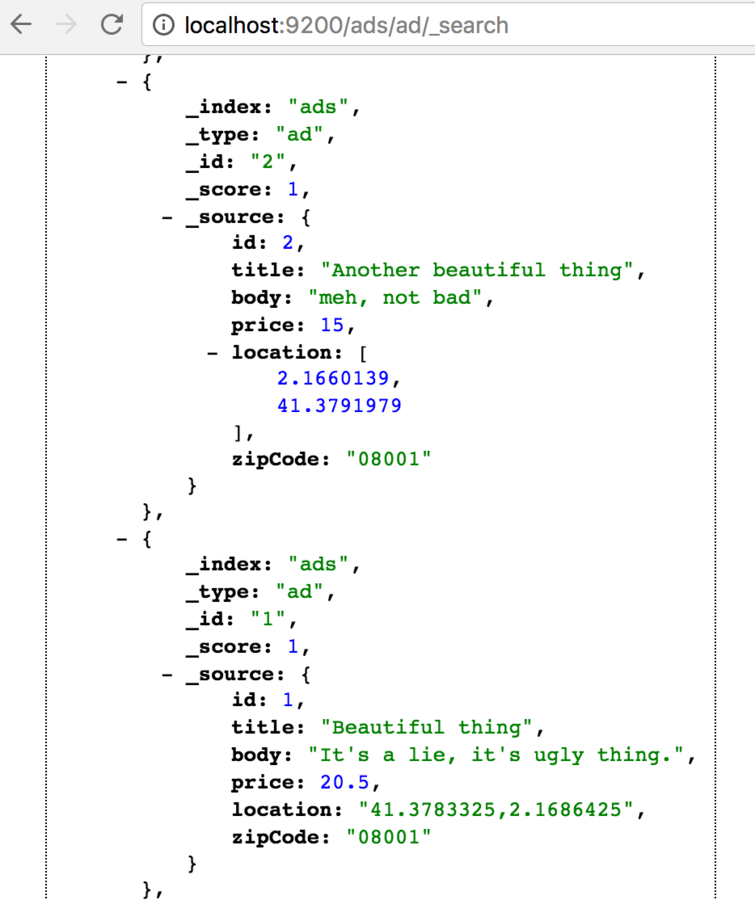
Documents will be saved as inserted, this means that if you insert locations (or dates... or whatever) in different formats, that documents will be retrieved with that inconsistencies.
Deleting documents
This operation can be performed with a simple DELETE HTTP request.
Deleting multiple documents by a query was deprecated because of problems with the cache state before that operations...
There is an external plugin for that.

Searching text
# Looks for exact term
# And yes, a GET request can have body!
curl -XGET "http://localhost:9200/ads/ad/_search" -d '
{
  "query": {
    "term": {
      "zipCode": "08001"
    }
  }
}
' | python -m json.tool

# Short form for simple queries
curl -XGET "http://localhost:9200/ads/ad/_search?q=zipCode:08001"

# Term search for analyzed field
curl -XGET "http://localhost:9200/ads/ad/_search" -d '
{
  "query": {
    "term": {
      "title": "thing"
    }
  }
}
' | python -m json.tool
Term filter
terms search looks for the term in the
Array handling
# Saved as received, array fits in any mapping.
curl -XPUT "http://localhost:9200/ads/ad/10" -d'
{
    "id": 10,
    "title": "Anohter one... really?",
    "body": "bahhh.",
    "price": 2000,
    "location": [2.1660139, 41.3791979],
    "zipCode": [ "08001", "08002" ]
}' | python -m json.tool

# Will retrieve all ads
curl -XGET "http://localhost:9200/ads/ad/_search?q=zipCode:08001" | python -m json.tool

# Will retrieve only new ad added in this file,
# because is the only one with 08002
curl -XGET "http://localhost:9200/ads/ad/_search?q=zipCode:08002" | python -m json.tool
Any field can be an array, no needed mapping option is needed to handle this.
Range search
curl -XGET "http://localhost:9200/ads/ad/_search" -d '
{
  "query": {
    "range": {
      "price": {
        "gte": 15,
        "lte": 20.6
      }
    }
  }
}
' | python -m json.tool
Range searches could be done easily like this
Match search
curl -XGET "http://localhost:9200/ads/ad/_search" -d '
{
  "query": {
    "match": {
      "title": {
        "query": "Another beautiful thing",
        "minimum_should_match": "75%"
       }
    }
  }
}
' | python -m json.tool
Match queries are used to gain control over searched text.
Fuzziness could be specified, also operator for various terms, the analyzer...
Sorting
curl -XGET "http://localhost:9200/ads/ad/_search" -d '
{
  "query": {
    "match_all": {}
  },
  "sort": {
    "price": "desc",
    "id": "desc"
  }
}
' | python -m json.tool
Sort does not hide any secret, you can sort by multiple fields like in any other SQL database
Query & Filter
The queries in Elastic search are divided in 2 main parts:
The query contains the filters that are affecting to the score.
The filter part is not affecting to the score, so, filters are faster and also cacheables by the engine.
curl -XGET "http://localhost:9200/ads/ad/_search" -d '
{
  "query": {
    "match": {
      "title": {
        "query": "Another beautiful thing",
        "operator": "and"
       }
    }
  },
  "filter": {
    "range": {
      "price": {
        "gte": 15,
        "lte": 20.6
      }
    }
  }
}
' | python -m json.tool
Score
The score is an arbitrary number that elasticsearch assign based on how much a document matches the current query.
There are 3 concepts that ES uses to assign the score of a text search:
- Term frequency
- Document frequency
- Total term frequency
{
  "took": 5,
  "timed_out": false,
  "_shards": {
    "total": 5,
    "successful": 5,
    "failed": 0
  },
  "hits": {
    "total": 2,
    "max_score": 0.625,
    "hits": [
      {
        "_index": "ads",
        "_type": "ad",
        "_id": "1",
        "_score": 0.625,
        "_source": {
          "id": 1,
          "title": "Beautiful thing",
          "body": "It's a lie, it's ugly thing.",
          "price": 20.5,
          "location": "41.3783325,2.1686425",
          "zipCode": "08001"
        }
      },
      {
        "_index": "ads",
        "_type": "ad",
        "_id": "2",
        "_score": 0.15342641,
        "_source": {
          "id": 2,
          "title": "Another beautiful thing",
          "body": "worst thing ever.",
          "price": 15,
          "location": [
            2.1660139,
            41.3791979
          ],
          "zipCode": "08001"
        }
      }
    ]
  }
}
Geolocation
Geoqueries are expensive! you should consider how much accuracy do you really need to make searches fast.
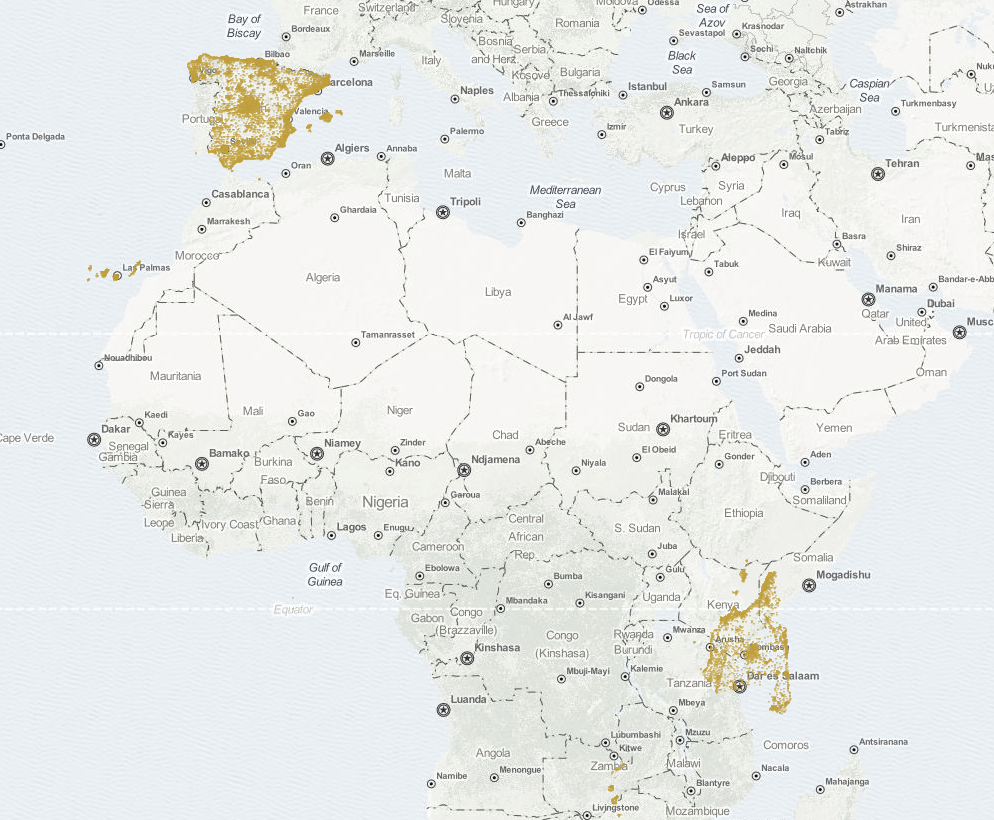
WTF!? this is what happens when you interchange lat/long at some point
Geo queries algorithms
Arc: The slowest but most accurate is the arc calculation, which treats the world as a sphere. Accuracy is still limited because the world isn’t really a sphere.
Plane: The plane calculation, which treats the world as if it were flat, is faster but less accurate. It is most accurate at the equator and becomes less accurate toward the poles.
Sloppy arc: So called because it uses the SloppyMath Lucene class to trade accuracy for speed, the sloppy_arccalculation uses the Haversine formula to calculate distance. It is four to five times as fast as arc, and distances are 99.9% accurate. This is the default calculation.
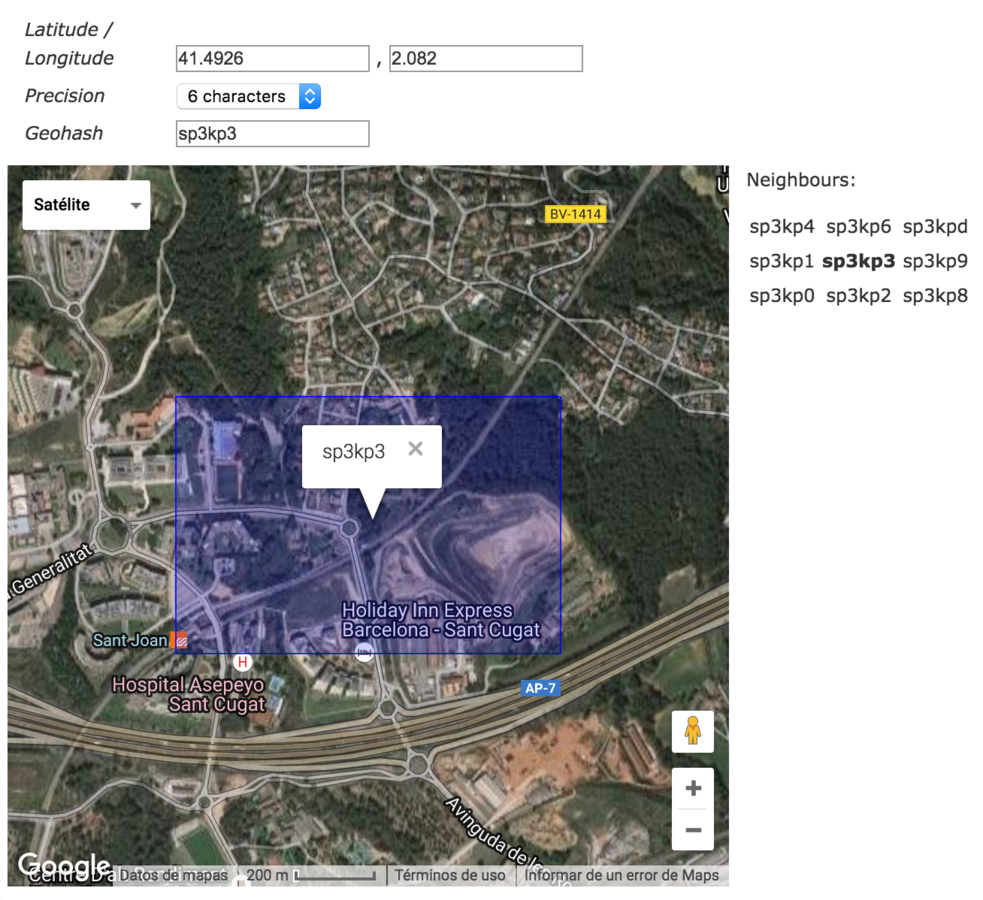
Geohashes
The geohash are a standard to hash locations with the desired preccision in a single value.
Precision goes from 1 to 12
Geo queries
There are many ways to make geolocated queries in elastic search:
- lat/long
- geohash
- bounding box
curl -XGET "http://localhost:9200/ads/ad/_search" -d '
{
  "query": {
    "match_all": {}
  },
  "filter": {
    "geo_distance" : {
      "location" : [ 2.1677398681640625, 41.37794494628906 ],
      "distance" : "2000m",
      "distance_type" : "plane",
      "optimize_bbox" : "indexed"
    }
  },
  "sort" : [
      {
        "_geo_distance" : {
          "location" : [ {
            "lat" : 41.37794494628906,
            "lon" : 2.1677398681640625
          } ],
          "unit" : "m"
        }
      }
  ]
}
' | python -m json.tool