Git workflows
and tools

Summary
-
Git basics
-
Gitflow
-
GitHub flow
-
Hubflow

Git basics
Short description
Git is a free and open source distributed Version Control System designed to handle everything from small to very large projects with speed and efficiency.
Ok... but what does VCS mean?
- Is the management of changes to documents.
- Changes are usually identified by a number.
- Revisions can be compared, restored, and with some types of files, merged.
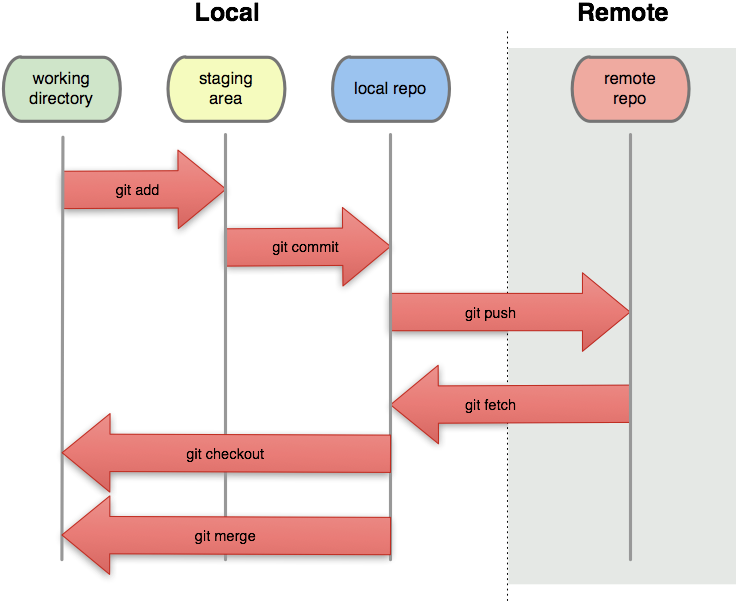
Files lifecycle
Gitflow
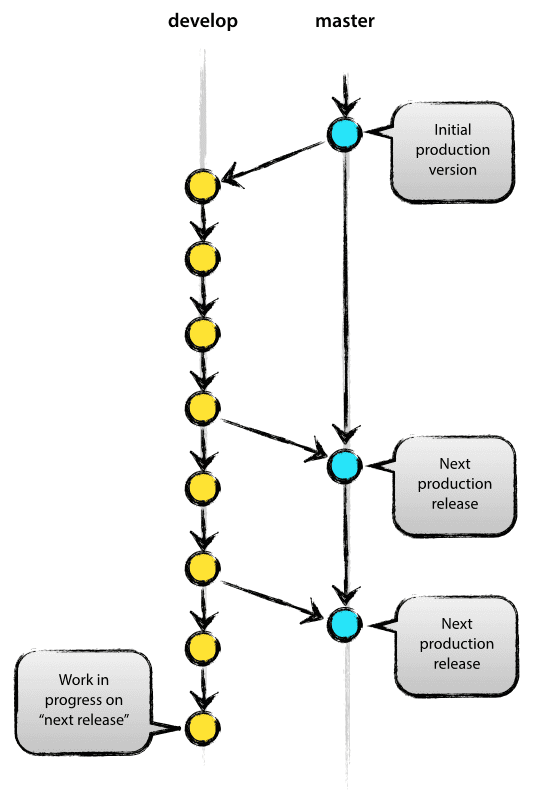
Main branches
-
master
production-ready state
-
develop
latest delivered changes for the next release
Feature branches
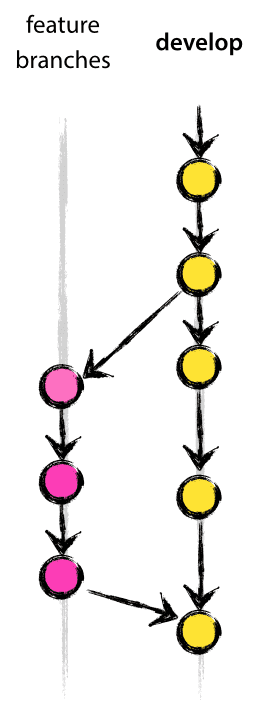
- Goal: develop new features for the upcoming or a distant future release
-
May branch off from:
develop
-
Must merge back into:
develop
Feature branches
- $ git checkout -b myfeature develop
{working process} - $ git checkout develop
- $ git merge --no-ff myfeature
- $ git branch -d myfeature
- $ git push origin develop
Git console process

Feature bran... HEY LISTEN!
Did you know?
You can install gitflow tool please from https://github.com/nvie/gitflow
And then just start it using the commands:
$ git flow init [-fd]
-d use default branch names
-f force

Feature branches
- $ git flow feature start [-F] myfeature
-F fetch from $ORIGIN before performing local operation -
$ git flow feature finish [-rFkDS] myfeature
-r rebase instead of merge
-F fetch from $ORIGIN before performing finish
-k keep branch after performing finish-D force delete feature branch after finish
-S squash feature during merge
Using gitflow tool
Release branches
- Goal: preparation of a new production release
- May branch off from:
develop
- Must merge back into:
develop and master

Release branches
- $ git checkout -b release-1.2 develop
{working progress} - $ git checkout master
- $ git merge --no-ff release-1.2
- $ git tag -a 1.2
- $ git checkout develop
- $ git merge --no-ff release-1.2
- $ git branch -d release-1.2
Git console process
Release branches
- $ git flow release start [-F] 1.2
-F fetch from $ORIGIN before performing local operation - $ git flow release finish [-Fsumpkn] 1.2
-F fetch from $ORIGIN before performing finish
-s sign the release tag cryptographically
-u use the given GPG-key for the digital signature (implies -s)
-m use the given tag message
-p push to $ORIGIN after performing finish
-k keep branch after performing finish
-n don't tag this release
-S squash release during merge
Using gitflow tool
Hotfix branches
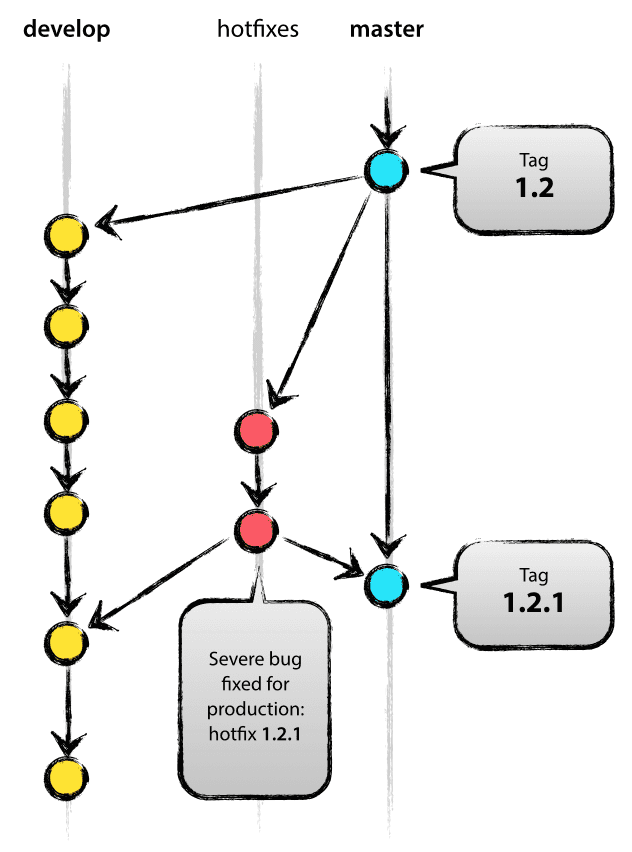
- Goal: act immediately upon an undesired state of a live production version
- May branch off from:
master
- Must merge back into:
develop and master
Hotfix branches
- $ git checkout -b hotfix-1.2.1 master
{working progress} -
$ git checkout master
-
$ git merge --no-ff hotfix-1.2.1
-
$ git tag -a 1.2.1
-
$ git checkout develop
-
$ git merge --no-ff hotfix-1.2.1
-
$ git branch -d hotfix-1.2.1
Git console process

Hotfix branches
- git flow hotfix start [-F] <version>
-F fetch from $ORIGIN before performing local operation - git flow hotfix finish [-Fsumpkn] <version>
-F fetch from $ORIGIN before performing finish
-s sign the release tag cryptographically
-u use the given GPG-key for the digital signature (implies -s)
-m use the given tag message
-p push to $ORIGIN after performing finish
-k keep branch after performing finish
-n don't tag this release
Using gitflow tool
GitHub flow
Short description
GitHub Flow is a lightweight, branch-based workflow that supports teams and projects where deployments are made regularly.

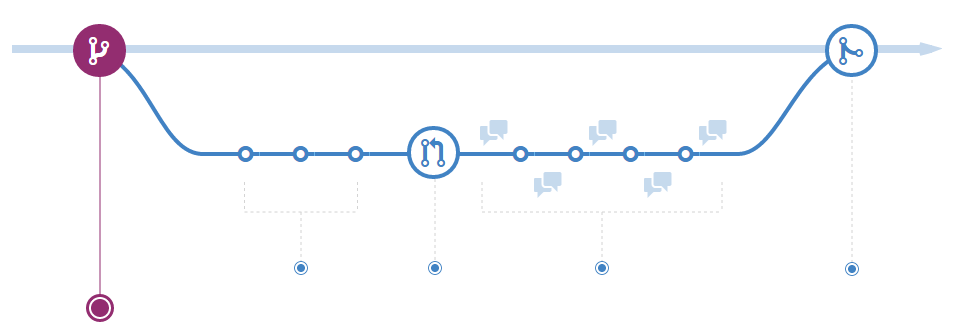
1. Create a branch
-
Anything in the master branch is always deployable.
-
All the branches are created from master.
-
Your branch name should be descriptive.
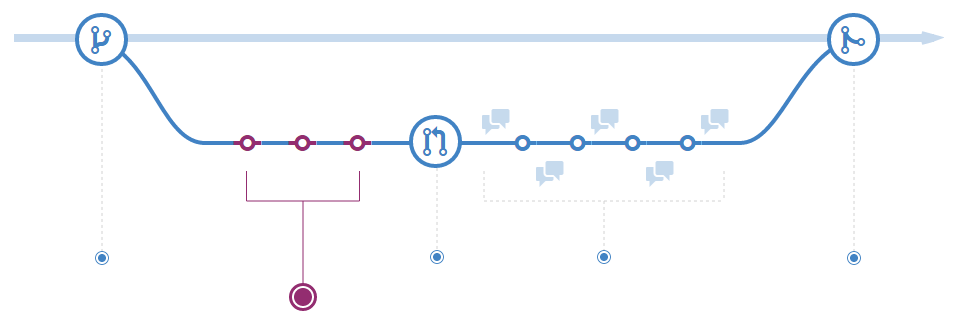
2. Add commits
-
One commit for every separate unit of change.
-
Don't be lazy and use clear comments.
3. Open a Pull Request
- Use GitHub's @mention system in your Pull Request message to ask for feedback from specific people or teams.
- 20 flexiones!!
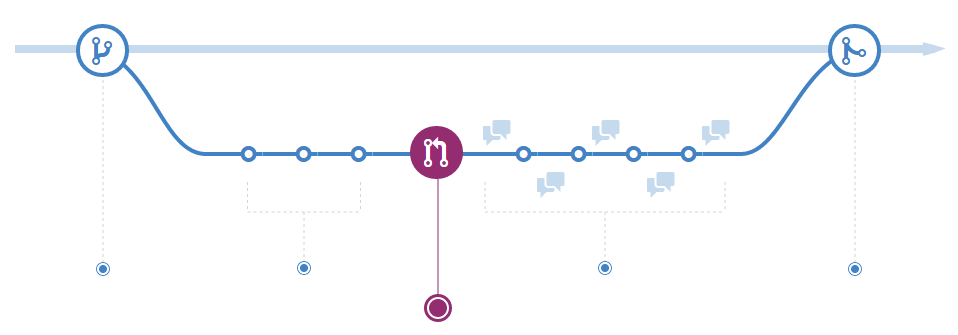
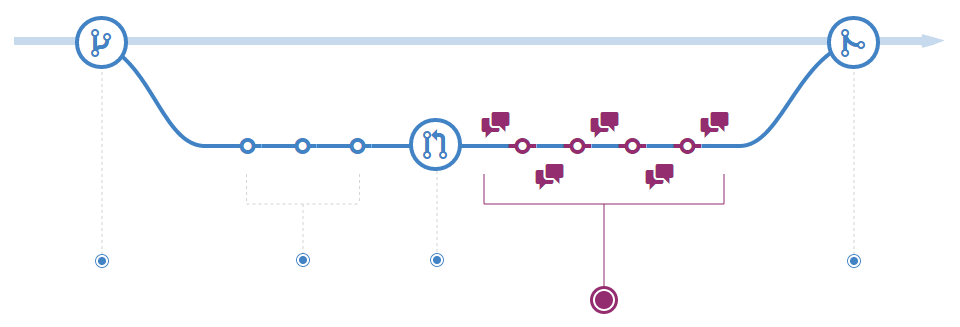
4. Discuss and review your code
- Fix it in your branch and push up the change.
- GitHub will show your new commits and any additional feedback you may receive in the unified Pull Request view.
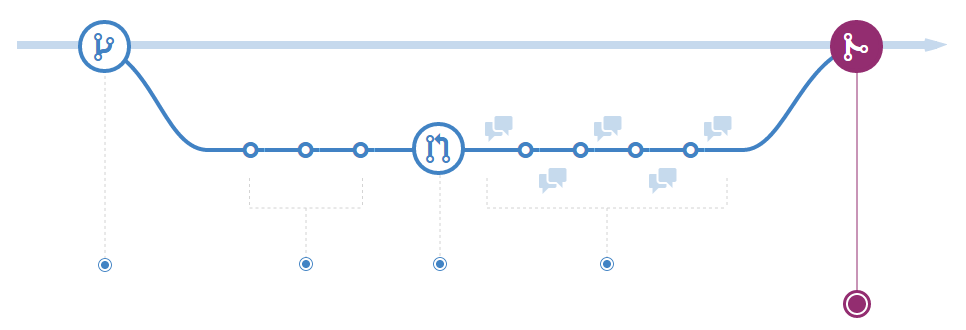
5. Merge and deploy
-
Merge your code to the master branch for deployment.
-
Keywords into the text of your Pull Request like Closes #32 would close issue number 32 in the repository.
But... what if we want to use Gitflow with Github?

Hubflow
Why GitHub + GitFlow
-
Gitflow tools limit their scope to your local Git repo clone
-
Loving pull requests!!
-
Lazyness of doing too many commands
-
Ensure online repo is up to date
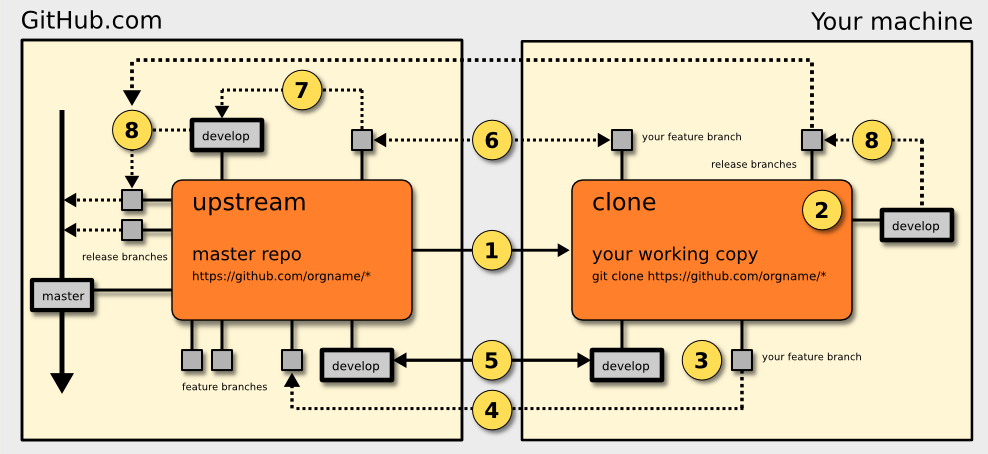
1. Cloning A Repo
-
Clone the existing repo from GitHub to your local workstation:
git clone git@github.com:<orgname>/<reponame> -
Do not fork the repo on GitHub - clone the master repo directly.
2. Initialise The HubFlow Tools
You have to do this every time you clone a repo.
- cd <reponame>
-
git hf init
3. Create A Feature Branch
- git hf feature start <feature-name>
- user name convention feature-
- git hf feature checkout <feature-name>
4. Publish The Feature Branch On GitHub
- git hf push
5. Keep Up To Date
- # pull down master and develop branches
git hf update - # merge develop into your feature branch
git merge develop
6. Collaborate With Others
-
git hf push -
git hf pull
7. Merge Your Feature Into Develop Branch
- git hf push
- create a pull request to <reponame</develop branch from <reponame</feature/<feature-name>
- git hf feature finish
8. Creating Releases
- git hf update
- git hf release start <version-number>
creates the branch release/2.6.0. - git hf release finish <version-number>
9. Creating Hotfixes
- git hf update
- git hf hotfix start <version-number>
- git hf hotfix finish <version-number>
Any question?