GIT Workshop
What is Git
- Open source project developed in 2005 by Linus Torvalds
- Distributed Version Control System (VCS)
Linus Torvalds has quipped about the name “git“, which is British English slang for a stupid or unpleasant person: “I’m an egotistical b*****d, and I name all my projects after myself. First Linux, now git."
Why do you want to use Git ?
What do you want out of today ?
Title Text
What's good about Git
- Performs well doing commen actions like branching, merging comparing history
- Can use off line and push changes later
- Easy to switch between branches
- All changes are secured using SHA1 hashing so history can never be tampered with or accidentally changed
- Becoming the standard VCS...
How Git works with files
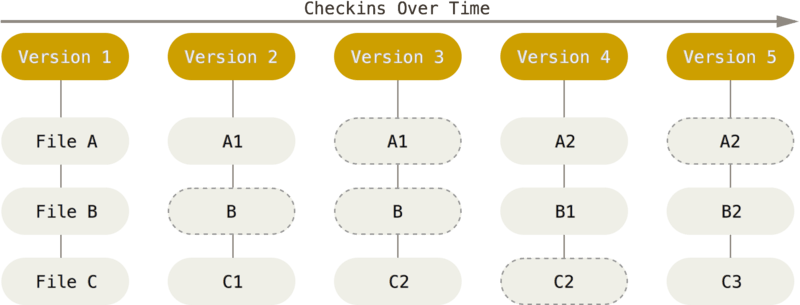
- Snapshots of each version (not deltas)
- Checksum on each version (unique id)
- Operations are additive
- Operations are local
- its OK to fail....
Command line interface (CLI)
- You are completely in control of what you are doing
- you completely understand what is happening
- Easier to share what you are doing
- Easier to get help online
- It is easier to build actions into automation pipelines
GUIs exist: Atlassian source tree, Kraken, IDE (visual studio)
Our repository
https://bitbucket.org/peterkaras/global-aerospaceSimple html page we can explore feature of git. Explore the Bitbucket UI...
We are using Bitbucket to host our remote repo, but we could be use:
- GitHub
- Assembla
- Peforce
- Visual studio team services
They all provide very similar functionality
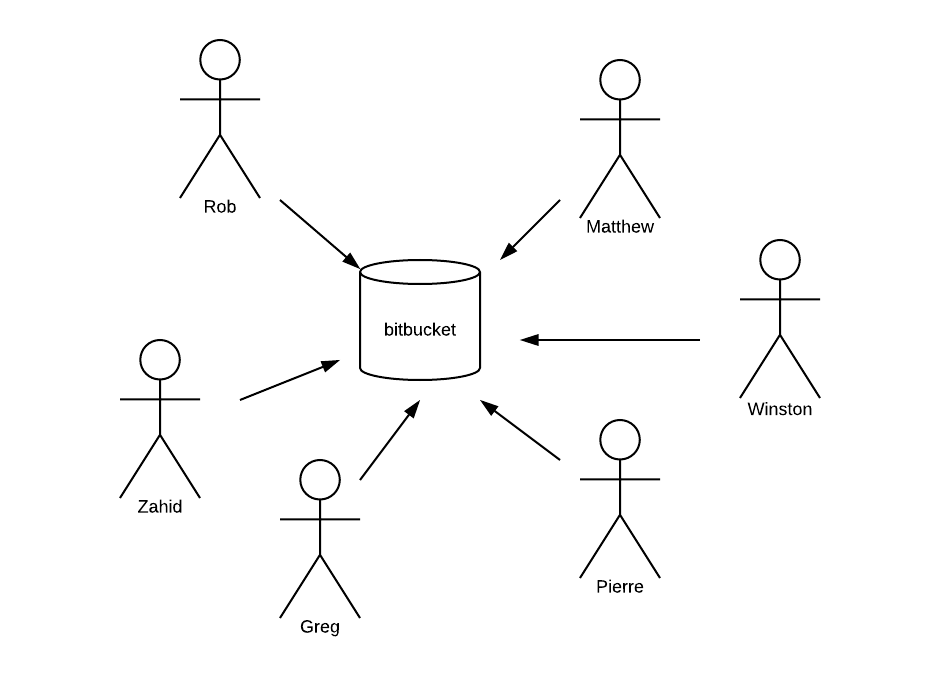
Distributed VCS
How we work
Slides - talk - discuss
Time for practice, work in groups around Laptops.
Questions, discussion...
We will practice commands as much as possible
Overview of content
- Basic commands
- Working with others
- Clean commits
- Gitflow
- Discussion...
1 Basic commands
git clone
git add
git commit
git push
Setting up user
Identifies you when you are pushing changes to a shared repository
$ git config --global user.name "John Doe"
$ git config --global user.email john@test.com
$ gityou are ready to go....
Getting Started
Creates a repository into a newly created directory: create .git folder
git clone https://bitbucket.org/peterkaras/global-aerospace.gitgit initInitialises a repository that you can later push to a shared repository
git statusUnderstanding local
Creates a repository into a newly created directory.
git clone git://sfdsfdsgit remote -vLists remote repos
Setting up access
You can access by providing username and password each time
HTTPSSSHYou can upload your public SSH key for easier long term access
Make a change
Add your new file to the staging area.
git add .git statusCommits, creates a checkpoint with your change
git commit -m "my first change"git statusWhat just happend
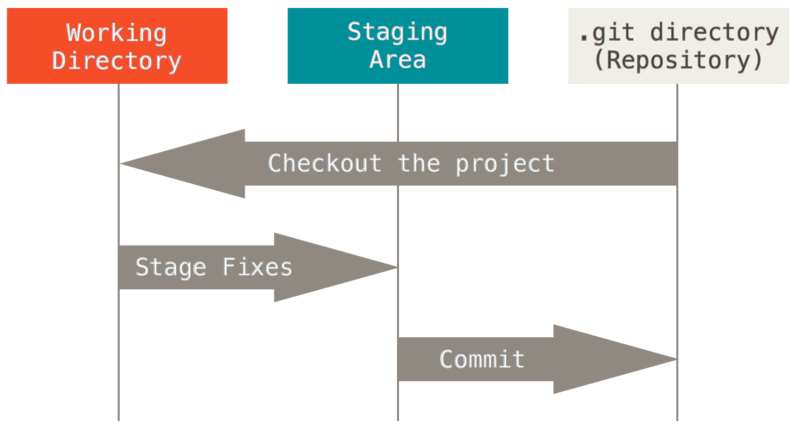
We organise our work into commits using the staging area
Internal view
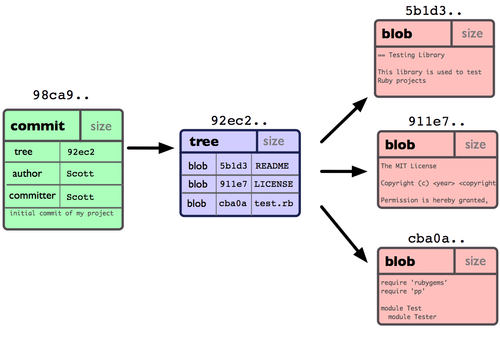
Push changes
What happens when everyone pushes their changes at the same time ?
git push2 Working with others
git branch
git fetch
git pull
git merge
git push
Why do we need branches ?
Create a branch
Creates a new branch
git branch my-first-branch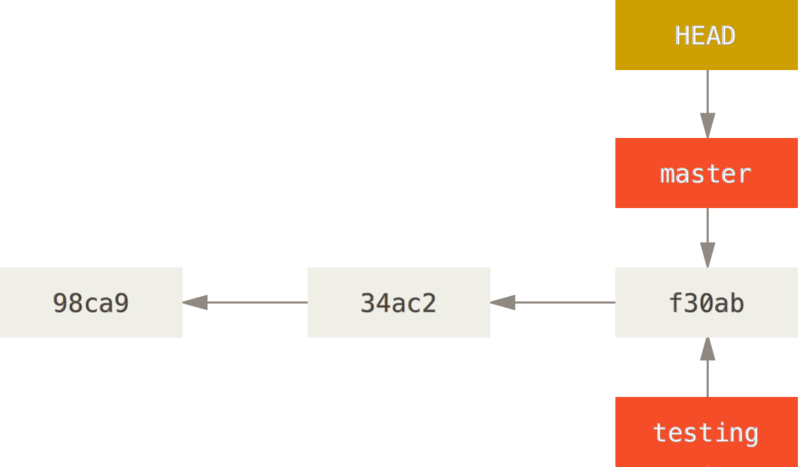
Checkout the new branch
git checkout my-first-branchMoves HEAD to point at your new branch
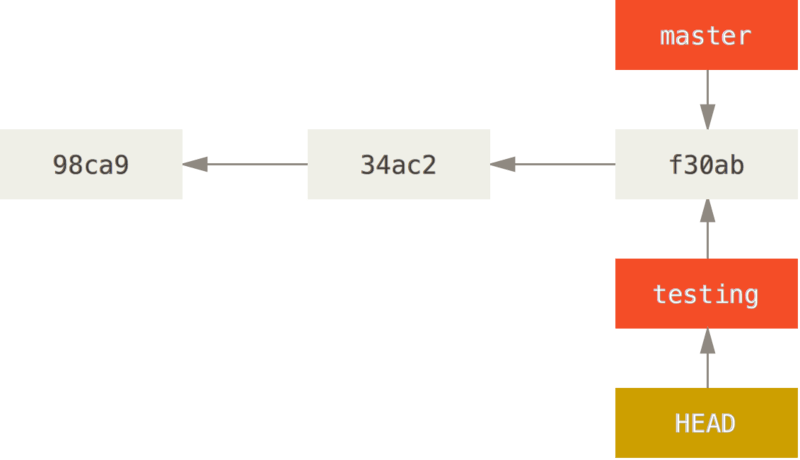
Make and commit a change
git status
git add .
git status
git commit -m "my change"
git status
Sharing your work
Shows you local and remote branches
git branch -agit push -u origin my-first-branchStores your branch on the remote repository
Seeing other peoples work
Fetches the latest view of the shared repository
git fetchgit pullfetch + merge into current branch.... see later
Merges
git checkout master
git pull
git checkout mybranch
git merge master
git commit
git checkout master
git merge another-branch
git commitWhen are you sure you can merge to master ?
Why do we need to get latest versions from master ?
Conflicts
[1] All create a branch and make some changes and push...
[2] One person merge to master
[3] Everyone pull latest changes and merge master to their barnches
git checkout -b my-new-branchResolving conflicts
If you have questions, please
<<<<<<< HEAD
my text in the head
=======
the text in branch-a
>>>>>>> branch-a
Git does a good job automerging, but sometimes you need to intervene manually to resolve conflicts
Collaborating with Pull requests
git push -u origin my-changesCreate a pull request and add each other as reviewers.
Why use pull requests ?
Branch management
How long do you think branches should stay open ?
Whats the disadvantage of having long lived branches ?
How does this relate to user stories (items of work) ?
3 Clean commits
git commit
git log
git stash
git rebase
git revert
git tag
Review logs in Bitbucket
How does the commit history look ?
Semantic commits
Makes commits meaningful
- Include TFS / JIRA number
Can be
- feature
- fix
- refactor
- test
- Doc
git commit -m "WAP-967 feature(postcode selection)"Branch names
Self explanatory names
git checkout -b fb/GA-789/my-new-featureCan use convention:
- fb : feature branch
- hf : hot fix
History
Keeping organised about commits means a clean history.
1 Story = 1 commit
git loggit rebase -i <commit number>Allows you to clean up local history
Stash
Saves staged and working directory.
git stashgit stash applyreapplies stashed changes
Tags
Creates a Tag V1.4
git tag -a v1.4 -m "my version 1.4"git taglists tags
should you branch or tag ?
Delete a branch
#remote
git push -d <remote_name> <branch_name>

#local
git branch -d <branch_name>
Always delete merged branches
Unstaging / reverting
unstages local files
git reset HEAD .git checkout .replaces unstaged files with contents of HEAD. overwrites changes
Revert a change
Creates a new commit backing out those changes
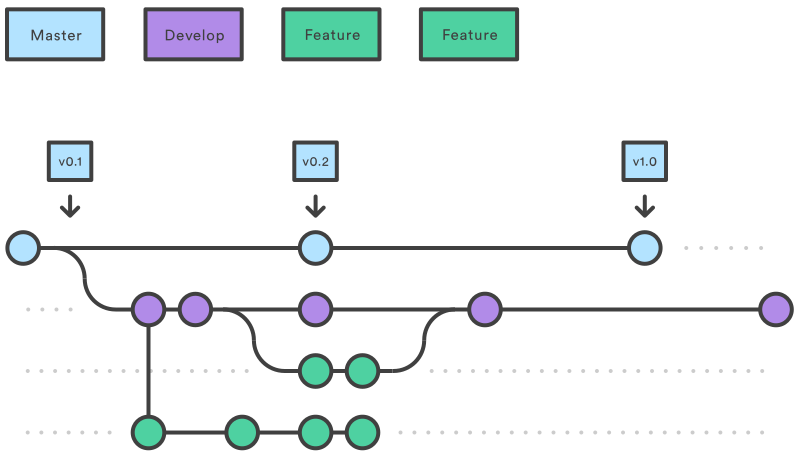
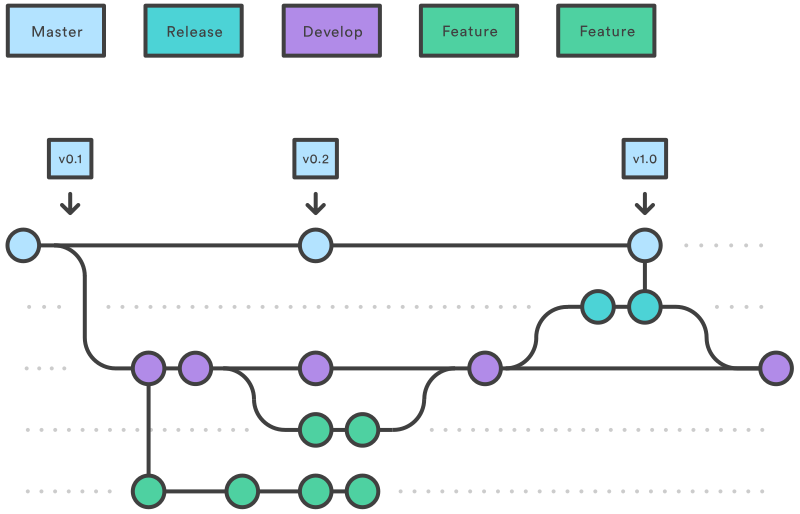
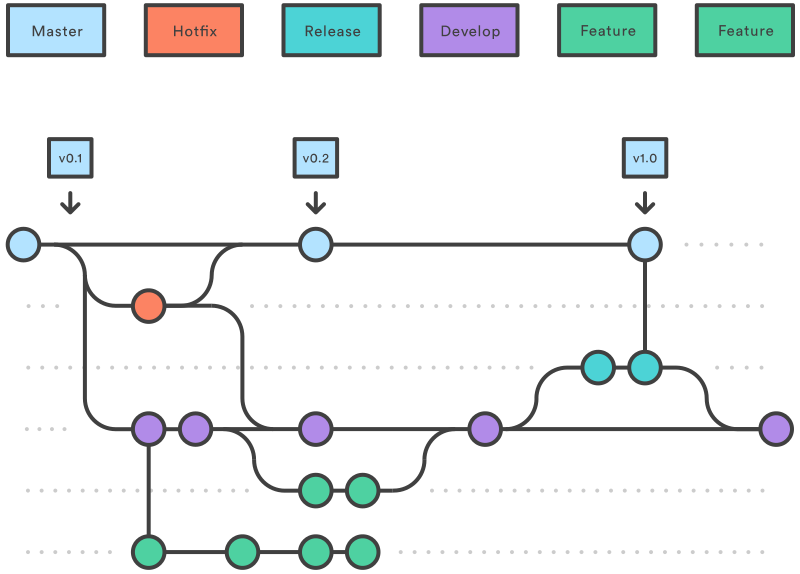
git revert <commit>1 Git flow
https://www.atlassian.com/git/tutorials/comparing-workflows/gitflow-workflow
Master / Develop branch
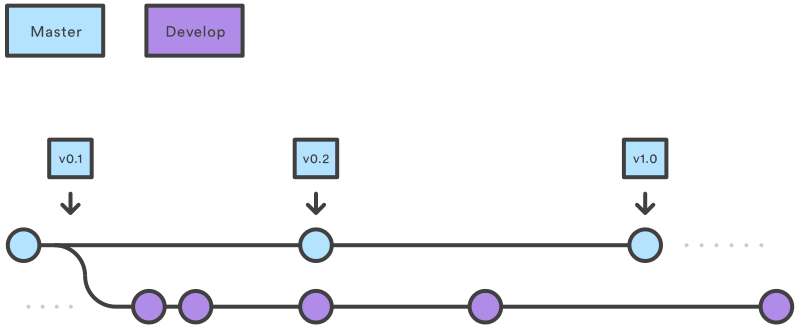
Feature branch
Release Branch
Hotfix branch
Complications
- Large Stories / long lived feature branches
- Multiple teams
- Large product
If you use git flow and find yourself diverging from the simple model, you are probably compensating for organizational or infrastructure issues.
4 Questions / Discussion
Resources
git --help <command>google git manual
google atlassian gitflow
google stackoverflow
The End
Optional Exercise
- GA-01: Introduction text
- GA-02: Submit button
- GA-03: Copyright
- GA-04: GDPR waiver
- GA-05: Crazy background color
- GA-06: Link to Global Aerospace website
Each take one of the following changes and create pull requests then merge to development.