Intro to Multithreading & Asynchrony
Presented by Raman But-Husaim
Agenda
- Who am I?
- Multithreading
- Thread Synchronization
- TPL
- Asynchrony
- Q&A

Source: https://1funny.com/sheep-jam-2/
Who Am I?
Sr Software Engineer at
Raman But-Husaim

9+ years of programming
4.5+ years in production
Master's Degree in Software Engineering
Microsoft Certified Specialist


Multithreading
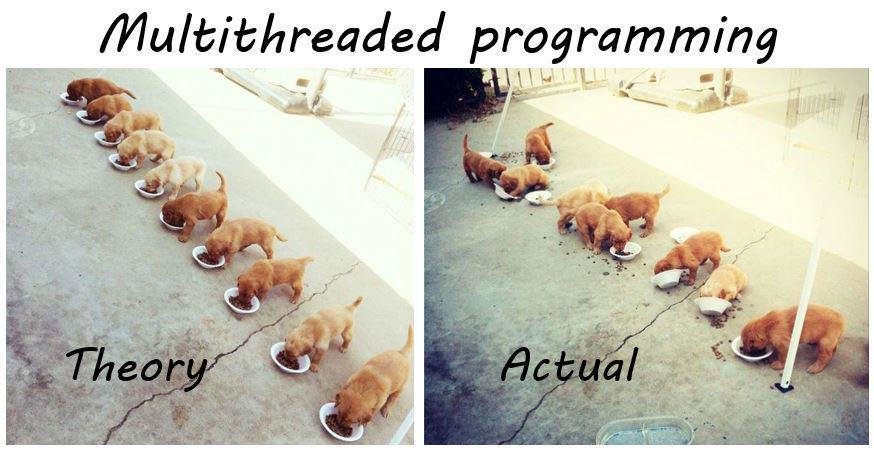
Source: https://www.reddit.com/r/ProgrammerHumor/comments/3mqjg6/multithreading_irl_xpost_from_rgifs/
Multithreading
Source: Concurrency in C# Cookbook, Stephen Cleary
Concurrency - Doing more than one thing at a time.
Terminology
Multithreading - A form of concurrency that uses multiple threads of execution.
Parallel - Doing lots of work by dividing it up among multiple threads that run concurrently.
Multithreading
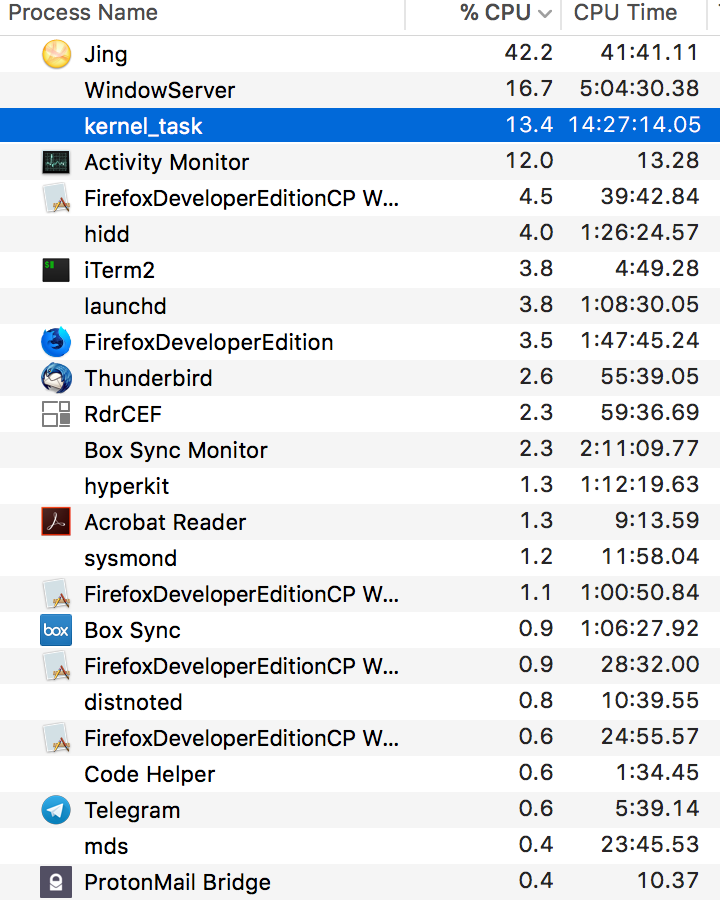
Process
A collection of resources that is used by a single instance of an application.
Each process is given a virtual address space, ensuring that the code and data used by one process is not accessible to another process.
Multithreading
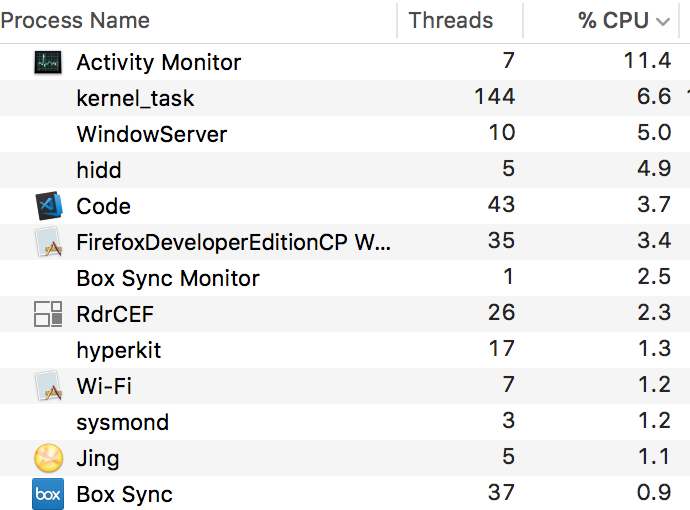
Thread
An OS concept whose job is to virtualize the CPU.
It could be considered as a virtual processor that is given to the one specific program and runs it independently.
Multithreading
Thread Overhead: Memory
Thread Kernel Object x86 - ~700 bytes of memory; x64 - 1240 bytes of memory.
Thread environment block (TEB) The TEB consumes 1 page
of memory (4 KB on x86, x64 CPUs, and ARM CPUs).
User-mode stack ~1 MB of memory in Windows
Kernel-mode stack x86 - ~ 12 KB, x64 - ~24 KB
Source: CLR via C#, J. Richter
Multithreading
Thread Overhead: CPU
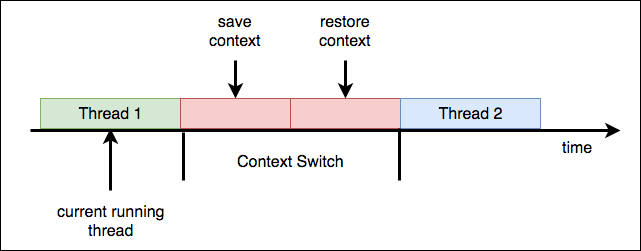
At any given moment in time, OS assigns one thread to a CPU. That thread is allowed to run for a time-slice (a quantum). When the time-slice expires, OS context switches to another thread.
Multithreading
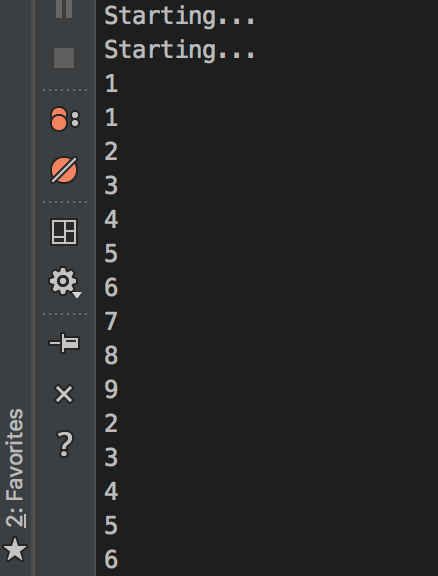
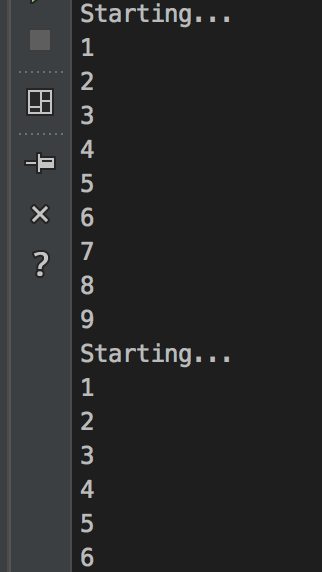
Thread: Code
public static void Main(string[] args)
{
    var thread = new Thread(DisplayNumbers);
    thread.Start();
    DisplayNumbers();
}

private static void DisplayNumbers()
{
    Console.WriteLine("Starting...");
    for (int i = 1; i < 10; i++)
    {
        Console.WriteLine(i);
    }
}

Source: Telegram Great Minds
Multithreading
Thread Pool
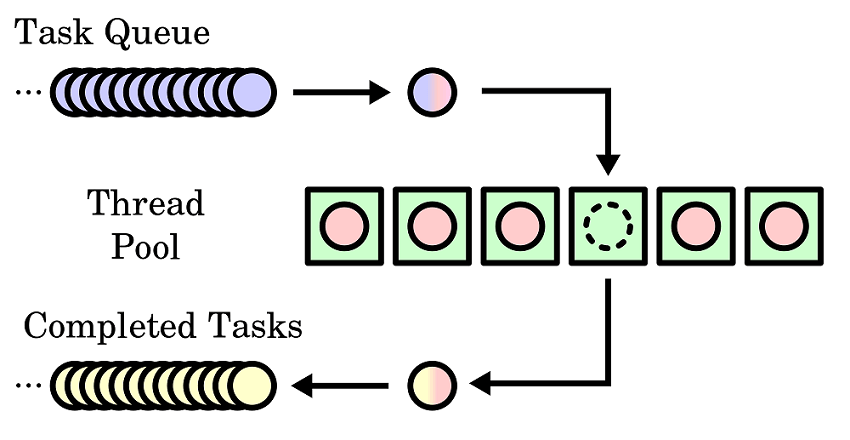
You can think of a thread pool as being a set of threads that are available for your application’s own use.
Source: https://en.wikipedia.org/wiki/Thread_pool
Multithreading
Thread Pool Internals
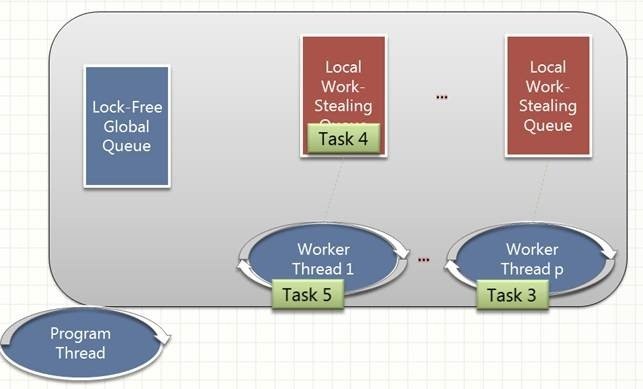
Source: http://regfordev.blogspot.de/2010/12/thread-pool.html

Source: Telegram Great Minds
Multithreading
Thread Pool: Code
static Boolean QueueUserWorkItem(WaitCallback callBack);
static Boolean QueueUserWorkItem(WaitCallback callBack, Object state);

delegate void WaitCallback(Object state);
public static void Main() {
Console.WriteLine("Main thread: queue operation");
ThreadPool.QueueUserWorkItem(ComputeBoundOp, 5);
Console.WriteLine("Main thread: Doing other work");
Thread.Sleep(10000); // Simulating other work (10 seconds)
Console.WriteLine("Hit <Enter> to end this program...");
Console.ReadLine();
}
private static void ComputeBoundOp(Object state) {
Console.WriteLine("In ComputeBoundOp: state={0}", state);
Thread.Sleep(1000); // Simulates other work (1 second)
}Multithreading
Thread Pool: Danger
- You require a foreground thread.
- You require a thread to have a particular priority.
- You have tasks that cause the thread to block for long periods of time. The thread pool has a maximum number of threads, so a large number of blocked thread pool threads might prevent tasks from starting.
- You need to have a stable identity associated with the thread, or to dedicate a thread to a task.

Source: Telegram Evil Minds
Thread Synchronization
Source: https://blog.superfeedr.com/ruby/open/ruby-fibers-may-confuse/

Thread Synchronization
Thread synchronization is used to prevent corruption when multiple threads access shared object at the same time.
Shared State

Source: Telegram Great Minds
If there is no shared state, there is no need for synchronization at all.
Thread Synchronization
Synchronization Sucks
Source: Telegram Great Minds
- Tedious and error-prone.
- They hurt performance.
- They allow only one thread to access the resource at a time.

Thread Synchronization
Golden Rule
Thread synchronization is bad, so try to design your
applications to avoid it as much as possible.
Thread Synchronization
Types
Primitive
- User-mode constructs
- Kernel-mode constructs
Hybrid

Source: Telegram Great Minds
Thread Synchronization
User-Mode: Features
- Use special CPU instructions to coordinate threads.
- Significantly faster than the kernel-mode constructs.
Cons
Pros
- Waste CPU time.
Thread Synchronization
User-Mode: Volatile
Disable some optimizations usually performed by the C# compiler, the JIT compiler, and the CPU itself.
System.Threading.Volatile

public static class Volatile
{
    public static void Write(ref Int32 location, Int32 value);
    public static Int32 Read(ref Int32 location);
    ...
}
Thread Synchronization
User-Mode: Volatile
On a multiprocessor system, a volatile write operation ensures that a value written to a memory location is immediately visible to all processors. A volatile read operation obtains the very latest value written to a memory location by any processor. These operations might require flushing processor caches, which can affect performance.
by MSDN
Thread Synchronization
User-Mode: Interlocked
Performs an atomic read and write operation.
Full memory fences. That is, any variable writes before the
call to an Interlocked method execute before the Interlocked method, and any variable reads after the call execute after the call.
System.Threading.Interlocked

public static class Interlocked
{
    public static Int32 Increment(ref Int32 location);
    public static Int32 Decrement(ref Int32 location);
    public static Int32 Add(ref Int32 location, Int32 value);
    public static Int32 Exchange(ref Int32 location, Int32 value);
    public static Int32 CompareExchange(ref Int32 location, Int32 value, Int32 comparand);
    ...
}
Thread Synchronization
Kernel-Mode: Features
Pros
- Does not waste CPU time.
- Can synchronize native and managed threads.
- Can synchronize threads running in different processes on the same machine
Cons
- Much slower that the user-mode constructs.
- Method call require transition from managed code to native user-mode to native kernel-mode code.
Thread Synchronization
Kernel-Mode: Examples
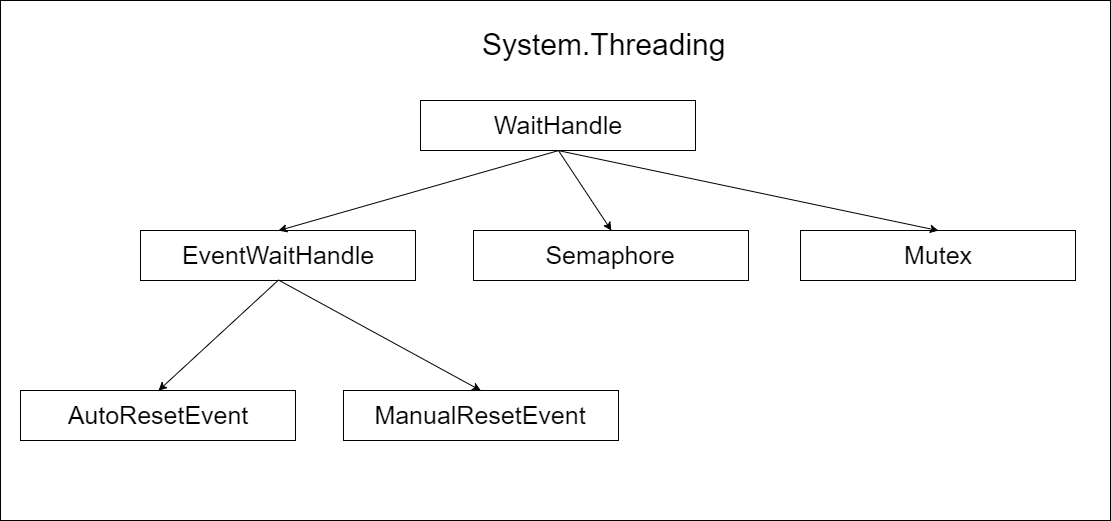
Thread Synchronization
Hybrid
Built by combining the user-mode and kernel-mode constructs.
Hybrid constructs provide the performance benefit of the primitive user-mode constructs when there is no thread contention. Hybrid constructs also use the primitive kernel-mode constructs to provide the benefit of not spinning (wasting CPU time) when multiple threads are contending for the construct at the same time.
Thread Synchronization
Hybrid: Examples
System.Threading
- ManualResetEventSlim
- SemaphoreSlim
- ReaderWriterLockSlim
- CountdownEvent
- Barrier
- Monitor

Source: Telegram Great Minds
For examples: Multithreading with C# Cookbook, Eugene Agafonov
Thread Synchronization
Hybrid: Monitor
Probably the most used synchronization construct.
C# has a built-in keyword to support it (lock), the just-intime (JIT) compiler has built-in knowledge of it
Every object on the heap can have a data structure, called a sync block, associated with it.
The Monitor class is a static class whose methods accept a reference to any heap object, and these methods manipulate the fields in the specified object’s sync block.
Thread Synchronization
Hybrid: Monitor Code
public static class Monitor {
    public static void Enter(Object obj);
    public static void Exit(Object obj);
    public static Boolean TryEnter(Object obj, Int32 millisecondsTimeout);
    public static void Enter(Object obj, ref Boolean lockTaken);
    public static void TryEnter(Object obj, Int32 millisecondsTimeout, ref Boolean lockTaken);
}
public class Class1
{
public void SomeMethod()
{
var pool = new Dictionary<int, int>();
int i = 0;
lock(pool) {
++i;
}
Console.WriteLine(i);
}
}Thread Synchronization
Hybrid: Monitor Decompiled
  public class Class1
  {
    public void SomeMethod()
    {
      Dictionary<int, int> dictionary1 = new Dictionary<int, int>();
      int num = 0;
      Dictionary<int, int> dictionary2 = dictionary1;
      bool lockTaken = false;
      try
      {
        Monitor.Enter((object) dictionary2, ref lockTaken);
        ++num;
      }
      finally
      {
        if (lockTaken)
          Monitor.Exit((object) dictionary2);
      }
      Console.WriteLine(num);
    }

    public Class1()
    {
      base.\u002Ector();
    }
  }
Thread Synchronization
Hybrid: Monitor Issues
- A variable can refer to a proxy object (see MarshalByRefObject).
- If a thread calls Monitor.Enter on a domain-neutral type the thread is taking a lock on that type across all AppDomains in the process.
- Because strings can be interned, two completely separate pieces of code could unknowingly get references to a single String object in memory.
- When passing a string across an AppDomain boundary, the CLR does not make a copy of the string; instead, it simply passes a reference to the string into the other AppDomain.
- Because Monitor’s methods take an Object, passing a value type causes the value type to get boxed, resulting in the thread taking a lock on the boxed object.
Source: CLR via C#, Jeffrey Richter
Thread Synchronization
Concurrent Collections
- ConcurrentDictionary
- ConcurrentQueue
- ConcurrentStack
- ConcurrentBag
- BlockingCollection
System.Collections.Concurrent
For examples: Multithreading with C# Cookbook, Eugene Agafonov

Task Parallel Library (TPL)
Source: http://www.travelstart.co.za/blog/wp-content/uploads/2013/07/lion-king-baby-simba.jpg

Task Parallel Library (TPL)
The Task Parallel Library (TPL) is a set of public types and APIs in the
System.Threading
System.Threading.Tasks
The purpose of the TPL is to make developers more productive by simplifying the process of adding parallelism and concurrency to applications.
Rationale
Task Parallel Library (TPL)
Rationale
Calling ThreadPool’s QueueUserWorkItem method to initiate an asynchronous compute-bound operation is simple, however it has limitations.
- No easy way to get a result from a thread pool worker thread.
- Need to propagate an exception to the original thread properly.
- No easy way to create a set of dependent asynchronous actions.
Task Parallel Library (TPL)
Rationale
TPL can be considered as one more abstraction layer over a thread pool, hiding the lower-level code that will work with the thread pool from a programmer and supplying a more convenient and fine-grained API.
by Eugene Agafonov
Task Parallel Library (TPL)
Task
The core concept of TPL is a task. A task represents an asynchronous operation that can be run in a variety of ways, using a separate thread or not.
A task can be combined with other tasks in different variations. Convenient APIs for task
combination are one of the key advantages of TPL compared to the previous patterns.
Task Parallel Library (TPL)
Task: Basic Operation
void Main()
{
    var t1 = new Task(() => SomeAsyncOperation("Task 1"));
    var t2 = new Task(() => SomeAsyncOperation("Task 2"));
    t2.Start();
    t1.Start();
    var t3 = Task.Run(() => SomeAsyncOperation("Task 3"));
    var t4 = Task.Factory.StartNew(() => SomeAsyncOperation("Task 4"));
    var t5 = Task.Factory.StartNew(
        () => SomeAsyncOperation("Task 5"),
        TaskCreationOptions.LongRunning);
    Task.WaitAll(new [] { t1, t2, t3, t4, t5 });
}

static void SomeAsyncOperation(string name)
{
    Console.WriteLine($"Task {name} is running on a thread id " +
        $"{Thread.CurrentThread.ManagedThreadId}. Is thread pool thread: " +
        $"{Thread.CurrentThread.IsThreadPoolThread}");
}
Task Parallel Library (TPL)
Task: Basic Operation
void Main()
{
    TaskMethod("Main Thread Task");
    Task<int> t1 = CreateTask("Task 1");
    t1.Start();
    int task1Result = t1.Result;
    Console.WriteLine($"Result is: {task1Result}");
    var t2 = CreateTask("Task 2");
    t2.RunSynchronously();
    var task2Result = t2.Result;
    Console.WriteLine($"Result is: {task2Result}");

    var t3 = CreateTask("Task 3");
    Console.WriteLine(t3.Status);
    t3.Start();
    while (!t3.IsCompleted)
    {
        Console.WriteLine(t3.Status);
        Thread.Sleep(TimeSpan.FromSeconds(0.5));
    }
    Console.WriteLine(t3.Status);
    var t3Result = t3.Result;
    Console.WriteLine($"Result is: {t3Result}");
}
static Task<int> CreateTask(string name)
{
    return new Task<int>(() => TaskMethod(name));
}
static int TaskMethod(string name)
{
    Console.WriteLine(
        $"Task {name} is running on a thread id " +
        $"{Thread.CurrentThread.ManagedThreadId}. " +
        "Is thread pool thread: " +
        $"{Thread.CurrentThread.IsThreadPoolThread}");
        Thread.Sleep(TimeSpan.FromSeconds(2));

    return 42;
}
Task Parallel Library (TPL)
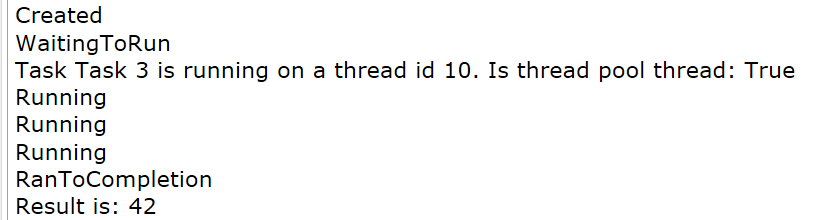
Task: Basic Operation - Result
void Main()
{
    TaskMethod("Main Thread Task");
    Task<int> t1 = CreateTask("Task 1");
    t1.Start();
    int task1Result = t1.Result;
    Console.WriteLine($"Result is: {task1Result}");
    var t2 = CreateTask("Task 2");
    t2.RunSynchronously();
    var task2Result = t2.Result;
    Console.WriteLine($"Result is: {task2Result}");
}

Task Parallel Library (TPL)
Task: Basic Operation - State
void Main()
{
    var t3 = CreateTask("Task 3");
    Console.WriteLine(t3.Status);
    t3.Start();
    while (!t3.IsCompleted)
    {
        Console.WriteLine(t3.Status);
        Thread.Sleep(TimeSpan.FromSeconds(0.5));
    }
    Console.WriteLine(t3.Status);
    var t3Result = t3.Result;
    Console.WriteLine($"Result is: {t3Result}");
}
Task Parallel Library (TPL)
Task: Continuation
void Main()
{
    var firstTask = new Task<int>(() => TaskMethod("First Task", 3));

    firstTask.ContinueWith(
        t => Console.WriteLine(
            $"The first answer is {t.Result}. Thread id " +
            $"{Thread.CurrentThread.ManagedThreadId}, is thread pool thread: " +
            $"{Thread.CurrentThread.IsThreadPoolThread}"),
        TaskContinuationOptions.OnlyOnRanToCompletion);

    firstTask.Start();
}
Task Parallel Library (TPL)
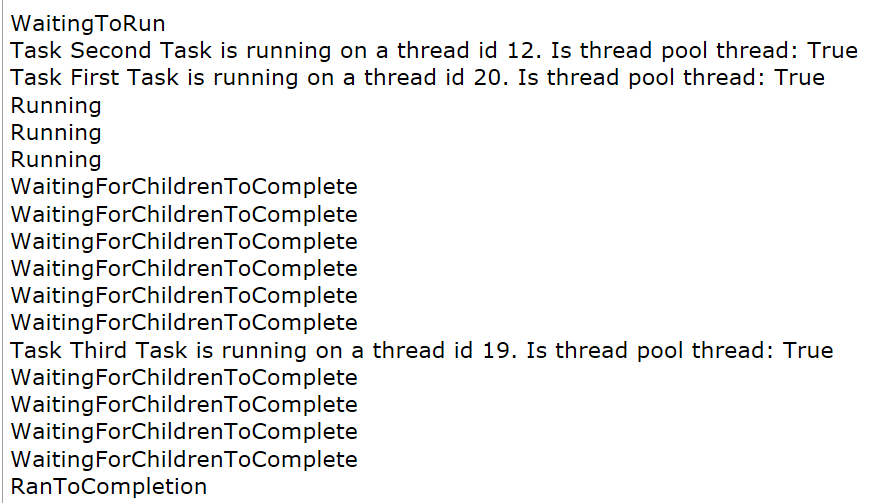
Task: Child Tasks
void Main()
{
    var firstTask = new Task<int>(() =>
    {
        var innerTask = Task.Factory.StartNew(
            () => TaskMethod("Second Task", 5),
            TaskCreationOptions.AttachedToParent);

        innerTask.ContinueWith(
            t => TaskMethod("Third Task", 2),
            TaskContinuationOptions.AttachedToParent);

        return TaskMethod("First Task", 2);
    });
    firstTask.Start();
    while (!firstTask.IsCompleted)
    {
        Console.WriteLine(firstTask.Status);
        Thread.Sleep(TimeSpan.FromSeconds(0.5));
    }

    Console.WriteLine(firstTask.Status);
}
Task Parallel Library (TPL)
Task: Cancellation
void Main()
{
    var cts = new CancellationTokenSource();
    var longTask = new Task<int>(() =>
        TaskMethod("Task 1", 10, cts.Token),
        cts.Token);

    Console.WriteLine(longTask.Status);
    cts.Cancel();
    Console.WriteLine(longTask.Status);
    Console.WriteLine("First task has been cancelled before execution");
}
public static int TaskMethod(
    string name,
    int seconds,
    CancellationToken token)
{
    Console.WriteLine(
        $"Task {name} is running on a thread id " +
        $"{Thread.CurrentThread.ManagedThreadId}. Is thread pool thread: " +
        $"{Thread.CurrentThread.IsThreadPoolThread}");
    for (int i = 0; i < seconds; i++)
    {
        Thread.Sleep(TimeSpan.FromSeconds(1));
        if (token.IsCancellationRequested) return -1;
    }

    return 42 * seconds;
}
Task Parallel Library (TPL)
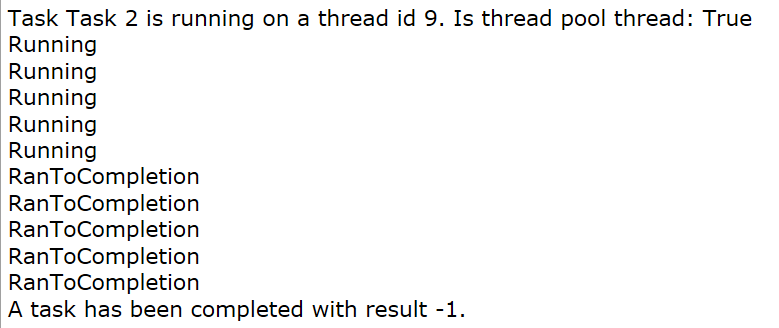
Task: Cancellation
void Main()
{
    var cts = new CancellationTokenSource();
    var longTask = new Task<int>(() =>
        TaskMethod("Task 2", 10, cts.Token),
        cts.Token);

    longTask.Start();
    for (int i = 0; i < 5; i++)
    {
        Thread.Sleep(TimeSpan.FromSeconds(0.5));
        Console.WriteLine(longTask.Status);
    }
    cts.Cancel();

    for (int i = 0; i < 5; i++)
    {
        Thread.Sleep(TimeSpan.FromSeconds(0.5));
        Console.WriteLine(longTask.Status);
    }
    Console.WriteLine($"A task has been completed with result {longTask.Result}.");
}
Task Parallel Library (TPL)
There's More
- Exception handling with Tasks
- Task.WhenAll/Task.WaitAll/Task.WhenAny
- TaskFactory features
- Data Prallelism and PLINQ
- TaskScheduler
- ...
Source: Telegram Great Minds
For examples: Multithreading with C# Cookbook, Eugene Agafonov
Asynchrony
Source: https://blogmymaze.wordpress.com/2012/10/23/the-hexagonal-classical-3-circuit-labyrinth/

Asynchrony
Definition
Synchronous
Asynchronous
- Perform something here and now.
- The caller thread will be blocked until it's done.
- Initiate something here and now.
- The caller thread is released immediately (could perform other operations).
Asynchronous programming is writing code that allows several things to happen at the same time without "blocking", or waiting for other things to complete.
by Matthew Jones
Asynchrony
Why Asynchronous?
Desktop User Interface
Desktop applications need to feel responsive to the user. The UI thread is the only one that can control the contents of a particular window.
Asynchronous code, even written manually, means that the UI thread can return to its primary job of checking the message queue for user events, and responding to them.
Source: Async in C# 5.0, Alex Davies
Asynchrony
Why Asynchronous?
Web Application Server Code
In Web App there will be a limit on either the total number of threads used to process web requests, or the total number of concurrent requests being handled.
When a thread is blocked, waiting for something, it doesn’t use any CPU time. However they do not perform any useful work as well.
Source: Async in C# 5.0, Alex Davies
Asynchrony
Difficult
Source: https://devrant.com/rants/177018/debug-debug-all-the-time
Asynchrony
Core ideas
The core of async programming are the Task and Task<T> objects, which model asynchronous operations. They are supported by the async and await keywords.
- For I/O-bound code, you await an operation which returns a Task or Task<T> inside of an async method.
- For CPU-bound code, you await an operation which is started on a background thread with the Task.Run method.
Source: https://docs.microsoft.com/en-us/dotnet/csharp/async
Asynchrony
Key pieces to understand
Source: https://docs.microsoft.com/en-us/dotnet/csharp/async
- Async code can be used for both I/O-bound and CPU-bound code, but differently for each scenario.
- Async code uses Task<T> and Task, which are constructs used to model work being done in the background.
- The async keyword turns a method into an async method, which allows you to use the await keyword in its body.
- When the await keyword is applied, it suspends the calling method and yields control back to its caller until the awaited task is complete.
- await can only be used inside an async method.
Asynchrony
Keywords
public async Task<int> DoSomethingAsync()
{
  var html = await _httpClient.DownloadStringAsync("http://dotnetfoundation.org");

  return html.Length;
}
The async keyword enables the await keyword in that method and changes how method results are handled.
Await is like a unary operator: it takes a single argument, an awaitable (an “awaitable” is an asynchronous operation).
Source: https://blog.stephencleary.com/2012/02/async-and-await.html
Asynchrony
Return Types
There are three return types we can use when writing an async method:
- Task: This class represents an asynchronous operation, and can be awaited.
- Task<T>: This class represents an asynchronous operation that returns a value, and can be awaited.
- void: If an async method returns void, it cannot be awaited - "fire and forget", which is rarely the desired behavior.
Asynchrony
Example
public sealed class ContentProvider
{
    public string GetName()
    {
        Thread.Sleep(TimeSpan.FromSeconds(2));

        return "Something";
    }

    public int GetAge()
    {
        Thread.Sleep(TimeSpan.FromSeconds(5));

        return 42;
    }
    ...
    public async Task<string> GetNameAsync()
    {
        await Task.Delay(TimeSpan.FromSeconds(2));

        return "Something";
    }

    public async Task<int> GetAgeAsync()
    {
        await Task.Delay(TimeSpan.FromSeconds(5));

        return 77;
    }
}
Sync API
Async API
Asynchrony
Example
private static Task<string> GetContentSync()
{
    var contentProvider = new ContentProvider();

    var name = contentProvider.GetName();
    var age = contentProvider.GetAge();

    return Task.FromResult($"{name} - {age}");
}
private static async Task<string> GetContentAsync()
{
var contentProvider = new ContentProvider();
var nameTask = contentProvider.GetNameAsync();
var ageTask = contentProvider.GetAgeAsync();
await Task.WhenAll(nameTask, ageTask);
return $"{nameTask.Result} - {ageTask.Result}";
}Sync API
Async API
Asynchrony
Example: Show Time

Source: Telegram Great Minds
Asynchrony
Lifecycle
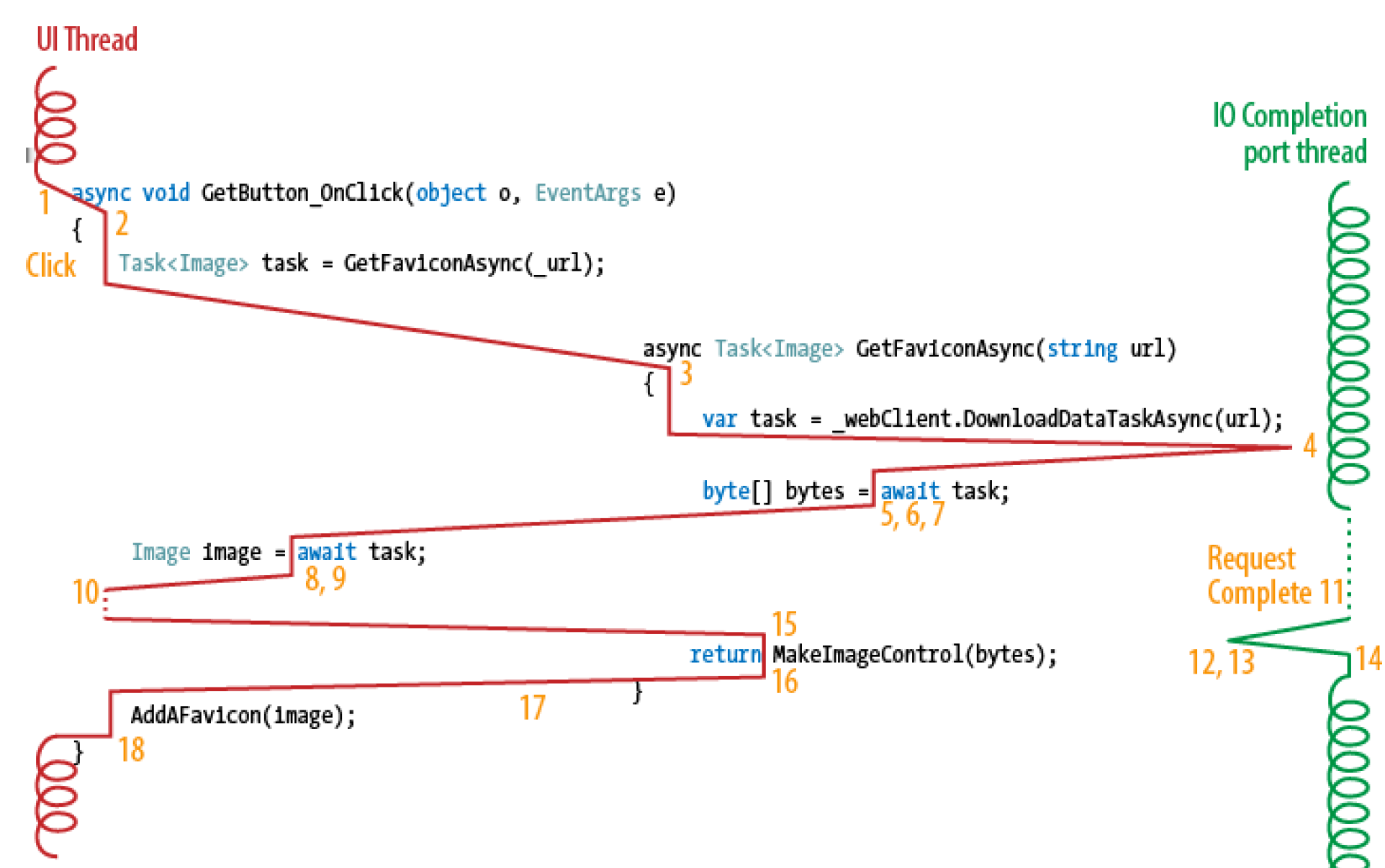
Source: Async in C# 5.0, Alex Davies
Asynchrony
State Machine
...
public async Task<int> GetAgeAsync()
{
    var age = 55;

    var newAge = age + 41;

    await Task.Delay(TimeSpan.FromSeconds(5));

    return newAge;
}
...
...
public Task<int> GetAgeAsync()
{
ContentProvider.<GetAgeAsync>d__3 stateMachine = new ContentProvider.<GetAgeAsync>d__3();
stateMachine.<>4__this = this;
stateMachine.<>t__builder = AsyncTaskMethodBuilder<int>.Create();
stateMachine.<>1__state = -1;
stateMachine.<>t__builder.Start<ContentProvider.<GetAgeAsync>d__3>(ref stateMachine);
return stateMachine.<>t__builder.Task;
}
...[CompilerGenerated]
private sealed class <GetAgeAsync>d__3 : IAsyncStateMachine
{
public int <>1__state;
public AsyncTaskMethodBuilder<int> <>t__builder;
public ContentProvider <>4__this;
private int <age>5__1;
private int <newAge>5__2;
private TaskAwaiter <>u__1;
public <GetAgeAsync>d__3()
{
base..ctor();
}
void IAsyncStateMachine.MoveNext()
{
int num1 = this.<>1__state;
int newAge52;
try
{
TaskAwaiter awaiter;
int num2;
if (num1 != 0)
{
this.<age>5__1 = 55;
this.<newAge>5__2 = this.<age>5__1 + 41;
awaiter = Task.Delay(TimeSpan.FromSeconds(5.0)).GetAwaiter();
if (!awaiter.IsCompleted)
{
this.<>1__state = num2 = 0;
this.<>u__1 = awaiter;
ContentProvider.<GetAgeAsync>d__3 stateMachine = this;
this.<>t__builder.AwaitUnsafeOnCompleted<TaskAwaiter, ContentProvider.<GetAgeAsync>d__3>(ref awaiter, ref stateMachine);
return;
}
}
else
{
awaiter = this.<>u__1;
this.<>u__1 = new TaskAwaiter();
this.<>1__state = num2 = -1;
}
awaiter.GetResult();
newAge52 = this.<newAge>5__2;
}
catch (Exception ex)
{
this.<>1__state = -2;
this.<>t__builder.SetException(ex);
return;
}
this.<>1__state = -2;
this.<>t__builder.SetResult(newAge52);
}
[DebuggerHidden]
void IAsyncStateMachine.SetStateMachine(IAsyncStateMachine stateMachine)
{
}
}Asynchrony
There's More
- What could be considered as "Awaitable"
- SynchonizationContext: what is it, dead locks, continuation thread selection and best practices
- State-machine compiler transformations
- ValueTask<T>
- ...
Source: Telegram Great Minds
Instead of Conclusion
Source: https://nerdist.com/brave-new-world-tv-series-syfy/

Instead of Conclusion
Actor Model

Source: https://www.redbubble.com/people/unitshifter/works/24884340-erlang-programming-language-logo?p=acrylic-block&rel=carousel
DotNet

https://getakka.net/

https://twitter.com/fsharporg

https://codeopinion.com/practical-microsoft-orleans/
Instead of Conclusion
CSP (Communicating Sequential Processes)

Go Lang
Source: http://www.unixstickers.com/stickers/coding_stickers/golang-aviator-logo-shaped-sticker

Crystal Lang
https://crystal-lang.org/
Instead of Conclusion
Reactive Extensions (Rx)
Source: https://egghead.io/courses/step-by-step-async-javascript-with-rxjs

Q&A
Source: https://www.amazon.com/Piece-Sleeping-Bubble-Cartoon-Sticker/dp/9099000626

Useful Links
Useful Books
CLR via C#, J. Richter
Async in C#, A. Davies
Concurrency in C# Cookbook, S. Cleary

Multithreading in C# Cookbook, E. Agafonov
C# in Depth, J. Skeet
Thanks!
Source: Telegram Great Minds sticker pack