Intro to Kubernetes
Working with Kubernetes for Engineers
What Problems does it solve?
Container
A container is simply a process on your machine that has been isolated from all other processes on the host machine.
Another way to think about a container is as a standardized unit of software.
Orchestrator
A piece of software designed to unify many different machines into a cluster, a kind of unified compute substrate, which appears to the user as a single very powerful computer on which containers run on.
Orchestration is coordinating and sequencing different activities. Scheduling is managing the resources available and assigning workloads where they can be most efficiently run. Cluster management joins multiple servers together into a unified, reliable, fault-tolerant (and seamless) group.
Kubernetes
Kubernetes is the (now) standard container orchestration system
Kubernetes does the things that the best system administrator would do: automation, failover, centralised logging, monitoring. It takes what we've learned in the DevOps community and makes it the default, out of the box.
-Kelsey Hightower
Kubernetes Architecture
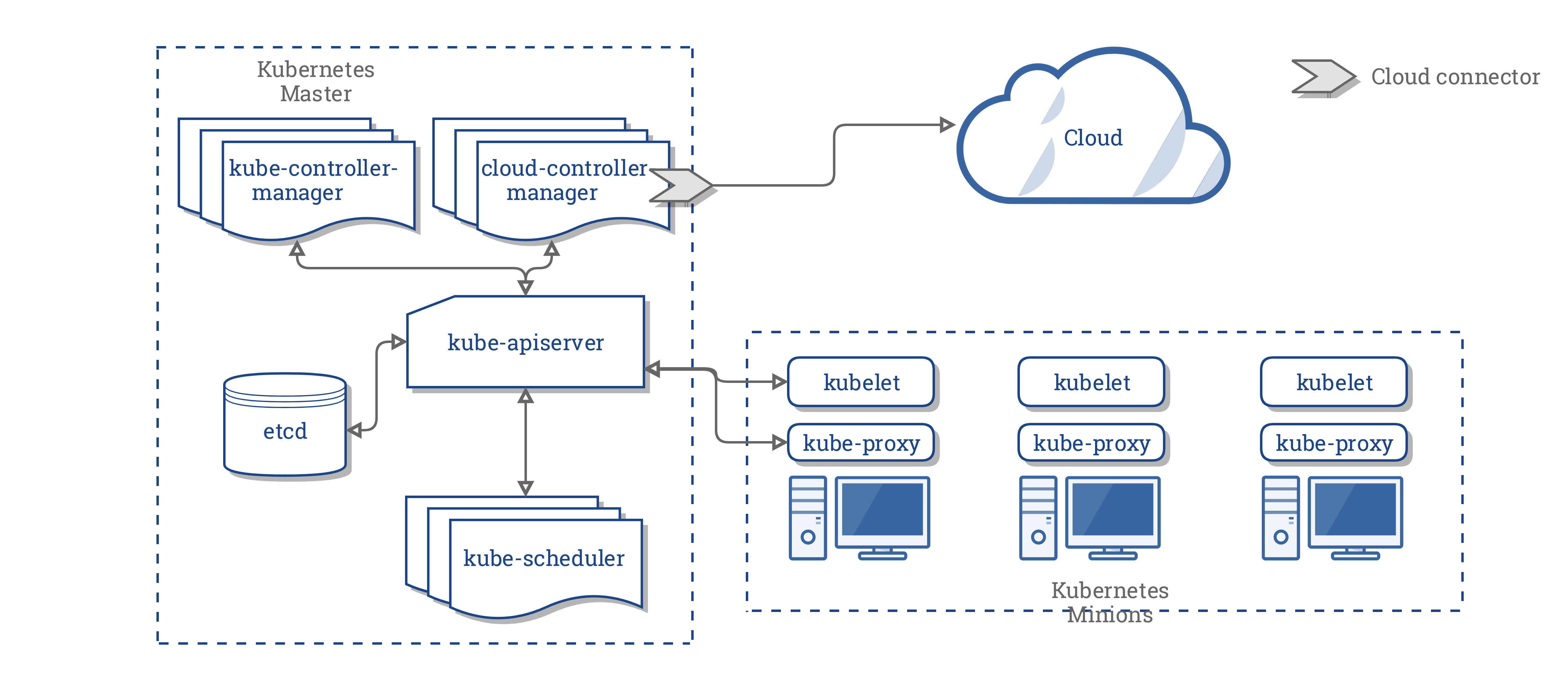
The Control Plane
kube-apiserver
The front-end server for the control plane
etcd
The database where Kubernetes stores all its information
kube-scheduler
This decides where to run newly created pods
The Control Plane
kube-controller-manager
Responsible for running resource controllers, such as Deployments
cloud-controller-manager
Interacts with the cloud provider (where it exists) managing resources such as load balancers
Worker Nodes
kubelet
Responsible for driving the container runtime to start workloads and monitoring their status
kube-proxy
Performs the networking the routes requests between pods on different nodes and between pods and the Internet
container runtime
Usually Docker but Kubernetes supports other runtimes such as rkt and cri-o
The Application
git clone git@github.com:recipher/ap-docker.gitThe sample application has three services - a static web application built with React, a microservice built with Node.js and a database using either sqlite or Postgresql.
We will learn how to Dockerize the application, how to connect the services together, how to ensure data is persisted and how to build a multi-service stack using Docker Compose.
Running the Application
cd ap-docker/app
yarn install
yarn start
Assuming you have node and yarn (or npm) installed, you can run the web application in isolation (the services are faked in development mode).
To access the application, open your browser at http://localhost:3000.
Working with Kubernetes
To run a docker container:
docker run -p 4200:4200 recipher/ap-docker-services The main tool that engineers will use to work with Kubernetes is called kubectl
kubectl run services --image=recipher/ap-docker-services --port 4200
kubectl port-forward deploy/services 8888:4200
Deployments
A deployment is a supervisor, which continually checks that the container is running and if it ever stops, starts it again immediately
kubectl get deployments
kubectl get deploy
kubectl get deploy -o wide
kubectl describe deploy/services
Pods
A Pod is the Kubernetes object that represents a group of one or more containers (usually one).
Deployments don't manage containers directly because sometimes a set of containers needs to be scheduled together, perhaps sharing storage.
kubectl get pods
Resource Manifests
Using kubectl run to create a deployment is useful but limited. If you need to change something you'd need to delete the existing deployment with kubectl delete and create a new one.
Kubernetes is a declarative system - continuously reconciles actual state with desired state. All you have to do is declare the desired state - the Deployment spec - and Kubernetes will do the rest.
We do this by declaring the spec with a Resource Manifest and use kubectl apply to make the changes.
Resource Manifests
apiVersion: apps/v1
kind: Deployment
metadata:
  name: services
  labels:
    app: ap-docker
spec:
  replicas: 1
  selector:
    matchLabels:
      app: ap-docker
  template:
    metadata:
      labels:
        app: ap-docker
    spec:
      containers:
        - name: services
          image: recipher/ap-docker-services
          ports:
            - containerPort: 4200
Services
A Service resource gives you a single unchanging IP address or DNS name that will be automatically routed to a matching Pod.
You can think of a Service as a web proxy or a load balancer, forwarding requests to a set of backend Pods.
Configuration
The ConfigMap resource is the primary object for storing configuration data in Kubernetes.
A ConfigMap is a set of key-value pairs - once you have a ConfigMap you can supply that data to an application either by creating a file in the Pod or by injecting it into the Pod's environment.
Helm
Resource manifests declare all of the information necessary to deploy your application. But there is a lot of repeated information in those manifests - label selectors, namespaces, ports and so on.
It would be useful to just specify those values once and then reference them whenever they occur in your manifests.
There is a tool for that.
Helm: A Kubernetes Package Manager
Helm
You can use the helm command-line tool to install and configure applications and you can create helm charts, which are Kubernetes packages, which completely specify the resources needed to run the application, its dependencies and its configurable settings.