Security Practices
for Django Applications
Anton Alekseev for PyCon Estonia 2020
Anton Alekseev
Technical Lead and Fullstack Developer @ Thorgate

Not a Security Expert -
But inspired enthusiast





Outline
- Why Security
- Misconceptions
- Terminology
- 10 steps checklist
- What's next
In Scope
- Phishing
- Cryptography
- Hardware security
- Tools
- Security Mindset
- Common vulnerabilities
Outside
Why security?
Famous Breaches in 2020
- Jan 2020 - Microsoft 280 000 000 customer records
- Apr 2020 - Zoom 500 000 accounts
- Apr 2020 - Facebook 267 000 000 profiles
- Aug 2020 - Instagram, TikTok, YouTube - 235 000 000 accounts
- ... 62 and counting
100% Secure Web-Application
Misconceptions
about Security

Image from Pixabay
- Staff, Sales, Marketing - Use strong passwords, know about phishing
- Developers - Know about vulnerabilities and follow security practices
- Engineering managers - Schedule secure audits
- Project Managers - Work with client to lower security risks
Misconceptions about security
Only for Security Experts
Security is
Misconceptions about security
Me, trying to read about cryptography
Too Complex
Security is
Django has a reputation of a very secure framework
Will Protect Me
my Awesome Framework
Misconceptions about security
Terminology
- OWASP - Open Web Application Security Project, publish each year top 10 vulnerabilities in web applications
- Malicious User - (internal user), a person who compromise the system from the inside
- Vulnerability - A weakness in the system that malicious user or hacker is using to compromise it
- Pentesting - Ethical hacker activity to expose the system with agreement from system owner to find potential vulnerabilities
10 Steps
- Use Secure Connection
- ?
- ?
- ?
- ?
- ?
- ?
- ?
- ?
- ?
for more secure applications
Me, looking at all requests that my application is making
1. Use Secure Connection
(for everything)
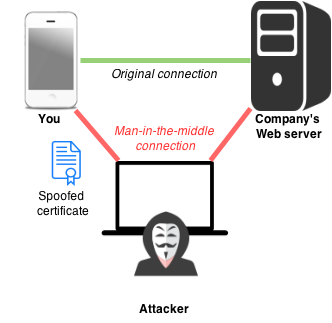
With HTTP connection you don't even need to spoof certificate
1. Use Secure Connection
(Howto fix)
- Ensure that SSL certificates are not expired (have a notification when they are)
- Ensure that load-balancer or proxy serving all requests to static files like images, javascript and styles via a secure connection
- Ensure that if your application communicate with third-party API it uses a secure connection
- If your application needs to transfer files via FTP, prefer using SFTP
- Use Secure Connection
- Configure Software
- ?
- ?
- ?
- ?
- ?
- ?
- ?
- ?
10 Steps
for more secure applications
"I will just set this option to True"
2. Configure Software
(with security in mind)
How much information can we get from Django debug page?
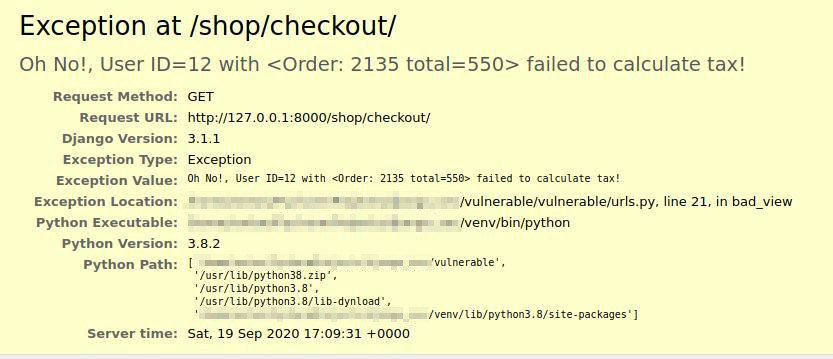
2. Configure Software
(Howto fix)
$ python manage.py check --deploy
System check identified some issues:

WARNINGS:
?: (security.W004) You have not set a value for the SECURE_HSTS_SECONDS setting. If your entire site is served only over SSL, you may want to consider setting a value and enabling HTTP Strict Transport Security. Be sure to read the documentation first; enabling HSTS carelessly can cause serious, irreversible problems.
?: (security.W008) Your SECURE_SSL_REDIRECT setting is not set to True. Unless your site should be available over both SSL and non-SSL connections, you may want to either set this setting True or configure a load balancer or reverse-proxy server to redirect all connections to HTTPS.
?: (security.W012) SESSION_COOKIE_SECURE is not set to True. Using a secure-only session cookie makes it more difficult for network traffic sniffers to hijack user sessions.
?: (security.W016) You have 'django.middleware.csrf.CsrfViewMiddleware' in your MIDDLEWARE, but you have not set CSRF_COOKIE_SECURE to True. Using a secure-only CSRF cookie makes it more difficult for network traffic sniffers to steal the CSRF token.
?: (security.W018) You should not have DEBUG set to True in deployment.
?: (security.W020) ALLOWED_HOSTS must not be empty in deployment.

System check identified 6 issues (0 silenced).- Use Secure Connection
- Configure Software
- Be Careful With Secrets
- ?
- ?
- ?
- ?
- ?
- ?
- ?
10 Steps
for more secure applications
Well well well, they left keys in the engine
3. Be Careful With Secrets
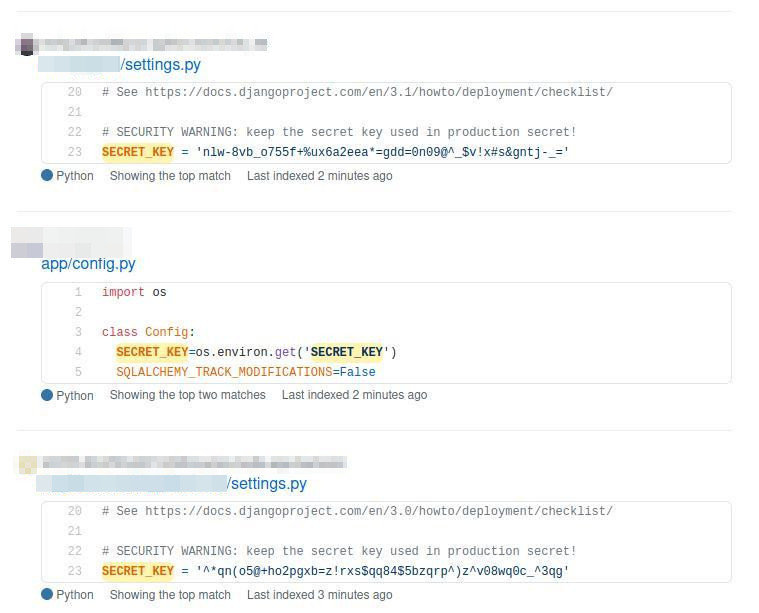
2 600 000 results on GitHub containing "secret key"
(Howto fix)
- Create a new secret key
- Use environment variables to store it
- For Django we use Django-environ package
- Remove the old secret key from Git history (if possible)
- Requires to mess around with Git reflog and might be dangerous
- Redeploy the application
3. Be Careful With Secrets
- Use Secure Connection
- Configure Software
- Be Careful With Secrets
- Check Dependencies
- ?
- ?
- ?
- ?
- ?
- ?
10 Steps
for more secure applications
Your application, still running on
Django 1.4 - did they forgot about me?
4. Check Dependencies

(Howto fix)
4. Check Dependencies
(venv) ➜  django_app safety check --full-report
+==============================================================================+
| REPORT                                                                       |
| checked 40 packages, using default DB                                        |
+============================+===========+==========================+==========+
| package                    | installed | affected                 | ID       |
+============================+===========+==========================+==========+
| insecure-package           | 0.1.0     | <0.2.0                   | 25853    |
+==============================================================================+
| This is an insecure package with lots of exploitable security                |
| vulnerabilities.                                                             |
+==============================================================================+
| django                     | 1.11      | <1.11.19,>=1.11.0        | 36885    |
+==============================================================================+
| Django 1.11.x before 1.11.19 allows Uncontrolled Memory Consumption via a    |
| malicious attacker-supplied value to the django.utils.numberformat.format()  |
| function.                                                                    |
+==============================================================================+- Use Secure Connection
- Configure Software
- Be Careful With Secrets
- Check Dependencies
- Be Less Predictable
- ?
- ?
- ?
- ?
- ?
10 Steps
for more secure applications
Your admin username is admin and you will be hacked soon
(Example)
5. Be Less Predictable
- Can you guess the admin login page for site https://secret-base.com?
-
https://secret-base.com/admin/
-
- Can you guess the admin email for that login page?
-
admin@secret-base.com
-
(Improvements)
5. Be Less Predictable
- Change the default admin dashboard URL, to something harder to guess - batcave, area-51, watchtower is a good starting point
- Use better references for objects, for example instead of referencing article by ID you can use a slug /posts/security-practices
- Check that you are not leaking in plain text information about your system in error messages, logs or emails
- Use Secure Connection
- Configure Software
- Be Careful With Secrets
- Check Dependencies
- Be Less Predictable
- Research And Use Tools
- ?
- ?
- ?
- ?
10 Steps
for more secure applications
When framework provides you with tools, but you like - nope, can't see anything
6. Research And Use Tools
- Use Django deploy check python manage.py check --deploy
- Manage user access with user_passes_test and permission_requred
- Manage allowed methods with require_safe, require_POST
- When you need to sign some data and verify it later, use signing module
- To prevent sensitive data from leaking into application logs, use sensitive_variables decorator
- To protect POST parameters from leaking into application logs, use sensitive_post_paramethers
- Use Secure Connection
- Configure Software
- Be Careful With Secrets
- Check Dependencies
- Be Less Predictable
- Research And Use Tools
- Use Even More Tools
- ?
- ?
- ?
10 Steps
for more secure applications
Use professional tools to destroy the illusion that you application is secure
7. Use Even More Tools
- OWASP ZAP - Attack proxy, intercepts and modify requests to you site
- Pycharm Python security plugin - All-purpose plugin for PyCharm IDE
- Pipenv check - Scans application dependencies
- Bandit - All-purpose vulnerability scanner for Python
- Django-security app - Models, Views and Forms for better security
- Django defender - Prevention of password brute-forcing
- Django CSP - Helps define Content Security Policy
- Django XSS fuzzer - XSS vulnerability scanner
- Use Secure Connection
- Configure Software
- Be Careful With Secrets
- Check Dependencies
- Be Less Predictable
- Research And Use Tools
- Use Even More Tools
- Don't Trust User Input
- ?
- ?
10 Steps
for more secure applications
Not All users are nice
8. Don't Trust User Input
8. Don't Trust User Input
(XSS - Cross Site Scripting)
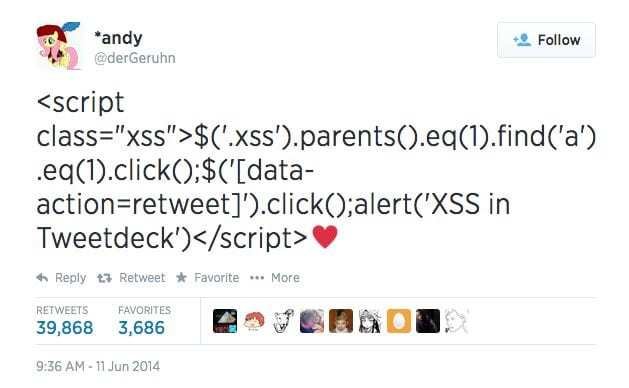
8. Don't Trust User Input
(XSS Example)
<!-- BAD -->
{% for comment in article_comments %}
    <div class="comment">
        <div class="user">{{ comment.author | default: "Anonym" }}</div>

        <div class="content">{{ comment.raw_html | safe }}</div>
    </div>
{% endfor %}
<!-- BETTER -->
{% for comment in article_comments %}
<div class="comment">
<div class="user">{{ comment.author | default: "Anonym" }}</div>
<!-- Note that we removed UNsafe "safe" filter -->
<div class="content">{{ comment.raw_html }}</div>
</div>
{% endfor %}8. Don't Trust User Input
(XSS Prevention)
- From Django 1.0 - template system by default escapes HTML code
- From Django 2.1 you can use json_script to add JSON safely into the template
- If you can, use markdown instead of raw HTML to provide users with a reach text editor
- But other than that - check your templates for user input and if it marked as safe (in which case it is UNsafe)
8. Don't Trust User Input
(SQLi - SQL Injection)

No security talk should be without this classical comics
8. Don't Trust User Input
(SQLi Example)
# Malicious SQL code will return all rows from the
# DB table regardless of initial filter in your SQL code
user_input = '"" or 1 = 1;--'

# BAD
# Note that we are formatting the string here, before passing it to Django


Customers.objects.raw(
    f'SELECT * FROM Customers WHERE customer_name = {user_input}'

)
# Malicious SQL code will return all rows from the
# DB table regardless of initial filter in your SQL code
user_input = '"" or 1 = 1;--'
# BETTER
# Note that here we passing malicious output to the Django,
# rather than formatting the SQL code ourself.
# Postgres is smart enough to escape malicious input and not evaluate it.
Customers.objects.raw(
'SELECT * FROM Customers WHERE customer_name = %s',
[user_input]
)8. Don't Trust User Input
(SQLi Prevention)
- Use Django ORM when possible
- If you can't - pass arguments instead of formatting the string
-
Run automatic tools regularly to know about unprotected SQL formatting
- Pycharm python security plugin
- Bandit
- OWASP ZAP
- Use Secure Connection
- Configure Software
- Be Careful With Secrets
- Check Dependencies
- Be Less Predictable
- Research And Use Tools
- Use Even More Tools
- Don't Trust User Input
- Protect User Data
- ?
10 Steps
for more secure applications
Are you storing personal data in plain text?
9. Protect User Data
(by requesting only what necessary)
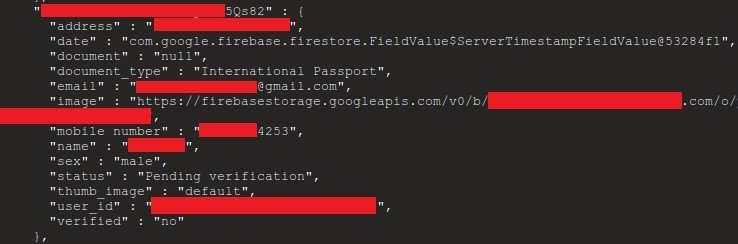
9. Protect User Data
(examples)
# BAD
# Lazy code - exposes everything from the database table
class UserProfileSerializer(serializers.ModelSeriazlier):
    class Meta:
        model = UserProfile


        fields = "__all__"
# BETTER
class UserProfileSerializer(serializers.ModelSeriazlier):
class Meta:
model = UserProfile
# Note that we explicitly saying which data will
# be exposed in the application API
fields = ("profile_pic", "job_title")9. Protect User Data
(preventing)
Django nor any automated tool can protect you from making mistakes here.
However these basic things can help:
- Carefully decide what data exposed in the API
- Mask the data in the API if possible
- Don't store sensitive data "just in case"
- Make sure that if you are collecting sensitive data it is encrypted
- All sensitive data transmitted only via a secure connection
- Disable caching for responses that contain sensitive data
- Use Secure Connection
- Configure Software
- Be Careful With Secrets
- Check Dependencies
- Be Less Predictable
- Research And Use Tools
- Use Even More Tools
- Don't Trust User Input
- Protect User Data
- Restrict Access
10 Steps
for more secure applications
That is one good role model for authorization system
10. Restrict Access
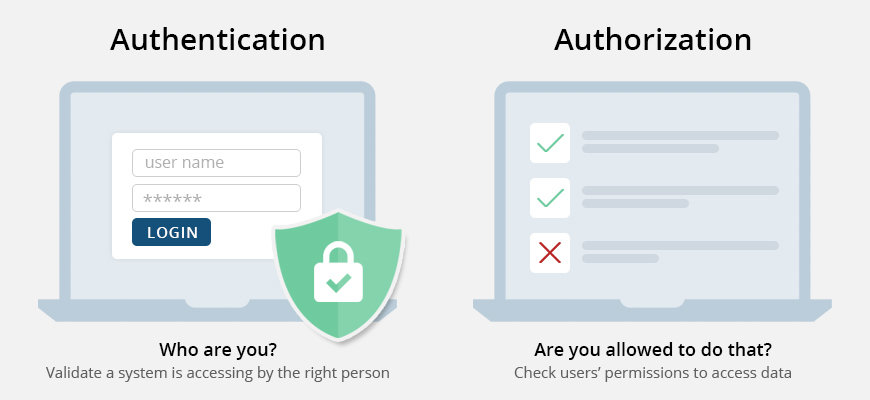
Image from ssl2buy wiki
10. Restrict Access
(Examples)
# BAD
# Only checking that user is authenticated
def transfer_money_view(request):
    if not request.user.is_authenticated:
        raise PermissionDenied


    form = TransferMoneyForm(request.GET or request.POST)
    if form.is_valid():
        form.save()

    return HttpResponseRedirect(reverse("home"))
# BETTER
# With a check that user can perform action
def transfer_money_view(request):
if not request.user.is_authenticated:
raise PermissionDenied
if user.name == "Al Capone":
raise PermissionDenied
form = TransferMoneyForm(request.GET or request.POST)
if form.is_valid():
form.save()
return HttpResponseRedirect(reverse("home"))10. Restrict Access
(Preventing)
- Apply access permissions by creating specific user roles and checking allowed actions
- Test application with different user roles. So you would know when access control is actually broken
- Remember the motto - it is best to disallow everything, and gradually lift restrictions
- Use Secure Connection
- Configure Software
- Be Careful With Secrets
- Check Dependencies
- Be Less Predictable
- Research And Use Tools
- Use Even More Tools
- Don't Trust User Input
- Protect User Data
- Restrict Access
10 Steps
for more secure applications
Make security checks
a regular activity
Step 0
What's Next?
- Cache poisoning
- DNS rebinding
- Content sniffing
- Cryptography, SSL
- JWT manipulation
- Server-side template injection
- Malicious uses of Unicode and ASCII
- Timing and other side-channel attacks
- Many more
Thank You!
- Anthony Shaw
- Jacinda Shelly
- Jacob Kaplan-Moss
- James Bennett
- Philip James
- Red and Black Tech
Special kudos for my colleagues
Madis Peetersoo & Karl Õkva
for support and guidance