Introduction to HTML
Tools to use

Here are the Download links:
What's HTML?
-
HTML = Hyper Text Markup Language.
-
It's the standard markup language for creating Web pages
-
It's like the "Skeleton" of a web page hence it defines the
structure of the web page.
-
HTML - - > consists of a series of elements used to
label pieces of content such as "a paragraph,"an image", "this is a link", etc
HTML Structure
<!DOCTYPE html>
<html>

    <head>
    	<!-- Meta-data goes here -->
    </head>

    <body>
    	<!-- Content of the page goes here -->
    </body>

</html>
HTML Structure
<!DOCTYPE html>- This line tells the browser that we are using HTML5.
- HTML5 is the fifth version of HTML which consists of many newer syntactic features.
HTML Structure
<html>- This is the root/parent element of an HTML page.
- It houses all other HTML elements
HTML Structure
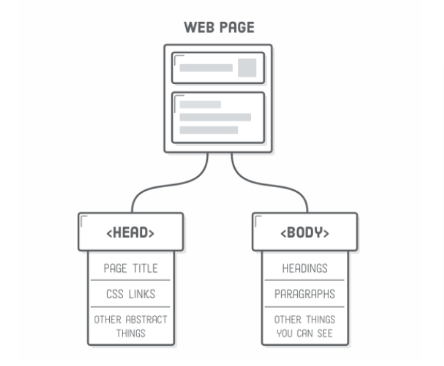
<head>- This element contains meta-data about the HTML page - information that determines how the webpage will look like.
HTML Structure
<body>- This is a container for all the visible contents of the webpage, such as headings, paragraphs, images, hyperlinks, videos, lists, etc.
An HTML Element
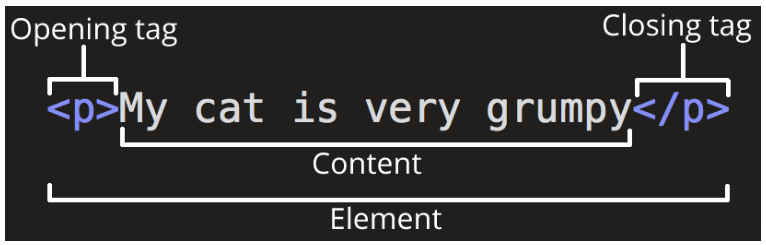
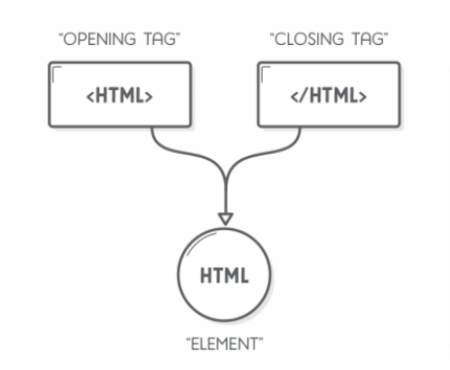
<starttag> Content goes here </endtag>An HTML element is defined by a start/opening tag, some content, and an end/closing tag:
What's a Tag?
HTML tags are the keywords on a web page that define how your web browser must format and display your web page.
Examples
<h1> This is a Heading Element </h1>

<p> This is a Paragraph element </p>
Empty Elements
<br>
<!-- Used to create a new line -->

<hr>
<!-- Used to create a horizontal
line on the webpage -->
- Empty elements are elements with no content therefore they don't have a closing tag.
Title Element
<title> Hello World </title>
- This element defines the name of our webpage that shows up as the tab name when opened in a browser.
Paragraph Element
<p> Hello World </p>
- This element is used to add paragraphs in your web page
Heading Element
<h1> Heading Level 1 </h1> <!-- The Biggest -->

<h2> Heading Level 2 </h2>

<h3> Heading Level 3 </h3>

<h4> Heading Level 4 </h4>

<h5> Heading Level 5 </h5>

<h6> Heading Level 6 </h6> <!-- The Smallest -->
Used to represent headings on a webpage
Lists In HTML
Ordered Lists
<ol>

    <li> Prepare the frying pan </li>
    <li> Pour some oil on the frying pan </li>
    <li> Whisk the eggs and pour on the pan </li>
    <li> Fry the omlete and until ready </li>
    <li> Serve the omlete on the plata </li>

</ol>- A Cooking Process
- List of best Animations
Lists In HTML
Unordered List
<ul>

    <li> Play with Messi and Ronald </li>
    <li> Be the president  </li>
    <li> Go to heaven </li>
    <li> Have a holiday in Silicon valley </li>
    <li> Meet Elon Musk at Space X </li>

</ul>- List of Ingredients
- Bucket list
- Shopping list
HTML Attributes
<img src="image.jpg" alt="Image">HTML attributes provide additional information about HTML elements.
They are used to modify the behavior or appearance of an element.
Placed inside the opening tag of an HTML element and consist of a name and a value.