SVG and Canvas Elements HTML5
- HTML 5 history and future
- What is canvas in HTML5 ?
- What is SVG in HTML5 ?
- Diffrence between Canvas and SVG
- Create animation using canvas tag
- Create bouncing ball using canvas tag ?
- Create HTML5 games using canvas tag
HTML 5 an Introduction
HTML5 is a core technology markup language of the Internet used for structuring and presenting content for the World Wide Web. It is the fifth revision of the HTML standard (created in 1990 and standardized as HTML 4 as of 1997)
and, as of December 2012, is a candidate recommendation of the World Wide Web Consortium (W3C founded in 1994).
Devolped by :- World Wide Web Consortium and WHATWG
Standardization process
The Mozilla Foundation and Opera Software presented a position paper at a World Wide Web Consortium (W3C) workshop in June 2004, focusing on developing technologies that are backward compatible with existing browsers
In 22 January 2008 First Public Working Draft of the specification released by WHATWG 2008.
Parts of HTML5 have been implemented in browsers despite the whole specification not yet having reached final Recommendation status.
W3C proposed a plan to release a stable HTML5 Recommendation by the end of 2014
| 2012 | 2013 | 2014 | 2015 | 2016 | |
|---|---|---|---|---|---|
| HTML 5.0 | Candidate Rec | Call for Review | Recommendation | ||
| HTML 5.1 | 1st Working Draft | Last Call | Candidate Rec | Recommendation | |
| HTML 5.2 | 1st Working Draft |
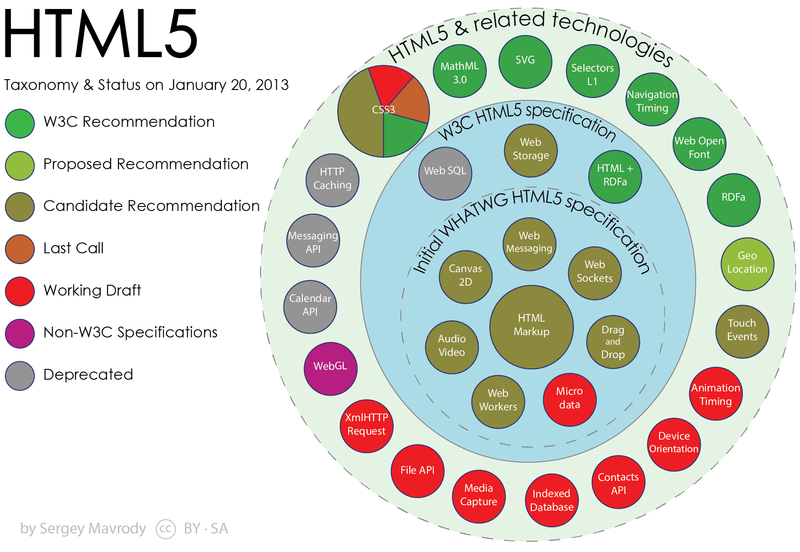
Timeline and Plans
New API's
- The canvas element for immediate mode 2D drawing.
- Timed media playback
- Offline Web Applications
- Document editing
- Drag-and-drop
- Cross-document messaging
- Browser history management
- MIME type and protocol handler registration
- Microdata
- Web Storage
Specification Maturation
Working Draft (WD)
Candidate Recommendation (CR)
Proposed Recommendation (PR)
W3C Recommendation (REC)
Later Revisions (WD)(NOTES)
Certification
Ques 1 : What is canvas ?
The HTML5 "canvas" element is used to draw graphics, on the fly, via scripting (usually JavaScript).
The "canvas" element is only a container for graphics, which contains the drawings and images. You must use javascript to actually draw the graphics in the container
Canvas has several methods for drawing lines, curves, paths, boxes, circles, text, and adding images.
Browser Support Internet Explorer 9+, Firefox, Opera, Chrome, and Safari support the canvas tag
These kind of shapes can be drawn using canvas element.
Note : Canvas element draw raster graphics.
What we can draw with canvas ?
- Lines
- Curves
- Arcs
- Paths
- Shapes
- Gradients
- Radial Gradients
- Draw Image
- Text
- Transformations
- Composite (Shadows, Alpha)
- Animations
Working demo will show further.
Ques 2 : What is SVG in html5 ?
SVG stands for Scalable Vector Graphics and it is a language for describing 2D-graphics and graphical applications in XML and the XML is then rendered by an SVG viewer.
SVG is mostly useful for vector type diagrams like Pie charts, Two-dimensional graphs in an X,Y coordinate system etc.
SVG became a W3C Recommendation 14. January 2003
SVG graphics do NOT lose any quality if they are zoomed or resized
Examples
<!DOCTYPE html>
<head>
<title>SVG Circle</title>
<meta charset="utf-8" />
</head>
<body>
<h2>HTML5 SVG Circle</h2>
<svg id="svgelem" height="200" xmlns="http://www.w3.org/2000/svg">
    <circle id="redcircle" cx="50" cy="50" r="50" fill="red" />
</svg>
</body>
</html>
Code to draw svg circle
Ques 3 : Diffrence between canvas and SVG elements ?
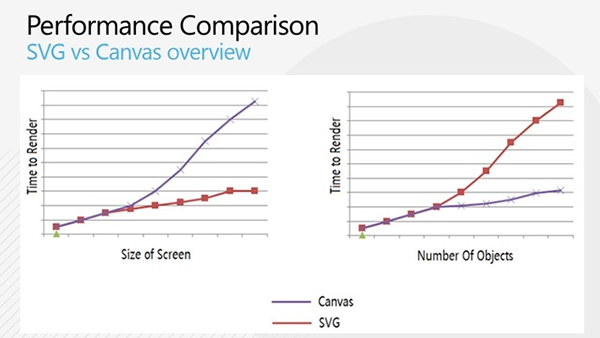
Render times graph representation given below :
| A Comparison of Canvas and SVG | |
|---|---|
| Canvas | SVG |
| Pixel-based (canvas is essentially an image element with a drawing API) | Object Model-based (SVG elements are similar to HTML elements) |
| Single HTML element similar to <img> in behavior | Multiple graphical elements which become part of the Document Object Model (DOM) |
| Visual presentation created and modified programmatically through script | Visual presentation created with markup and modified by CSS or programmatically through script |
| Event model/user interaction is coarse—at the canvas element only; interactions must be manually programmed from mouse coordinates | Event model/user interaction is object-based at the level of primitive graphic elements—lines, rectangles, paths |
| API does not support accessibility; markup-based techniques must be used in addition to canvas | SVG markup and object model directly supports accessibility |
Game
http://www.catuhe.com/ms/en/index.htm
https://www.dropbox.com/home/walkwel
http://cssdeck.com/