Frontend Development Workflow
1. GRUNT
In one word: automation. The less work you have to do when performing repetitive tasks like minification, compilation, unit testing, linting, etc,
the easier your job becomes.
- npm install -g grunt-cli (For global installation)
- npm install grunt --save-dev (for local grunt )
- gruntFile.js (for config file)
- grunt (To run grunt task)
2. BEM
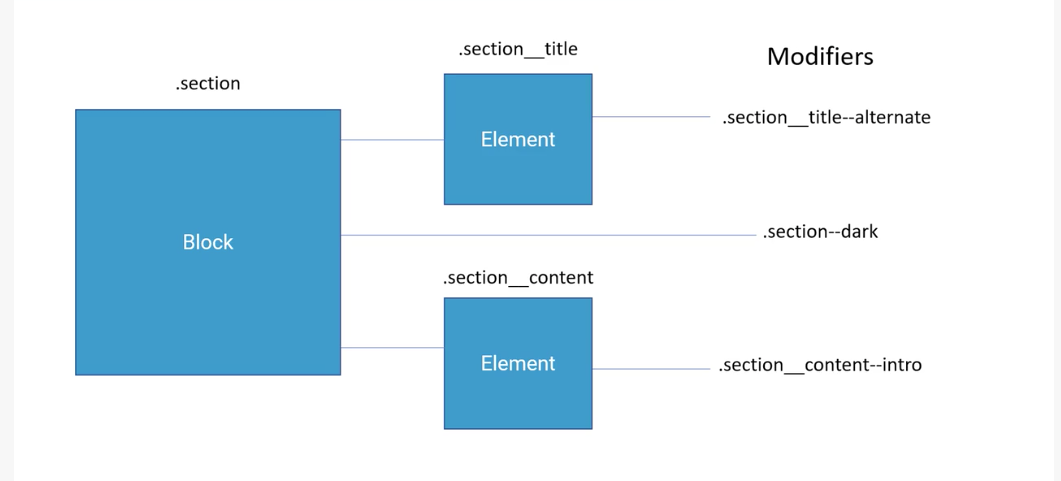
Block Element Modifier is a methodology that helps you to create reusable components and code sharing in front-end development
Block
HTML
<div class="block" >
CSS
.block{
some-css:style;
}
Element
HTML
<div class="block__elem" >
CSS
.block__elem{
some-css:style;
}
Modifier
HTML
<div class="block__elem--modifier" >
CSS
.block__elem--modifier{
some-css:style;
}
Advantages
Easy
Modular
Flexible
Low specificity (Simple class selector, avoid combining classes)
Clear relationship between blocks,elements and modifiers
Encapsulation / name-spacing
3. SASS/SCSS
Sass is the most mature, stable, and powerful professional grade CSS extension language in the world.
Features
- Preprocessing
- Variables
- Nesting
- Partials
- Import
- Mixins
- Inheritance
- Operators
4. Autoprefixer
Block Element Modifier is a methodology that helps you to create reusable components and code sharing in front-end development
https://autoprefixer.github.io/
5. Normalize css
Normalize.css makes browsers render all elements more consistently and in line with modern standards. It precisely targets only the styles that need normalizing.
https://necolas.github.io/normalize.css/
6. HTML Framework
List of Frameworks
Bootstrap
Material Design
Foundation
7. Flux Architecture
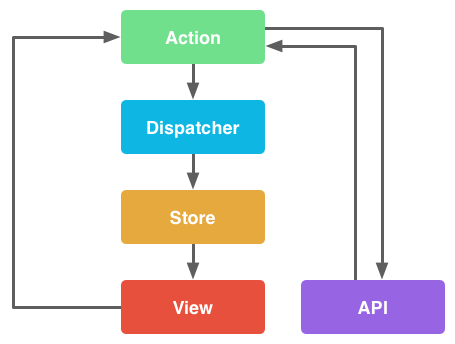
Flux is an architecture that Facebook uses internally when working with React. It is not a framework or a library. It is simply a new kind of architecture that complements React and the concept of
Unidirectional Data Flow.
Components
Actions - Helper methods that facilitate passing data to the Dispatcher
Dispatcher - Receives actions and broadcasts payloads to registered callbacks
Stores - Containers for application state & logic that have callbacks registered to the dispatcher
Controller Views - React Components that grab the state from Stores and pass it down via props to child components.
8. Browser Sync
With each web page, device and browser, testing time grows exponentially. From live reloads to URL pushing, form replication to click mirroring, Browsersync cuts out repetitive manual tasks. It’s like an extra pair of hands. Customise an array of sync settings from the UI or command line to create a personalised test environment. Need more control? Browsersync is easily integrated with your web platform, build tools, and other Node.js projects.
https://browsersync.io/