Templating engines
What and When ?
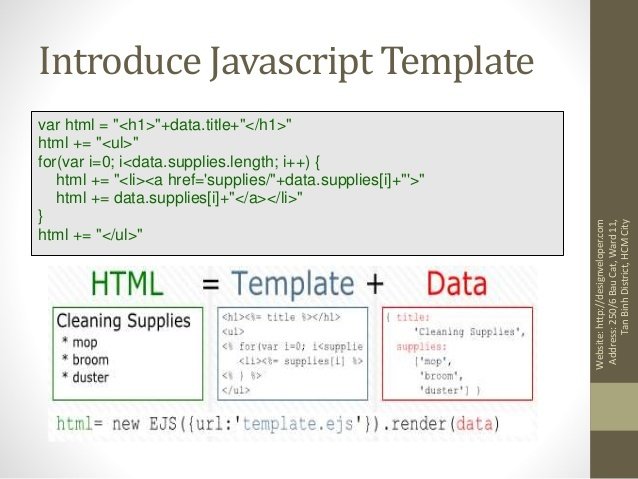
Which one ?



Consist Of
-
Interpolation (replace some placeholder with assigned value)
-
Evaluation (evaluate expression inside tag)
-
Conditionals (render part of template according to passed values)
-
Looping (repeatedly render some part of code)
-
Blocks/partials/inheritance (mark some block as 'changeable' and redefine it in 'child' templates)
-
Possibility to change syntax
-
Pre-parsing
-
etc...
Interpolation
<script id="entry-template" type="text/x-handlebars-template">
  <div class="entry">
    <h1>{{title}}</h1>
    <div class="body">
      {{body}}
    </div>
  </div>
</script>
var data = {
title: "My New Post",
body: "This is my first post!"
};Template
Data
const template = document.getElementById('entry-template').innerHTML;
const html = Handlebars.compile(template)(data)
HTML
<script id="entry-template" type="text/x-handlebars-template">
  <div class="entry">
    <h1>My New Post</h1>
    <div class="body">
      This is my first post!
    </div>
  </div>
</script>
Expression
<script id="entry-template" type="text/x-handlebars-template">
  <div class="entry">
    <h1>{{title}}</h1>
    <div class="body">
      <h2>{{body.header}}</h2>
      {{body.msg[0].txt}}
    </div>
  </div>
</script>
var data = {
title: "My New Post",
body: {
header: "Some header text",
msgs: [
{
txt: "This is my first post!"
}
]
}
};Template
Data
const template = document.getElementById('entry-template').innerHTML;
const html = Handlebars.compile(template)(data)
Condition
<script id="entry-template" type="text/x-handlebars-template">
    <div class="entry">
      {{#if author}}
        <h1>{{firstName}} {{lastName}}</h1>
      {{/if}}
    </div>
<script>
var data = {
author: true,
firstName: "Sarhan",
lastName: "Azizov"
};Template
Data
const template = document.getElementById('entry-template').innerHTML;
const html = Handlebars.compile(template)(data)
HTML
<div class="entry">
    <h1>Sarhan Azizov</h1>
</div>
Loop
<script id="entry-template" type="text/x-handlebars-template">
    <ul class="people_list">
      {{#each people}}
        <li>{{this}}</li>
      {{/each}}
    </ul>
<script>
var data = {
people: [
"Yehuda Katz",
"Alan Johnson",
"Charles Jolley"
]
};Template
Data
const template = document.getElementById('entry-template').innerHTML;
const html = Handlebars.compile(template)(data)
HTML
<ul class="people_list">
  <li>Yehuda Katz</li>
  <li>Alan Johnson</li>
  <li>Charles Jolley</li>
</ul>
Partial
<script id="entry-template" type="text/x-handlebars-template">
<div class="post">
  {{> userMessage tagName="h1" }}

  <h1>Comments</h1>

  {{#each comments}}
    {{> userMessage tagName="h2" }}
  {{/each}}
</div>
<script>
var data = {
author: {firstName: "Alan", lastName: "Johnson"},
body: "I Love Handlebars",
comments: [{
author: {firstName: "Yehuda", lastName: "Katz"},
body: "Me too!"
}]
};Handlebars.registerPartial('userMessage',
' <{{tagName}}> By {{author.firstName}} {{author.lastName}} </{{tagName}}>'
+ '<div class="body">{{body}}</div>');
const template = document.getElementById('entry-template').innerHTML;
const html = Handlebars.compile(template)(data)<div class="post">
<h1>By Alan Johnson</h1>
<div class="body">I Love Handlebars</div>
<h1>Comments</h1>
<h2>By Yehuda Katz</h2>
<div class="body">Me Too!</div>
</div>Underscore
JavaScript Utils Library
MVC
is an architectural pattern that separates an application into three main logical parts
MVC
M - Business logic data
V - Presents data from model
C - Responds to the user actions

HOME WORK
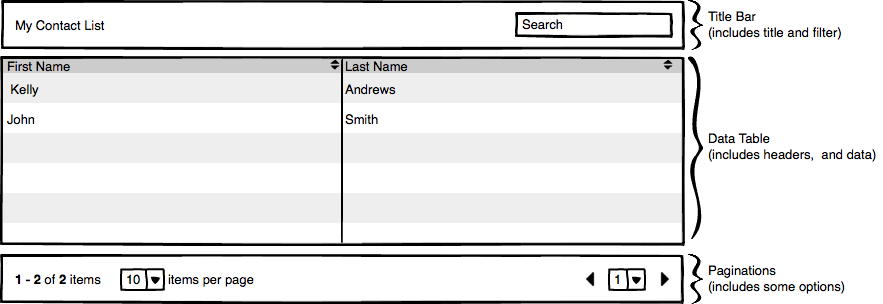
- Search by any field
- Reset condition of the search (add button)
- Add page for additions item in the table
- add icon for removing item from the table
- pagination optional
--> data <--